
react-native 横向滚动的商品展示
在app中会有这种页面
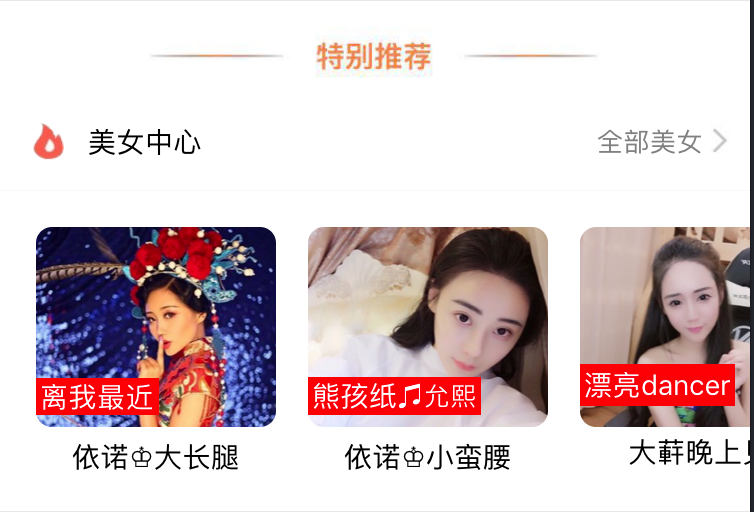
像这样商品是横向的,而且要滚动,思路是利用 ScrollView 横向的滚动
思路:
(a): 横向滚动的整体作为一个组件 ShopCenter
{/*** 横向滚动 ***/}

                    <ShopCenter

                        popToHomeView = {(smid) => this.pushToShopCenterDetail(smid)}

                    />
其中:(讨论梳理整体的链接跳转方法)
popToHomeView 这个函数是从组建中一级级传出来到父页面的,在父页面中让这个函数等价于 函数
pushToShopCenterDetail
// 横向滚动 跳转到购物中心详情页

    pushToShopCenterDetail(smid){

        const { navigate } = this.props.navigation;

        navigate('Detail', {id: smid})

    }
这些都是在父页面中写的。
(b):在组件页面中
es6写法代码
/* 组件 cell */

import React from 'react';

import {

    StyleSheet,

    Text,

    View,

    Image,

    TouchableOpacity,

    ScrollView

} from 'react-native';

// navigator

import { StackNavigator } from 'react-navigation';

// 获取设备宽高

var Dimensions = require('Dimensions');

var {width, height} = Dimensions.get('window');

// 引入外部的json数据

import Home_D5 from '../../../date/scrollCenter.json';

export default class ShopCenter extends React.Component {

    // props 传值,默认传的值 默认商品 id 为1.

    static defaultProps = {

        popToHomeView:

    }

    render() {

        return (

            <View style={styles.container}>

                <ScrollView

                    style={styles.scrollViewStyle}

                    horizontal={true} // 横向

                    showsHorizontalScrollIndicator={false}  // 此属性为true的时候,显示一个水平方向的滚动条。

                    >

                    {this.renderAllItem()}

                </ScrollView>

            </View>

        );

    }

    // 返回下部分所有的Item

    renderAllItem(){

        // 定义组件数组

        var itemArr = [];

        // 取出数据

        var shopData= Home_D5.data;

        // 遍历

        for (var i=; i<shopData.length; i++){

           // 取出单个数据

            var data = shopData[i];

           // 创建组件装入数组

            itemArr.push(

                <ShopCenterItem

                    shopImage = {data.img}

                    shopSale = {data.showtext.text}

                    shopName = {data.name}

                    detailurl = {data.detailurl}

                    smid = {data.smid}

                    key={i}

                    // 将id再次封装传递下去

                    popTopShopCenter = {(smid)=>this.popTopHome(smid)}

                />

            );

        }

        // 返回

        return itemArr;

    }

    popTopHome(smid){

        // 判断

        //if (this.props.smid == null) return;

        // 执行回调函数 将跳转地址传递下去

        this.props.popToHomeView(smid);

    }

}

// 每一个商场

export class ShopCenterItem extends React.Component{

    static defaultProps = {

        shopImage: '',

        shopSale:'',

        shopName: '',

        detailurl: '',

        smid: '',

        popTopShopCenter: null

    }

    render(){

        return(

            <TouchableOpacity

                onPress={()=>this.clickItem(this.props.smid)}

            >

               <View style={styles.itemViewStyle}>

                   <Image source={{uri: this.props.shopImage}} style={styles.imageStyle}/>

                   <Text style={styles.shopSaleStyle}>{this.props.shopSale}</Text>

                   <Text style={styles.shopNameStyle}>{this.props.shopName}</Text>

               </View>

           </TouchableOpacity>

        );

    }

    clickItem(smid){

        // 判断

        if (this.props.smid == null) return;

        // 执行回调函数 再次接受传递的id

        this.props.popTopShopCenter(smid);

    }

};
这种组件中又拆分,跳转的时候带过去参数方法思路:一直将要传递的参数进行传递,最后在父页面中进行控制跳转传递参数就行。
es5写法
import React, { Component } from 'react';

import {

    AppRegistry,

    StyleSheet,

    Text,

    View,

    ScrollView,

    Image,

    TouchableOpacity

} from 'react-native';

// 引入外部的组件类

var CommonCell = require('./XMGBottomCommonCell');

// 引入外部的json数据

var Home_D5 = require('../../LocalData/XMG_Home_D5.json');

var ShopCenter = React.createClass({

  // es5 默认数据处理

    getDefaultProps(){

        // 回调函数

        return{

            popToHomeView: null

        }

    },

    render() {

        return (

            <View style={styles.container}>

                {/*上部分*/}

               <CommonCell

                   leftIcon="gw"

                   leftTitle="购物中心"

                   rightTitle={Home_D5.tips}

               />

                {/*下部分*/}

                <ScrollView

                    style={styles.scrollViewStyle}

                    horizontal={true} // 横向

                    showsHorizontalScrollIndicator={false}

                    >

                    {this.renderAllItem()}

                </ScrollView>

            </View>

        );

    },

    // 返回下部分所有的Item

    renderAllItem(){

        // 定义组件数组

        var itemArr = [];

        // 取出数据

        var shopData= Home_D5.data;

        // 遍历

        for (var i=; i<shopData.length; i++){

           // 取出单个数据

            var data = shopData[i];

           // 创建组件装入数组

            itemArr.push(

                <ShopCenterItem

                    shopImage = {data.img}

                    shopSale = {data.showtext.text}

                    shopName = {data.name}

                    detailurl = {data.detailurl}

                    key={i}

                    popTopShopCenter = {(url)=>this.popTopHome(url)}

                />

            );

        }

        // 返回

        return itemArr;

    },

    popTopHome(url){

        // 判断

        if (this.props.popToHomeView == null) return;

        // 执行回调函数

        this.props.popToHomeView(url);

    }

});

// 每一个商场

var ShopCenterItem = React.createClass({

    getDefaultProps(){

        return{

            shopImage: '',

            shopSale:'',

            shopName: '',

            detailurl: '',

            popTopShopCenter: null

        }

    },

    render(){

        return(

           <TouchableOpacity onPress={()=>this.clickItem(this.props.detailurl)}>

               <View style={styles.itemViewStyle}>

                   <Image source={{uri: this.props.shopImage}} style={styles.imageStyle}/>

                   <Text style={styles.shopSaleStyle}>{this.props.shopSale}</Text>

                   <Text style={styles.shopNameStyle}>{this.props.shopName}</Text>

               </View>

           </TouchableOpacity>

        );

    },

    clickItem(url){

        // 判断

        if (this.props.detailurl == null) return;

        // 执行回调函数

        this.props.popTopShopCenter(url);

    }

});

const styles = StyleSheet.create({

    container: {

       marginTop:

    },

    welcome: {

        fontSize: ,

        textAlign: 'center',

        margin: ,

    },

    imageStyle:{

        width:,

        height:,

        borderRadius:

    },

    scrollViewStyle:{

        flexDirection:'row',

        backgroundColor:'white',

        padding:

    },

    itemViewStyle:{

        margin:

    },

    shopSaleStyle:{

        // 绝对定位

        position:'absolute',

        left:,

        bottom:,

        backgroundColor:'red',

        color:'white',

        padding:

    },

    shopNameStyle:{

        textAlign:'center',

        marginTop:

    }

});

// 输出组件类

module.exports = ShopCenter;
使用的时候导入一个Json数据就可以直接使用
json

{

  "count": ,

  "data": [

    {

      "detailurl": "imeituan://www.meituan.com/web/?url=http://i.meituan.com/shoppingmall/smDetail/4374715",

      "promotionIcon": "",

      "name": "依诺♔大长腿",

      "img": "https://vi3.6rooms.com/live/2017/02/11/23/1010v1486825491140350116_s.jpg",

      "showtext": {

        "text": "离我最近",

        "count": ,

        "color": ""

      },

      "longitude": 113.327086,

      "latitude": 23.131909,

      "smid": ,

      "promotionText": "送福利 商品低至1.5折"

    },

    {

      "detailurl": "imeituan://www.meituan.com/web/?url=http://i.meituan.com/shoppingmall/smDetail/50606658",

      "promotionIcon": "",

      "name": "依诺♔小蛮腰",

      "img": "https://vi3.6rooms.com/live/2017/07/20/12/1010v1500526250183630933_s.jpg",

      "showtext": {

        "text": "熊孩纸♫允熙",

        "count": ,

        "color": ""

      },

      "longitude": 113.26605,

      "latitude": 23.17151,

      "smid": ,

      "promotionText": "春来花开 满100最高减60"

    },

    {

      "detailurl": "imeituan://www.meituan.com/web/?url=http://i.meituan.com/shoppingmall/smDetail/75813274",

      "promotionIcon": "",

      "name": "大蓒晚上见",

      "img": "https://vi0.6rooms.com/live/2017/03/26/23/1010v1490542518707536335_s.jpg",

      "showtext": {

        "text": "漂亮dancer",

        "count": ,

        "color": ""

      },

      "longitude": 113.269668,

      "latitude": 23.1818,

      "smid": ,

      "promotionText": "新春送福利 购物满额有好礼"

    },

      "longitude": 113.232008,

      "latitude": 23.397758,

      "smid": ,

      "promotionText": "48家品牌优惠中:瑞可爷爷的店每满30减5,全单9折(买单立享)"

    }

  ],

  "tips": "全部5家",

  "jumpto": "imeituan://www.meituan.com/web/?url=http://i.meituan.com/shoppingmall/smList?sid=@geodist:asc"

}
react-native 横向滚动的商品展示的更多相关文章
- [RN] React Native 自定义导航栏随滚动渐变
React Native 自定义导航栏随滚动渐变 实现效果预览: 代码实现: 1.定义导航栏 NavPage.js import React, {Component} from 'react'; im ...
- [RN] React Native 滚动跳转到指定位置
React Native 滚动跳转到指定位置 一.结构 <ScrollView horizontal={true} ref={(view) => { this.myScrollView = ...
- React Native学习(七)—— FlatList实现横向滑动列表效果
本文基于React Native 0.52 Demo上传到Git了,有需要可以看看,写了新内容会上传的.Git地址 https://github.com/gingerJY/React-Native-D ...
- React Native之ListView使用
前言 学习本系列内容需要具备一定 HTML 开发基础,没有基础的朋友可以先转至 HTML快速入门(一) 学习 本人接触 React Native 时间并不是特别长,所以对其中的内容和性质了解可能会有所 ...
- React Native组件之ScrollView 和 StatusBar和TabBarIos
React Native中的组件ScrollView类似于iOS中的UIScrollView,其基本的使用方法和熟悉如下: /** * Sample React Native App * https: ...
- 腾讯优测优分享 | 探索react native首屏渲染最佳实践
腾讯优测是专业的移动云测试平台,旗下的优分享不定时提供大量移动研发及测试相关的干货~ 此文主要与以下内容相关,希望对大家有帮助. react native给了我们使用javascript开发原生app ...
- 探索react native首屏渲染最佳实践
文 / 腾讯 龚麒 0.前言 react native给了我们使用javascript开发原生app的能力,在使用react native完成兴趣部落安卓端发现tab改造后,我们开始对由react n ...
- Qzone React Native改造
Android Qzone 6.1版本在情侣空间涉水React Native,以动态插件方式将情侣空间进行React Natived的改造.在情侣空间基础上,Android Qzone 6.2版本以融 ...
- React Native常用组件之ScrollView
1. 两个要点 1.1 ScrollView必须有一个确定的高度才能正常工作 它实际上所做的就是将一系列不确定高度的子组件装进一个确定高度的容器(通过滚动操作) 通常有两种做法: 第一种: 直接给该S ...
随机推荐
- (42)Spring Boot多数据源【从零开始学Spring Boot】
我们在开发过程中可能需要用到多个数据源,我们有一个项目(MySQL)就是和别的项目(SQL Server)混合使用了.其中SQL Server是别的公司开发的,有些基本数据需要从他们平台进行调取,那么 ...
- elasticsearch match和match_phrase匹配原则(十)
分词测试 分词后倒排索引结果:可以通过http://127.0.0.1:9200/_analyze 测试 { "analyzer":"ik_max_word", ...
- [bzoj2502]清理雪道[上下界网络流]
bzoj状态里有两种,一种时间是个位数,一种是四位数,我就是四位数的那种,,,估计都是看了hzwer.. #include <bits/stdc++.h> #define INF 0x3f ...
- F2BPM作流引擎系列索引
索引如下 F2工作流引擎遵循参考WFCM标准规范,符合中国国情特色,更轻量级的工作流引擎,支持多种数据库(mmsqlserver,mysql,oracle),有强大智能的组织模型接口可快速应用到任何基 ...
- HDU 3473
分析可知,最优的x应该在区间中的数排列后最中间的地方选择.由于区间的数个数有奇偶之分,于是当奇数个时,就是中位数了.偶数个时,就是排列后中间两数区间的任意一个. 可以应用划分树求得前半部分,树状数组统 ...
- ASP.NET MVC 4源代码分析之怎样定位控制器
利用少有的空余时间.具体的浏览了下ASP.NET MVC 4的源代码.照着之前的步伐继续前进(尽管博客园已经存在非常多大牛对MVC源代码分析的博客,可是从个人出发.还是希望自己可以摸索出这些). 首先 ...
- zoj1940
链接:点击打开链接 题意:三维搜索'S'为起点,'E'为终点,求走出的最短时间 代码: #include <iostream> #include <stdio.h> #incl ...
- hdu4430之枚举+二分
Yukari's Birthday Time Limit: 12000/6000 MS (Java/Others) Memory Limit: 32768/32768 K (Java/Other ...
- WINDOWS下配置SVN代码管理
服务器端使用 visualsvn server,客户端使用tortoiseSvn. 一.服务器端 1.首先,下载visualsvn server,安装到服务器.下载地址: http://www.vis ...
- C++常用字符串分割方法实例汇总
投稿:shichen2014 字体:[增加 减小] 类型:转载 时间:2014-10-08我要评论 这篇文章主要介绍了C++常用字符串分割方法实例汇总,包括了strtok函数.STL.Boost等常用 ...