
iframe跨域+
script、image、iframe的src都不受同源策略的影响。所以我们可以借助这一特点,实现跨域。如前面所介绍的JSONP跨域,以及灯标(Beacons)。
该篇随笔主要阐述iframe结合一些技术,实现跨域请求。
1、iframe+window.name;
2、iframe+location.hash;
3、iframe+window.postMessage.
另,在最后赋予“灯标”技术阐述。
| 一、iframe + window.name实现跨域 |
window对象有个name属性,该属性有个牛逼的地方就是:在同一个窗口中,我不管你页面怎么变,我window.name的值是一直存在的,在同一个窗口任意读写,并且支持非常长的name值(2MB)。
有点含糊?
我们写个demo看看。
假设我有个页面a.html,当页面加载完成后,我将window.name赋值’Monkey’,在3秒后跳转到另一页面b.html,并在这个b.html中alert一下window.name,看看结果如何。
a.html代码如下:
<!DOCTYPE html>

    <head>

        <title>window.name</title>

        <meta http-equiv="Content-Type" content="text/html; charset=utf-8"/>

    </head>

    <body>

        <script>

            window.name = 'Monkey';

            setTimeout(function(){

                window.location = 'b.html';

            },3000);

        </script>

    </body>

</html>
b.html代码如下:
<!DOCTYPE html>

    <head>

        <title>window.name</title>

        <meta http-equiv="Content-Type" content="text/html; charset=utf-8"/>

    </head>

    <body>

        <script>

            alert(window.name);

        </script>

    </body>

</html>
运行a.html代码,等待3秒后,得如下结果:
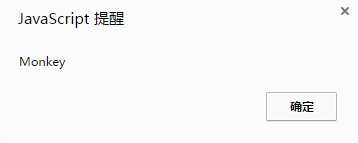
看来,只要在同一个窗口,window.name就是可读写的,如,前一个页面设置了这个属性,后一个页面就可以读取它。
注:window.name传输技术,原本是用于解决cookie的一些劣势(每个域名4*20KB的限制、数据只能是字符串、设置和获取cookie语法的复杂等等)而发明,后来才强化了window.name传输,用来解决跨域数据传输问题。
假设,当我在一个页面a中想跨域访问另一个不在同一域中b的数据时,怎么利用window.name呢?
显然,我们不能像上面那样,将a页面window.location重定向为b,这样我岂不是当前页面已经不再了。所以我们可以借助于iframe标签来达到这一目的(因为iframe的src不受同源策略影响,所以可以跨域访问资源)。
思路:
(1)、在a.html中嵌入iframe,将所需要的文档b.html加载进来,且b.html利用window.name传入a.html想要获取的数据;
(2)、iframe在得到b.html的内容后,必须将src变为a.html的同源域,因为同源策略是会阻止非同源的frame访问name属性值,最后a.html通过iframe.contentWindow.name,获取b.html里window.name的值,从而实现跨域获得数据。
demo如下:
<!DOCTYPE html>

    <head>

        <title>a.html</title>

        <meta http-equiv="Content-Type" content="text/html; charset=utf-8"/>

    </head>

    <body>

        <script>

            /*

                addIframeTag:动态创建iframe,通过src获得相应文档

                Param: src -->动态给创建iframe的src赋值

            */

            function addIframeTag(src){

                //在loadFn函数中,用于判断iframe加载情况

                var state = 0;

                //创建iframe

                var iframe = document.createElement('iframe');

                //loadFn:跨域获取数据,如b.html

                var loadFn = function(){

                    if (state === 1) {

                        //获取window.name数据

                        var data = iframe.contentWindow.name;

                        //相关操作,如alert获取的数据

                        alert(data);

                        //清除动态创建的iframe

                        iframe.contentWindow.document.write('');

                        iframe.contentWindow.close();

                        document.body.removeChild(iframe);

                    } else if (state === 0) {

                        state = 1;

                        // 将src变为a.html的同源域

                        iframe.src = "a.html";

                    }

                };

                //给创建的iframe赋予指定的src值

                iframe.src = src;

                //当iframe加载完文件后,触发onload事件

                if (iframe.attachEvent) {

                    iframe.attachEvent('onload', loadFn);

                } else {

                    iframe.onload  = loadFn;

                }

                //隐藏iframe

                iframe.style.display = 'none';

                //将创建的iframe加入body中

                document.body.appendChild(iframe);

            };

            window.onload = function(){

                addIframeTag('b.html');

            };

        </script>

    </body>

</html>
a.html
<!DOCTYPE html>

    <head>

        <title>b.html</title>

        <meta http-equiv="Content-Type" content="text/html; charset=utf-8"/>

    </head>

    <body>

        <script>

            window.name = 'Monkey';

        </script>

    </body>

</html>
b.html
| 二、iframe + location.hash实现跨域 |
location.hash简而言之就是锚点,如127.0.0.1#monkey中的#monkey就是锚点。借用大额的一个例子,具体感受下锚点:here。
大家点击了上面的例子,会发现点击锚点后location.hash改变了,但却没有导致页面刷新。
So,我们就可以借助这一特性,实现数据传递。 但,因为我是借助于location.hash来实现数据传递,所以缺点也很明显:数据是直接暴露在URL中,且传递的数据容量有限。
那么,我们怎么通过location.hash来实现跨域访问数据呢?
假设:a.html想跨域访问b.html中的数据
思路:因为改变a.html的location.hash值不会刷新页面,所以我们可以借助iframe去访问b.html(因为iframe的src不受同源策略影响,所以可以跨域访问资源),然后在iframe中动态改变它父窗口a.html中的location.hash值。但是,个别浏览器不允许非同源的窗口修改parent.location.hash的值,所以我们还需要借助一个代理,在iframe获得b.html后,再在iframe里嵌套一个与a.html同源的html,如c.html,并通过c.html中的parent.parent.location.hash改变a.html中的location.hash值,从而达到跨域获取数据。

抛砖引玉,我的具体实现如下:
注:由于我是在本地跑的程序,所以我将c.html 直接换成a.html,并加入锚点判断,只是为了体验一把iframe+location.hash的跨域。
<!DOCTYPE html>

    <head>

        <title>a.html</title>

        <meta http-equiv="Content-Type" content="text/html; charset=utf-8"/>

    </head>

    <body>

        <script>

            function startRequest(){

                //获得a.html的锚点

                var _hash = location.hash ? location.hash.substring(1):'';

                //如果锚点是b.html中的代理ifrmae传来的,则赋值,如somedata

                if(_hash === 'proxy'){

                    parent.parent.location.hash = 'somedata';

                    return;

                }

                else{

                    //创建一个iframe

                    var ifr = document.createElement('iframe');

                    ifr.style.display = 'none';

                    //想b.html获取信息

                    ifr.src = 'b.html#paramdo';

                    document.body.appendChild(ifr);

                    //获得b.html的数据

                    setInterval(function(){

                        try{

                            var data = location.hash ? location.hash.substring(1):'';

                            if(console.log){

                                console.log('Now data is '+ data);

                            }

                        }catch(e){

                            console.log(e);

                        }

                    },2000);

                }

            };

            startRequest();

        </script>

    </body>

</html>
a.html
<!DOCTYPE html>

    <head>

        <title>b.html</title>

        <meta http-equiv="Content-Type" content="text/html; charset=utf-8"/>

    </head>

    <body>

        <script>

            //如果发现传过来的location.hash是#paramdo,做callBack操作

            if(location.hash === '#paramdo'){

                callBack();

            }

            function callBack(){

                try{

                    parent.location.hash = 'somedata';

                }catch(e){

                    // ie、chrome的安全机制无法修改parent.location.hash,

                    // 所以要利用一个代理iframe,src与a.html同源

                    var ifrproxy = document.createElement('iframe');

                    ifrproxy.style.display = 'none';

                    //这里我指向a.html只是为了模拟同源

                    ifrproxy.src='a.html#proxy';

                    document.body.appendChild(ifrproxy);

                }

            }

        </script>

    </body>

</html>
b.html
| 三、iframe + window.postMessage实现跨域 |
HTML5引入了一个跨域文档API(Cross-document messaging),这个API为window对象,新增了个window.postMessage方法,允许跨窗口通信,且不必同源。
语法如下:
otherwindow.postMessage(message, targetOrigin);
(1)、otherwindow:对接收信息页面的window引用,可以是页面中iframe的contentWindow属性;window.open返回值;通过name或下标从window.frames取到的值。
(2)、message:要发送的数据,string类型。
(3)、targetOrigin:用于接收消息的窗口的源(origin),即“协议 + 域名 + 端口”。也可以设为*,表示不限制域名,向所有窗口发送。
postMessage是向窗口发送信息,当然相应窗口得接收信息咯。
怎么接收信息呢?
通过message事件,监听对方的信息。一旦有postMessage传送过来的信息就可以做相应处理了。
如下:
Window.addEventListener(‘message’,function(e){console.log(e.data);},false);
且message中的e(即event对象),通过三属性:
(1)、event.source:发送消息的窗口对象;
(2)、event.origin:发送消息窗口的源(协议+主机+端口号);
(3)、event.data:发送的消息内容。
抛砖迎玉Demo(a.html与b.html通信)如下:
<!DOCTYPE html>

    <head>

        <title>a.html</title>

        <meta http-equiv="Content-Type" content="text/html; charset=utf-8"/>

    </head>

    <body>

        <iframe id="ifr" src='b.html'></iframe>

        <script>

            window.onload = function(){

                var ifr = document.getElementById('ifr');

                ifr.contentWindow.postMessage('I was there','/');

            };

        </script>

    </body>

</html>
a.html
<!DOCTYPE html>

    <head>

        <title>b.html</title>

        <meta http-equiv="Content-Type" content="text/html; charset=utf-8"/>

    </head>

    <body>

        <script>

            window.addEventListener('message', function(event){

                console.log('origin: '+event.origin);

                console.log('data: '+event.data);

                console.log('source'+event.source);

            });

        </script>

    </body>

</html>
b.html
运行上述a.html代码,得下:

| 四、拓展--灯标 |
此技术与动态iframe标签插入非常类似,用JavaScript创建一个新的Image对象,将src设置为服务器上一个脚本文件的URL。此URL包含我们打算通过GET格式传回的键值对数据。
注意并没有创建img元素或者将它们插入到DOM中。
如下:
var url = '/status_tracker.php';

var params = [

    'step = 2',

    'time = 1465141496244'

];

(new Image()).src = url + '?' + params.join('&');
服务器取得此数据并保存下来,而不必向客户端返回什么,因此没有实际的图像显示。这是将信息发回服务器最有效的方法。其开销很小,而且任何服务器端错误都不会影响客户端。
简单的图像灯标意味着你所能做的受到限制。你不能发送POST数据,所以你被URL长度限制在一个相当小的字符数量上。你可以用非常有限的方法接收返回数据。可以监听Image对象的load事件,它可以告诉你服务器端是否成功接收了数据,你还可以检查服务器返回图片的宽度和高度(如果返回了一张图片)并用这些数字通知你服务器的状态。例如,宽度为1表示‘成功’,2表示‘重试’。
如果你不需要为此响应返回数据,那么你应当发送一个204 No Content响应代码,无消息正文。它将阻止客服端继续等待永远不会到来的消息体:
var url = '/status_tracker.php';

var params = [

    'step = 2',

    'time = 1465141496244'

];

var beacon = new Image();

beacon.src = url + '?' + params.join('&');

beacon.onload = function(){

    if(this.width == 1){

        //Success

    }else if(this.width == 2){

        //Failure;create another beacon and try again.

    }

}

beacon.onerror = function(){

    //Error;wait a bit, then create another beacon and try again.

}
灯标是向服务器回送数据最快和最有效的方法。服务器根本不需要发回任何响应正文,所以你不必担心客户端下载数据。唯一的缺点是接收到的响应类型是受限的。如果你需要向客户端返回大量数据,那么使用XHR。如果你只关心将数据发送到服务端(可能需要极少的回复),那么使用图像灯标。
| 五、参考文献 |
[1]、大额
[2]、无双
[3]、RainMan
[4]、MDN
[5]、阮一峰
iframe跨域+的更多相关文章
- JS跨域(ajax跨域、iframe跨域)解决方法及原理详解(jsonp)
这里说的js跨域是指通过js在不同的域之间进行数据传输或通信,比如用ajax向一个不同的域请求数据,或者通过js获取页面中不同域的框架中(iframe)的数据.只要协议.域名.端口有任何一个不同,都被 ...
- javascript跨域、iframe跨域访问
1.window 对象 浏览器会在其打开一个 HTML 文档时创建一个对应的 window 对象.但是,如果一个文档定义了一个或多个框架(即,包含一个或多个 frame 或 iframe 标签),浏览 ...
- iframe跨域cookie问题
今天在项目里面遇到了iframe跨域不能写cookie的问题.应用场景是这样的:有A和B两个业务,A要通过iframe的方式嵌入B,但是在ie下A不能通过写cookie的方式记录信息,在firefox ...
- iframe跨域访问
js跨域是个讨论很多的话题.iframe跨域访问也被研究的很透了. 一般分两种情况: 一. 是同主域下面,不同子域之间的跨域: 同主域,不同子域跨域,设置相同的document.domian就可以解决 ...
- 利用location.hash+iframe跨域获取数据详解
前言 如果看懂了前文利用window.name+iframe跨域获取数据,那么此文也就很好理解了.一样都是动态插入一个iframe,然后把iframe的src指向服务端地址,而服务端同样都是输出一段j ...
- 利用window.name+iframe跨域获取数据详解
详解 前文提到用jsonp的方式来跨域获取数据,本文为大家介绍下如何利用window.name+iframe跨域获取数据. 首先我们要简单了解下window.name和iframe的相关知识.ifra ...
- CP="CAO PSA OUR" 用P3P header解决iframe跨域访问cookie
1.IE浏览器iframe跨域丢失Session问题 在开发中,我们经常会遇到使用Frame来工作,而且有时是为了跟其他网站集成,应用到多域的情况下,而Iframe是不能保存Session的因此,网上 ...
- 在IE浏览器中iframe跨域访问cookie/session丢失的解决办法
单点登录需要在需要进入的子系统B中添加一个类,用于接收A系统传过来的参数: @Action(value = "outerLogin", results = { @Result(na ...
- js iframe跨域访问
1.什么是跨域? 2.前台解决跨域几种方法 2.1 动态创建script 2.2 使用document.domain 2.3使用HTML5新属性postMessage 2.4 利用iframe和loc ...
- IFrame跨域访问自定义高度
由于JS禁止跨域访问,如何实现不同域的子页面将高度返回给父页面本身,是解决自定义高度的难点. JS跨域访问问题描述:应用A访问应用B的资源,由于A,B应用分别部署在不同应用服务器(tomcat)上,属 ...
随机推荐
- C语言与java 20155317 王新玮第二次
20155317 王新玮第二次写作感想 你有什么技能比大多数人(超过90%以上)更好? 刚刚看到这个题目,我的首先想到的是会一些中医,懂得中医的理论框架知识,懂得大部分的中医脉象,能够解决日常生活 ...
- 关于UIAlertAction如何修改sheet上的字体颜色
相信很多程序员都会遇到需求是这样的: 但是你发现无论怎么设置cancel和Destructive都无法让红色字体移动到下面取消按钮上: 其实之前一直用错,用了ios9之前的UIActionSheet这 ...
- Firefox页面缩放
这一段firefox只能缩放文字,不能实现整个页面的缩放,各种尝试,最后发现是勾选了view--zoom--zoom text only!!(按alt键调出菜单)
- vs2012 打开解决方案崩溃或者点击项目崩溃
报错: 问题签名: 问题事件名称: CLR20r3 解决方案: 步骤1:开始-->所有程序-->Microsoft Visual Studio 2012-->Visual Stud ...
- *HDU1846HDU2188 巴什博奕
Brave Game Time Limit: 1000/1000 MS (Java/Others) Memory Limit: 32768/32768 K (Java/Others)Total ...
- linux下安装启动rpc服务
1.上传包 rocky:~ # ls Desktop dts.xml jdk1..0_41 oswbb rpc.rstatd- rpc.rstatd-.tar.gz rocky:~ # cd rpc. ...
- 浅谈PHP7新特性
1. 运算符(NULL 合并运算符) 把这个放在第一个说是因为我觉得它很有用.用法: $a = $_GET['a'] ?? 1; 它相当于: $a = isset($_GET['a']) ? $_GE ...
- pagination 分页
<!DOCTYPE html> <html> <head> <title>pagination</title> <style type ...
- DAO模型
DAO模型 前面我们在使用JDBC时解决的都是一些很简单的问题,例如登录,注册等等,所以有些例直接把代码写在了main方法中.这种写法很容易出现代码臃肿,耦合度高,不能模块化开发等诸多弊端,特别是将来 ...
- $.each ---- 跳出当前的循环
有些朋友可能会以为在jquery跳出循环可以直接使用continue和break了,但是使用之后没有效果,因为在jquery中没有这两条命令.后来上网查了下,得到了结果:return false;—— ...