
Selenium WebDriver 之 PageObjects 模式 by Example
目录

  1. 项目配置

  2. 一个WebDriver简单例子

  3. 使用Page Objects模式

  4. 总结

  5. Troubleshooting

  6. 参考文档
本篇文章通过例子来阐述一下Selenium2.0 WebDriver 之 Page Objects模式。
项目配置
maven 3, pom.xml配置如下
<dependency>

    <groupId>org.seleniumhq.selenium</groupId>

    <artifactId>selenium-java</artifactId>

    <version>2.46.0</version>

</dependency>
另外我是用TestNG 写Selenium tests, 加如下dependency
<dependency>

    <groupId>org.testng</groupId>

    <artifactId>testng</artifactId>

    <version>6.8</version>

</dependency>
一个WebDriver简单例子
主要做如下几个动作:
1. 打开博客园首页
2. 断言页面标题出现
3. 在找找看输入框输入字符
4. 点击找找看按钮
5. 断言进入的页面标题
 package test.demo;

 import static org.testng.Assert.assertEquals;

 import org.openqa.selenium.By;

 import org.openqa.selenium.WebDriver;

 import org.openqa.selenium.WebElement;

 import org.openqa.selenium.firefox.FirefoxDriver;

 import org.openqa.selenium.firefox.FirefoxProfile;

 import org.testng.annotations.AfterTest;

 import org.testng.annotations.BeforeTest;

 import org.testng.annotations.Test;

 ;

 /**

  * @Description: A simple Test using WebDriver

  * @author wadexu

  *

  * @updateUser

  * @updateDate

  */

 public class WebPageTest {

     private WebDriver driver;

     @BeforeTest

     public void setUp() {

         FirefoxProfile firefoxProfile = new FirefoxProfile();

         // use proxy

         firefoxProfile.setPreference("network.proxy.type", 1);

         firefoxProfile.setPreference("network.proxy.http", "10.51.1.140");

         firefoxProfile.setPreference("network.proxy.http_port", "8080");

         driver = new FirefoxDriver(firefoxProfile);

     }

     @AfterTest

     public void tearDown() {

         driver.close();

     }

     @Test

     public void test() {

         driver.get("http://www.cnblogs.com/");

         assertEquals("博客园 - 开发者的网上家园", driver.getTitle());

         WebElement searchBox = driver.findElement(By.id("zzk_q"));

         searchBox.sendKeys("wadexu");

         WebElement searchBtn = driver.findElement(By.xpath("//*[@id='search_block']/div[1]/input[2]"));

         searchBtn.click();

         assertEquals("wadexu-博客园找找看", driver.getTitle());

     }

 }
这种写法缺点很多, 可读性差,页面元素,操作HTML,测试逻辑全部在一起。
##转载注明出处:http://www.cnblogs.com/wade-xu/p/4744937.html
使用Page Objects模式
PageObjects是对具体页面的抽象,使用时通过PageFactory来构造。
首先我们为博客园首页和找找看搜索页面定义两个page objects
-- CnBlogsHomePage
 package test.demo;

 import org.openqa.selenium.WebElement;

 import org.openqa.selenium.support.FindBy;

 /**

  * @Description: 博客园首页

  * @author wadexu

  *

  * @updateUser

  * @updateDate

  */

 public class CnBlogsHomePage {

     @FindBy(id = "zzk_q") //找找看输入框

     protected WebElement searchBox;

     @FindBy(xpath = "//*[@id='search_block']/div[1]/input[2]") //找找看按钮

     protected WebElement searchBtn;

     public void searchFor(String content) {

         searchBox.sendKeys(content);

         searchBtn.click();

     }

 }
-- SearchResultPage
package test.demo;

import java.util.List;

import org.openqa.selenium.By;

import org.openqa.selenium.WebElement;

import org.openqa.selenium.support.FindBy;

/**

 * @Description: 博客园找找看頁面

 * @author wadexu

 *

 * @updateUser

 * @updateDate

 */

public class SearchResultPage {

    @FindBy(id = "searchResult")

    protected WebElement searchResult;

    //for tutorial purpose only

    public boolean searchResultListNotNull() {

        WebElement searchResultItems = searchResult.findElement(By.cssSelector(".forflow"));

        List<WebElement> resultItemTitleList = searchResultItems.findElements(By.tagName("a"));

        for (WebElement e : resultItemTitleList) {

            System.out.println(e.getText());

        }

        return resultItemTitleList.size() > 0;

    }

}
##转载注明出处:http://www.cnblogs.com/wade-xu/p/4744937.html
下面是使用Page Objects 的测试
 package test.demo;

 import static org.testng.Assert.assertTrue;

 import org.openqa.selenium.WebDriver;

 import org.openqa.selenium.firefox.FirefoxDriver;

 import org.openqa.selenium.firefox.FirefoxProfile;

 import org.openqa.selenium.support.PageFactory;

 import org.testng.annotations.AfterTest;

 import org.testng.annotations.BeforeTest;

 import org.testng.annotations.Test;

 /**

  * @Description: UsingPageObjectsTest

  * @author wadexu

  *

  * @updateUser

  * @updateDate

  */

 public class UsingPageObjectsTest {

     private WebDriver driver;

     @BeforeTest

     public void setUp() {

         FirefoxProfile firefoxProfile = new FirefoxProfile();

         // use proxy

         firefoxProfile.setPreference("network.proxy.type", 1);

         firefoxProfile.setPreference("network.proxy.http", "10.51.1.149");

         firefoxProfile.setPreference("network.proxy.http_port", "8080");

         driver = new FirefoxDriver(firefoxProfile);

     }

     @AfterTest

     public void tearDown() {

         driver.close();

     }

     @Test

     public void test() {

         driver.get("http://www.cnblogs.com/");

         CnBlogsHomePage homePage = PageFactory.initElements(driver, CnBlogsHomePage.class);

         homePage.searchFor("wadexu");

         SearchResultPage resultPage = PageFactory.initElements(driver, SearchResultPage.class);

         assertTrue(resultPage.searchResultListNotNull());

     }

 }
WebDriver为了支持PageObject模式,支持库包含一个叫PageFactory的工厂类, 我们通过PageFactory的initElements方法来实例化PageObject的实例.
这种方式看上去简洁明了,可读性高,封装了界面交互细节,可以使测试更关注业务逻辑而非页面细节,就像在写功能测试用例。
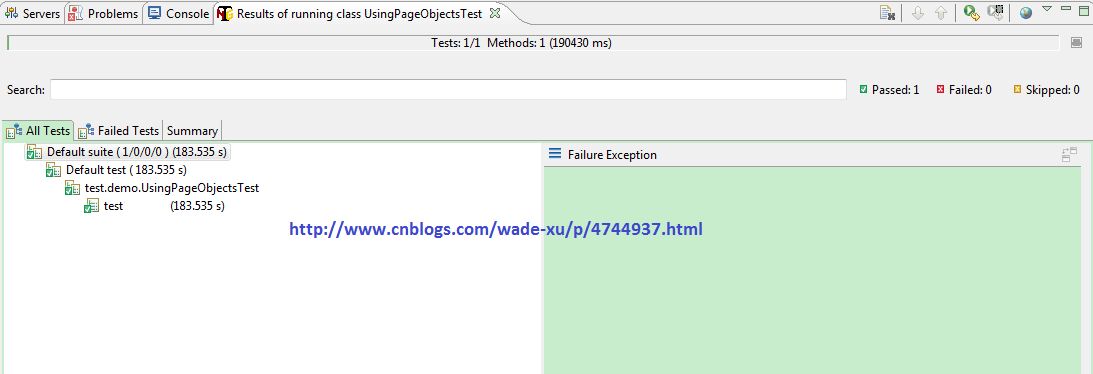
Run as TestNG 测试结果如下
就是这么简单!使用Rest-assured 测试Restful Web Services

WadeXu

这些年我们一起搞过的持续集成~Jenkins+Perl and Shell script

WadeXu

Postman (Chrome插件)

HackerVirus

VC/MFC如何设置对话框背景颜色

youxin

玩转单元测试之DBUnit

WadeXu

性能分析神器VisualVM

WadeXu

性能分析神器VisualVM

qingchen1984

玩转单元测试之WireMock -- Web服务模拟器

WadeXu

写在离职前夕

平静缓和用胸音说爱

带你入门带你飞Ⅰ 使用Mocha + Chai + Sinon单元测试Node.js

WadeXu

PASSED: test

===============================================

    Default test

    Tests run: 1, Failures: 0, Skips: 0

===============================================

[TestNG] Time taken by org.testng.reporters.JUnitReportReporter@288051: 4 ms

[TestNG] Time taken by org.testng.reporters.SuiteHTMLReporter@4d865b28: 28 ms

[TestNG] Time taken by org.testng.reporters.XMLReporter@45d64c37: 6 ms

[TestNG] Time taken by [TestListenerAdapter] Passed:0 Failed:0 Skipped:0]: 0 ms

[TestNG] Time taken by org.testng.reporters.EmailableReporter@68e6ff0d: 3 ms
##转载注明出处:http://www.cnblogs.com/wade-xu/p/4744937.html
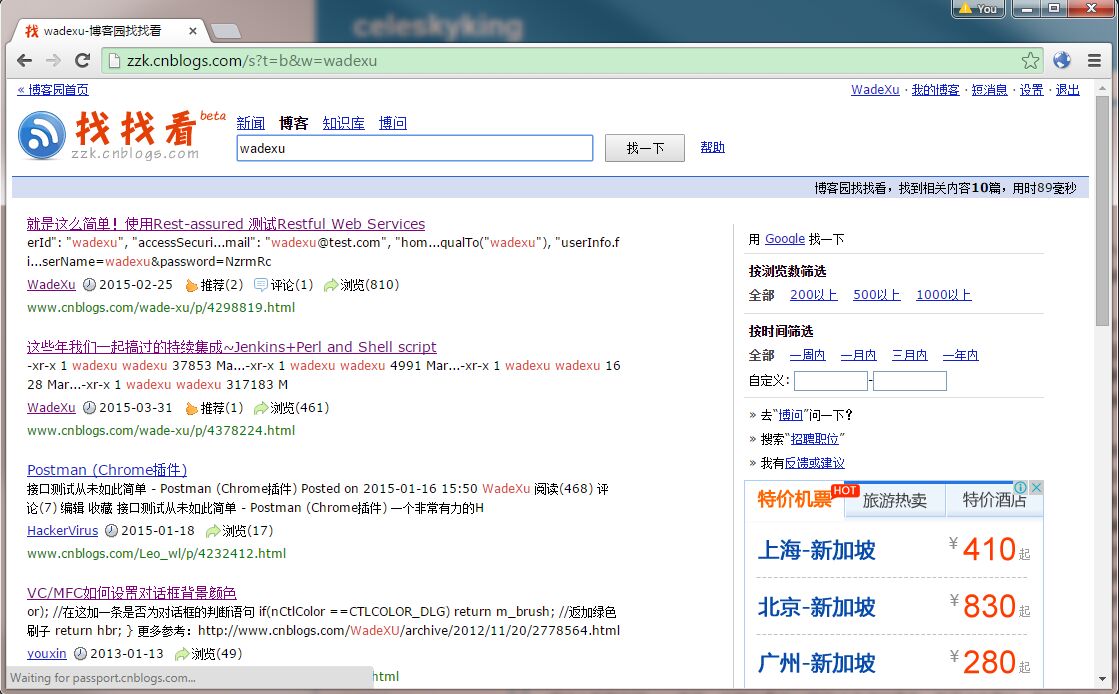
运行的很慢, 主要是因为博客园的页面加载的许多Script 都是在线引入,很多这种source <script async="" type="text/javascript" src="http://www.googletagservices.com/tag/js/gpt.js"></script>
而我又不能禁用script,否则点不了找找看button。
测试截图
总结
本文我们学到的知识点有:
- 使用Selenium WebDriver查找元素,通过By id, xpath, cssSelector, tagName 例子里尽可能的运用了这些方式。
- 通过FirefoxProfile 设置代理, 也可以设置页面不加载一些对象如image, script, stylesheet 设置方式:firefoxProfile.setPreference("permissions.default.image", 2); //2表示关闭
- Page Objects模式, 优点很多,分离页面元素及操作元素的步骤,便于维护, 降低代码冗余度,提升复用率。
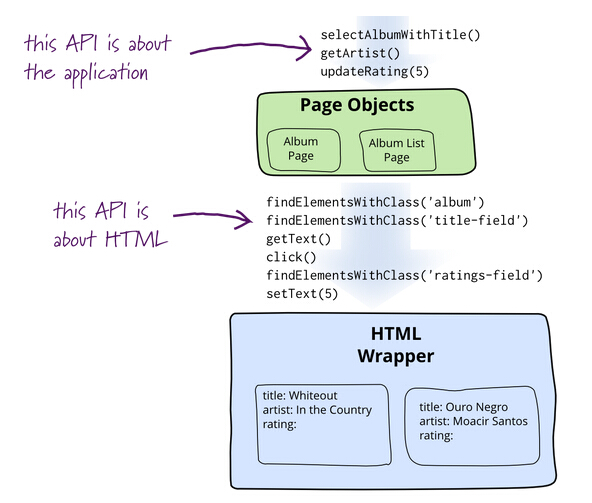
(此图来源于网络)
##转载注明出处:http://www.cnblogs.com/wade-xu/p/4744937.html
Troubleshooting
1. org.openqa.selenium.firefox.NotConnectedException: Unable to connect to host 127.0.0.1 on port 7055 after 45000 ms
firefox浏览器版本太高,selenium不兼容,要么降低firefox的版本,要么用新的selenium webDriver
2. Selenium WebDriver正常打开浏览器,但是无法访问页面
跟环境有关,使用FirefoxProfile setPreference 设置个代理, 有几种方式供参考。
WebDriver每次启动一个Firefox的实例时,会生成一个匿名的profile,并不会使用当前Firefox的profile。这点一定要注意。比如如果访问被测试的web服务需要通过代理,你想直接设置Firefox的代理是行不通的,因为WebDriver启动的Firefox实例并不会使用你这个profile,正确的做法是通过FirefoxProfile来设置。
3. org.openqa.selenium.NoSuchElementException: Unable to locate element
代码问题,不能定位元素
参考文档
感谢阅读,如果您觉得本文的内容对您的学习有所帮助,您可以点击右下方的推荐按钮,您的鼓励是我创作的动力。
##转载注明出处:http://www.cnblogs.com/wade-xu/p/4744937.html
Selenium WebDriver 之 PageObjects 模式 by Example的更多相关文章
- Selenium的PO模式(Page Object Model)|(Selenium Webdriver For Python)
研究Selenium + python 自动化测试有近两个月了,不能说非常熟练,起码对selenium自动化的执行有了深入的认识. 从最初无结构的代码,到类的使用,方法封装,从原始函数 ...
- 解决Ruby在IE11中报Unable to get browser (Selenium::WebDriver::Error::NoSuchWindowError)的错误
转载地址:http://www.tuicool.com/articles/BRnqeu2 I was updating the browser WebDrivers for Seleno ...
- Selenium WebDriver使用IE浏览器
摘:http://www.cnblogs.com/dream0577/archive/2012/10/07/2714579.html /** 用IE驱动,1.先到官网下载IEDriverS ...
- 浅析selenium的page object模式
selenium目前比较流行的设计模式就是page object,那么到底什么是page object呢,简单来说,就是把页面作为对象,在使用中传递页面对象,来使用页面对象中相应的成员或者方法,能更好 ...
- Selenium Webdriver元素定位的八种常用方式
楼主原创,欢迎学习和交流,码字不容易,转载请注明出处,谢谢. 在使用selenium webdriver进行元素定位时,通常使用findElement或findElements方法结合By类返回的元素 ...
- Selenium WebDriver + Python 环境配置
1. 下载必要工具及安装包 1.1.[Python开发环境] 下载并安装Python 2.7.x版本(当前支持2.x版本,不要下载最新的3.X的版本因为python3并非完全兼容python2) ...
- Selenium webdriver 操作IE浏览器
V1.0版本:直接新建WebDriver使用 import org.openqa.selenium.WebDriver; import org.openqa.selenium.ie.InternetE ...
- selenium webdriver启动IE浏览器失败的解决办法
通过selenium webdriver启动IE浏览器失败,报错:selenium.common.exceptions.WebDriverException: Message: Unexpected ...
- Selenium Webdriver元素定位的八种常用方法
如果你只是想快速实现控件抓取,而不急于了解其原理,可直接看: http://blog.csdn.net/kaka1121/article/details/51878346 如果你想学习web端自动化, ...
随机推荐
- IONIC 开发的Android应用程序签名(或重新签名)详解
完全通过DOS命令来完成apk签名 给apk签名一共要用到3个工具,或者说3个命令,分别是:keytool.jarsigner和zipalign,下面是对这3个工具的简单介绍: ...
- OpenGL阴影,Shadow Volumes(附源程序,使用 VCGlib )
实验平台:Win7,VS2010 先上结果截图: 本文是我前一篇博客:OpenGL阴影,Shadow Mapping(附源程序)的下篇,描述两个最常用的阴影技术中的第二个,Shadow Volu ...
- NSCharacterSet在字符串操作中得使用
NSCharacterSet以及它的可变版本NSMutableCharacterSet,用面向对象的方式表示一组Unicode字符,它经常与NSString及NSScanner组合起来使用,在不同的字 ...
- 点击input框,不让手机软键盘弹出的办法
设置readonly="" <input type="text" readonly="" placeholder="请输入邮 ...
- Linux下高cpu解决方案(转载)
昨天搞定了一个十万火急的issue,客户抱怨产品升级后系统会变慢和CPU使用率相当高,客户脾气很大,声称不尽快解决这个问题就退货,弄得我们 R&D压力很大,解决这个issue的任务分给了我,客 ...
- 如何在Mac OS系统下配置Java服务器开发环境
1.http://www.oracle.com/technetwork/Java/javase/downloads/index-jsp-138363.html 安装JDK(可通过java -versi ...
- 合并果子 2004年NOIP全国联赛普及组
时间限制: 1 s 空间限制: 128000 KB 题目等级 : 钻石 Diamond 题目描述 Description 在一个果园里,多多已经将所有的果子打了下来,而且按果子的不同种类分成了不同的堆 ...
- iOS应用之间调用
//// iOS应用之间调用.h// IOS笔记 1.判断系统里是否安装了某个app.比如新浪微博应用注册了URL scheme为@"weibo",我们可以通过[[UIAppl ...
- SQL Server系统存储过程
1. execute sp_databases 查询当前所有数据库大致信息(名称,大小等) 2. exec sp_helpdb [Myschool] 返回数据库的所有详细信息(数据库大小,位置,文 ...
- 另类分析SIGSEGV信号
关于SIGSEGV信号的含义就不解释了.网络上有很多解释. 今天记录一下,自己遇到的一个问题,想了好几天都没想出来的.今天终于想到原因了. 过程描述: 有个类 CBase,里面放了一个成员变量 DAT ...