
Docker 容器
1. 容器
在过去,如果要开始编写Python应用程序,首先要做的就是在机器上安装Python运行时环境。但是,这就造成了这样一种情况:你的机器上的环境需要完美,以便你的应用程序能够按预期运行,而且还需要与你的生产环境相匹配。
使用Docker,你只需要获取一个可移植的Python运行时作为镜像,不需要安装。然后,当你构建应用程序时就会在代码旁边包含基本的Python镜像,确保应用程序、它的依赖项和运行时一起运行。
这些可移植的镜像被一些称之为“Dockerfile”来定义。
2. 用Dockerfile定义一个容器
Dockerfile
示例:
在你的本地机器上创建一个空目录,进入该目录,然后在此目录下创建一个名字叫Dockerfile的文件,将下列内容复制粘贴到文件中,保存。
# Use an official Python runtime as a parent image

FROM python:2.7-slim

# Set the working directory to /app

WORKDIR /app

# Copy the current directory contents into the container at /app

COPY . /app

# Install any needed packages specified in requirements.txt

RUN pip install --trusted-host pypi.python.org -r requirements.txt

# Make port 80 available to the world outside this container

EXPOSE 80

# Define environment variable

ENV NAME World

# Run app.py when the container launches

CMD ["python", "app.py"]
可以看到,Dockerfile文件需要引用app.py和requirements.txt文件,于是,在与Dockerfile同级的目录下创建这两个文件
requirements.txt
Flask

Redis
app.py
from flask import Flask

from redis import Redis, RedisError

import os

import socket

# Connect to Redis

redis = Redis(host="redis", db=0, socket_connect_timeout=2, socket_timeout=2)

app = Flask(__name__)

@app.route("/")

def hello():

    try:

        visits = redis.incr("counter")

    except RedisError:

        visits = "<i>cannot connect to Redis, counter disabled</i>"

    html = "<h3>Hello {name}!</h3>" \

           "<b>Hostname:</b> {hostname}<br/>" \

           "<b>Visits:</b> {visits}"

    return html.format(name=os.getenv("NAME", "world"), hostname=socket.gethostname(), visits=visits)

if __name__ == "__main__":

    app.run(host='0.0.0.0', port=80)
构建App
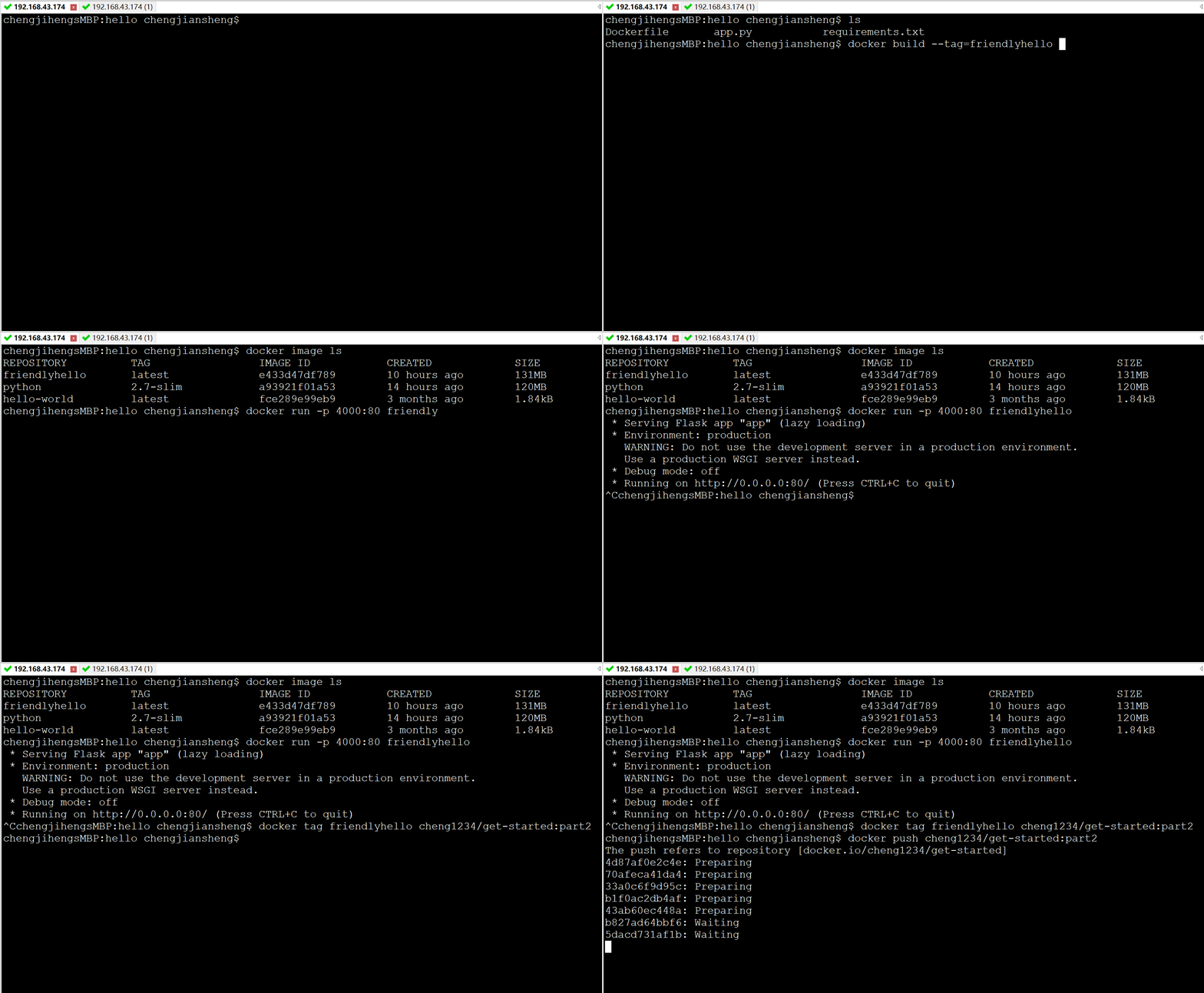
$ ls

Dockerfile		app.py			requirements.txt
docker build --tag=friendlyhello .$ docker image ls
REPOSITORY TAG IMAGE ID
friendlyhello latest 326387cea398注意:tag默认是latest,当然你可以手动指定,比如:--tag=friendlyhello:v0.0.1
3. 运行App
运行app,将本地4000端口映射到容器对外公布的80端口
docker run -p 4000:80 friendlyhello4. 共享你的镜像
为了能够在任何地方都运行,我们需要将我们的镜像上传到注册中心。注册中心是仓库的集合,而仓库是镜像的集合。这很像GitHub仓库或者Maven仓库。一个账号可以在注册中心中创建许多个仓库。
用Docker ID登录
$ docker login5. 给镜像打标签
将本地镜像关联到注册中心的某个仓库,格式是这样的: username/repository:tag
其中,tag是可选的,但是推荐加上tag。当你关联到仓库后,注册中心会给这个镜像分配一个版本号
给镜像打Tag的格式如下:
docker tag image username/repository:tag例如,我们给我们刚才的friendlyhello打一个tag
docker tag friendlyhello gordon/get-started:part26. 发布镜像
docker push username/repository:tag(PS:这个过程很像git在本地打标签并推送到远程仓库)
1 git tag v1.0

2 git push origin v1.0
推送成功以后,我们就可以在注册中心看到了
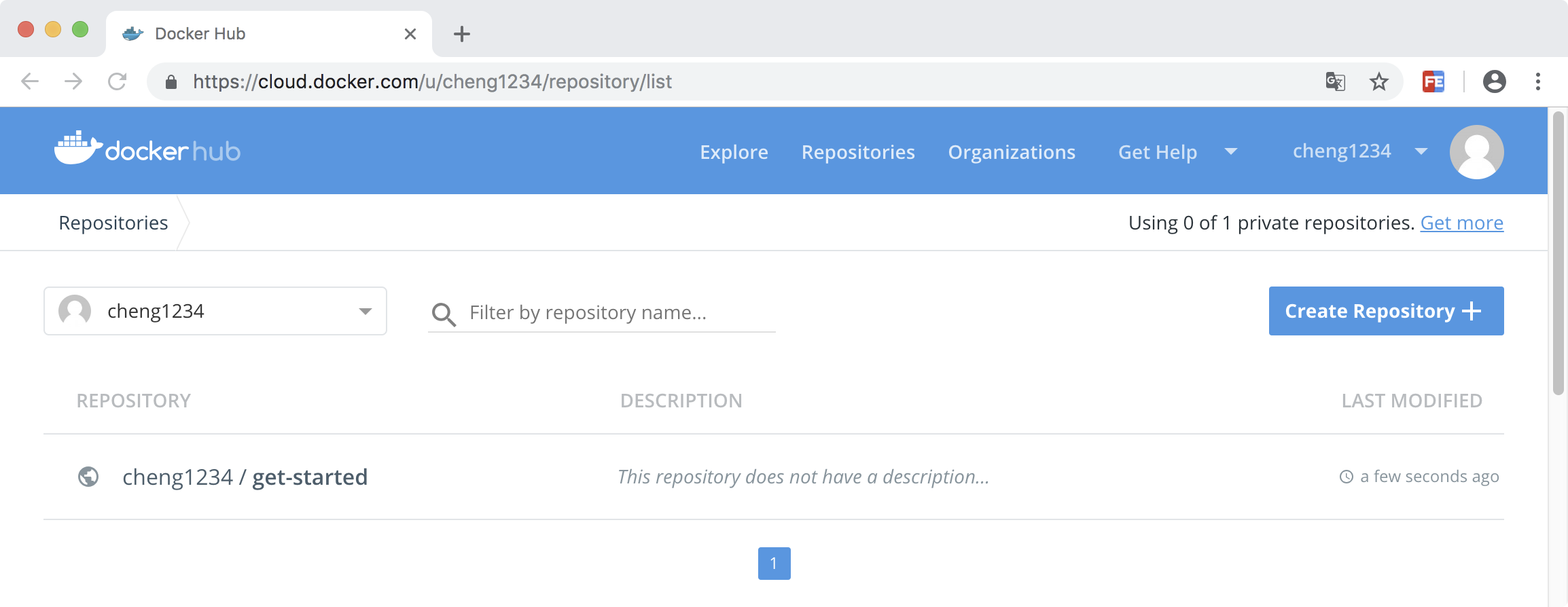
7. 备忘单
docker build -t friendlyhello .  # Create image using this directory's Dockerfile

docker run -p 4000:80 friendlyhello  # Run "friendlyhello" mapping port 4000 to 80

docker run -d -p 4000:80 friendlyhello         # Same thing, but in detached mode

docker container ls                                # List all running containers

docker container ls -a             # List all containers, even those not running

docker container stop <hash>           # Gracefully stop the specified container

docker container kill <hash>         # Force shutdown of the specified container

docker container rm <hash>        # Remove specified container from this machine

docker container rm $(docker container ls -a -q)         # Remove all containers

docker image ls -a                             # List all images on this machine

docker image rm <image id>            # Remove specified image from this machine

docker image rm $(docker image ls -a -q)   # Remove all images from this machine

docker login             # Log in this CLI session using your Docker credentials

docker tag <image> username/repository:tag  # Tag <image> for upload to registry

docker push username/repository:tag            # Upload tagged image to registry

docker run username/repository:tag                   # Run image from a registry
Docker 容器的更多相关文章
- docker——容器安装tomcat
写在前面: 继续docker的学习,学习了docker的基本常用命令之后,我在docker上安装jdk,tomcat两个基本的java web工具,这里对操作流程记录一下. 软件准备: 1.jdk-7 ...
- Docker容器环境下ASP.NET Core Web API应用程序的调试
本文主要介绍通过Visual Studio 2015 Tools for Docker – Preview插件,在Docker容器环境下,对ASP.NET Core Web API应用程序进行调试.在 ...
- 在docker容器中vi指令找不到
在使用docker容器时,有时候里边没有安装vi,敲vi命令时提示说:vi: command not found,这个时候就需要安装vi,可是当你敲apt-get install vi命令时,提示: ...
- 理解Docker(4):Docker 容器使用 cgroups 限制资源使用
本系列文章将介绍Docker的有关知识: (1)Docker 安装及基本用法 (2)Docker 镜像 (3)Docker 容器的隔离性 - 使用 Linux namespace 隔离容器的运行环境 ...
- docker学习(5) 在mac中创建mysql docker容器
github上有一个专门的docker-libary项目,里面有各种各样常用的docker镜像,可以做为学习的示例,今天研究下其中mysql镜像的用法,国内镜像daocloud.io也能找到mysql ...
- 在Linux和Windows的Docker容器中运行ASP.NET Core
(此文章同时发表在本人微信公众号"dotNET每日精华文章",欢迎右边二维码来关注.) 译者序:其实过去这周我都在研究这方面的内容,结果周末有事没有来得及总结为文章,Scott H ...
- 自定义Docker容器的 hostname
自定义Docker容器的 hostname 作者: John Deng 原创内容,欢迎传播,请注明出处:http://www.cnblogs.com/johnd/p/set-docker-host ...
- Docker容器是否可以改变世界?
Docker容器是否可以改变世界? 2016-01-15 杜亦舒 2016年了,很多大牛开始预测技术趋势,其中一个普遍的观点我也很认同: Docker会更加流行,会改变程序世界 2015年的上半年我接 ...
- 搭建ubuntu14.04的hadoop集群【docker容器充当服务器】
首先弄出来装有hadoop.java.ssh.vim的镜像起名badboyf/hadoop.做镜像有两种方法,一种是用Dockerfile来生成一个镜像,一种是基于ubuntu14.04的基础镜像生成 ...
- 在docker容器中安装和使用,linux版的powershell
powershell 传教士 原创文章.始于 2016-09-18 ,2016-10-27修改powershell docker官网.允许转载,但必须保留名字和出处,否则追究法律责任 1 在任意版本的 ...
随机推荐
- Interesting卡常数
C++ Interesting卡常数 作为一名OIer,在Noip中卡(kǎ 我就爱读kǎ)常数可以说是必备技巧.在此总结一下我所知卡常数的神奇手法: IO优化 fread 和 fwrite ,如果还 ...
- phone number
problem description: you should change the given digits string into possible letter string according ...
- 【Java入门提高篇】Day16 Java异常处理(下)
今天继续讲解java中的异常处理机制,主要介绍Exception家族的主要成员,自定义异常,以及异常处理的正确姿势. Exception家族 一图胜千言,先来看一张图. Exception这是一个父类 ...
- 解决150%DPI下Photoshop不能显示成合适大小的问题
Adobe官方这里一直不给力,只能靠自己动手了. 和解决CHM高分屏显示的步骤差不多: Ctril+R,输入regedit编辑注册表. 进入到 HKEY_LOCAL_MACHINE > SOFT ...
- htmlparser 学习
htmlparser 学习系列 htmlparser 使用法使用与详解
- 如何书写一篇能看懂的html和CSS代码
在书写html和CSS过程中,如果只是想要实现网页的外观和基本功能,那么简单的书写代码就可以满足需求,甚至不需要使用类名或者注释等.但实际上,这么写肯定是不行的,首先对于类同结构的重复书写就是一件很浪 ...
- 创建第一个core项目(netCore学习笔记1)
1.安装 core和netFramework其实是相对独立的,但是core的IDE是在vs2017才开始支持,而vs2017的安装环境必须搭配.net4.6,所以: Step1:安装.net4.6 S ...
- 一张图搞定OAuth2.0
1.引言 本篇文章是介绍OAuth2.0中最经典最常用的一种授权模式:授权码模式 非常简单的一件事情,网上一堆神乎其神的讲解,让我不得不写一篇文章来终结它们. 一项新的技术,无非就是了解它是什么,为什 ...
- css的input文本框的 propertychange、focus、blur
1.输入框检查的需求--即时搜索--解决方案 当input的value发生变化就会发生,无论是键盘输入还是鼠标黏贴的改变都能及时监听到变化,propertychange,只要当前对象属性发生改变.(I ...
- PAT1021:Deepest Root
1021. Deepest Root (25) 时间限制 1500 ms 内存限制 65536 kB 代码长度限制 16000 B 判题程序 Standard 作者 CHEN, Yue A graph ...