
Django+Bootstrap+Mysql 搭建个人博客(四)
4.1.博客分类
(1)blog_tags.py
@register.simple_tag

def get_categories():

    return Category.objects.all()

@register.simple_tag

def get_entry_count_of_category(category_name):

    return Entry.objects.filter(category__name=category_name).count()
(2)right_side_bar.html
 <div class="row">

    <div class="widget">

        <h3>分类:</h3>

        {% get_categories as category_list %}

        <ul class="list-group">

        {% for category in category_list %}

            <li class="list-group-item">

                <a href="{% url 'blog:blog_category' category.id %}">{{ category.name }}</a>

                <span class="badge">{% get_entry_count_of_category category.name %}</span>

            </li>

        {% endfor %}

        </ul>

    </div>

</div>
4.2.博客归档
(1)urls.py
url(r'^archives/(?P<year>[0-9]+)/(?P<month>[0-9]+)$', views.archives, name='blog_archives'),
(2)views.py
def archives(request, year, month):

    entries = models.Entry.objects.filter(created_time__year=year, created_time__month=month)

    page = request.GET.get('page', 1)

    entry_list, paginator = make_paginator(entries, page)

    page_data = pagination_data(paginator, page)

    return render(request, 'blog/index.html', locals())
(3)blog_tags.py
@register.simple_tag

def archives():

    return Entry.objects.dates('created_time', 'month', order='DESC')

@register.simple_tag

def get_entry_count_of_date(year, month):

    return Entry.objects.filter(created_time__year=year, created_time__month=month).count()
(4)right_side_bar.html
<div class="row">

    <div class="widget">

        <h3>归档:</h3>

        {% archives as date_list %}

        <ul class="list-group">

        {% for date in date_list %}

            <li class="list-group-item">

                <a href="{% url 'blog:blog_archives' date.year date.month %}">

                    <i class="glyphicon glyphicon-chevron-right"></i>

                    {{ date.year }} 年 {{ date.month }} 月

                    <span class="badge">{% get_entry_count_of_date date.year date.month %}</span>

                </a>

            </li>

        {% endfor %}

        </ul>

    </div>

</div>
4.3.标签云
(1)blog_tags.py
@register.simple_tag

def get_tags():

    return Tag.objects.all()
(2)right_side_bar.html
<div class="row">
<div class="widget" >
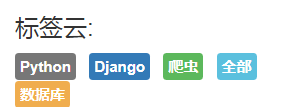
<h3>标签云:</h3>
{% get_tags as tag_list %}
{% for tag in tag_list %}
<a href="{% url 'blog:blog_tag' tag.id %}" style="font-size: 20px;">
<span style="padding: 5px;" class="label {% cycle 'label-default' 'label-primary' 'label-success' 'label-info' 'label-warning' 'label-danger' %}">{{ tag.name }}</span>
</a>
{% endfor %}
</div>
</div>
4.4.RSS订阅
(1)blog/feed.py
from django.contrib.syndication.views import Feed

# from django.urls import reverse

from .models import Entry

class LatestEntriesFeed(Feed):

    title = "Zhang_derek的博客"

    link = "/siteblogs/"

    description = "zhang_derek的最新博客文章!"

    def items(self):

        return Entry.objects.order_by('-created_time')[:5]

    def item_title(self, item):

        return item.title

    def item_description(self, item):

        return item.abstract
(2)website/urls.py
from blog.feed import LatestEntriesFeed

url(r'^latest/feed/$', LatestEntriesFeed()),    #RSS订阅
(3)right_side_bar.html
<div class="row">

    <div class="rss">

        <a href="/latest/feed/"><i class="glyphicon glyphicon-plus"></i>RSS 订阅</a>

    </div>

</div>
Django+Bootstrap+Mysql 搭建个人博客(四)的更多相关文章
- Django+Bootstrap+Mysql 搭建个人博客(一)
1.1.环境搭建 (1)虚拟环境 mkvirtualenv website pip install django==1.11.7 (2)创建项目和app:website和blog (3)设置中文set ...
- Django+Bootstrap+Mysql 搭建个人博客(三)
3.1.分页功能 (1)views.py from django.core.paginator import Paginator,EmptyPage,PageNotAnInteger def make ...
- Django+Bootstrap+Mysql 搭建个人博客(五)
5.1.自定义403,404和500页面 (1)website/urls.py from blog import views as blog_views handler403 = blog_views ...
- Django+Bootstrap+Mysql 搭建个人博客(二)
2.1.博客首页设计 (1)settings.py MEDIA_ROOT = os.path.join(BASE_DIR,'media').replace("//","/ ...
- Django+Bootstrap+Mysql 搭建个人博客(六)
6.1.comments插件 (1)安装 pip install django-contrib-comments (02)settings INSTALLED_APPS = [ 'django.con ...
- Django+Bootstrap+Mysql 搭建个人博客 (六)
6.1.comments插件 (1)安装 pip install django-contrib-comments (02)settings INSTALLED_APPS = [ 'django.con ...
- Python Web开发:Django+BootStrap实现简单的博客项目
创建blog的项目结构 关于如何创建一个Django项目,请查看[Python Web开发:使用Django框架创建HolleWorld项目] 创建blog的数据模型 创建一个文章类 所有开发都是数据 ...
- django入门--django-blog-zinnia搭建个人博客
1.安装python 选择合适python2.7及以上版本安装https://www.python.org/downloads/ 2.建立虚拟环境 这不是必须的,但是建议使用,为每个项目单独引入依赖, ...
- Django两天搭建个人博客
传送门:https://github.com/1417766861/django-blog(可直接运行,上面有步骤) 效果: 首页: 侧栏: 详情页面: 修改头像,资料,文章发布: 支持添加标签拖拽 ...
随机推荐
- Django----初识视图与模板
1.使用Bootstrap(一个优秀的前端框架,是基于html,css基础上进行开发,快速,便捷,提供非常多的空间并且都是附带源码)实现静态博客页面 bootstrap中文官网:www.bootcss ...
- Kafka消费者组再均衡问题
在Kafka中,当有新消费者加入或者订阅的topic数发生变化时,会触发Rebalance(再均衡:在同一个消费者组当中,分区的所有权从一个消费者转移到另外一个消费者)机制,Rebalance顾名思义 ...
- recyclerview嵌套GridView去屏蔽后者的点击事件,而是前者响应到事件。
无论是标题中的嵌套方式,还是其它列表控件之间的嵌套,都适用. 1.在GirdView的所在布局的根布局中设置改属性: android:descendantFocusability="blac ...
- redis.Redis与redis.StrictRedis区别
redis-py提供两个类Redis和StrictRedis用于实现Redis的命令,StrictRedis用于实现大部分官方的命令,并使用官方的语法和命令(比如,SET命令对应与StrictRedi ...
- 彻底解决eclipse中tomcat启动速度缓慢的问题
问题: Tomcat启动提示At least one JAR was scanned for TLDs yet contained no TLDs tomcat启动速度总是很慢,检查后发现tomcat ...
- 1.3 正则表达式和python语言-1.3.6匹配多个字符串
1.3.6 匹配多个字符串(2018-05-08) 我们在正则表达式 bat|bet|bit 中使用了择一匹配(|)符号.如下为在 Python中使用正则表达式的方法. import re #bat| ...
- 自己编译Android(小米5)内核并刷入(一键自动编译打包)
之前自己编译过Android系统,刷入手机.编译很简单,但坑比较大,主要是GFW埋的坑.. 编译android系统太大了,今天记下自己编译及刷入android内核的方法. 主要是看到第三方内核可以超频 ...
- Caused by: org.apache.ibatis.builder.BuilderException: Parsing error was found in mapping #{}. Check syntax #{property|(expression), var1=value1, var2=value2, ...}
解决办法:查看与该项目中的所有#{},应该是 #{}的中间没有写值
- java中的HMAC-SHA1加密
public class Sha1Util { private static final String MAC_NAME = "HmacSHA1"; private static ...
- java代码的编译、执行过程
Java代码编译是由Java源码编译器来完成,流程图如下所示: Java字节码的执行是由JVM执行引擎来完成,流程图如下所示: Java代码编译和执行的整个过程包含了以下三个重要的机制: Java源码 ...