
vue 自定义marquee无缝滚动组件
今天介绍一下,上下,左右无缝滚动的公告栏信息组件的开发。
首先上效果:
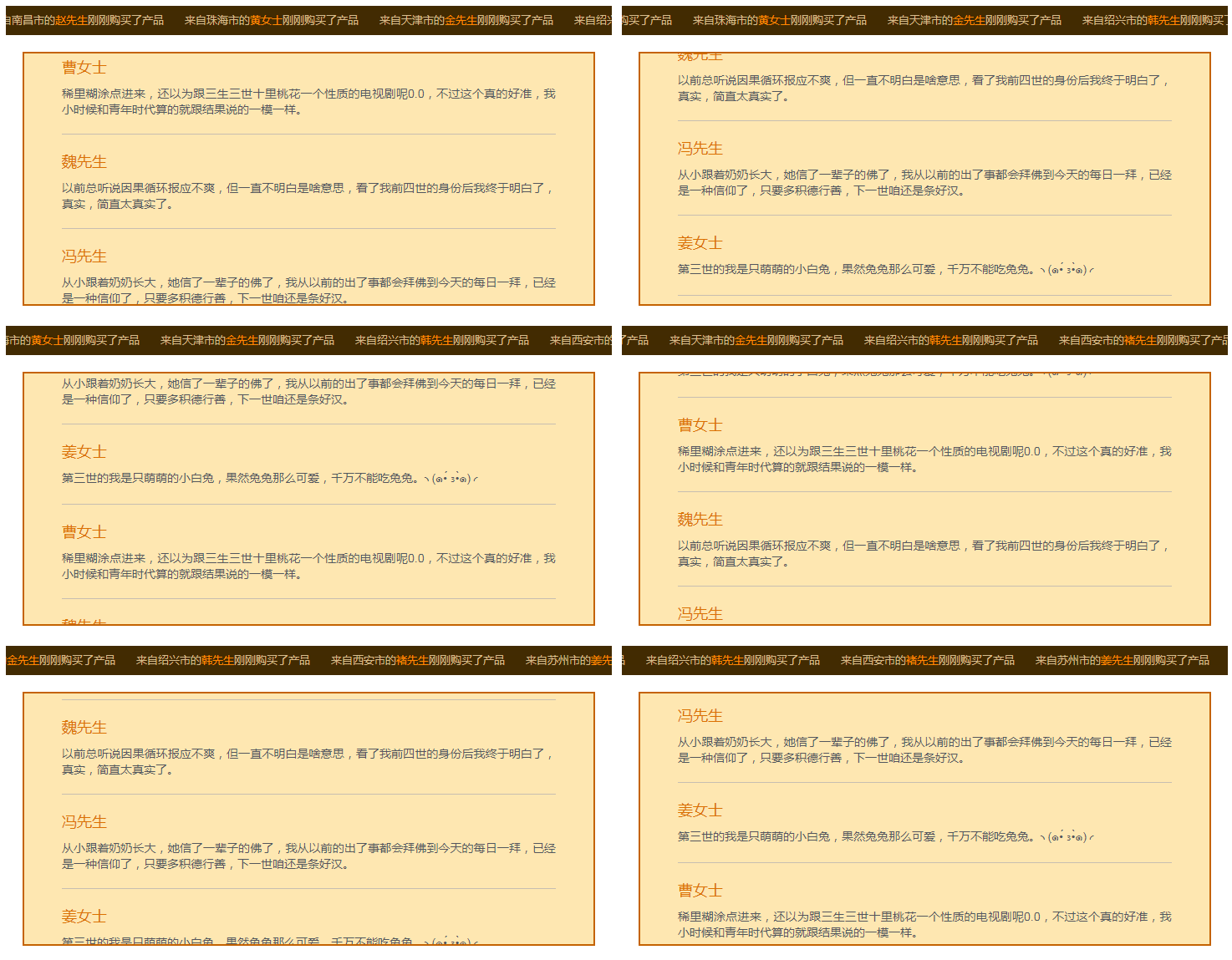
看起来有点卡顿,实际上还是挺顺畅的。。。
代码:
左右滚动的组件:marqueeX
<template>

    <div class="my-outbox">

        <div class="my-inbox" ref='box'>

            <div class="my-list" v-for="(item,index) in sendVal" :key='index'>

                {{item.place}}<span class="my-uname">{{item.name}}</span>刚刚购买了产品

            </div>

            <div class="my-list" v-for="(item,index) in sendVal" :key='(index+1)*100'>

                {{item.place}}<span class="my-uname">{{item.name}}</span>刚刚购买了产品

            </div>

        </div>

    </div>

</template>

<script>

    export default {

        name:'my-marquee-left',

        props:{

            sendVal:Array

        },

        data() {

            return {}

        },

        mounted:function(){

            var that = this;

            var target = this.$refs.box;

            var initLeft = 0;

            setInterval(function(){

                initLeft ++;

                if(initLeft >= target.offsetWidth / 2 ){

                    initLeft = 0;

                }

                target.style = 'transform: translateX(-'+ initLeft +'px)';

            },16)

        }

    }

</script>

<style lang="less" scoped>

    .my-outbox{

        color: #D7BC8D;

        overflow: hidden;

        height: 35px;

        background: #422b02;

        position: relative;

        .my-inbox{

            white-space: nowrap;

            position: absolute;

            font-size: 0;

            .my-list{

                margin-right: 25px;

                display: inline-block;

                font-size: 13px;

                height: 35px;

                line-height: 35px;

                .my-uname{

                    color: #FF8900;

                }

            }

        }

    }

</style>
上线滚动的组件:marqueeY
<template>

    <div class="my-outbox" ref='outbox'>

        <div class="my-inbox" ref='movebox'>

            <div class="my-listbox" v-for="(item,index) in sendVal" :key='index'>

                <div class="my-title">

                    {{item.name}}<text class="my-utel">{{item.mobile}}</text>

                    <text class="my-addr">{{item.place}}</text>

                </div>

                <div class="my-content">{{item.content}}</div>

            </div>

            <div class="my-listbox" v-for="(item,index) in sendVal" :key='(index+1)*100' v-if='isShow'>

                <div class="my-title">

                    {{item.name}}<text class="my-utel">{{item.mobile}}</text>

                    <text class="my-addr">{{item.place}}</text>

                </div>

                <div class="my-content">{{item.content}}</div>

            </div>

        </div>

    </div>

</template>

<script>

    export default {

        name:'my-marquee-top',

        props:{

            sendVal:Array

        },

        data() {

            return {

                isShow:true

            }

        },

        mounted:function(){

            var moveTarget = this.$refs.movebox;

            var outbox = this.$refs.outbox;

            if(outbox.offsetHeight > (moveTarget.offsetHeight /2)){

                this.isShow = false;

                return

            }

            var initTop = 0;

            setInterval(function(){

                initTop ++;

                if(initTop >= moveTarget.offsetHeight / 2 ){

                    initTop = 0;

                }

                moveTarget.style = 'transform: translateY(-'+ initTop +'px)';

            },16)

        },

    }

</script>

<style lang="less" scoped>

    .my-outbox{

        color: #FEE7B1;

        height:300px;

        margin: 20px;

        background: #FEE7B1;

        overflow: hidden;

        border: 2px solid #C46302;

        .my-inbox{

            margin: 0 45px;

            .my-listbox{

                padding: 20px 0;

                font-size: 18px;

                border-bottom: 1px solid #C7BEB1;

                .my-title{

                    color: #DB7000;

                    margin-bottom: 10px;

                    clear: both;

                    overflow:hidden;

                    .my-utel{

                        font-size: 16px;

                        margin-left: 20px;

                    }

                    .my-addr{

                        font-size: 16px;

                        float: right;

                    }

                }

                .my-content{

                    text-align: justify;

                    word-break: break-all;

                    font-size: 14px;

                    color: #53565D;

                }

            }

        }

    }

</style>
使用组件:
<marqueeX send-val='data1'  v-if='data1' />

<marqueeY send-val='data2'  v-if='data2' />
测试数据:
data: {

    "msg": [{

        "place": "来自烟台市的",

        "name": "许先生"

    }, {

        "place": "来自东莞市的",

        "name": "曹先生"

    }, {

        "place": "来自郑州市的",

        "name": "邹女士"

    }, {

        "place": "来自海口市的",

        "name": "戚先生"

    }, {

        "place": "来自南京市的",

        "name": "陈先生"

    }, {

        "place": "来自金华市的",

        "name": "吴先生"

    }, {

        "place": "来自泉州市的",

        "name": "卫先生"

    }, {

        "place": "来自哈尔滨市的",

        "name": "钱先生"

    }, {

        "place": "来自成都市的",

        "name": "尤先生"

    }, {

        "place": "来自惠州市的",

        "name": "张先生"

    }, {

        "place": "来自宁波市的",

        "name": "喻女士"

    }, {

        "place": "来自石家庄市的",

        "name": "吕先生"

    }, {

        "place": "来自大连市的",

        "name": "蒋女士"

    }, {

        "place": "来自南昌市的",

        "name": "赵先生"

    }, {

        "place": "来自珠海市的",

        "name": "黄女士"

    }, {

        "place": "来自天津市的",

        "name": "金先生"

    }, {

        "place": "来自绍兴市的",

        "name": "韩先生"

    }, {

        "place": "来自西安市的",

        "name": "褚先生"

    }, {

        "place": "来自苏州市的",

        "name": "姜先生"

    }, {

        "place": "来自南宁市的",

        "name": "陈女士"

    }, {

        "place": "来自沈阳市的",

        "name": "华先生"

    }],

    "comment": [{

        "name": "冯先生",

        "mobile": "170****8441",

        "place": "重庆",

        "content": "从小跟着奶奶长大,她信了一辈子的佛了,我从以前的出了事都会拜佛到今天的每日一拜,已经是一种信仰了,只要多积德行善,下一世咱还是条好汉。"

    }, {

        "name": "姜女士",

        "mobile": "180****2717",

        "place": "包头",

        "content": "第三世的我是只萌萌的小白兔,果然兔兔那么可爱,千万不能吃兔兔。╮(๑•́ ₃•̀๑)╭"

    }, {

        "name": "曹女士",

        "mobile": "171****5347",

        "place": "辽阳",

        "content": "稀里糊涂点进来,还以为跟三生三世十里桃花一个性质的电视剧呢0.0,不过这个真的好准,我小时候和青年时代算的就跟结果说的一模一样。"

    }, {

        "name": "魏先生",

        "mobile": "151****3555",

        "place": "无锡",

        "content": "以前总听说因果循环报应不爽,但一直不明白是啥意思,看了我前四世的身份后我终于明白了,真实,简直太真实了。"

    }]

}
(1) 上下滚动和左右滚动的 js 代码 基本没什么区别,只是我在上下滚动的代码中加入了判断如果数据太短就不显示克隆的内容和不执行滚动事件
(2) 大致的思路就是让装内容的盒子一直滚动至内容底部,然后在大于或者等于这个位置的时候,就把当前滚动的位置 置为0,相当于初始化。
(3) 引用组件的时候,使用 v-if 是因为我用setTimeout模拟后台延时返回数据,然后在数据没拿到的时候就不显示该组件。
(4) 因为有克隆的内容部分,所以那部分也需要设置key,一定要注意同一组件中,key不要搞成一样。
更新:
使用 requestAnimationFrame 来实现一帧一帧的绘制移动的距离:
只更新 marqueeX 的实现方法,marqueeY实现方式是一样的:
export default {

        name:'my-marquee-left',

        props:{

            sendVal:Array

        },

        data() {

            return {

                initLeft:0,

                animateTarget:null

            }

        },

        mounted:function(){

            this.animateTarget = this.$refs.box;

            requestAnimationFrame(this.animateFn);

        },

        methods:{

            animateFn(){

                this.initLeft++;

                if (this.initLeft >= this.animateTarget.offsetWidth / 2) {

                    this.initLeft = 0;

                }

                this.animateTarget.style = "transform: translateX(-" + this.initLeft + "px)";

                requestAnimationFrame(this.animateFn)

       }

        }

}
vue 自定义marquee无缝滚动组件的更多相关文章
- 基于vue的无缝滚动组件
vue-seamless-scroll A simple, Seamless scrolling for Vue.js 在awesome上一直没有发现vue的无缝滚动组件,在工作之余写了个组件,分享出 ...
- vue插件 vue-seamless-scroll 无缝滚动插件ES6使用总结
最近因为需求需要写一个项目信息无缝向上滚动组件,在网上搜了一下,看到大家的一致好评就果断的使用了vue-seamless-scroll组件.下面就简单的介绍它的使用,具体详细的使用推荐大家去看下开发者 ...
- vue自定义轮播图组件 swiper
1.banner 组件 components/Banner.vue <!-- 轮播图 组件 --> <template> <div class="swiper- ...
- vue 上实现无缝滚动播放文字系统公告
首先实现效果,当时的需求做的系统公告框设定一个宽度,超宽滚动播放,没超宽则静态展示,有了需求,想了下实现原理,最开始打算js更改字体内容的方式,但是想了下感觉会有点麻烦,想起之前做了表格的左侧边固定, ...
- 使用Vue自定义指令实现Select组件
完成的效果图如下: 一.首先,我们简单布局一下: <template> <div class="select"> <div class="i ...
- iOS开发之多图片无缝滚动组件封装与使用
经常有园友会问"博主,有没有图片无限滚动的Demo呀?", 正儿八经的图片滚动的Demo我这儿还真没有,今天呢就封装一个可以在项目中直接使用的图片轮播.没看过其他iOS图片无限轮播 ...
- vue自定义下拉框组件
创建下拉框组件 Select.vue <template> <div class="selects"> <div :class="{sele ...
- Vue自定义class覆盖第三方组件原有样式
一个vue文件可以写多个<style></style>, 如果在style加上socped代表本组件的样式,不污染全局. 如果需要覆盖第三方组件样式,则不能加scoped,因此 ...
- Vue 自定义全局消息框组件
消息弹框组件,默认3秒后自动关闭,可设置info/success/warning/error类型 效果图: 文件目录: Message.vue <template> <transit ...
随机推荐
- mysql的定时器
mysql定时器是系统给提供了event,而oracle里面的定时器是系统给提供的job.废话少说,下面创建表: create table mytable ( id int auto_incremen ...
- 进程命令(taskkill)
taskkill 命令: // 描述: 结束一个或多个任务或流程. // 语法: taskkill [/s <computer> [/u [<Domain>\]<User ...
- bootstrap,bootstrap-table,bootstrapValidator,animate,layer配合起来搞事情
资源准备(just download) bootstrap: http://www.bootcss.com/ bootstrap-table: http://bootstrap-table.wenzh ...
- rm: cannot remove ‘overlay/’: Device or resource busy
umount /var/lib/docker/overlay #取消挂载就可以啦 rm -rf overlay/
- ESP8266产品ID
ESP.getChipId() https://github.com/espressif/arduino-esp32/blob/master/libraries/ESP32/examples/Chip ...
- c++stack类的用法
官方解释: LIFO stack Stacks are a type of container adaptor, specifically designed to operate in a LIFO ...
- centos7 安装mysql5.7
[root@izbp1buyhgwtrvlxv3u2gqz soft]# wget http://dev.mysql.com/get/mysql57-community-release-el7-8.n ...
- Svn 安装、配置、使用指南
Svn 安装.配置.使用指南 Svn 是 Subversion 的简称,是一个开放源代码的版本控制系统,它采用了分支管理系统. 1. 安装配置 1.1. 安装 svn 1.2. 创建 svn 仓库 1 ...
- SpringCloud搭建Eureka集群
第一部分:搭建Eureka Server集群 Step1:新建工程,引入依赖 依赖文件pom.xml如下 <?xml version="1.0" encoding=" ...
- vue 中使用jquery
vue-cli搭建的项目 第一种方式:npm 引包的方式 1.安装jquery npm install jquery --save 2.webpack配置 在项目根目录下的build目录下找到webp ...