
使用ML.NET实现猜动画片台词
前面几篇主要内容出自微软官方,经我特意修改的案例的文章:
相信看过后大家对ML.NET有了一定的了解了,由于目前还是0.1的版本,也没有更多官方示例放出来,大家普遍觉得提供的特性还不够强大,所以处在观望状态也是能理解的。
本文结合Azure提供的语音识别服务,向大家展示另一种ML.NET有趣的玩法——猜动画片台词。
这个场景特别容易想像,是一种你说我猜的游戏,我会事先用ML.NET对若干动画片的台词进行分类学习,然后使用麦克风,让使用者随便说一句动画片的台词(当然得是数据集中已存在的,没有的不要搞事情呀!),然后来预测出自哪一部。跟随我动手做做看。
准备工作
这次需要使用Azure的认知服务中一项API——Speaker Recognition,目前还处于免费试用阶段,打开https://azure.microsoft.com/zh-cn/try/cognitive-services/?api=speaker-recognition,能看到如下页面:

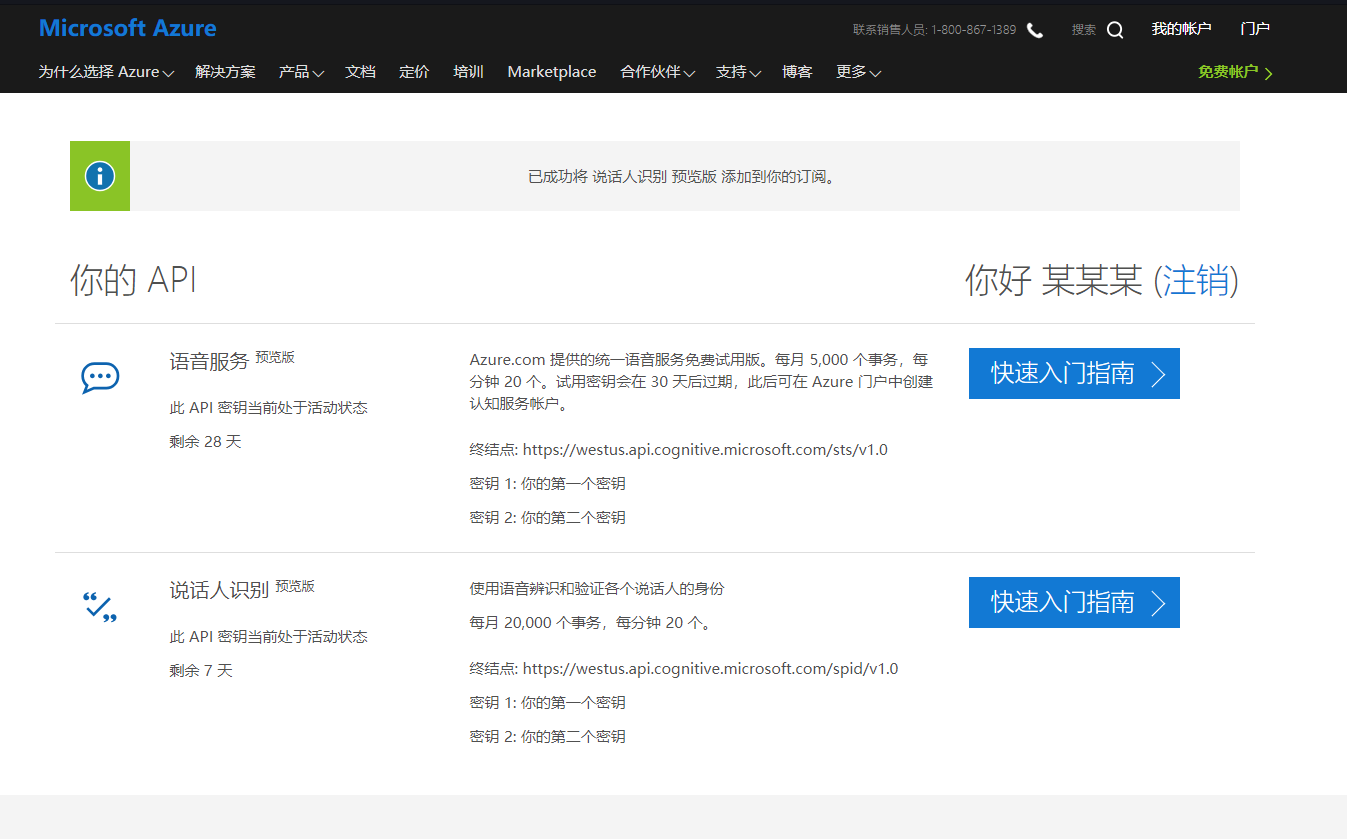
点击获取API密钥,用自己的Azure账号登录,然后就能看到自己的密钥了,类似如下图:
创建项目
这一次请注意,我们要创建一个.NET Framework 4.6.1或以上版本的控制台应用程序,通过NuGet分别引用三个类库:Microsoft.ML,JiebaNet.Analyser,Microsoft.CognitiveServices.Speech。
然后把编译平台修改成x64,而不是Any CPU。(这一点非常重要)
代码分解
在Main函数部分,我们只需要关心几个主要步骤,先切词,然后训练模型,最后在一个循环中等待使用者说话,用模型进行预测。
static void Main(string[] args)

{

    Segment(_dataPath, _dataTrainPath);

    var model = Train();

    Evaluate(model);

    ConsoleKeyInfo x;

    do

    {

        var speech = Recognize();

        speech.Wait();

        Predict(model, speech.Result);

        Console.WriteLine("\nRecognition done. Your Choice (0: Stop Any key to continue): ");

        x = Console.ReadKey(true);

    } while (x.Key != ConsoleKey.D0);

}
初始化的变量主要就是训练数据,Azure语音识别密钥等。注意YourServiceRegion的值是“westus”,而不是网址。
const string SubscriptionKey = "你的密钥";

const string YourServiceRegion = "westus";

const string _dataPath = @".\data\dubs.txt";

const string _dataTrainPath = @".\data\dubs_result.txt";
定义数据结构和预测结构和我之前的文章一样,没有什么特别之处。
public class DubbingData

{

    [Column(ordinal: "")]

    public string DubbingText;

    [Column(ordinal: "", name: "Label")]

    public string Label;

}

public class DubbingPrediction

{

    [ColumnName("PredictedLabel")]

    public string PredictedLabel;

}
切记部分注意对分隔符的过滤。
public static void Segment(string source, string result)

{

    var segmenter = new JiebaSegmenter();

    using (var reader = new StreamReader(source))

    {

        using (var writer = new StreamWriter(result))

        {

            while (true)

            {

                var line = reader.ReadLine();

                if (string.IsNullOrWhiteSpace(line))

                    break;

                var parts = line.Split(new[] { '\t' }, StringSplitOptions.RemoveEmptyEntries);

                if (parts.Length != ) continue;

                var segments = segmenter.Cut(parts[]);

                writer.WriteLine("{0}\t{1}", string.Join(" ", segments), parts[]);

            }

        }

    }

}
训练部分依然使用熟悉的多分类训练器StochasticDualCoordinateAscentClassifier。TextFeaturizer用于对文本内容向量化处理。
public static PredictionModel<DubbingData, DubbingPrediction> Train()

{

    var pipeline = new LearningPipeline();

    pipeline.Add(new TextLoader<DubbingData>(_dataTrainPath, useHeader: false, separator: "tab"));

    pipeline.Add(new TextFeaturizer("Features", "DubbingText"));

    pipeline.Add(new Dictionarizer("Label"));

    pipeline.Add(new StochasticDualCoordinateAscentClassifier());

    pipeline.Add(new PredictedLabelColumnOriginalValueConverter() { PredictedLabelColumn = "PredictedLabel" });

    var model = pipeline.Train<DubbingData, DubbingPrediction>();

    return model;

}
验证部分这次重点是看损失程度分数。
public static void Evaluate(PredictionModel<DubbingData, DubbingPrediction> model)

{

    var testData = new TextLoader<DubbingData>(_dataTrainPath, useHeader: false, separator: "tab");

    var evaluator = new ClassificationEvaluator();

    var metrics = evaluator.Evaluate(model, testData);

    Console.WriteLine();

    Console.WriteLine("PredictionModel quality metrics evaluation");

    Console.WriteLine("------------------------------------------");

    //Console.WriteLine($"TopKAccuracy: {metrics.TopKAccuracy:P2}");

    Console.WriteLine($"LogLoss: {metrics.LogLoss:P2}");

}
预测部分没有什么大变化,就是对中文交互进行了友好展示。
public static void Predict(PredictionModel<DubbingData, DubbingPrediction> model, string sentence)

{

    IEnumerable<DubbingData> sentences = new[]

    {

        new DubbingData

        {

            DubbingText = sentence

        }

    };

    var segmenter = new JiebaSegmenter();

    foreach (var item in sentences)

    {

        item.DubbingText = string.Join(" ", segmenter.Cut(item.DubbingText));

    }

    IEnumerable<DubbingPrediction> predictions = model.Predict(sentences);

    Console.WriteLine();

    Console.WriteLine("Category Predictions");

    Console.WriteLine("---------------------");

    var sentencesAndPredictions = sentences.Zip(predictions, (sentiment, prediction) => (sentiment, prediction));

    foreach (var item in sentencesAndPredictions)

    {

        Console.WriteLine($"台词: {item.sentiment.DubbingText.Replace(" ", string.Empty)} | 来自动画片: {item.prediction.PredictedLabel}");

    }

    Console.WriteLine();

}
Azure语音识别的调用如下。
static async Task<string> Recognize()

{

    var factory = SpeechFactory.FromSubscription(SubscriptionKey, YourServiceRegion);

    var lang = "zh-cn";

    using (var recognizer = factory.CreateSpeechRecognizer(lang))

    {

        Console.WriteLine("Say something...");

        var result = await recognizer.RecognizeAsync().ConfigureAwait(false);

        if (result.RecognitionStatus != RecognitionStatus.Recognized)

        {

            Console.WriteLine($"There was an error. Status:{result.RecognitionStatus.ToString()}, Reason:{result.RecognitionFailureReason}");

            return null;

        }

        else

        {

            Console.WriteLine($"We recognized: {result.RecognizedText}");

            return result.RecognizedText;

        }

    }

}
运行过程如下:
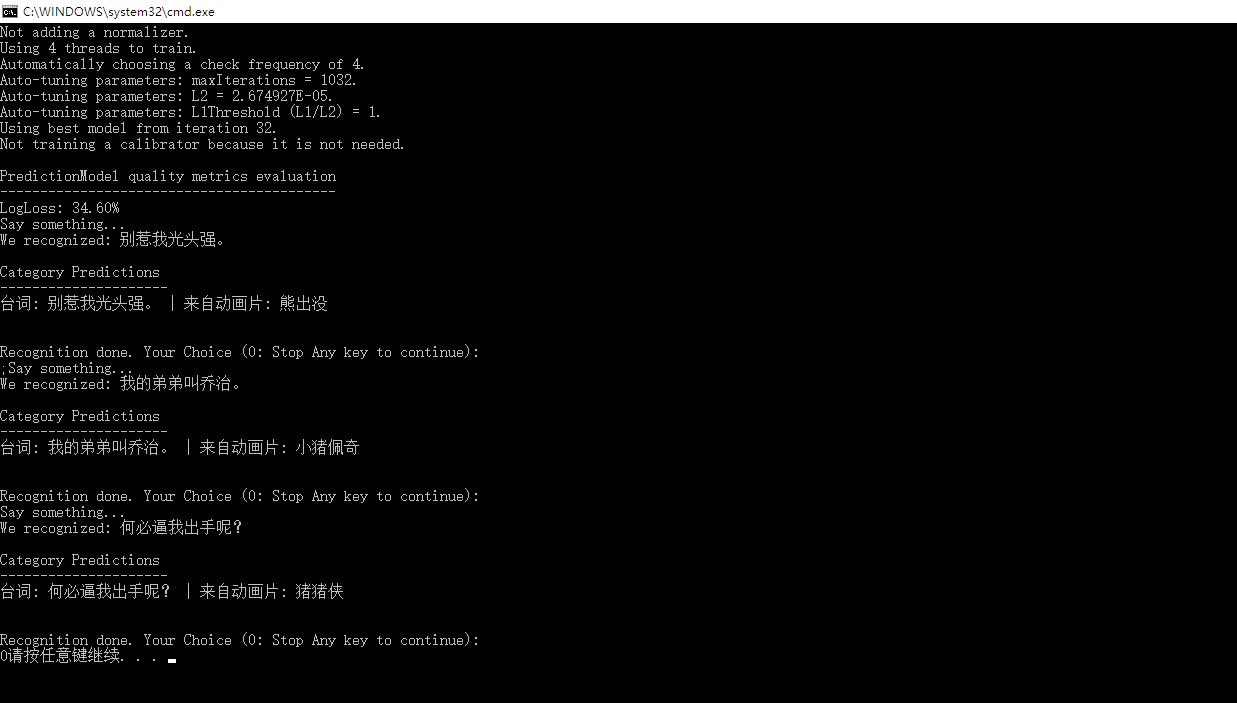
虽然这看上去有点幼稚,不过一样让你开心一笑了,不是么?请期待更多有趣的案例。
本文使用的数据集:下载
完整的代码如下:
using System;

using Microsoft.ML.Models;

using Microsoft.ML.Runtime;

using Microsoft.ML.Runtime.Api;

using Microsoft.ML.Trainers;

using Microsoft.ML.Transforms;

using System.Collections.Generic;

using System.Linq;

using Microsoft.ML;

using JiebaNet.Segmenter;

using System.IO;

using Microsoft.CognitiveServices.Speech;

using System.Threading.Tasks;

namespace DubbingRecognition

{

    class Program

    {

        public class DubbingData

        {

            [Column(ordinal: "")]

            public string DubbingText;

            [Column(ordinal: "", name: "Label")]

            public string Label;

        }

        public class DubbingPrediction

        {

            [ColumnName("PredictedLabel")]

            public string PredictedLabel;

        }

        const string SubscriptionKey = "你的密钥";

        const string YourServiceRegion = "westus";

        const string _dataPath = @".\data\dubs.txt";

        const string _dataTrainPath = @".\data\dubs_result.txt";

        static void Main(string[] args)

        {

            Segment(_dataPath, _dataTrainPath);

            var model = Train();

            Evaluate(model);

            ConsoleKeyInfo x;

            do

            {

                var speech = Recognize();

                speech.Wait();

                Predict(model, speech.Result);

                Console.WriteLine("\nRecognition done. Your Choice (0: Stop Any key to continue): ");

                x = Console.ReadKey(true);

            } while (x.Key != ConsoleKey.D0);

        }

        public static void Segment(string source, string result)

        {

            var segmenter = new JiebaSegmenter();

            using (var reader = new StreamReader(source))

            {

                using (var writer = new StreamWriter(result))

                {

                    while (true)

                    {

                        var line = reader.ReadLine();

                        if (string.IsNullOrWhiteSpace(line))

                            break;

                        var parts = line.Split(new[] { '\t' }, StringSplitOptions.RemoveEmptyEntries);

                        if (parts.Length != ) continue;

                        var segments = segmenter.Cut(parts[]);

                        writer.WriteLine("{0}\t{1}", string.Join(" ", segments), parts[]);

                    }

                }

            }

        }

        public static PredictionModel<DubbingData, DubbingPrediction> Train()

        {

            var pipeline = new LearningPipeline();

            pipeline.Add(new TextLoader<DubbingData>(_dataTrainPath, useHeader: false, separator: "tab"));

            //pipeline.Add(new ColumnConcatenator("Features", "DubbingText"));

            pipeline.Add(new TextFeaturizer("Features", "DubbingText"));

            //pipeline.Add(new TextFeaturizer("Label", "Category"));

            pipeline.Add(new Dictionarizer("Label"));

            pipeline.Add(new StochasticDualCoordinateAscentClassifier());

            pipeline.Add(new PredictedLabelColumnOriginalValueConverter() { PredictedLabelColumn = "PredictedLabel" });

            var model = pipeline.Train<DubbingData, DubbingPrediction>();

            return model;

        }

        public static void Evaluate(PredictionModel<DubbingData, DubbingPrediction> model)

        {

            var testData = new TextLoader<DubbingData>(_dataTrainPath, useHeader: false, separator: "tab");

            var evaluator = new ClassificationEvaluator();

            var metrics = evaluator.Evaluate(model, testData);

            Console.WriteLine();

            Console.WriteLine("PredictionModel quality metrics evaluation");

            Console.WriteLine("------------------------------------------");

            //Console.WriteLine($"TopKAccuracy: {metrics.TopKAccuracy:P2}");

            Console.WriteLine($"LogLoss: {metrics.LogLoss:P2}");

        }

        public static void Predict(PredictionModel<DubbingData, DubbingPrediction> model, string sentence)

        {

            IEnumerable<DubbingData> sentences = new[]

            {

                new DubbingData

                {

                    DubbingText = sentence

                }

            };

            var segmenter = new JiebaSegmenter();

            foreach (var item in sentences)

            {

                item.DubbingText = string.Join(" ", segmenter.Cut(item.DubbingText));

            }

            IEnumerable<DubbingPrediction> predictions = model.Predict(sentences);

            Console.WriteLine();

            Console.WriteLine("Category Predictions");

            Console.WriteLine("---------------------");

            var sentencesAndPredictions = sentences.Zip(predictions, (sentiment, prediction) => (sentiment, prediction));

            foreach (var item in sentencesAndPredictions)

            {

                Console.WriteLine($"台词: {item.sentiment.DubbingText.Replace(" ", string.Empty)} | 来自动画片: {item.prediction.PredictedLabel}");

            }

            Console.WriteLine();

        }

        static async Task<string> Recognize()

        {

            var factory = SpeechFactory.FromSubscription(SubscriptionKey, YourServiceRegion);

            var lang = "zh-cn";

            using (var recognizer = factory.CreateSpeechRecognizer(lang))

            {

                Console.WriteLine("Say something...");

                var result = await recognizer.RecognizeAsync().ConfigureAwait(false);

                if (result.RecognitionStatus != RecognitionStatus.Recognized)

                {

                    Console.WriteLine($"There was an error. Status:{result.RecognitionStatus.ToString()}, Reason:{result.RecognitionFailureReason}");

                    return null;

                }

                else

                {

                    Console.WriteLine($"We recognized: {result.RecognizedText}");

                    return result.RecognizedText;

                }

            }

        }

    }

}
使用ML.NET实现猜动画片台词的更多相关文章
- ML.NET
ML.NET http://www.cnblogs.com/BeanHsiang/category/1218714.html 随笔分类 - 使用ML.NET实现NBA得分预测 摘要: 本文将介绍一种特 ...
- AI,DM,ML,PR的区别与联系
数据挖掘和机器学习的区别和联系,周志华有一篇很好的论述<机器学习与数据挖掘>可以帮助大家理解.数据挖掘受到很多学科领域的影响,其中数据库.机器学习.统计学无疑影响最大.简言之,对数据挖掘而 ...
- ML学习分享系列(2)_计算广告小窥[中]
原作:面包包包包包包 改动:寒小阳 && 龙心尘 时间:2016年2月 出处:http://blog.csdn.net/Breada/article/details/50697030 ...
- iOS 11: CORE ML—浅析
本文来自于腾讯Bugly公众号(weixinBugly),未经作者同意,请勿转载,原文地址:https://mp.weixin.qq.com/s/OWD5UEiVu5JpYArcd2H9ig 作者:l ...
- AI,DM,ML,PR的区别与联系
数据挖掘和机器学习的区别和联系,周志华有一篇很好的论述<机器学习与数据挖掘>可以帮助大家理解.数据挖掘受到很多学科领域的影响,其中数据库.机器学习.统计学无疑影响最大.简言之,对数据挖掘而 ...
- iOS Core ML与Vision初识
代码地址如下:http://www.demodashi.com/demo/11715.html 教之道 贵以专 昔孟母 择邻处 子不学 断机杼 随着苹果新品iPhone x的发布,正式版iOS 11也 ...
- 机器学习规则:ML工程最佳实践----rules_of_ml section 2【翻译】
作者:黄永刚 ML Phase II: 特征工程 第一阶段介绍了机器学习的一个周期,为学习系统获取训练数据,通过有趣的引导设计指标,创建一个服务框架.在有了一个完整系统之后,就进入了第一阶段. 第二阶 ...
- HTML5网页录音和压缩,边猜边做..(附源码)
宣传一下自己的qq群: (暗号:C#交流) 欢迎喜欢C#,热爱C#,正在学习C#,准备学习C#的朋友来这里互相学习交流,共同进步 群刚建,人不多,但是都是真正热爱C#的 我也是热爱C#的 希望大家可以 ...
- Spark2 ML 学习札记
摘要: 1.pipeline 模式 1.1相关概念 1.2代码示例 2.特征提取,转换以及特征选择 2.1特征提取 2.2特征转换 2.3特征选择 3.模型选择与参数选择 3.1 交叉验证 3.2 训 ...
随机推荐
- maya cmds pymel 'ESC' 退出 while, for 循环
maya cmds pymel 'ESC' 退出 while, for 循环 import maya.cmds as cmds cmds.progressWindow(isInterruptable= ...
- docker-compose模板文件
mysql.redis.asp.net core项目应用程序三个常见的docker-compose文件模板参考: version: "3" services: mysql: res ...
- SetParameter错误:java.time.Instant cannot be resolved
SetParameter Hibernate使用SetParameter错误 List<Customer> list = session.createQuery(hql).setParam ...
- Y1吐槽002 情绪
看了石原里美的<高岭之花>,虽然全程基本都是看不懂的,但是风间直人对喜怒哀乐里面的怒和哀的分析还是深有感触. 悲哀的人心里有爱 愤怒的人心里有恨,一个人装了太多的恨的话,别人是拯救不了的: ...
- 更换MariaDB数据库
https://downloads.mariadb.org/mariadb/repositories/#mirror=neusoft&distro=Ubuntu&distro_rele ...
- CoreException: Could not get the value for parameter compilerId for plugin execution default-compile: PluginResolutionException: Plugin org.apache.maven.plugins:maven-compiler-plugin:3.1
今天遇到一个奇怪的问题, 之前写好的代码, 更换环境后, 重新搭建的nexus, maven私服总是报错, 各种clean/update都不管用 原来是没写版本号, 后来加上3.1版本, 还是报错, ...
- today-Extension widget 扩展开发
设置UI部分的展开和收起
- SpringBoot报错:nested exception is org.apache.ibatis.executor.ExecutorException: No constructor found in com.tuyrk.test.User matching [java.lang.Long, java.lang.String, java.lang.String]
错误提示: Caused by: org.apache.ibatis.executor.ExecutorException: No constructor found in com.tuyrk._16 ...
- 在Centos中部署nginx
准备工作: nginx的安装依赖openSSL,zlib和pcre Openssl下载地址: http://www.openssl.org/ zlib下载地址: http://www.zlib.net ...
- layui 表格内容显示更改
在cole 中使用temple 属性进行修改 例: table.render({ elem: '#messageTable' ,id: 'search_table_mId' ,height: 500 ...