
Sentiment analysis in nlp
Sentiment analysis in nlp
The goal of the program is to analysis the article title is Sarcasm or not, i use tensorflow 2.5 to solve this problem.
Dataset download url: https://www.kaggle.com/rmisra/news-headlines-dataset-for-sarcasm-detection/home
a sample of the dataset:
{

  "article_link": "https://www.huffingtonpost.com/entry/versace-black-code_us_5861fbefe4b0de3a08f600d5",

  "headline": "former versace store clerk sues over secret 'black code' for minority shoppers",

  "is_sarcastic": 0

}
we want to depend on headline to predict the is_sarcastic, 1 means True,0 means False.
preprocessing
use pandas to read json file.
import pandas as pd

# lines = True means headle the json for each line

df = pd.read_json("Sarcasm_Headlines_Dataset_v2.json" ,lines="True")

df

'''

   is_sarcastic      headline                     article_link

0      1         thirtysomething sci...         https://www.theonion.co...

1      0             dem rep. totally ...       https://www.huffingtonpos..

'''
build list for each column
labels = []

sentences = []

urls = []

# a tips for convert series to list

'''

    type(df['is_sarcastic'])

    # Series

    type(df['is_sarcastic'].values)

    # ndarray

    type(df['is_sarcastic'].values.tolist())

    # list

'''

labels = df['is_sarcastic'].values.tolist()

sentences = df['headline'].values.tolist()

urls = df['article_link'].values.tolist()

len(labels) # 28619

len(sentences) # 28619
split dataset into train set and test set
# train size is the 2/3 of the all dataset.

train_size = int(len(labels) / 3 * 2)

train_sentences = sentences[0: train_size]

test_sentences = sentences[train_size:]

train_y = labels[0:train_size]

test_y = labels[train_size:]
init some parameter
# some parameter

vocab_size = 10000

# input layer to embedding

embedding_dim = 16

# each input sentence length

max_length = 100

# padding method

trunc_type='post'

padding_type='post'

# token the unfamiliar word

oov_tok = "<OOV>"
preprocessing on train set and test set
# processing on train set and test set

import numpy as np

from tensorflow.keras.preprocessing.text import Tokenizer

from tensorflow.keras.preprocessing.sequence import pad_sequences

tokenizer = Tokenizer(oov_token = oov_tok)

tokenizer.fit_on_texts(train_sentences)

train_X = tokenizer.texts_to_sequences(train_sentences)

# padding the data

train_X = pad_sequences(train_X,

                       maxlen = max_length,

                       truncating = trunc_type,

                       padding = padding_type)

train_X[:2]

# convery the list to nparray

train_y = np.array(train_y)

# same operator to test set

test_X = tokenizer.texts_to_sequences(test_sentences)

test_X = pad_sequences(test_X ,

                      maxlen = max_length,

                      truncating = trunc_type,

                      padding = padding_type)

test_y = np.array(test_y)
build the model
some important functions and args:
tf.keras.layers.Dense # Dense
implements the operation:output = activation(dot(input, kernel) + bias) , a NN layeractivation # Activation function to use. If you don't specify anything, no activation is applied (ie. "linear" activation:
a(x) = x).use_bias # Boolean, whether the layer uses a bias vector.
tf.keras.Sequential # contain a linear stack of layer into a
tf.keras.Model.tf.keras.Model # to train and predict
config the model with losses and metrics with
model.compile(args)optimizer
some args
AdamRMSpropSGDAdagrad
loss # The loss value that will be minimized by the model will then be the sum of all individual losses.
metrices # List of metrics to be evaluated by the model during training and testing.
train the model with
model.fit(x=None,y=None)batch_size # Number of samples per gradient update. If unspecified,
batch_sizewill default to 32.epochs # Number of epochs to train the model
verbose # Verbosity mode. 0 = silent, 1 = progress bar, 2 = one line per epoch,verbose=2 is recommended when not running interactively
validation_data #( valid_X, valid_y )
tf.keras.layers.Embedding # Turns positive integers (indexes) into dense vectors of fixed size. as shown in following figure
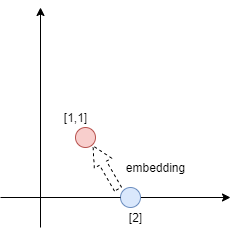
the purpose of the embedding is making the 1-dim integer proceed the muti-dim vectors add. can find the hide feature and connect to predict the labels. in this program ,every word's emotion direction can be trained many times.
tf.keras.layer.GlobalAveragePooling1D # add all muti-dim vectors ,if the output layer shape is (32, 10, 64), after the pooling, the shape will be changed as (32,64), as shown in following figure
-
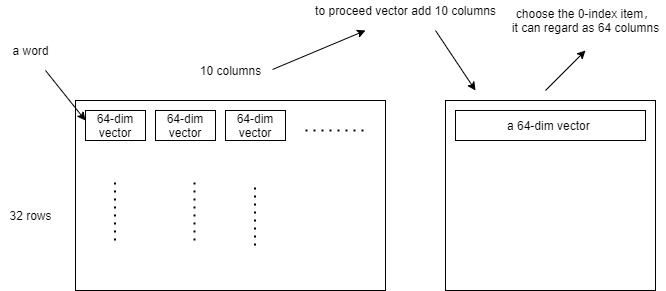
code is more simple then theory
# build the model

model = tf.keras.Sequential(

        [

            # make a word became a 64-dim vector

            tf.keras.layers.Embedding(vocab_size, embedding_dim, input_length = max_length),

            # add all word vector

            tf.keras.layers.GlobalAveragePooling1D(),

            # NN

            tf.keras.layers.Dense(24, activation = 'relu'),

            tf.keras.layers.Dense(1, activation = 'sigmoid')

        ]

)

model.compile(loss = 'binary_crossentropy', optimizer = 'adam' , metrics = ['accuracy'])
train the model
num_epochs = 30

history = model.fit(train_X, train_y, epochs = num_epochs,

                   validation_data = (test_X, test_y),

                   verbose = 2)
after the 30 epochs
Epoch 30/30

597/597 - 8s - loss: 1.8816e-04 - accuracy: 1.0000 - val_loss: 1.2858 - val_accuracy: 0.8216
predict our sentence
mytest_sentence = ["you are so cute", "you are so cute but looks like stupid"]
mytest_X = tokenizer.texts_to_sequences(mytest_sentence)
mytest_X = pad_sequences(mytest_X ,
maxlen = max_length,
truncating = trunc_type,
padding = padding_type)
mytest_y = model.predict(mytest_X)
# if result is bigger then 0.5 ,it means the title is Sarcasm
print(mytest_y > 0.5)
'''
[[False]
[ True]]
'''
reference:
tensorflow API: https://www.tensorflow.org/api_docs/python/tf/keras/Sequential
colab: bit.ly/tfw-sarcembed
Sentiment analysis in nlp的更多相关文章
- Sentiment Analysis resources
Wikipedia: Sentiment analysis (also known as opinion mining) refers to the use of natural language p ...
- NAACL 2013 Paper Mining User Relations from Online Discussions using Sentiment Analysis and PMF
中文简单介绍:本文对怎样基于情感分析和概率矩阵分解从网络论坛讨论中挖掘用户关系进行了深入研究. 论文出处:NAACL'13. 英文摘要: Advances in sentiment analysis ...
- 【Deep Learning Nanodegree Foundation笔记】第 10 课:Sentiment Analysis with Andrew Trask
In this lesson, Andrew Trask, the author of Grokking Deep Learning, will walk you through using neur ...
- 论文阅读:Multi-task Learning for Multi-modal Emotion Recognition and Sentiment Analysis
论文标题:Multi-task Learning for Multi-modal Emotion Recognition and Sentiment Analysis 论文链接:http://arxi ...
- 使用RNN进行imdb影评情感识别--use RNN to sentiment analysis
原创帖子,转载请说明出处 一.RNN神经网络结构 RNN隐藏层神经元的连接方式和普通神经网路的连接方式有一个非常明显的区别,就是同一层的神经元的输出也成为了这一层神经元的输入.当然同一时刻的输出是不可 ...
- Deep Learning for NLP 文章列举
Deep Learning for NLP 文章列举 原文链接:http://www.xperseverance.net/blogs/2013/07/2124/ 大部分文章来自: http://w ...
- 转 Deep Learning for NLP 文章列举
原文链接:http://www.xperseverance.net/blogs/2013/07/2124/ 大部分文章来自: http://www.socher.org/ http://deepl ...
- Standford CoreNLP--Sentiment Analysis初探
Stanford CoreNLP功能之一是Sentiment Analysis(情感分析),可以标识出语句的正面或者负面情绪,包括:Positive,Neutral,Negative三个值. 运行有两 ...
- Java自然语言处理NLP工具包
1. Java自然语言处理 LingPipe LingPipe是一个自然语言处理的Java开源工具包.LingPipe目前已有很丰富的功能,包括主题分类(Top Classification).命名实 ...
随机推荐
- Postman 正确使用姿势
前言: 请各大网友尊重本人原创知识分享,谨记本人博客:南国以南i 简介: Postman是一个接口测试工具,在做接口测试的时候,Postman相当于一个客户端,它可以模拟用户发起的各类HTTP请求,将 ...
- Python 中删除列表元素的三种方法
列表基本上是 Python 中最常用的数据结构之一了,并且删除操作也是经常使用的. 那到底有哪些方法可以删除列表中的元素呢?这篇文章就来总结一下. 一共有三种方法,分别是 remove,pop 和 d ...
- Java中时间类中的Data类与Time类
小简博客 - 小简的技术栈,专注Java及其他计算机技术.互联网技术教程 (ideaopen.cn) Data类 Data类中常用方法 boolean after(Date date) 若当调用此方法 ...
- Java基础语法Day_08(继承、抽象)
第1节 继承 day09_01_继承的概述 day09_02_继承的格式 day09_03_继承中成员变量的访问特点 day09_04_区分子类方法中重名的三种变量 day09_05_继承中成员方法的 ...
- .NET桌面程序应用WebView2组件集成网页开发3 WebView2的进程模型
系列目录 [已更新最新开发文章,点击查看详细] WebView2 运行时使用与 Microsoft Edge 浏览器相同的进程模型. WebView2 运行时中的进程 WebView2 进程组 ...
- python3 常见错误(一)
以下全部是在python3中适用. 错误一: 函数默认参数 Python允许为函数的参数提供默认的可选值.但是它可能会导致一些易变默认值的混乱.例子: 我们希望每次调用myFun函数,list1都为默 ...
- Linux系统inodes资源耗尽问题
1 inodes介绍 Linux系统下文件数据储存在"块"中,文件的元信息,例如文件的创建者.文件的创建日期.文件的大小等.这种储存文件元信息的区域就叫做inode,中文译名为&q ...
- 1.Docker简介
Docker是个什么东西 假定您在开发一个项目,您使用的是一台笔记本电脑而且您的开发环境具有特定的配置.其他开发人员身处的环境配置也各有不同.您正在开发的应用依赖于您当前的配置且还要依赖于某些配置文件 ...
- JUC自定义线程池练习
JUC自定义线程池练习 首先上面该线程池的大致流程 自定义阻塞队列 首先定义一个双向的队列和锁一定两个等待的condition 本类用lock来控制多线程下的流程执行 take和push方法就是死等, ...
- KeyDB重量发布6.3.0开源版
摘要:5月12日 KeyDB 社区隆重发布了 6.3.0开源版本,将与华为加拿大研究院DCS团队2021-2022年合作的成果,深度优化的企业版的能力贡献给了开源社区. KeyDB是目前Redis 分 ...