
ASP.NET Core - JWT认证实现
一、JWT结构
JWT介绍就太多了,这里主要关注下Jwt的结构。
Jwt中包含三个部分:Header(头部).Payload(负载).Signature(签名)
Header:描述 JWT 的元数据的JSON对象,如:
{"alg":"HS256","typ":"JWT"}Payload:一个用来存放实际需要传递的数据的JSON 对象。如:
"http://schemas.xmlsoap.org/ws/2005/05/identity/claims/name": "admin",

    "exp": 1610877510,

    "iss": "cba",

    "aud": "cba"

}- Signature:对前两部分(Header、Payload)的签名,防止数据篡改。
HMACSHA256(base64UrlEncode(header) + "." + base64UrlEncode(payload), secret)
JWT示例:
eyJhbGciOiJIUzI1NiIsInR5cCI6IkpXVCJ9.eyJodHRwOi8vc2NoZW1hcy54bWxzb2FwLm9yZy93cy8yMDA1LzA1L2lkZW50aXR5L2NsYWltcy9uYW1lIjoiYWRtaW4iLCJleHAiOjE2MTA4Nzc1MTAsImlzcyI6ImNiYSIsImF1ZCI6ImNiYSJ9.O9lbZwfqRuA6vKcRCfYieA1zLkTPppdSvTc8UzwCkNw
二、ASP.NET Core 使用JTW认证
1、添加Nuget包引用:
dotnet add package Microsoft.AspNetCore.Authentication.JwtBearer
2、定义一个JwtSettingDto结构,用于读取JWT配置信息
public class JwtSetting

{

    /// <summary>

    /// 发行者

    /// </summary>

    public string Issuer { get; set; }

    /// <summary>

    /// 受众

    /// </summary>

    public string Audience { get; set; }

    /// <summary>

    /// 秘钥

    /// </summary>

    public string SecretKey { get; set; }

    /// <summary>

    /// 过期时间

    /// </summary>

    public int AccessExpiration { get; set; }

    /// <summary>

    /// 刷新时间

    /// </summary>

    public int RefreshExpiration { get; set; }

}
3、在appsetting.json配置文件中,添加jwt相关配置信息
  "JWTSetting": {

    "Issuer": "cba",

    "Audience": "cba",

    "SecretKey": "123456789abcdefghi",

    "AccessExpiration": 60,

    "RefreshExpiration": 80

  }
4、在Startup.cs 中启用Jwt认证
public void ConfigureServices(IServiceCollection services)

{

    services.Configure<JwtSetting>(Configuration.GetSection("JWTSetting"));

    var token = Configuration.GetSection("JWTSetting").Get<JwtSetting>();

    //JWT认证

    services.AddAuthentication(x =>

    {

        x.DefaultAuthenticateScheme = JwtBearerDefaults.AuthenticationScheme;

        x.DefaultChallengeScheme = JwtBearerDefaults.AuthenticationScheme;

    }).AddJwtBearer(x =>

    {

        x.RequireHttpsMetadata = false;

        x.SaveToken = true;

        x.TokenValidationParameters = new TokenValidationParameters

        {

            ValidateIssuerSigningKey = true,

            IssuerSigningKey = new SymmetricSecurityKey(Encoding.ASCII.GetBytes(token.SecretKey)),

            ValidIssuer = token.Issuer,

            ValidAudience = token.Audience,

            ValidateIssuer = false,

            ValidateAudience = false

        };

    });

}

// This method gets called by the runtime. Use this method to configure the HTTP request pipeline.

public void Configure(IApplicationBuilder app, IWebHostEnvironment env)

{

    app.UseAuthentication();

    app.UseAuthorization();

}
5、实现认证控制器:
a) 添加认证Dto
public class LoginDto

{

    [Required]

    public string Username { get; set; }

    [Required]

    public string Password { get; set; }

}
b) 实现用户校验服务:默认实现:当用户密码都等于admin通过校验
public interface IUserService

{

    bool IsValid(LoginDto request);

}

public class UserService : IUserService

{

    //本次,固定校验admin

    public bool IsValid(LoginDto request)

    {

        return request.Password == request.Username && request.Username == "admin";

    }

}
c) 实现签发token的认证服务:
//认证服务接口
public interface IAuthenticateService

{

    bool IsAuthenticated(LoginDto request, out string token);

}

//认证服务

public class TokenAuthenticationService : IAuthenticateService

{

    private readonly IUserService _userService;

    private readonly JwtSetting _jwtSetting;

    public TokenAuthenticationService(IUserService userService, IOptions<JwtSetting> jwtSetting)

    {

        _userService = userService;

        _jwtSetting = jwtSetting.Value;

    }

    public bool IsAuthenticated(LoginDto request, out string token)

    {

        token = string.Empty;

        if (!_userService.IsValid(request))

            return false;

        var claims = new[] { new Claim(ClaimTypes.Name, request.Username) };

        var key = new SymmetricSecurityKey(Encoding.UTF8.GetBytes(_jwtSetting.SecretKey));

        var credentials = new SigningCredentials(key, SecurityAlgorithms.HmacSha256);

        var jwtToken = new JwtSecurityToken(_jwtSetting.Issuer, _jwtSetting.Audience, claims, expires: DateTime.Now.AddMinutes(_jwtSetting.AccessExpiration), signingCredentials: credentials);

        token = new JwtSecurityTokenHandler().WriteToken(jwtToken);

        return true;

    }

}
d) 添加认证控制器
[Route("api/[controller]")]

[ApiController]

public class AuthenticationController : ControllerBase

{

    private IAuthenticateService _authService;

    public AuthenticationController(IAuthenticateService authService)

    {

        _authService = authService;

    }

    [AllowAnonymous]

    [HttpPost, Route("RequestToken")]

    public ActionResult RequestToken([FromBody] LoginDto request)

    {

        if (!ModelState.IsValid)

        {

            return BadRequest("Invalid Request");

        }

        string token;

        if (_authService.IsAuthenticated(request, out token))

        {

            return Ok(token);

        }

        return BadRequest("Invalid Request");

    }

}
6、注入服务:TokenAuthenticationService 、UserService
services.AddScoped<IUserService, UserService>();

services.AddScoped<IAuthenticateService, TokenAuthenticationService>();
7、添加测试控制器:
[Authorize]

[Route("api/[controller]")]

[ApiController]

public class AuditLogController : ControllerBase

{

    // GET: api/<AuditLogController>

    [HttpGet]

    public IEnumerable<string> Get()

    {

        return new string[] { "value1", "value2" };

    }

}
到此Jwt认证在.net core中已经实现,接下来验证下运行效果
三、验证结果
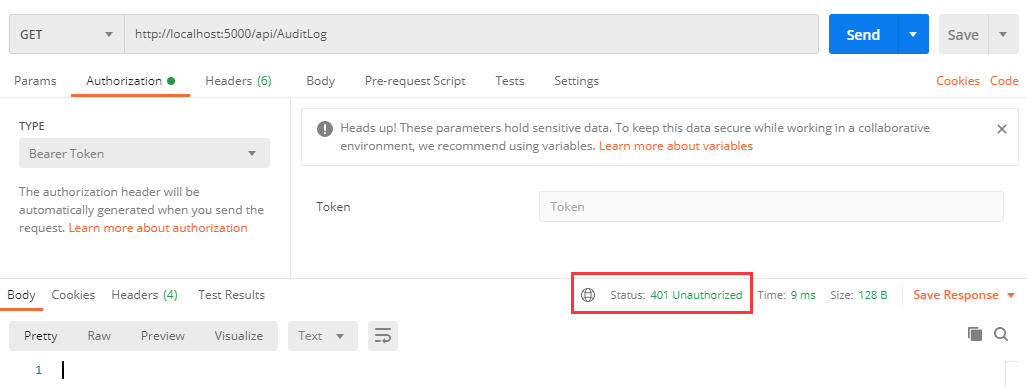
1、请求AuditLog接口:api/AuditLog未传入认证信息时:
2、获取Token:

3、添加token调用接口:
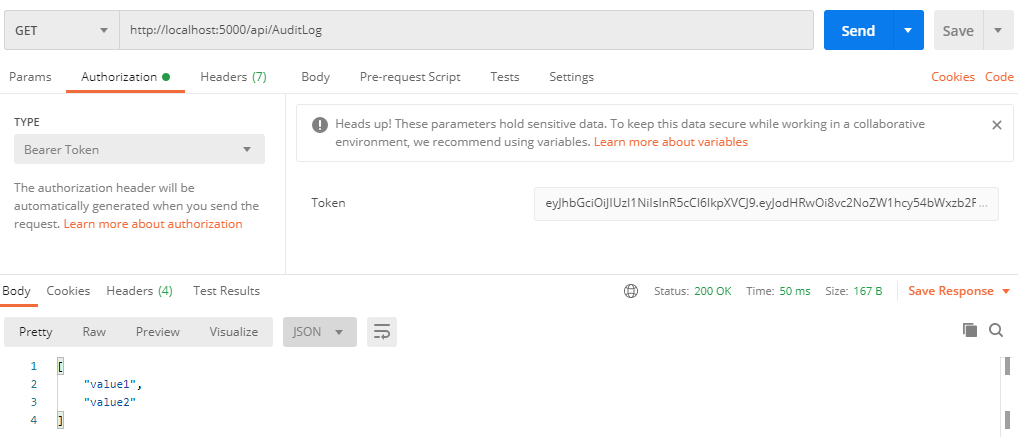
四、Swagger UI添加认证
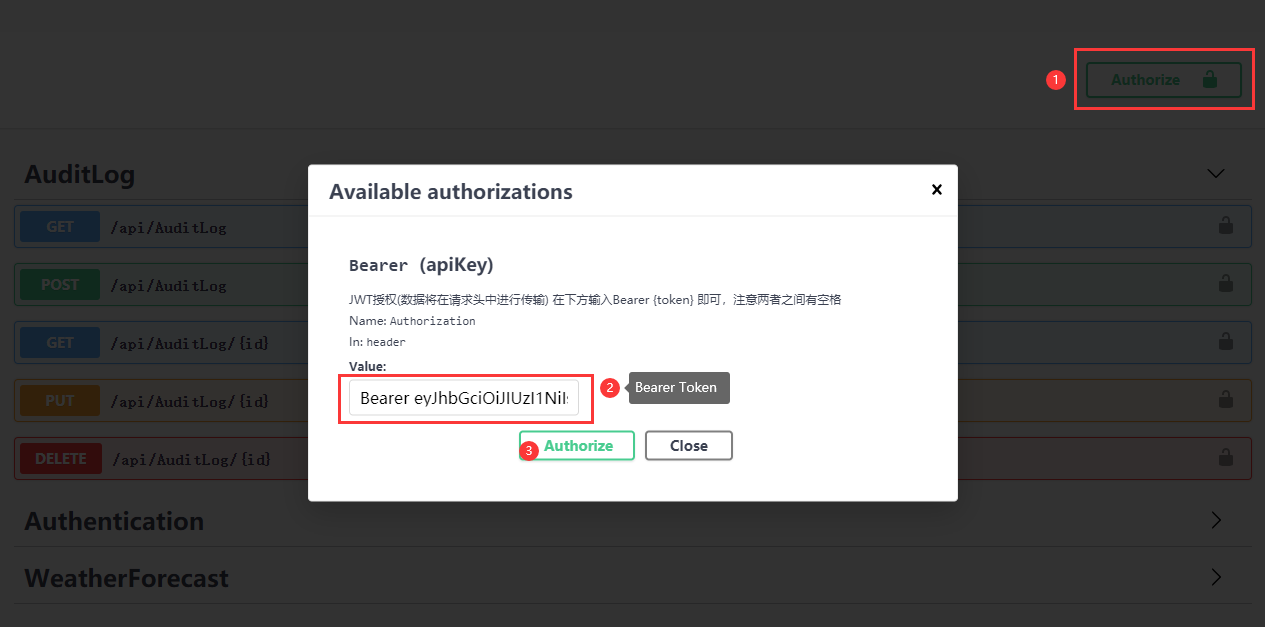
在项目中通常都添加了Swagger UI来展示接口及基础测试,那么如果添加了认证后,如何在调用接口前添加认证信息呢?
在Startup中:ConfigureServices中添加Swagger设置时,添加认证设置
//注册Swagger生成器,定义一个和多个Swagger 文档

services.AddSwaggerGen(c =>

{

    c.SwaggerDoc("v1", new OpenApiInfo { Title = "AuditLogDemo API", Version = "v1" });

    #region 启用swagger验证功能

    //添加一个必须的全局安全信息,和AddSecurityDefinition方法指定的方案名称一致即可。

    c.AddSecurityRequirement(new OpenApiSecurityRequirement

    {

        {

            new OpenApiSecurityScheme

            {

                Reference = new OpenApiReference {

                    Type = ReferenceType.SecurityScheme,

                    Id = "Bearer"

                }

            },

            new string[] { }

        }

    });

    c.AddSecurityDefinition("Bearer", new OpenApiSecurityScheme

    {

        Description = "JWT授权(数据将在请求头中进行传输) 在下方输入Bearer {token} 即可,注意两者之间有空格",

        Name = "Authorization",//jwt默认的参数名称

        In = ParameterLocation.Header,//jwt默认存放Authorization信息的位置(请求头中)

        Type = SecuritySchemeType.ApiKey,

        BearerFormat = "JWT",

        Scheme = "Bearer",

    });

    #endregion

});
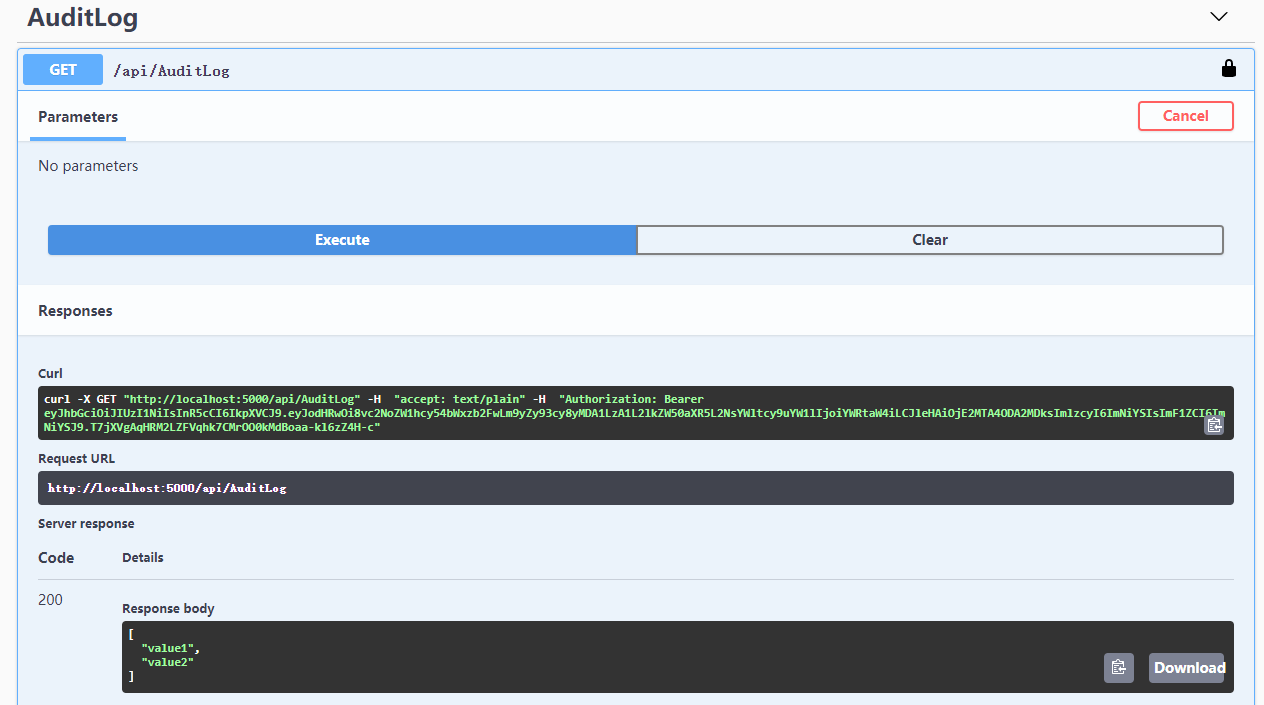
运行效果: 添加token->调用需认证接口
其他:
源码地址:https://github.com/cwsheng/AuditLogDemo.git
ASP.NET Core - JWT认证实现的更多相关文章
- ASP.NET Core JWT认证授权介绍
using JWTWebApi.Models; using Microsoft.AspNetCore.Authentication.JwtBearer; using Microsoft.AspNetC ...
- asp.net core 自定义认证方式--请求头认证
asp.net core 自定义认证方式--请求头认证 Intro 最近开始真正的实践了一些网关的东西,最近写几篇文章分享一下我的实践以及遇到的问题. 本文主要介绍网关后面的服务如何进行认证. 解决思 ...
- ASP.NET Core Token认证
翻译:Token Authentication in ASP.NET Core 令牌认证(Token Authentication)已经成为单页应用(SPA)和移动应用事实上的标准.即使是传统的B/S ...
- 深入解读 ASP.NET Core 身份认证过程
长话短说:上文我们讲了 ASP.NET Core 基于声明的访问控制到底是什么鬼? 今天我们乘胜追击:聊一聊ASP.NET Core 中的身份验证. 身份验证是确定用户身份的过程. 授权是确定用户是否 ...
- ASP.NET Core 身份认证 (Identity、Authentication)
Authentication和Authorization 每每说到身份验证.认证的时候,总不免说提及一下这2个词.他们的看起来非常的相似,但实际上他们是不一样的. Authentication想要说明 ...
- CZGL.Auth: ASP.NET Core Jwt角色授权快速配置库
CZGL.Auth CZGL.Auth 是一个基于 Jwt 实现的快速角色授权库,ASP.Net Core 的 Identity 默认的授权是 Cookie.而 Jwt 授权只提供了基础实现和接口,需 ...
- asp.net core 外部认证多站点模式实现
PS:之前因为需要扩展了微信和QQ的认证,使得网站是可以使用QQ和微信直接登录.github 传送门 .然后有小伙伴问,能否让这个配置信息(appid, appsecret)按需改变,而不是在 Con ...
- 使用WebApi和Asp.Net Core Identity 认证 Blazor WebAssembly(Blazor客户端应用)
原文:https://chrissainty.com/securing-your-blazor-apps-authentication-with-clientside-blazor-using-web ...
- asp.net core 身份认证/权限管理系统简介及简单案例
如今的网站大多数都离不开账号注册及用户管理,而这些功能就是通常说的身份验证.这些常见功能微软都为我们做了封装,我们只要利用.net core提供的一些工具就可以很方便的搭建适用于大部分应用的权限管理系 ...
随机推荐
- linux下安装Zookeeper 3.4.14
1.下载Zookeeper 3.4.14(https://zookeeper.apache.org/) wget https://mirror.bit.edu.cn/apache/zookeeper/ ...
- Angular:自定义属性指令
①在命令行窗口下用 CLI 命令ng g directive创建指令类文件 ②将directives/light.directive.ts文件改造一番 import { Directive, Elem ...
- Int,String,Integer,double之间的类型的相互转换
Int整数,String字符串之间的类型的转换 int转成String 结果为: String转成int类型 结果为: double转成String 结果为: String转成double 结果为: ...
- screw一键生成数据库文档
1. 简介 在项目开发和交付阶段,数据库文档是必不可少的.对于大型项目多个数据库几百甚至几千张表来说,手写数据库文档必然是耗时且痛苦的.因此需要一个插件自动生成文档. screw提供了多种文件 ...
- ubuntu 18 安装xgboost GPU版本
综合上述两个帖子: https://www.cnblogs.com/huadongw/p/6161145.html https://blog.csdn.net/u011587516/article/d ...
- JDK下载与安装
Java有很多个版本,最新的版本会兼容之前的. 先附上下载地址:https://www.oracle.com/technetwork/java/javase/downloads/jdk8-downlo ...
- Linux命令-2.文件属性
在Linux系统中文件的属性有:文件类型.属主属性.属组属性.其他属性,使用10个字符表示,如下图: 其中第0位表示文件类型: 当为[ d ]则是目录 当为[ - ]则是文件: 若是[ l ]则表示为 ...
- 推荐系统实践 0x11 NeuralCF
前言 这一篇文章我们来谈一下2017年新加坡国立大学提出的基于深度学习的系统过滤模型NeuralCF.我们在之前讲过矩阵分解技术,将协同过滤中的共现矩阵分解成用户向量矩阵以及物品向量矩阵.那么Embe ...
- Vue 修改成功之后我做了什么
Vue 修改成功之后我做了什么 背景:前端将修改的数据传递到后端,后端返回成功之后,我们要将数据及时显示出来. 霸道方法一:重新请求接口 柔和方法二:修改成功之后的数据传递到源数据中,进行双向绑定显示 ...
- 网站开发学习Python实现-Django学习-介绍(6.1.1)
@ 目录 1.MVT 2.ORM 关于作者 1.MVT 主要的目的是为了快速,简便的开发数据库驱动的网站,强调代码的复用,多个组件可以很方便以插件的方式服务于整个框架,采用的是MVT设计模式(差不多的 ...