
asp.net core 外部认证多站点模式实现
PS:之前因为需要扩展了微信和QQ的认证,使得网站是可以使用QQ和微信直接登录。github 传送门 。然后有小伙伴问,能否让这个配置信息(appid, appsecret)按需改变,而不是在 ConfigureServices 里面写好。
先上 官方文档 : https://docs.microsoft.com/zh-cn/aspnet/core/security/authentication/social/?view=aspnetcore-2.1
官方已经实现了 microsft,facebook,twitter,google 等这几个网站认证。代码可以认证授权库看到找到 https://github.com/aspnet/Security 。
国内的QQ和微信其实也是基于OAuth来实现的,所以自己集成还是比较容易。
正常情况下,配置这个外部认证都是在 ConfigureServices 里面配置好,并且使用配置或者是使用机密文件的形式来保存 appid 等信息。
回到正文,多站点模式,就是一个网站下分为多个子站点,并且不同的子站点可以配置不同的appId 。Asp.net core 默认的配置模式,在这种场景下已经适应不了了。
先上代码: https://github.com/jxnkwlp/AspNetCore.AuthenticationQQ-WebChat/tree/muti-site
官方代码分析:
1,RemoteAuthenticationHandler 远程认证处理程序。位于 microsoft.aspnetcore.authentication 下 。 源码 (https://github.com/aspnet/Security/blob/master/src/Microsoft.AspNetCore.Authentication/RemoteAuthenticationHandler.cs)
这个是泛型类,并且需要一个 TOptions ,这个 TOptions 必须是继承 RemoteAuthenticationOptions 的类。
2,OAuthHandler 实现 OAuth 认证处理程序,这个类继承 RemoteAuthenticationHandler 。同时必须实现一个 OAuthOptions 。
正常情况下实现 QQ、微信、github ,google ,facebook 等登录都是基于这个来实现的。 OAuthHandler 已经实现了标准的 OAuth 认证。
源码:https://github.com/aspnet/Security/blob/master/src/Microsoft.AspNetCore.Authentication.OAuth/OAuthHandler.cs
在 ConfigureServices 中,使用 AddFacebook 等方法,就是将 对于的 Handler 添加到 处理管道中,这些管到都是实现了 OAuth,然后传递 对应的 Options 来配置Handler 。
3,回到Account/ExternalLogin ,在提交外部登录的请求中, AuthenticationProperties properties = _signInManager.ConfigureExternalAuthenticationProperties(provider, redirectUrl); //这行代码的作用是 配置当前外部登录返回URL和认证的相关属性。return Challenge(properties, provider); // 将结果转到相关相关处理程序。这里返回的结果用于上面 OAuthHandler 作为一个处理参数。从这开始,就进入了 OAuthHandler 的处理范围了。
4,查看 OAuthHandler 代码 。 Task HandleChallengeAsync(AuthenticationProperties properties); 这个函数作为接收上一步中传递的 认证参数。 默认实现代码:
protected override async Task HandleChallengeAsync(AuthenticationProperties properties)

{

    if (string.IsNullOrEmpty(properties.RedirectUri))

    {

        properties.RedirectUri = CurrentUri;

    }

    // OAuth2 10.12 CSRF

    GenerateCorrelationId(properties);

    var authorizationEndpoint = BuildChallengeUrl(properties, BuildRedirectUri(Options.CallbackPath));

    var redirectContext = new RedirectContext<OAuthOptions>(

        Context, Scheme, Options,

        properties, authorizationEndpoint);

    await Events.RedirectToAuthorizationEndpoint(redirectContext);

}
protected virtual string BuildChallengeUrl(AuthenticationProperties properties, string redirectUri)

{

    var scopeParameter = properties.GetParameter<ICollection<string>>(OAuthChallengeProperties.ScopeKey);

    var scope = scopeParameter != null ? FormatScope(scopeParameter) : FormatScope();

    var state = Options.StateDataFormat.Protect(properties);

    var parameters = new Dictionary<string, string>

    {

        { "client_id", Options.ClientId },

        { "scope", scope },

        { "response_type", "code" },

        { "redirect_uri", redirectUri },

        { "state", state },

    };

    return QueryHelpers.AddQueryString(Options.AuthorizationEndpoint, parameters);

}
在这里面,构建了一个请求URL, 要求的这个URL 是目标站点授权的URL, 比如微信的那个黑色背景中间有二维码的页面。 这个构建请求URL的方法可以重写。
5,在上一步中,在需要授权的网站,授权完成后,会跳转到自己的网站并且带上授权相关数据。入口是 Task<HandleRequestResult> HandleRemoteAuthenticateAsync();
改造方法:
在上面的分析中,官方的实现是 在 ConfigureServices 中配置好参数 TOptions ,然后在 Handler 中 获取该参数。我们的目的是在请求中可以按需改变参数,如 client_id。
1,定义一个接口 IClientStore 和 一个实体 ClientStoreModel 。
public interface IClientStore

{

    /// <summary>

    ///  由 <paramref name="provider"/> 和 <paramref name="subjectId"/> 查找 <seealso cref="ClientStoreModel"/>

    /// </summary>

    ClientStoreModel FindBySubjectId(string provider, string subjectId);

}
/// <summary>

///  表示一个 Client 信息

/// </summary>

public class ClientStoreModel

{

    public string Provider { get; set; }

    public string SubjectId { get; set; }

    /// <summary>

    /// Gets or sets the provider-assigned client id.

    /// </summary>

    public string ClientId { get; set; }

    /// <summary>

    /// Gets or sets the provider-assigned client secret.

    /// </summary>

    public string ClientSecret { get; set; }

}
IClientStore 用于查找 client 的配置信息
2,在 Account/ExternalLogin 中,新增一个 参数 subjectId ,表示在当前某个认证(Provider)中是哪个请求(SubjectId) 。
同时在返回的授权配置参数中将subjectId 保存起来。
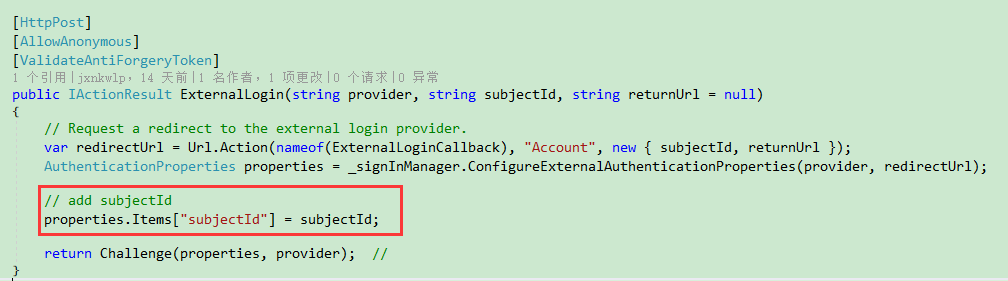
3,定义一个 MultiOAuthHandler ,集成 RemoteAuthenticationHandler ,不继承 OAuthHandler 是因为 这里需要一个新的 Options. (完整代码 请看代码仓库) 定义: class MultiOAuthHandler<TMultiOAuthOptions>:RemoteAuthenticationHandler<TMultiOAuthOptions>whereTMultiOAuthOptions:MultiOAuthOptions,new()
在构造函数中添加参数 IClientStore 。
4,在默认的实现中,从外部授权网站跳转回自己的网站的时候,默认的路径是 /signin-{provider} , 比如 /signin-microsoft 。为了区分请求的 subjectId , 这个默认路径将改为 /signin-{provider}/subject/{subjectId} 。
5,修改 HandleRemoteAuthenticateAsync ,在开头添加2行代码,用于获取 subjectId 。
var callbackPath = Options.CallbackPath.Add("/subject").Value;

var subjectId = Request.Path.Value.Remove(, callbackPath.Length + );
6,修改 ExchangeCodeAsync 方法
protected virtual async Task<OAuthTokenResponse> ExchangeCodeAsync(string subjectId, string code, string redirectUri)

{

    var clientStore = GetClientStore(subjectId);

    var tokenRequestParameters = new Dictionary<string, string>()

    {

        { "client_id", clientStore.ClientId },

        { "client_secret", clientStore.ClientSecret },

        { "redirect_uri", redirectUri },

        { "code", code },

        { "grant_type", "authorization_code" },

    };

    var requestContent = new FormUrlEncodedContent(tokenRequestParameters);

    var requestMessage = new HttpRequestMessage(HttpMethod.Post, Options.TokenEndpoint);

    requestMessage.Headers.Accept.Add(new MediaTypeWithQualityHeaderValue("application/json"));

    requestMessage.Content = requestContent;

    var response = await Backchannel.SendAsync(requestMessage, Context.RequestAborted);

    if (response.IsSuccessStatusCode)

    {

        var payload = JObject.Parse(await response.Content.ReadAsStringAsync());

        return OAuthTokenResponse.Success(payload);

    }

    else

    {

        var error = "OAuth token endpoint failure: " + await Display(response);

        return OAuthTokenResponse.Failed(new Exception(error));

    }

}
7,还有一些小修改,就不一一列出来了。 到这里 MultiOAuthHandler 相关就调整好了。
我把这个单独出来了 Microsoft.AspNetCore.Authentication.MultiOAuth
8,使用 。 实现 IClientStore 接口,然后在 ConfigureServices 中添加如下代码:
services.AddAuthentication()

    .AddMultiOAuthStore<MylientStore>()

    .AddMultiWeixinAuthentication(); // 微信
9, 目前github 上的demo 只对 微信 做了实现。
PS:如有错误,欢迎指正。
源地址: https://blog.wuliping.cn/post/aspnet-core-security-authentication-social-multi-config
asp.net core 外部认证多站点模式实现的更多相关文章
- asp.net core 使用identityServer4的密码模式来进行身份认证(2) 认证授权原理
前言:本文将会结合asp.net core 认证源码来分析起认证的原理与流程.asp.net core版本2.2 对于大部分使用asp.net core开发的人来说. 下面这几行代码应该很熟悉了. s ...
- asp.net core 自定义认证方式--请求头认证
asp.net core 自定义认证方式--请求头认证 Intro 最近开始真正的实践了一些网关的东西,最近写几篇文章分享一下我的实践以及遇到的问题. 本文主要介绍网关后面的服务如何进行认证. 解决思 ...
- ASP.NET Core Token认证
翻译:Token Authentication in ASP.NET Core 令牌认证(Token Authentication)已经成为单页应用(SPA)和移动应用事实上的标准.即使是传统的B/S ...
- 深入解读 ASP.NET Core 身份认证过程
长话短说:上文我们讲了 ASP.NET Core 基于声明的访问控制到底是什么鬼? 今天我们乘胜追击:聊一聊ASP.NET Core 中的身份验证. 身份验证是确定用户身份的过程. 授权是确定用户是否 ...
- ASP.NET Core路由中间件[2]: 路由模式
一个Web应用本质上体现为一组终结点的集合.终结点则体现为一个暴露在网络中可供外界采用HTTP协议调用的服务,路由的作用就是建立一个请求URL模式与对应终结点之间的映射关系.借助这个映射关系,客户端可 ...
- asp.net core 使用identityServer4的密码模式来进行身份认证(一)
IdentityServer4是ASP.NET Core的一个包含OpenID和OAuth 2.0协议的框架.具体Oauth 2.0和openId请百度. 前言本博文适用于前后端分离或者为移动产品来后 ...
- ASP.NET Core 身份认证 (Identity、Authentication)
Authentication和Authorization 每每说到身份验证.认证的时候,总不免说提及一下这2个词.他们的看起来非常的相似,但实际上他们是不一样的. Authentication想要说明 ...
- 避免在ASP.NET Core中使用服务定位器模式
(此文章同时发表在本人微信公众号"dotNET每日精华文章",欢迎右边二维码来关注.) 题记:服务定位器(Service Locator)作为一种反模式,一般情况下应该避免使用,在 ...
- Visual Studio 2015/2017 与ASP.NET CORE 联合创建具有SPA模式的Angular2模板
虽然注册博客园很久,但是一直没有什么可写的,真心感觉好尴尬了,这次终于找到了一点可以写,有点小兴奋和小害羞呢. 进入主题,前端SPA模式越来越受到欢迎,Core 也开始被很多企业提上日程,但是因为这个 ...
随机推荐
- Excel开发学习笔记:查找与创建worksheet
开发环境基于VSTO,具体配置:visual studio 2010,VB .Net,excel 2007,文档级别的定制程序. 如题,我在ThisWorkbook.vb中添加了一个public函数来 ...
- Invalid byte tag in constant pool: 19
环境: windows 2008 server R2 ; tomcat 8.5.3 ; jdk-1.8.0_91 故障截图: 报的就是 Invalid byte tag in constant ...
- 卷积神经网络之ResNet网络模型学习
Deep Residual Learning for Image Recognition 微软亚洲研究院的何凯明等人 论文地址 https://arxiv.org/pdf/1512.03385v1.p ...
- 阻塞IO(blocking IO)
在linux中,默认情况下所有的socket都是blocking,一个典型的读操作流程大概是这样: 当用户进程调用了recvfrom这个系统调用,kernel就开始了IO的第一个阶段:准备数据.对于n ...
- 简单 JS 弹出层 背景变暗
<!DOCTYPE html PUBLIC "-//W3C//DTD XHTML 1.0 Transitional//EN" "http://www.w3.org/ ...
- beijing
#include<stdio.h> #include<string.h> #include<stdlib.h> #include<graphics.h> ...
- Linux下安装Python2.7
Linux下安装Python2.7 CentOS6.8 中默认安装了Python2.6,但是很多应用需要使用Python2.7,于是要学会如何在Linux下安装Python2.7,这里记录一下,免得以 ...
- DLL卸载
[DLL卸载] 1.扫描Module.通过CreateToohelp32Snapshot.Module32First.Module32Next来完成. 2.通过FreeLibrary来卸载.通过在ke ...
- Windows:condition_variable 两个例子
题目:子线程循环 10 次,接着主线程循环 100 次,接着又回到子线程循环 10 次,接着再回到主线程又循环 100 次,如此循环50次,试写出代码.注意:一定是子线程先执行,主线程再执行. #in ...
- JSP,PHP详细性能测试
前几天在CU看到有人比较PHP与JSP,.net,结果表明PHP比JSP,.net性能低下很多.本人认为即使有差距,也不应该有这么大,所以认真测试一下几者间的性能差距.由于很久没用.net了,所以,暂 ...