
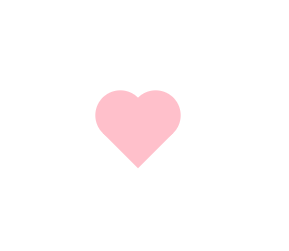
FCC---Create a More Complex Shape Using CSS and HTML---一个粉色爱心
One of the most popular shapes in the world is the heart shape, and in this challenge you'll create one using pure CSS.
But first, you need to understand the ::before and ::after pseudo-elements.
These pseudo-elements are used to add something before or after a selected element.
In the following example, a ::before pseudo-element is used to add a rectangle to an element with the class heart:
.heart::before {

  content: "";

  background-color: yellow;

  border-radius: %;

  position: absolute;

  height: 50px;

  width: 70px;

  top: -50px;

  left: 5px;

}
For the ::before and ::after pseudo-elements to function properly, they must have a defined content property.
This property is usually used to add things like a photo or text to the selected element. When the ::before and ::after pseudo-elements are used to make shapes, the content property is still required, but it's set to an empty string.
In the above example, the element with the class of heart has a ::before pseudo-element that produces a yellow rectangle with height and width of 50px and 70px, respectively.
This rectangle has round corners due to its 25% border radius and is positioned absolutely at 5px from the left and 50px above the top of the element.
练习题:
Transform the element on the screen to a heart. In the heart::after selector, change the background-color to pink and the border-radius to 50%.
Next, target the element with the class heart (just heart) and fill in the transform property. Use the rotate() function with -45 degrees.
Finally, in the heart::before selector, set its content property to an empty string.
练习代码:
 <style>

   .heart {

     position: absolute;

     margin: auto;

     top: ;

     right: ;

     bottom: ;

     left: ;

     background-color: pink;

     height: 50px;

     width: 50px;

     transform: rotate(-45deg);

   }

   .heart::after {

     background-color: pink;

     content: "";

     border-radius: %;

     position: absolute;

     width: 50px;

     height: 50px;

     top: 0px;

     left: 25px;

   }

   .heart::before {

     content: "";

     background-color: pink;

     border-radius: %;

     position: absolute;

     width: 50px;

     height: 50px;

     top: -25px;

     left: 0px;

   }

 </style>

 <div class="heart"></div>
效果:
刚刚自己又抄写了一遍。
- 先做个粉色的方形
- 再做2个伪元素,调好边界半径,依次叠加出2个心型的圆屁股
FCC---Create a More Complex Shape Using CSS and HTML---一个粉色爱心的更多相关文章
- 怎样将多个CSS文件导入一个CSS文件中
问题: 在HTML中引入css的其中的两个方法: 导入式和链接式的目的都是将一个独立的css文件引入一个文件中,二者的区别不大,事实上,二者最大的区别在于链接式使用html的标记引入外部css文 ...
- 何使用CSS写出一个下拉菜单。
导航菜单是每个网站所必备的功能,也是每个学习制作网站的朋友所必须接触的,如何用css样式制作一个简单漂亮的二级下拉菜单呢? 下面为大家分享一下我的经验 方法步骤: 第一步 : 首页我们打开Subli ...
- 用HTML+CSS画出一个同心圆
参加web前端校招的同学们经常会遇到这样的面试题:用HTML+CSS画出一个同心圆. 例如: 这道题主要考验的是基础盒模型布局能力和倒圆角属性的巧用. 1.html代码 <body> &l ...
- div+css 怎么让一个小div在另一个大div里面 垂直居中
div+css 怎么让一个小div在另一个大div里面 垂直居中 方法1: 1 2 3 4 5 6 7 8 9 10 11 12 13 14 .parent { width:800 ...
- Css中实现一个盒子固定宽度,另一个盒子宽度自适应的方法
Css中实现一个盒子固定宽度,另一个盒子宽度自适应的方法 网上方法很多,个人认为以下两种思想是最为常用的. 一种是让第一个盒子脱离文档流,第二个盒子离左边有一定距离. 第二种方法是使用flex布局,不 ...
- 用css做出来一个三角形
用css做出来一个三角形 <!--不设置宽高 转换行内块 边线设置成宽度--> <div class="triangle"> 三角 ...
- No.6 - 利用 CSS animation 制作一个炫酷的 Slider
*{ margin:; padding:; } div{ margin: auto; width: 800px; height: 681px; position: relative; overflow ...
- 百度前端技术学院2018笔记 之 利用 CSS animation 制作一个炫酷的 Slider
前言 题目地址 利用 CSS animation 制作一个炫酷的 Slider 思路整理 首先页面包含三种东西 一个是type为radio的input其实就是单选框 二是每个单选框对应的label 三 ...
- HTML & CSS & JavaScript 从一个表格到一个灰阶颜色表(目录)
HTML & CSS & JavaScript 从一个表格到一个灰阶颜色表 01 HTML & CSS & JavaScript 从一个表格到一个灰阶颜色表 02 HT ...
随机推荐
- ASP.NET页面缓冲
整页缓存<% OutPutCache Duration=5 VaryByParam="none" %>Duration是缓冲时间 参数可以有多个 在varyByPara ...
- Linux系统:centos7下搭建Rocketmq4.3中间件,配置监控台
本文源码:GitHub·点这里 || GitEE·点这里 一.环境搭建 环境版本 centos7 jdk1.8 已搭建好 rocketmq4.3 1.下载安装包 网址 https://www.apac ...
- 《少年的你》票房被刷爆?让我用python分析一波它好看在哪里!
最近少年的你刷爆票房,但是是真好看还是假好看,我们也不知道,所以让我们用python来分析一下~ 票房过12亿 两位主演粉丝加起来过亿 电影话题量过亿 豆瓣8.4分, 时光网8.4分, IMDB 7. ...
- 基于JWT的Token登录认证
1.JWT简介 JSON Web Token(缩写 JWT),是目前最流行的跨域认证解决方案. 2.JWT的原理 JWT的原理是,服务器认证以后,生成一个JSON格式的对象,发回给客 ...
- 易优CMS:if的基础用法
[基础用法] 名称:if 功能:条件判断,比switch判断标签更灵活些,视个人习惯而用. 语法: {eyou:if condition='($eyou.field.has_children > ...
- golang-方法和接口
1.方法 方法类似函数 ,多了一个接收者 ,接收者是指针指向结构体(也可以是值) ,方法与结构体绑定 (可以理解为模板定义方法) ,方法位于结构体内部 方法集可以理解就是多个方法 可以组合其他结构体方 ...
- html文本框默认值刷新后无法继续显示解决方法
转载于:https://blog.csdn.net/yufeitong/article/details/8485129 有这种情况,文本框输入值后,再次刷新默认值就无法显示了 原始html代码: &l ...
- Mysql存储过程--大于十分钟执行
--存储过程 DELIMITER | DROP PROCEDURE IF EXISTS update_tatus | CREATE PROCEDURE update_status() BEGIN mi ...
- ORA-12505
tomcat 连不上 oracle,报: java.sql.SQLException: Listener refused the connection with the following error ...
- AcWing 30. 正则表达式匹配 (剑指OFFER leetcode 10)
题目描述请实现一个函数用来匹配包括’.’和’*’的正则表达式. 模式中的字符’.’表示任意一个字符,而’*’表示它前面的字符可以出现任意次(含0次). 在本题中,匹配是指字符串的所有字符匹配整个模式. ...