
通过Blazor使用C#开发SPA单页面应用程序(4) - Ant Design Button
前面学习了Blazor的特点、环境搭建及基础知识,现在我们尝试的做个实际的组件。
Ant Design是蚂蚁金服是基于Ant Design设计体系的 UI 组件库,主要用于研发企业级中后台产品。目前官方是基于React和Angular实现的,今年也推出了Vue的实现。其组件涵盖面较广,其组件风格及交互效果还是比较惊艳的,后面准备利用Ant Design的样式文件利用Blazor模仿几个组件的实现。
由于也是新学的Blazor开发,可能实现的方式有些笨拙,希望高手提出宝贵意见,先看看实现的Button 按钮、Grid 栅格、导航栏的效果。
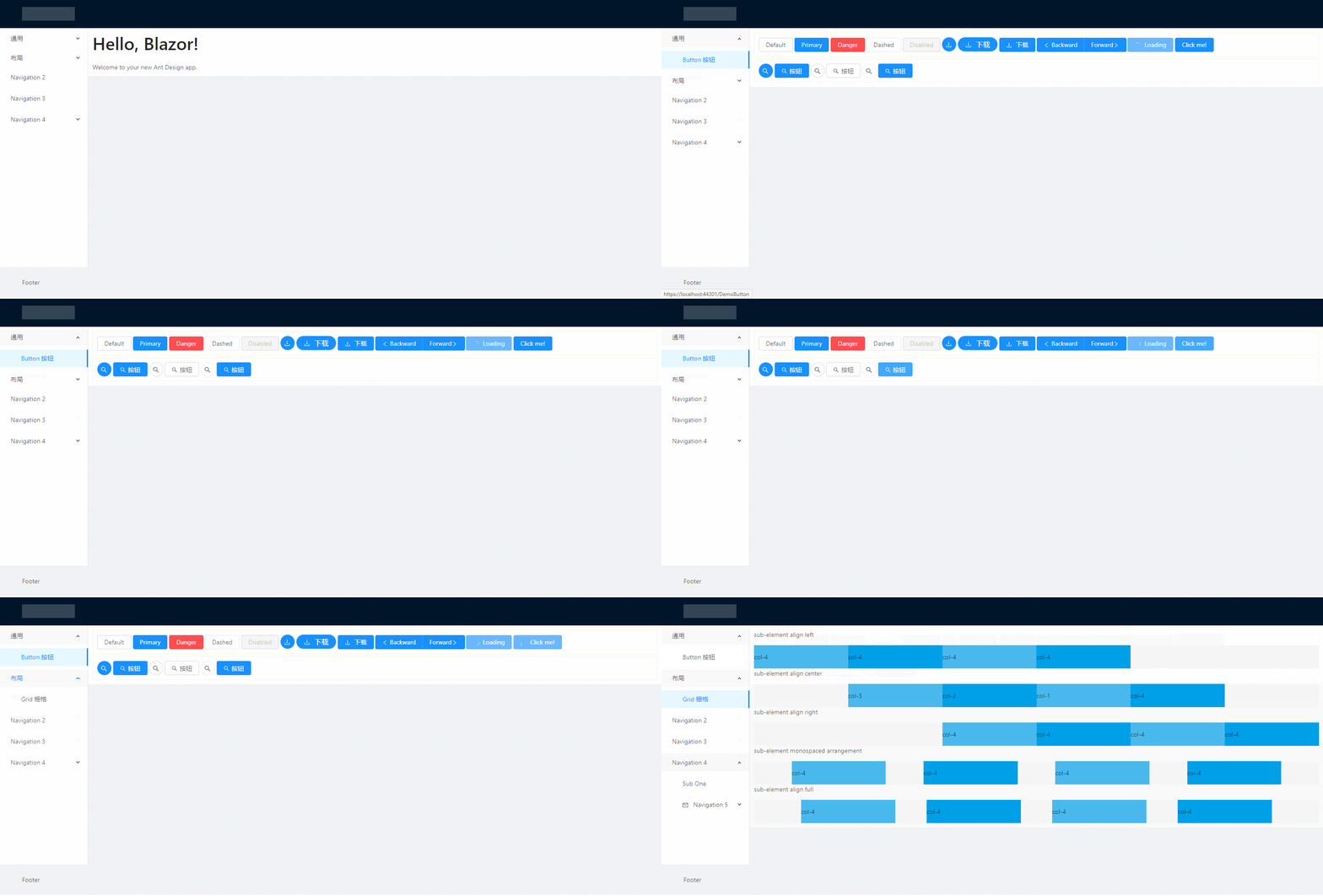
先来看看Button按钮,它支持多种风格,是否只显示图标,loading状态等。实现步骤及主要代码且听我娓娓道来,
1、引用样式文件
首先去antd.css cdn 下载稳定版的css文件,放到 wwwroot 文件夹下。再 _Host.cshtml 引用该文件。

2、建立 AButtonBase 类
AButtonBase类定义了按钮的属性参数;注册了class名称(例如:class="ant-btn ant-btn-primary")的计算表达式,class内容是根据属性参数的设置情况计算出来的。
属性set 的 ClassMapper.Dirty() 是通知样式名生成方法属性改变了需要重新生成样式名称。
而ClassMapper是用于注册组件需要用到的样式构建类,PrefixCls()是添加样式共用的前缀,Add有多个重载,可以是直接的样式名称;也可以是根据第一个参数的bool表达式来确定,第二个参数的样式是否启用。
using BlazorAntDesign.Core;

using Microsoft.AspNetCore.Components;

using Microsoft.AspNetCore.Components.RenderTree;

using System;

using System.Collections.Generic;

using System.Linq;

using System.Threading.Tasks;

namespace BlazorAntDesign.General

{    public class AButtonBase : BaseComponent

    {

        #region Properties

        /// <summary>

        /// 设置按钮大小,可选值为 Small、Large 或者不设

        /// </summary>

        [Parameter]

        protected AButtonSizes ButtonSize

        {

            get => buttonSize;

            set

            {

                buttonSize = value;

                ClassMapper.Dirty();

            }

        }

        private AButtonSizes buttonSize = AButtonSizes.Default;

        /// <summary>

        /// 设置按钮类型,可选值为 Primary、Dashed、Danger 或者不设

        /// </summary>

        [Parameter]

        protected AButtonTypes ButtonType

        {

            get => buttonType;

            set

            {

                buttonType = value;

                ClassMapper.Dirty();

            }

        }

        private AButtonTypes buttonType = AButtonTypes.Default;

        /// <summary>

        /// 设置按钮形状,可选值为 Circle、 Round 或者不设

        /// </summary>

        [Parameter]

        protected AButtonShapes ButtonShape

        {

            get => buttonShape;

            set

            {

                buttonShape = value;

                ClassMapper.Dirty();

            }

        }

        private AButtonShapes buttonShape = AButtonShapes.Default;

        /// <summary>

        /// 设置 button 原生的 type 值,可选值请参考 HTML 标准

        /// </summary>

        [Parameter]

        protected AButtonHTMLTypes HtmlType { get; set; } = AButtonHTMLTypes.Button;

        /// <summary>

        /// 按钮标题

        /// </summary>

        [Parameter]

        protected string Title

        {

            get => title;

            set

            {

                title = value;

                ClassMapper.Dirty();

            }

        }

        private string title;

        /// <summary>

        /// 设置按钮的图标名称

        /// </summary>

        [Parameter]

        protected string IconName { get; set; }

        /// <summary>

        /// 将按钮宽度调整为其父宽度的选项

        /// </summary>

        [Parameter]

        protected bool Block

        {

            get => block;

            set

            {

                block = value;

                ClassMapper.Dirty();

            }

        }

        private bool block;

        /// <summary>

        /// 幽灵属性,使按钮背景透明。幽灵按钮将按钮的内容反色,背景变为透明,常用在有色背景上。

        /// </summary>

        [Parameter]

        protected bool Ghost

        {

            get => ghost;

            set

            {

                ghost = value;

                ClassMapper.Dirty();

            }

        }

        private bool ghost;

        /// <summary>

        /// 设置按钮载入状态

        /// </summary>

        [Parameter]

        protected bool Loading

        {

            get => loading;

            set

            {

                loading = value;

                ClassMapper.Dirty();

            }

        }

        private bool loading;

        /// <summary>

        /// 按钮失效状态

        /// </summary>

        [Parameter]

        protected bool Disabled { get; set; }

        [Parameter]

        protected RenderFragment ChildContent { get; set; }

        /// <summary>

        /// 点击按钮时的回调

        /// </summary>

        [Parameter]

        public EventCallback<UIMouseEventArgs> OnClick { get; set; }

        //protected System.Action Clicked { get; set; }

        protected bool click_animating { get; set; }

        #endregion

        protected override void RegisterClasses()

        {

            ClassMapper.PrefixCls("ant-btn")

                    .Add(() => ClassMapper.GetEnumName(buttonSize))

                    .Add(() => ClassMapper.GetEnumName(buttonType))

                    .Add(() => ClassMapper.GetEnumName(buttonShape))

                    .Add(() => Block, () => "block")

                    .Add(() => Ghost, () => "background-ghost")

                    .Add(() => Loading, () => "loading")

                    .Add(() => string.IsNullOrEmpty(title) && ChildContent == null, () => "icon-only");

            base.RegisterClasses();

        }

        protected void buttonDown()

        {

            click_animating = false;

        }

        protected void buttonUp()

        {

            click_animating = true;

        }

    }

}
AButtonSizes、AButtonTypes、AButtonShapes、AButtonHTMLTypes 属性参数是定义的枚举,例如:
namespace BlazorAntDesign.General

{

    /// <summary>

    /// 按钮尺寸选项

    /// </summary>

    public enum AButtonSizes

    {

        /// <summary>

        /// 缺省,中

        /// </summary>

        [ClassNamePart("")]

        Default,

        /// <summary>

        /// 大

        /// </summary>

        [ClassNamePart("lg")]

        Large,

        /// <summary>

        /// 小

        /// </summary>

        [ClassNamePart("sm")]

        Small

    }

}
namespace BlazorAntDesign.General

{

    /// <summary>

    /// 按钮类型选项

    /// </summary>

    public enum AButtonTypes

    {

        /// <summary>

        /// 缺省,次按钮

        /// </summary>

        [ClassNamePart("")]

        Default,

        /// <summary>

        /// 主按钮

        /// </summary>

        Primary,

        /// <summary>

        ///

        /// </summary>

        Ghost,

        /// <summary>

        /// 虚线按钮

        /// </summary>

        Dashed,

        Danger

    }

}
AButtonBase类继承自自定义的BaseComponent,BaseComponent继承自Blazor的ComponentBase类。
BaseComponent主要定义了所有组件共用的属性,ElementId、Style、ClassMapper等,
using System;

using System.Collections.Generic;

using System.Linq;

using System.Threading.Tasks;

using Microsoft.AspNetCore.Components;

namespace BlazorAntDesign.Core

{

    public abstract class BaseComponent : ComponentBase, IDisposable

    {

        #region Members

        private bool disposed;

        private ElementRef elementRef;

        #endregion

        #region Constructors

        public BaseComponent()

        {

            ElementId = Utils.IDGenerator.Instance.Generate;

            ClassMapper = new ClassMapper();

            RegisterClasses();

        }

        #endregion

        #region Methods

        protected virtual void RegisterClasses()

        {

            ClassMapper.AddCustomClass(() => customClass);

        }

        public void Dispose()

        {

            Dispose(true);

            GC.SuppressFinalize(this);

        }

        protected virtual void Dispose(bool disposing)

        {

            if (!disposed)

            {

                if (disposing)

                {

                    if (ClassMapper != null)

                    {

                        //ClassMapper.Dispose();

                        ClassMapper = null;

                    }

                }

                disposed = true;

            }

        }

        #endregion

        #region Properties

        /// <summary>

        /// 定义用户自定义的 ClassName

        /// </summary>

        [Parameter]

        protected string ClassName

        {

            get => customClass;

            set

            {

                customClass = value;

                ClassMapper.Dirty();

            }

        }

        private string customClass;

        /// <summary>

        /// Gets the reference to the rendered element.

        /// </summary>

        public ElementRef ElementRef { get => elementRef; protected set => elementRef = value; }

        /// <summary>

        /// 获取 element 唯一 Id.

        /// </summary>

        public string ElementId { get; }

        [Parameter]

        protected string Style { get; set; }

        /// <summary>

        /// 获取 ClassMapper.

        /// </summary>

        protected ClassMapper ClassMapper { get; private set; }

        #endregion

    }

}
3、建立 AButton.razor
@inherits BlazorAntDesign.General.AButtonBase

<button class="@ClassMapper.Class"

        type="@(Enum.GetName(typeof(AButtonHTMLTypes), HtmlType).ToLower())"

        ant-click-animating-without-extra-node="@(click_animating ? "true" : "")"

        disabled="@Disabled"

        @onkeydown="@buttonDown"

        @onmousedown="@buttonDown"

        @onkeyup="@buttonUp"

        @onmouseup="@buttonUp"

        @onclick="@OnClick">

    @*图标*@

    @if (Loading)

    {<AIcon IconName="loading"></AIcon>}

    else

    {

        if (!string.IsNullOrEmpty(IconName))

        {<AIcon IconName="@IconName"></AIcon>}

    }

    @*标题*@

    @if (!string.IsNullOrEmpty(Title))

    {<span>@Title</span>}

@*子内容*@

    @ChildContent</button>
其中 @inherits BlazorAntDesign.General.AButtonBase 是代码隐藏方式,指定后台代码继承自AButtonBase类,button class="@ClassMapper.Class",将采用的样式根据指定的属性值计算出来赋值给button的class属性。下面根据属性设置判断是否显示图标、标题、子内容。
4、使用 AButton
建立DemoButton.razor文件,样例代码如下:
@page "/DemoButton"

@using BlazorAntDesign.General;

<div style="border:1px solid beige;padding:10px">

    <AButton Title="Default"></AButton>

    <AButton Title="Primary" ButtonType="AButtonTypes.Primary"></AButton>

    <AButton Title="Danger" ButtonType="AButtonTypes.Danger"></AButton>

    <AButton Title="Dashed" ButtonType="AButtonTypes.Dashed"></AButton>

    <AButton Title="Disabled" Disabled="true"></AButton>

    <AButton ButtonType="AButtonTypes.Primary" IconName="download" ButtonShape="AButtonShapes.Circle"></AButton>

    <AButton Title="下载" ButtonType="AButtonTypes.Primary" IconName="download" ButtonShape="AButtonShapes.Round"></AButton>

    <AButton Title="下载" ButtonType="AButtonTypes.Primary" IconName="download"></AButton>

    <AButtonGroup><AButton ButtonType="AButtonTypes.Primary" IconName="left">Backward</AButton><AButton ButtonType="AButtonTypes.Primary">Forward<AIcon IconName="right" /></AButton></AButtonGroup>

    <AButton Title="Loading" ButtonType="AButtonTypes.Primary" Loading="true"></AButton>

    <AButton Title="Click me!" ButtonType="AButtonTypes.Primary" Loading="@isLoading" OnClick="@(()=> { isLoading = true; })"></AButton>

</div>

<div style="border:1px solid beige;padding:10px;margin-top:5px">

    <AButton IconName="search" ButtonType="AButtonTypes.Primary" ButtonShape="AButtonShapes.Circle"></AButton>

    <AButton IconName="search" ButtonType="AButtonTypes.Primary">按钮</AButton>

    <AButton IconName="search" ButtonShape="AButtonShapes.Circle"></AButton>

    <AButton IconName="search">按钮</AButton>

    <AButton IconName="search" ButtonType="AButtonTypes.Dashed" ButtonShape="AButtonShapes.Circle"></AButton>

    <AButton IconName="search" ButtonType="AButtonTypes.Primary">按钮</AButton>

</div>

@code{

    private bool isLoading = false;

    private void LoadingClick()

    {

        isLoading = true;

    }

}
@page "/DemoButton" 为组件路由
@using BlazorAntDesign.General; 为应用组件命名空间
好了Button的实现思路今天就学习到这了,希望有兴趣的同仁共同学习探讨,让Blazor真正走向SPA开发的舞台,让.net core七龙珠面向全栈开发,更好的拥抱社区,刷新业界对.net体系的认知。
番 外 篇
Blazor 在发展:
微软已将 Blazor 移出了实验阶段,进入了官方预览版。使用组件模型进行服务器端渲染的 Blazor 版本将与.NET Core 3 的最终版本一起发布(请参阅.NET Core 路线图),客户端版本将在随后不久发布。还有工作要完成:调试体验极其有限,必须改进;有机会通过提前编译生成本机 Wasm 来优化代码性能;在将未使用的代码库发送到浏览器之前,需要从库中删除未使用的代码,从而降低总体大小(这个过程称为树抖动)。对 WebAsssembly 的兴趣和采用与日俱增,借助 Blazor,编写可以在任何地方运行的 C#和.NET 代码的梦想终于实现了。
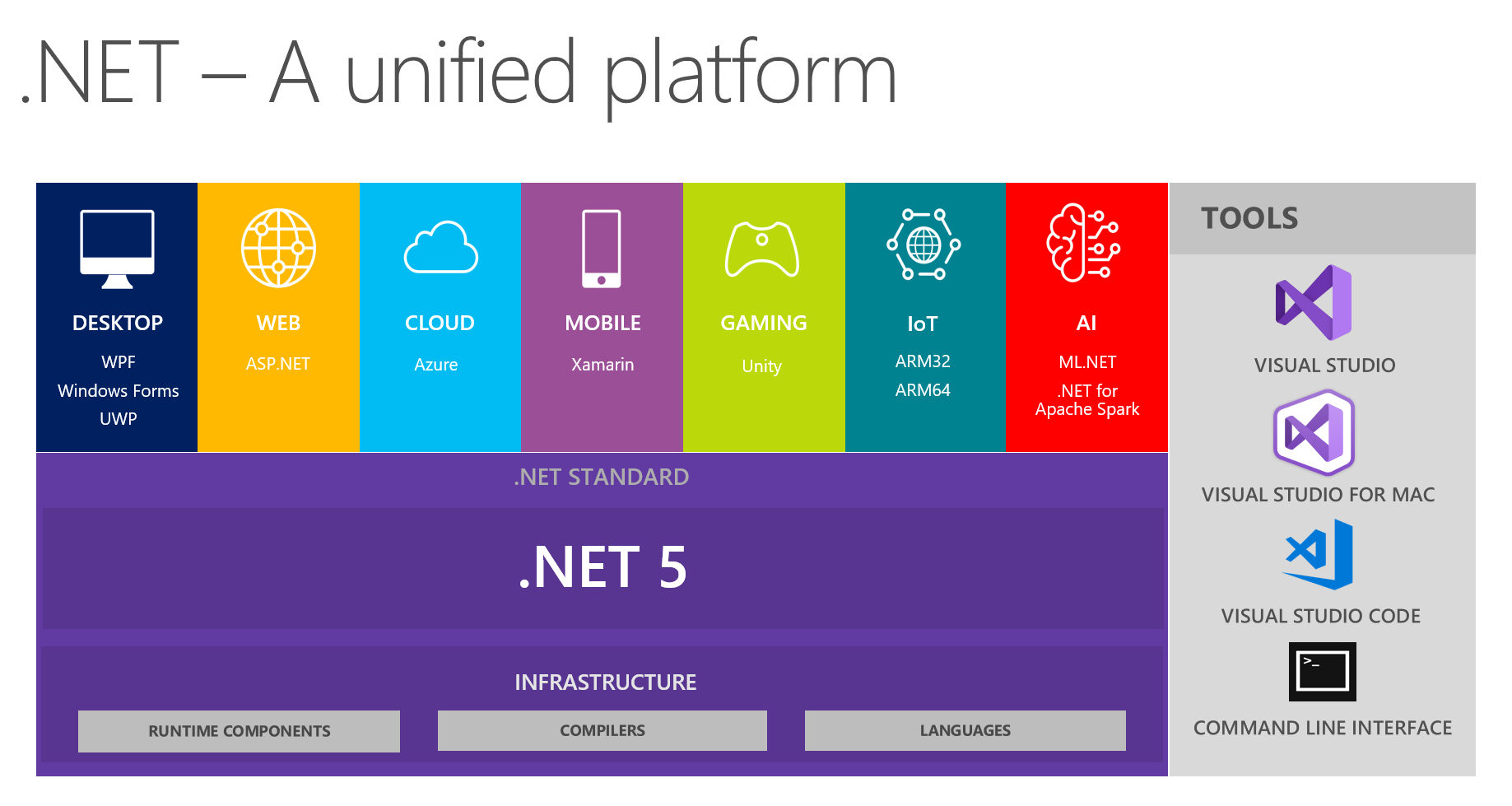
.net core将踏上新的征程:
通过Blazor使用C#开发SPA单页面应用程序(4) - Ant Design Button的更多相关文章
- 通过Blazor使用C#开发SPA单页面应用程序(3)
今天我们来看看Blazor开发的一些基本知识. 一.Blazor组件结构 Blazor中组件的基本结构可以分为3个部分,如下所示: //Counter.razor //Directives secti ...
- 通过Blazor使用C#开发SPA单页面应用程序(1)
2019年9月23——25日 .NET Core 3.0即将在.NET Conf上发布! .NET Core的发布及成熟重燃了.net程序员的热情和希望,一些.net大咖也在积极的为推动.NET Co ...
- 通过Blazor使用C#开发SPA单页面应用程序(2)
今天我们尝试创建一个默认的Blazor应用. 1.安装 .Net Core 3.0需要Visual Studio 2019 的支持. 安装.Net Core 3.0 预览版 SDK版本,注意预览版对应 ...
- SPA 单页面应用程序。
看到这个问题,先说下自己的理解到的程度,再去参考做修正,争取这一次弄懂搞清楚 自己的理解: 单页面应用程序,解决浏览器获取数据刷新页面的尴尬,通过ajax请求获取数据达到异步更新视图的按钮,原理的实现 ...
- 单页面应用程序(SPA)的优缺点
我们通常所说的单页面应用程序通常通过前端框架(angular.react.vue)进行开发,单页面应用程序将所有的活动局限于一个Web页面中,仅在该Web页面初始化时加载相应的HTML.JavaScr ...
- Java快速开发平台强大的代码生成器,JEECG 3.7.5 VUE+ElementUI SPA单页面应用版本发布
JEECG 3.7.5 VUE+ElementUI SPA单页面应用版本发布 此版本为Vue+ElementUI SPA单页面应用版本,提供新一代风格代码生成器模板,采用Vue技术,提供两套精美模板E ...
- 单页面应用程序(SPA)
一.概念 ①在一个页面上实现网站的大部分功能,就是单页面应用程序,是一种常见的网页开发模式. ②整个网站就只有一个Html文件,每次在切换页面时,不需要请求服务器,只要通过本地的js来切换即可.这样可 ...
- AngularJs(SPA)单页面SEO以及百度统计应用(上)
只有两种人最具有吸引力,一种是无所不知的人,一种是一无所知的人 问:学生问追一个女孩总是追不上怎么办?回答:女孩不是追来的,是吸引来的,你追的过程是吸引女孩的过程,如果女孩没有看上你,再追都是没有用的 ...
- 只需要4步就可以将asp.net mvc变成SPA(单页面)应用,实现无刷新页面切换!
SENNA.js Senna.js是一个超快速的单页面应用程序引擎,轻松构建基于Web的现代应用程序,只有大约8KB的JavaScript而没有任何依赖性.还提供非常酷炫的动画效果.想要详细了解的朋友 ...
随机推荐
- 【基础算法-模拟-例题-金币】-C++
原题链接:P2669 金币 这道题目完全是一道模拟题,只要按照题目中的加金币的算法和sum累加就可以很轻易得出最终答案. 说一下有一些点需要注意: 1.用i来计每天发的金币数,n来计已经拿了金币的天数 ...
- 打开pycharm,提示invalid Log Path【已解决】
问题:打开pycharm,提示invalid Log Path 解决: 网上其他方法都说重装,这个成本有点高,所以我不去尝试. 因为我下载的是免安装版,所以使用时生成的文件是后来才生成的,所以我尝试 ...
- Eclipse中Cannot nest src folder解决方法
错误示例: : Java Model Status [Cannot nest output folder 'xxx/bin/main' inside output folder 'xxx/bin'] ...
- apache CXF Service 简单使用
cxf介绍 框架官网:cxf.apache.org 支持多种协议: SOAP1.1,1.2 XML/HTTP CORBA(Common Object Request Broker Architectu ...
- 快速掌握mongoDB(五)——读写分离的副本集实现和Sharing介绍
1 mongoDB副本集 1 副本集简介 前边我们介绍都是单机MongoDB的使用,在实际开发中很少会用单机MongoDB,因为使用单机会有数据丢失的风险,同时单台服务器无法做到高可用性(即当服务器宕 ...
- 01、HTML 简介
实例: <!DOCTYPE html> <html> <head> <meta charset="utf-8"> <title ...
- jquery:为动态加载的元素绑定事件
最近在做项目的时候发现的一个问题,通过ajax动态加载出来的一个button值绑定不了点击事件.我使用的是datatables这款表单插件,表单内容是通过ajax动态渲染出来的. 解决方案: 通过Go ...
- TP框架基础(一)
[使用框架] 官网:thinkphp.cn. 目前建议使用thinkPHP3.2版本 一.结构目录>Thinkphp文件夹,是thinkPHP的核心文件,里面的内容是不允许我们修改的 > ...
- npm常用命令(原创)
1.对于我们下载下来的node包,假设该包存在依赖情况执行: npm install(或者npm i) 下载依赖包: 下载依赖成功过后,文件夹内会产生package-lock.json文件: 2.下载 ...
- SpringBoot日志相关
SpringBoot使用的是SLF4j当门面,Logback当实现完成 日志级别 数字越大,级别越高,框架只会输出大于等于当前日志级别的信息 ERROR 40 WARN 30 INFO 20 DEBU ...