
GRE Over IPSec配置
路由器GRE over IPSec站点到站点VPN
问题分析:对于前面的经典的IPSec VPN的配置来说,兼容性较好,适合于多厂商操作的时候,但是这种经典的配置方式不适合在复杂的网路中配置,如下: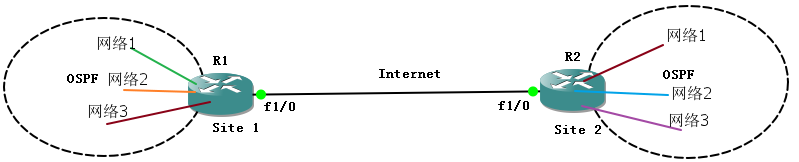
这样在site 1和site 2后面有很多的网络,这样出现的难题是:
*没有虚拟隧道接口,不能让两个站点的动态路由协议贯通
*由于没有虚拟隧道接口,所以很难对通信点之间的明文数据流进行控制(ACL、NAT、QoS)
*感兴趣流多,是两个站点的组合数,网络多的话,感兴趣流也多
——为了解决这一缺陷,那么Cisco提供两种方案,一种是GRE(IOS 12.4之前推荐),一种是SVTI(IOS 12.4以后的路由器推荐)。
分析GRE是如何解决经典配置的问题的:1、GRE上运行OSPF,这样可以实现内部互学路由;2、可以在GRE隧道接口配置ACL等控制;3、感兴趣流最终会是站点之间的GRE流量。GRE over IPSec 属于典型的传输模式的IPSec VPN(因为加密点=通信点)。
实验拓扑:
默认基本配置完成
Site1:
R1(config)#ip route 0.0.0.0 0.0.0.0 12.1.1.2
R1(config)#in tunnel 13
R1(config-if)#ip add 13.1.1.1 255.255.255.0
R1(config-if)#tunnel source 12.1.1.1
R1(config-if)#tun destination 23.1.1.3
R1(config-if)#end
R1#ping 13.1.1.3
Type escape sequence to abort.
Sending 5, 100-byte ICMP Echos to 13.1.1.3, timeout is 2 seconds:
!!!!!
Success rate is 100 percent (5/5), round-trip min/avg/max = 136/162/180 ms
R1(config)#router os 1
R1(config-router)#network 13.1.1.0 0.0.0.255 a 0
R1(config-router)#net 1.1.1.0 0.0.0.255 a 0
R1(config-router)#router-id 1.1.1.1
R1(config-router)#end
R1#sho ip ro ospf
Codes: L - local, C - connected, S - static, R - RIP, M - mobile, B - BGP
D - EIGRP, EX - EIGRP external, O - OSPF, IA - OSPF inter area
N1 - OSPF NSSA external type 1, N2 - OSPF NSSA external type 2
E1 - OSPF external type 1, E2 - OSPF external type 2
i - IS-IS, su - IS-IS summary, L1 - IS-IS level-1, L2 - IS-IS level-2
ia - IS-IS inter area, * - candidate default, U - per-user static route
o - ODR, P - periodic downloaded static route, + - replicated route
Gateway of last resort is 12.1.1.2 to network 0.0.0.0
3.0.0.0/32 is subnetted, 1 subnets
O 3.3.3.3 [110/1001] via 13.1.1.3, 00:00:08, Tunnel13
R1(config)#crypto isakmp enable
R1(config)#crypto is policy 10
R1(config-isakmp)#authentication pre-share
R1(config-isakmp)#exi
R1(config)#crypto isakmp key 0 cisco address 23.1.1.3
R1(config)#ip access-list extended vpn
R1(config-ext-nacl)#permit gre 12.1.1.0 0.0.0.255 23.1.1.0 0.0.0.255
R1(config-ext-nacl)#exi
R1(config)#crypto ipsec transform-set trans esp-des esp-md5-hmac
R1(cfg-crypto-trans)#mode transport
R1(cfg-crypto-trans)#exi
R1(config)#crypto map cisco 10 ipsec-isakmp
% NOTE: This new crypto map will remain disabled until a peer
and a valid access list have been configured.
R1(config-crypto-map)#match address vpn
R1(config-crypto-map)#set peer 23.1.1.3
R1(config-crypto-map)#set transform-set trans
R1(config-crypto-map)#int f1/0
R1(config-if)#crypto map cisco
R1#ping 3.3.3.3 so 1.1.1.1
Type escape sequence to abort.
Sending 5, 100-byte ICMP Echos to 3.3.3.3, timeout is 2 seconds:
Packet sent with a source address of 1.1.1.1
.!!!!
Success rate is 80 percent (4/5), round-trip min/avg/max = 208/243/264 ms
R1#sho crypto en connections active
Crypto Engine Connections
ID Type Algorithm Encrypt Decrypt LastSeqN IP-Address
1 IPsec DES+MD5 0 15 17 12.1.1.1
2 IPsec DES+MD5 8 0 0 12.1.1.1
1001 IKE SHA+DES 0 0 0 12.1.1.1
Site2
R3(config)#ip route 0.0.0.0 0.0.0.0 23.1.1.2
R3(config)#end
R3(config)#int tu 13
R3(config-if)#tun so 23.1.1.3
R3(config-if)#tun destination 12.1.1.1
R3(config-if)#ip add 13.1.1.3 255.255.255.0
R3(config)#ro
R3(config)#router os 1
R3(config-router)#router-id 3.3.3.3
R3(config-router)#net 3.3.3.0 0.0.0.255 a 0
R3(config-router)#net 13.1.1.0 0.0.0.255 a 0
R3(config-router)#end
R3(config)#crypto is enable
R3(config)#crypto isakmp po 10
R3(config-isakmp)#authentication pre-share
R3(config-isakmp)#exi
R3(config)#crypto isakmp key 0 cisco address 12.1.1.1
R3(config)#ip access-list extended vpn
R3(config-ext-nacl)#permit gre 23.1.1.0 0.0.0.255 12.1.1.0 0.0.0.255
R3(config-ext-nacl)#exi
R3(config)#crypto ipsec transform-set trans esp-des esp-md5-hmac
R3(cfg-crypto-trans)#mode transport
R3(cfg-crypto-trans)#exi
R3(config)#crypto map cisco 10 ipsec-isakmp
% NOTE: This new crypto map will remain disabled until a peer
and a valid access list have been configured.
R3(config-crypto-map)#set peer 12.1.1.1
R3(config-crypto-map)#set transform-set trans
R3(config-crypto-map)#match address vpn
R3(config-crypto-map)#int f1/0
R3(config-if)#crypto map cisco
除此之外,可以直接使用下面的配置来代替crypto map。解释一下,注意这个IPSec profile的运用位置,是隧道接口,并且使用的关键字是tunnel protection,显然使用这个IPSec profile来保护隧道的,那隧道中的流量自然就得以保护,而这流量就是感兴趣流,那么流量而动另一端肯定是对等体的目的地址,那么就不需要设置peer和match address了
Site1(config)#crypto ipsec profile IPSecPro //名字
Site1(ipsec-profile)#set transform-set trans
Site1(ipsec-profile)#int tun 13
Site1(config-if)#tunnel protection ipsec profile IPSecPro
Site2(config)#crypto ipsec profile IPSecPro
Site2(ipsec-profile)#set transform-set trans
Site2(ipsec-profile)#int tun 13
Site2(config-if)#tunnel protection ipsec profile IPSecPro
GRE Over IPSec配置的更多相关文章
- 动态的GRE OVER IPSEC的实验模拟与分析
此篇博客正在介绍的是下图中的Dynamic P2P GRE OVER IPSEC VPN: 为什么出现这种动态的GRE OVER IPSEC VPN技术呢? 首先在前面几篇博客中已经介绍过了,动态是为 ...
- netsh导入导出IPSec配置策略
首先提一句: ipsec规则中,filter action为允许的比拒绝的优先级要高,其它的没有顺序关系,经测试验证! 参考:http://tech.techweb.com.cn/thread-354 ...
- ipsec配置strongswan.conf和ipsec.conf
配置strongswan.conf vi /usr/local/etc/strongswan.conf # strongswan.conf - strongSwan configuration fil ...
- 思科CISCO ASA 5521 防火墙 Ipsec 配置详解
版本信息: Cisco Adaptive Security Appliance Software Version 9.9(2) Firepower Extensible Operating Syste ...
- 为何GRE可以封装组播报文而IPSEC却不行?
Author : Email : vip_13031075266@163.com Date : 2021.01.24 Copyright : 未经同意不得 ...
- 华为路由器GRE配置
1. 协议简介 gre(generic routing encapsulation,通用路由封装)协议是对某些网络层协议(如ip 和ipx)的数据报进行封装,使这些被封装的数据报能够在另一个网络层协议 ...
- openwrt配置strongswan对接hillstone ipsec的笔记
一.主要参考资料: https://openwrt.org/docs/guide-user/services/vpn/ipsec/strongswan/roadwarrior https://open ...
- 华三F100系列防火墙 、华为USG6300系列防火 GRE 隧道配置
GRE概述: 通用路由封装(GRE: Generic Routing Encapsulation)是通用路由封装协议,可以对某些网络层协议的数据报进行封装,使这些被封装的数据报能够在IPV4网络中传输 ...
- gre tunnel
http://searchenterprisewan.techtarget.com/tip/GRE-tunnel-vs-IPsec-tunnel-What-is-the-difference Enca ...
随机推荐
- NOIP做题练习(day4)
A - 同花顺 题面 题解 30分做法 爆搜即可. 60分做法 去重+贪心. 100分做法 去重+贪心后,我们要寻找一段符合条件的最长同花上升子序列 \(L\),\(n-L\) 即为所求的答案. 首先 ...
- 每天进步一点点------ORCAD Capture CIS 快捷键
ORCAD Capture CIS 快捷键 I: 放大O: 缩小C: 以光标所指为新的窗口显示中心 W: 画线On/OffP: 快速放置元件R: 元件旋转90°H: 元件 ...
- jmeter的使用--添加自定义函数和导入自定义jar
1.添加自定义函数,增加 号码生成函数 MobileGenerator和身份证生成函数IdCardGenerator 在package org.apache.jmeter.functions;中增加 ...
- 如何用navicat连接linux服务器上的mysql以及重启服务
1,开启mysql权限:https://www.cnblogs.com/NaughtyCat/p/how-to-connect-to-mysql-on-linux-by-navicat.html my ...
- 吴裕雄 python 机器学习——数据预处理正则化Normalizer模型
from sklearn.preprocessing import Normalizer #数据预处理正则化Normalizer模型 def test_Normalizer(): X=[[1,2,3, ...
- 【原】接口mock作用
1.前后端 接口定义完成 并发开工 2.测试拿到mock接口 编写用例 3.mock接口 模拟异常服务器返回值 500 404 4.mock接口 模拟数据 不修改线上数据库
- shell笔记1
- MySQL删除语句比较,清空表数据,重置自增长索引
drop truncate delete 程度从强到弱 1.drop table tbdrop将表格直接删除,没有办法找回 2.truncate (table) tbtruncate 删除表中的所有数 ...
- 【Python实现图片验证码】
"```python import base64 import random from PIL import Image from PIL import ImageDraw # 画笔对象 f ...
- pip install 安装指定版本的包
pip install 安装指定版本的包 要用 pip 安装指定版本的 Python 包,只需通过 == 操作符 指定 pip install robotframework==2.8.7 将安装r ...