
iOS开发UIResponder之NSUndoManager
1、简介
UIResponder有个属性:NSUndoManager
@property(nullable, nonatomic,readonly) NSUndoManager *undoManager NS_AVAILABLE_IOS(3_0);
NSUndoManager可以叫做撤销管理器,可以撤销和重做,类似快捷键command+z和command+shift+z;
NSUndoManger内部维护两个栈,undo栈(撤销)和redo栈(重写)。
2、NSUndoManger的简单使用
2.1、数组的undo和redo
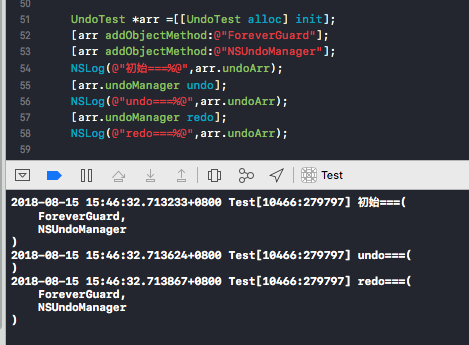
#import "UndoTest.h"

@interface UndoTest()

@end

@implementation UndoTest

- (instancetype)init{

    if (self = [super init]) {

        self.undoManager = [[NSUndoManager alloc] init];

        self.undoArr = [NSMutableArray array];

    }

    return self;

}

- (void)addObjectMethod:(NSString *)anObject{

    [[self.undoManager prepareWithInvocationTarget:self] removeObjectMehtod:anObject];

    [self.undoArr addObject:anObject];

}

- (void)removeObjectMehtod:(NSString *)anObject{

    [[self.undoManager prepareWithInvocationTarget:self] addObjectMethod:anObject];

    if ([self.undoArr containsObject:anObject]) {

        [self.undoArr removeObject:anObject];

    }

}

@end
UndoTest代码
2.2、视图移动的undo和redo
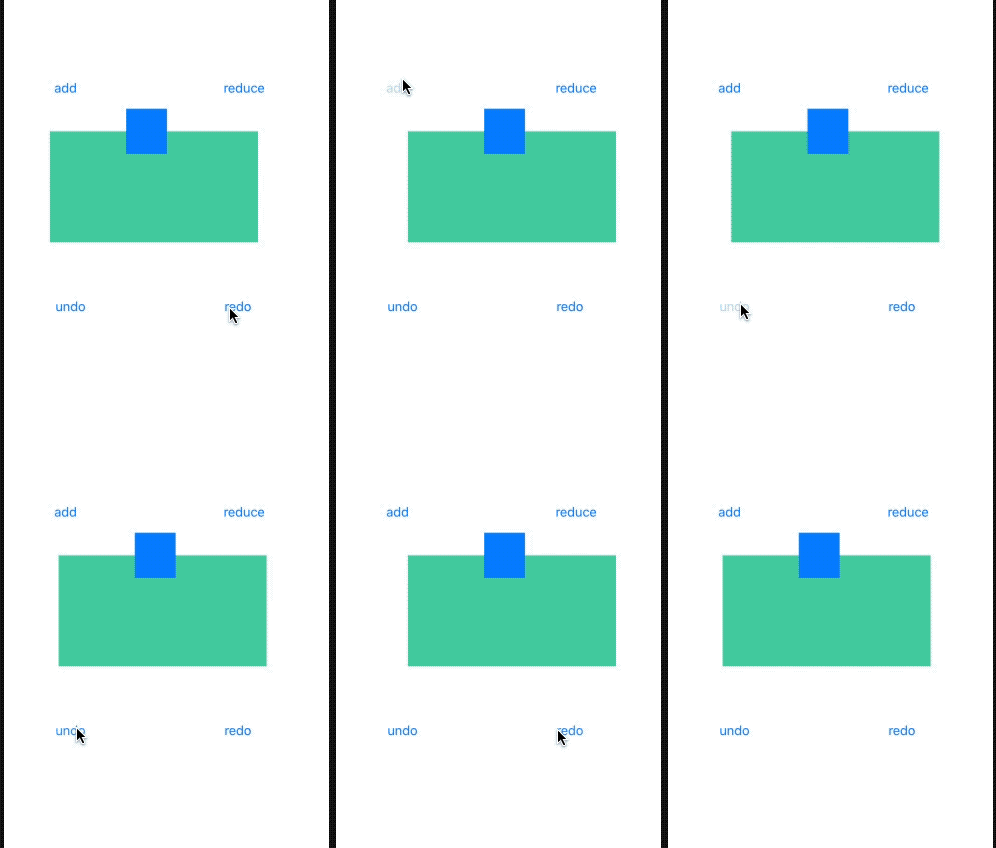
- (void)viewDidLoad {

    [super viewDidLoad];

    _undoManager = [[NSUndoManager alloc] init];

}

- (void)btnViewAdd{

    [[_undoManager prepareWithInvocationTarget:self] btnViewReduce];

    CGRect rect = self.btnView.frame;

    rect.origin.x +=;

    self.btnView.frame = rect;

}

- (void)btnViewReduce{

    [[_undoManager prepareWithInvocationTarget:self] btnViewAdd];

    CGRect rect = self.btnView.frame;

    rect.origin.x -=;

    self.btnView.frame = rect;

}

- (IBAction)addClick:(id)sender {

    [self btnViewAdd];

}

- (IBAction)reduceClick:(id)sender {

    [self btnViewReduce];

}

- (IBAction)undoClick:(UIButton *)sender {

    [_undoManager undo];

}

- (IBAction)redoClick:(UIButton *)sender {

    [_undoManager redo];

}
视图移动代码
3、NSUndoManger的相关API
NS_CLASS_AVAILABLE(10_0, 3_0)

@interface NSUndoManager : NSObject {

@private

    id             _undoStack;

    id             _redoStack;

    NSArray         *_runLoopModes;

    uint64_t        _NSUndoManagerPrivate1;

    id             _target;

    id            _proxy;

    void        *_NSUndoManagerPrivate2;

    void        *_NSUndoManagerPrivate3;

}

//创建撤销组

- (void)beginUndoGrouping;  //开始

- (void)endUndoGrouping;    //结束

@property BOOL groupsByEvent; //默认启用,自动分组,一个RunLoop事件中注册的所有undomanager为一个顶级组

@property (readonly) NSInteger groupingLevel;//组等级

//启用和禁用撤消

- (void)disableUndoRegistration;

- (void)enableUndoRegistration;

@property (readonly, getter=isUndoRegistrationEnabled) BOOL undoRegistrationEnabled;

/* Groups By Event */

//限制撤销堆栈

@property NSUInteger levelsOfUndo;

//在运行循环的周期内处理输入类型的模式。

@property (copy) NSArray<NSRunLoopMode> *runLoopModes;

//执行撤消和重做

- (void)undo;

- (void)redo;

- (void)undoNestedGroup;

//检查撤销能力

@property (readonly) BOOL canUndo;

@property (readonly) BOOL canRedo;

//检查是否正在执行撤消或重做

@property (readonly, getter=isUndoing) BOOL undoing;

@property (readonly, getter=isRedoing) BOOL redoing;

//移除撤销操作

- (void)removeAllActions;

- (void)removeAllActionsWithTarget:(id)target;

//注册撤消操作

- (void)registerUndoWithTarget:(id)target selector:(SEL)selector object:(nullable id)anObject;

- (id)prepareWithInvocationTarget:(id)target;

- (void)registerUndoWithTarget:(id)target handler:(void (^)(id target))undoHandler API_AVAILABLE(macos(10.11), ios(9.0), watchos(2.0), tvos(9.0)) NS_REFINED_FOR_SWIFT;

//如果撤销组作为一个整体被丢弃,则该密钥具有对应的true值。

FOUNDATION_EXPORT NSString * const NSUndoManagerGroupIsDiscardableKey API_AVAILABLE(macos(10.7), ios(5.0), watchos(2.0), tvos(9.0));

// used with NSRunLoop's performSelector:target:argument:order:modes:

static const NSUInteger NSUndoCloseGroupingRunLoopOrdering = ;

//可撤销的撤消和重做操作

@property (readonly) BOOL undoActionIsDiscardable API_AVAILABLE(macos(10.7), ios(5.0), watchos(2.0), tvos(9.0));

@property (readonly) BOOL redoActionIsDiscardable API_AVAILABLE(macos(10.7), ios(5.0), watchos(2.0), tvos(9.0));

- (void)setActionIsDiscardable:(BOOL)discardable API_AVAILABLE(macos(10.7), ios(5.0), watchos(2.0), tvos(9.0));

//管理操作名字

@property (readonly, copy) NSString *undoActionName;

@property (readonly, copy) NSString *redoActionName;

- (void)setActionName:(NSString *)actionName;

//获取和本地化菜单项标题

@property (readonly, copy) NSString *undoMenuItemTitle;

@property (readonly, copy) NSString *redoMenuItemTitle;

- (NSString *)undoMenuTitleForUndoActionName:(NSString *)actionName;

- (NSString *)redoMenuTitleForUndoActionName:(NSString *)actionName;

@end

//通知

//打开或关闭撤销组

FOUNDATION_EXPORT NSNotificationName const NSUndoManagerCheckpointNotification API_AVAILABLE(macos(10.0), ios(3.0), watchos(2.0), tvos(9.0));

//将要执行一个撤销操作

FOUNDATION_EXPORT NSNotificationName const NSUndoManagerWillUndoChangeNotification API_AVAILABLE(macos(10.0), ios(3.0), watchos(2.0), tvos(9.0));

//将要执行重做操作

FOUNDATION_EXPORT NSNotificationName const NSUndoManagerWillRedoChangeNotification API_AVAILABLE(macos(10.0), ios(3.0), watchos(2.0), tvos(9.0));

//已经执行一个撤销操作

FOUNDATION_EXPORT NSNotificationName const NSUndoManagerDidUndoChangeNotification API_AVAILABLE(macos(10.0), ios(3.0), watchos(2.0), tvos(9.0));

//已经执行重做操作

FOUNDATION_EXPORT NSNotificationName const NSUndoManagerDidRedoChangeNotification API_AVAILABLE(macos(10.0), ios(3.0), watchos(2.0), tvos(9.0));

//已经打开一个撤销组时 beginUndoGrouping

FOUNDATION_EXPORT NSNotificationName const NSUndoManagerDidOpenUndoGroupNotification API_AVAILABLE(macos(10.0), ios(3.0), watchos(2.0), tvos(9.0));

//将要关闭一个撤销组时 endUndoGrouping

FOUNDATION_EXPORT NSNotificationName const NSUndoManagerWillCloseUndoGroupNotification API_AVAILABLE(macos(10.0), ios(3.0), watchos(2.0), tvos(9.0));

//已经关闭一个撤销组时 endUndoGrouping

FOUNDATION_EXPORT NSNotificationName const NSUndoManagerDidCloseUndoGroupNotification API_AVAILABLE(macos(10.7), ios(5.0), watchos(2.0), tvos(9.0));

NS_ASSUME_NONNULL_END
iOS开发UIResponder之NSUndoManager的更多相关文章
- iOS开发UIResponder简介API
#import <Foundation/Foundation.h> #import <UIKit/UIKitDefines.h> #import <UIKit/UIEve ...
- 【IOS开发笔记02】学生管理系统
端到端的机会 虽然现在身处大公司,但是因为是内部创业团队,产品.native.前端.服务器端全部坐在一起开发,大家很容易做零距离交流,也因为最近内部有一个前端要转岗过来,于是手里的前端任务好像可以抛一 ...
- ios开发中的小技巧
在这里总结一些iOS开发中的小技巧,能大大方便我们的开发,持续更新. UITableView的Group样式下顶部空白处理 //分组列表头部空白处理 UIView *view = [[UIViewal ...
- iOS开发系列--IOS程序开发概览
概览 终于到了真正接触IOS应用程序的时刻了,之前我们花了很多时间去讨论C语言.ObjC等知识,对于很多朋友而言开发IOS第一天就想直接看到成果,看到可以运行的IOS程序.但是这里我想强调一下,前面的 ...
- iOS开发系列--触摸事件、手势识别、摇晃事件、耳机线控
-- iOS事件全面解析 概览 iPhone的成功很大一部分得益于它多点触摸的强大功能,乔布斯让人们认识到手机其实是可以不用按键和手写笔直接操作的,这不愧为一项伟大的设计.今天我们就针对iOS的触摸事 ...
- iOS开发-UI 从入门到精通(三)
iOS开发-UI 从入门到精通(三)是对 iOS开发-UI 从入门到精通(一)知识点的综合练习,搭建一个简单地登陆界面,增强实战经验,为以后做开发打下坚实的基础! ※在这里我们还要强调一下,开发环境和 ...
- iOS开发——UI精选OC篇&UIApplication,UIWindow,UIViewController,UIView(layer)简单介绍
UIApplication,UIWindow,UIViewController,UIView(layer)简单介绍 一:UIApplication:单例(关于单例后面的文章中会详细介绍,你现在只要知道 ...
- IOS开发常用设计模式
IOS开发常用设计模式 说起设计模式,感觉自己把握不了笔头,所以单拿出iOS开发中的几种常用设计模式谈一下. 单例模式(Singleton) 概念:整个应用或系统只能有该类的一个实例 在iOS开发我们 ...
- 解析iOS开发中的FirstResponder第一响应对象
1. UIResonder 对于C#里所有的控件(例如TextBox),都继承于Control类.而Control类的继承关系如下: 代码如下: System.Object System.Marsha ...
随机推荐
- 【LeetCode 19】删除链表的倒数第N个节点
题目链接 [题解] 经典的一道题. 让p1指向链表的第一个元素. 让p2指向链表的第二个元素. 然后让他们俩同时往后移动. 直到p2到达链表的尾巴. 这时p1和p2之间总是隔了n-1个元素. 所以p1 ...
- 思维——cf1238C
听思维的一道题,网上大多直接模拟,感觉有点麻烦,其实只要把连续段求出来,然后处理一下统计答案就行 两个注意点:1.除了第一个连续段,其余段长度都要+1 2.因为目的地是0,所以最后一段要特判一下 #i ...
- go语言中使用正则表达式
一.代码 package main import ( "fmt" "regexp" ) func main() { text := `Hello 世界!123 ...
- 十折交叉验证10-fold cross validation, 数据集划分 训练集 验证集 测试集
机器学习 数据挖掘 数据集划分 训练集 验证集 测试集 Q:如何将数据集划分为测试数据集和训练数据集? A:three ways: 1.像sklearn一样,提供一个将数据集切分成训练集和测试集的函数 ...
- Robotframework之下拉列表select
下拉框控件很常见啊,主要说一下robotframework中怎么玩转下拉框,第一点要注意的就是,别看到下拉的就用select控件去操作,因为很多下拉列表用的不一定就是select控件.robotfra ...
- ORM-Dapper:Dapper百科
ylbtech-ORM-Dapper:Dapper百科 1.返回顶部 2.返回顶部 3.返回顶部 4.返回顶部 5.返回顶部 6.返回顶部 作者:ylbtech出处:htt ...
- pycharm中evaluate expression的用法
pycharm中evaluate expression的用法 首先要用debug调试模式运行程序,在代码编辑处右键debug,或着选择右上角的小虫子图标点击. 然后保证整个程序运行的时候可以中断,然后 ...
- Maven 打包jar清单
<project> ... <build> <plugins> <plugin> <groupId>org.apache.maven.plu ...
- img路径错误时,用户友好图片
img 标签的属性里面添加 onerror="this.src='error友好图片'" 就可以了!
- centos7.4 系统优化
static 表示该服务与其他服务相关联,不能单独设置该服务的启动状态 disabled 表示禁止开机启动 enabled 表示允许开机启动 auditd.service enabled autovt ...