
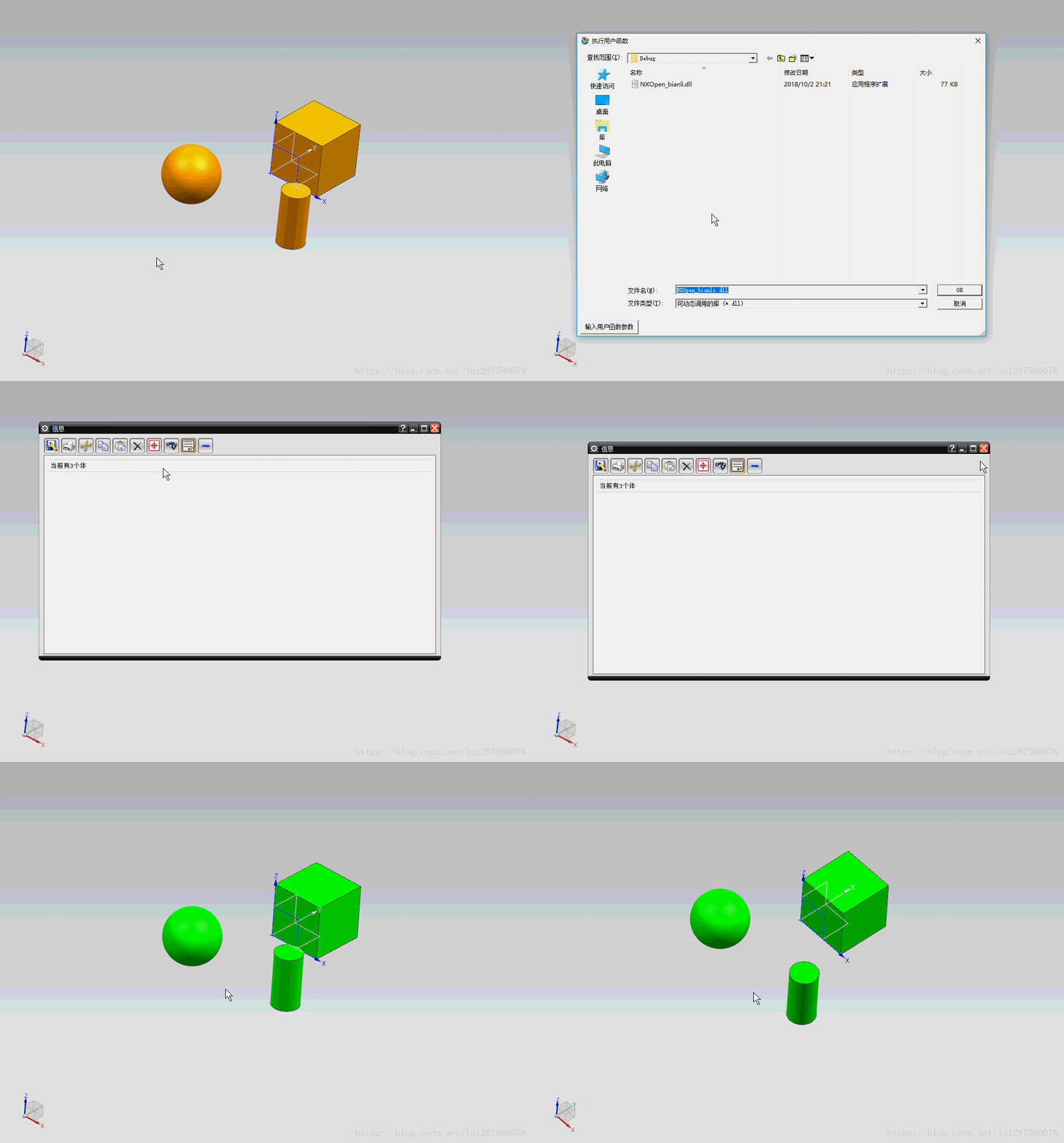
NX二次开发-NXOpen方式遍历所有体workPart->Bodies();
     NX11+VS2013

     #include <NXOpen/DisplayManager.hxx>

     #include <NXOpen/Body.hxx>

     #include <NXOpen/BodyCollection.hxx>

     #include <NXOpen/NXException.hxx>

     #include <NXOpen/NXObject.hxx>

     #include <NXOpen/Part.hxx>

     #include <NXOpen/PartCollection.hxx>

     NXOpen::Session *theSession = NXOpen::Session::GetSession();

     NXOpen::Part *workPart(theSession->Parts()->Work());

     NXOpen::Part *displayPart(theSession->Parts()->Display());

     std::vector<tag_t> BodyVecotor;

     NXOpen::Body *WorkBody;

     NXOpen::BodyCollection *Bodys = workPart->Bodies();

     NXOpen::BodyCollection::iterator Ite = Bodys->begin();

     for (; Ite != Bodys->end(); ++Ite)

     {

         WorkBody = (*Ite);

         BodyVecotor.push_back(WorkBody->Tag());

         NXOpen::DisplayModification *displayModification1;

         displayModification1 = theSession->DisplayManager()->NewDisplayModification();

         displayModification1->SetNewColor();

         std::vector<NXOpen::DisplayableObject *> objects1();

         NXOpen::Body *body1(dynamic_cast<NXOpen::Body *>(workPart->Bodies()->FindObject(WorkBody->JournalIdentifier())));

         objects1[] = body1;

         displayModification1->Apply(objects1);

     }

     char msg[];

     sprintf_s(msg, "当前有%d个体", BodyVecotor.size());

     lw->Open();

     lw->WriteLine(msg);
NX二次开发-NXOpen方式遍历所有体workPart->Bodies();的更多相关文章
- NX二次开发-NXOpen获取边的端点NXOpen::Edge::GetVertices
NX9+VS2012 #include <NXOpen/Features_BlockFeatureBuilder.hxx> #include <NXOpen/Features_Fea ...
- NX二次开发-NXOPEN自动切换到工程图模块
UFUN的API里是没有切换到工程图的函数的,NXOPEN里是有方法可以用的.不过应该是不支持NX9以下的版本. NX9的不能录制出来,在UI类里有方法 NX9+VS2012 #include < ...
- NX二次开发-NXOpen::CoordinateSystemCollection Class Reference
NX11+VS2013 #include <NXOpen/Section.hxx> #include <NXOpen/SectionCollection.hxx> #inclu ...
- NX二次开发-NXOPEN获取所有工程图和所有视图DrawingSheet,DrawingSheetCollection,DraftingView
NX11+VS2013 #include <NXOpen/Part.hxx> #include <NXOpen/PartCollection.hxx> #include < ...
- NX二次开发-NXOpen::Drawings::DrawingSheet Class Reference
NX11+VS2013 #include <NXOpen/Section.hxx> #include <NXOpen/SectionCollection.hxx> #inclu ...
- NX二次开发-NXOpen::WCS Class Reference
NX11+VS2013 #include <NXOpen/Part.hxx> #include <NXOpen/PartCollection.hxx> #include < ...
- NX二次开发-NXOpen中Point3d类型转换成point类型
NX9+VS2012 #include <NXOpen/NXObject.hxx> #include <NXOpen/Part.hxx> #include <NXOpen ...
- NX二次开发-NXOPEN设置工程图表格注释字体workPart->Fonts()->AddFont("chinesef_fs", NXOpen::FontCollection::TypeNx);
NX9+VS2012 #include <uf.h> #include <uf_tabnot.h> #include <NXOpen/Part.hxx> #incl ...
- NX二次开发-NXOPEN导出STEP Step214Creator *step214Creator1;
没有什么可以看的,NXOPEN直接录制一下导出STEP就可以了.录制出来自己挑需要的代码拿过来改一下. NX9+VS2012 #include <NXOpen/Part.hxx> #inc ...
随机推荐
- 线程池——Executors
一 Executor框架 为了更好地控制多线程,JDK提供了一套线程框架Executor,帮助开发人员有效的进行线程控制.它们都在java.util.concurrent包中,是JDK并发包的核心.其 ...
- 谷歌浏览器srcoll时,控制台一直报错
如果是使用betheme-child主题,在wp后台去掉这个srcoll插件 目录是wp后台的Betheme——Theme Options——Addons & Plugins——Addons— ...
- thinkphp REST
REST介绍 REST(Representational State Transfer表述性状态转移)是一种针对网络应用的设计和开发方式,可以降低开发的复杂性,提高系统的可伸缩性.REST提出了一些设 ...
- 思维+贪心——cf1042D
/* 首先考虑从后往前计算lis,显然0的在很多情况下的贡献要大于1 如果遇上0,那么lis++,如果遇上1,那么cnt1++,并且用cnt1更新lis 这样的贪心保证正确,因为从[i,j]这一段的l ...
- [nRF51822 AK II 教程]第一课,开发环境的配置及背景介绍【转】
低功耗蓝牙4.0是全新的技术,并不向下兼容,也就是说它和蓝牙3.0.2.0什么的都不能通信的.另外,蓝牙4.0目前的规范只能做外设和主机(智能手机,电脑等)通讯,也就是说你想用一个单模的蓝牙4.0开发 ...
- java文件上传方式1servlet 方式2springmvc
protected void doGet(HttpServletRequest request, HttpServletResponse response) throws ServletExcepti ...
- 剑指offer——40字符串的排列
题目描述 输入一个字符串,按字典序打印出该字符串中字符的所有排列.例如输入字符串abc,则打印出由字符a,b,c所能排列出来的所有字符串abc,acb,bac,bca,cab和cba. 输入描述: 输 ...
- VMvare+Ubuntu环境安装
安装步骤参考:https://blog.csdn.net/stpeace/article/details/78598333 VMvare15秘钥:https://blog.csdn.net/felix ...
- linux学习的任督二脉-进程调度和内存管理
转自 宋宝华老师的博客原文:https://blog.csdn.net/21cnbao/article/details/77505330 内功心法 学习或遇到问题时,反过来主动思考如果我是设计者,我会 ...
- pycharm的第一次使用(其实并不是第一次)
file --> settings --> editor -->general --> change font size file --> settings --> ...