
c#画图之柱形图
public JsonResult DrawBarChart()

        {

            #region 允许配置项

            //定义宽高

            int height = , width = ;

            //边缘位置留白

            int margin_top = ;

            int margin_right = ;

            int margin_bottom = ;

            int margin_left = ;

            //辅助线距离顶部的距离

            int xsubline = ;

            //文字大小,单位:px

            int fontsize = ;

            #endregion

            #region 数据

            //最大数量/总数量

            int maxCount = ;

            string[] bottomData = new string[] { "第一个", "第二个", "第三个", "第四个", "第五个" };

            int[] barData = new int[] { , , , ,  };

            maxCount = barData.Max();

            maxCount = maxCount ==  ?  : maxCount;

            #endregion

            //单位转换对象

            Spire.Pdf.Graphics.PdfUnitConvertor unitCvtr = new Spire.Pdf.Graphics.PdfUnitConvertor();

            //生成图像对象

            Bitmap image = new Bitmap(width + margin_left + margin_right, height + margin_top + margin_bottom);

            //创建画布

            Graphics g = Graphics.FromImage(image);

            //消除锯齿

            g.SmoothingMode = SmoothingMode.AntiAlias;

            //质量

            g.InterpolationMode = InterpolationMode.HighQualityBicubic;

            g.CompositingQuality = CompositingQuality.HighQuality;

            //黑色画笔--主轴颜色

            Brush blackBrush = new SolidBrush(Color.FromArgb(, , , ));

            Pen blackPen = new Pen(blackBrush, );

            //灰色画笔--辅助线条颜色

            Brush grayBrush = new SolidBrush(Color.FromArgb(, , , ));

            Pen grayPen = new Pen(grayBrush, );

            //填充区域内容

            g.FillRectangle(Brushes.WhiteSmoke, , , width + margin_left + margin_right, height + margin_top + margin_bottom);

            //y轴

            g.DrawLine(blackPen, margin_left, margin_top, margin_left, (height + margin_top));

            //x轴

            g.DrawLine(blackPen, margin_left, (height + margin_top), (width + margin_left), (height + margin_top));

            Font font = new Font("宋体", unitCvtr.ConvertUnits(fontsize, Spire.Pdf.Graphics.PdfGraphicsUnit.Pixel, Spire.Pdf.Graphics.PdfGraphicsUnit.Point));

            //x轴--辅助线

            //画5条辅助线,不管数字大小..这里数字变化后,maxCount也继续变化,以适应后面的计算

            int avgCount = Convert.ToInt32(Math.Ceiling(maxCount / 5.0));

            maxCount = avgCount * ;

            int lineHeight = (height - xsubline) / ;

            //画辅助线与文字

            for (int i = ; i <= ; i++)

            {

                //辅助线

                if (i > )

                {

                    g.DrawLine(grayPen, margin_left, (height + margin_top - lineHeight * i), (width + margin_left), (height + margin_top - lineHeight * i));

                }

                //指向文字的线

                g.DrawLine(blackPen, (margin_left - ), (height + margin_top - lineHeight * i), margin_left, (height + margin_top - lineHeight * i));

                //文字

                int text = avgCount * i;

                //if (i == 5)

                //{

                //    if (maxCount - text > 0)

                //    {

                //        text = text + (maxCount - text);

                //    }

                //}

                RectangleF rec = new RectangleF(, (height + margin_top - lineHeight * i - fontsize / ), margin_left - , );

                //public void DrawString(string s, Font font, Brush brush, RectangleF layoutRectangle);

                //g.DrawString(text.ToString(), font, blackBrush, 10, (height + margin_top - lineHeight * i));

                StringFormat format = new StringFormat(StringFormatFlags.DirectionRightToLeft);

                g.DrawString(text.ToString(), font, blackBrush, rec, format);

            }

            //蓝色画笔--柱子的颜色

            Brush blueBrush = new SolidBrush(Color.FromArgb(, , , ));

            Pen bluePen = new Pen(blueBrush, );

            int singleWidth = width / barData.Length;

            for (int i = ; i < barData.Length; i++)

            {

                StringFormat format = new StringFormat();

                format.Alignment = StringAlignment.Center; //居中

                //计算柱子

                int pillarHeight = Convert.ToInt32(barData[i] / Convert.ToDouble(maxCount) * (height - xsubline));

                //这里是画柱子的代码

                Rectangle rectangle = new Rectangle(margin_left + (i * singleWidth + singleWidth / ), height + margin_top - pillarHeight, singleWidth / , pillarHeight);

                g.FillRectangle(blueBrush, rectangle);

                //柱子上的文字

                RectangleF recText = new RectangleF(margin_left + (i * singleWidth), (height + margin_top - pillarHeight - ), singleWidth, );

                g.DrawString(barData[i].ToString(), font, blackBrush, recText, format);

                //x轴下的文字

                //指向线

                g.DrawLine(blackPen, margin_left + (i * singleWidth + singleWidth / ), (height + margin_top), margin_left + (i * singleWidth + singleWidth / ), (height + margin_top + ));

                //文字

                RectangleF rec = new RectangleF(margin_left + (i * singleWidth), (height + margin_top + ), singleWidth, (margin_bottom - ));

                g.DrawString(bottomData[i].ToString(), font, blackBrush, rec, format);

            }

            //将图片保存到指定的流中,适用于直接以流的方式输出图片

            //System.IO.MemoryStream ms = new System.IO.MemoryStream();

            //image.Save(ms, System.Drawing.Imaging.ImageFormat.Jpeg);

            //Response.ClearContent();

            //Response.ContentType = "image/Jpeg";

            //Response.BinaryWrite(ms.ToArray());

            string relativePath = @"\draw-image\" + DateTime.Now.ToString("yyyyMMddHHmmssfff") + ".jpg";

            string path = Server.MapPath(relativePath);

            image.Save(path, System.Drawing.Imaging.ImageFormat.Jpeg);

            //return relativePath;

            return Json(relativePath, JsonRequestBehavior.AllowGet);

        }
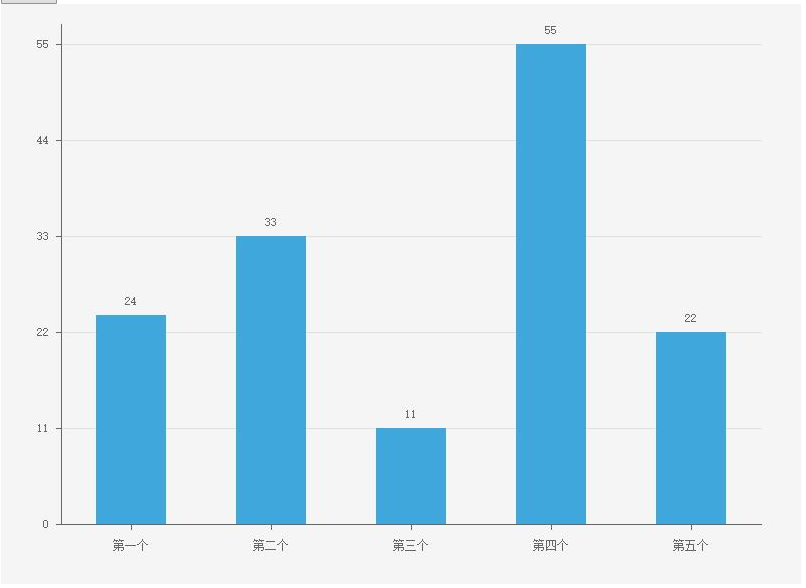
效果图
c#画图之柱形图的更多相关文章
- XCL-Charts图表库中柱形图的同源风格切换介绍
柱形图是被使用最多的图之中的一个,在写XCL-Charts这个Android图表库时,为它花费的时间相当多,不是由于有多难绘制,而是要在设计时怎样才干保证图基类能适应各种情况,能灵活满足足够多的需求, ...
- Excel 2010高级应用-柱形图(一)
今天,做项目低保真,是在excel中画图,这也是我第一次在excel中画图. 每次做过的东西或者学到的新东西,我必须要把他们记录下来,这样到时再次用到它们时可以很容易地找到. 下面介绍做柱形图的过程: ...
- echarts画图时tooltip.formatter参数params不会更新(转载)
echarts画图时tooltip.formatter参数params不会更新 解决方案: setOption时默认是合并, 如果要全部重新加载 要写成 setOption({},true),这样就可 ...
- Matplotlib学习---用matplotlib画柱形图,堆积柱形图,横向柱形图(bar chart)
这里利用Nathan Yau所著的<鲜活的数据:数据可视化指南>一书中的数据,学习画图. 数据地址:http://datasets.flowingdata.com/hot-dog-cont ...
- R语言-画柱形图
barplot()函数 1.柱形图 > sales<-read.csv("citysales.csv",header=TRUE) #读取数据 > barplot( ...
- High-speed Charting Control--MFC绘制图表(折线图、饼图、柱形图)控件
原文地址:https://www.codeproject.com/articles/14075/high-speed-charting-control 本文翻译在CodeProject上的介绍(主要还 ...
- ASP.NET 简单的柱形图实现(附带示例)
对于一些内部系统的项目,各种图表是在所难免的,因为图表可以更加清晰的表达出想看到的数据. 因为之前从来没有做过关于图表的东西,唯一能想到的就是“验证码”,所以应该是一个思路,用GDI去搞. 数据懒着去 ...
- C# WinForm开发系列之c# 通过.net自带的chart控件绘制饼图,柱形图和折线图的基础使用和扩展
一.需要实现的目标是: 1.将数据绑定到pie的后台数据中,自动生成饼图. 2.生成的饼图有详细文字的说明. 1.设置chart1的属性Legends中默认的Legend1的Enable为false: ...
- python使用matplotlib画图,jieba分词、词云、selenuium、图片、音频、视频、文字识别、人脸识别
一.使用matplotlib画图 关注公众号"轻松学编程"了解更多. 使用matplotlib画柱形图 import matplotlib from matplotlib impo ...
随机推荐
- Spring AnnotationConfigApplicationContext
Spring AnnotationConfigApplicationContext 概述 通常Spring XML文件用来作为ClassPathXmlApplicationContext 的初始化.@ ...
- SpringCloud与微服务系列专栏
一. 前置知识 学习SpringCloud之前需要具备和掌握如下框架和工具的使用:SpringMVC,Spring,Spring Boot,Mybatis,Maven,Git. SpringCloud ...
- 使用springboot Admin 2.0.6版本 集成监控springcloud微服务应用
一 新建 添加依赖 <dependencies> <dependency> <groupId>de.codecentric</groupId> < ...
- centos7安装lnmp
一.配置CentOS 第三方yum源(CentOS默认的标准源里没有nginx软件包) [root@localhost ~]# yum install wget #安装下载工具wget [root@l ...
- Spring(六)核心容器 - 注册单例 Bean 实例、SingletonBeanRegistry 简介
前言 上篇文章我们对注册 Bean 的核心类 BeanDefinitionRegistry 进行了讨论,这里的注册 Bean 是指保存 Bean 的相关信息,也就是将 Bean 定义成 BeanDef ...
- 9. Palindrome Number QuestionEditorial Solution
Determine whether an integer is a palindrome. Do this without extra space. click to show spoilers. S ...
- 中国天气网API接口
http://www.weather.com.cn/data/sk/101010100.html http://www.weather.com.cn/data/cityinfo/101010100.h ...
- 百度MP3音乐API接口及应用
当你在百度去搜索一首歌时,你会发现有种更简单的方法. http://box.zhangmen.baidu.com/x?op=12&count=1&title=歌名$$作者$$$$ 例如 ...
- Android整理:SQlite数据库的使用以及通过listView显示数据
前言:上个月与同学一起做了一个简单的Android应用,这段时间正好没有很多事情所以趁热整理一下学习到的知识,刚开始学习Android还有很多不懂的地方,继续努力吧! 作业中需要用到数据库,当然首选A ...
- 2019ccpc哈尔滨打铜记
小学生日记: 2019.10.13,哈尔滨,打了个铜 开头 先说结论,这次失败,我的锅70%,sdl的锅5%,ykh25% Day0 周五, 我们队出现了奇怪的厄运上身 首先是我中途在飞机上数据线突然 ...