
记录SSM框架项目迁移SpringBoot框架-----pom.xml的迁移
第一步:迁移pom.xml文件(去除spring相关的依赖)
SSM中的pom:
<project xmlns="http://maven.apache.org/POM/4.0.0"

    xmlns:xsi="http://www.w3.org/2001/XMLSchema-instance"

    xsi:schemaLocation="http://maven.apache.org/POM/4.0.0 http://maven.apache.org/maven-v4_0_0.xsd">

    <modelVersion>4.0.0</modelVersion>

    <groupId>top.lyfan</groupId>

    <artifactId>xyspgl</artifactId>

    <packaging>war</packaging>

    <version>0.0.1-SNAPSHOT</version>

    <name>xyspgl Maven Webapp</name>

    <url>http://maven.apache.org</url>

    <properties>

        <spring.version>4.3.7.RELEASE</spring.version>

    </properties>

    <dependencies>

        <!-- 单元测试所需jar包 -->

        <dependency>

            <groupId>junit</groupId>

            <artifactId>junit</artifactId>

            <version>4.12</version>

            <scope>test</scope>

        </dependency>

        <!-- https://mvnrepository.com/artifact/ch.qos.logback/logback-classic -->

        <!-- 日志jar包 -->

        <dependency>

            <groupId>ch.qos.logback</groupId>

            <artifactId>logback-classic</artifactId>

            <version>1.2.3</version>

        </dependency>

        <!-- 4.Spring -->

        <!-- 1)Spring核心 -->

        <!-- 1)包含spring框架的核心工具类,spring其他组件都要使用到这个包里的类,是其他组件的基本核心 -->

        <dependency>

            <groupId>org.springframework</groupId>

            <artifactId>spring-core</artifactId>

            <version>${spring.version}</version>

        </dependency>

        <!-- 2)这个jar包是所有文件都要用到的,它包含访问配置文件、创建和管理bean以及进行(ioc/Di) 操作相关的所有类,如果应用只需要基本的(ioc/Di)操作,引入core与bean的jar包就足够了 -->

        <dependency>

            <groupId>org.springframework</groupId>

            <artifactId>spring-beans</artifactId>

            <version>${spring.version}</version>

        </dependency>

        <!-- 3)这个jae包为spring核心提供了大量的扩展,可以找到使用spring ApplicationContext特性时所需的全部标签及所需要

            的全部的类,instrumentation组件及校验Validation方面的相关类。 -->

        <dependency>

            <groupId>org.springframework</groupId>

            <artifactId>spring-context</artifactId>

            <version>${spring.version}</version>

        </dependency>

        <!-- 二)Spring DAO层 -->

        <!-- 4)这个jar文件包含 Spring 对JDBC 数据访问进行封装的所有类 -->

        <dependency>

            <groupId>org.springframework</groupId>

            <artifactId>spring-jdbc</artifactId>

            <version>${spring.version}</version>

        </dependency>

        <!-- 5)为JDBC、Hibernat、JDO、JPA 等提供的一致的声明式和编程式 事务管理 -->

        <dependency>

            <groupId>org.springframework</groupId>

            <artifactId>spring-tx</artifactId>

            <version>${spring.version}</version>

        </dependency>

        <!-- 三)Spring web -->

        <!-- 6)Spring web包含web应用开发时,用到spring框架时所需的核心类,包括自动载入WebApplicationContext -->

        <dependency>

            <groupId>org.springframework</groupId>

            <artifactId>spring-web</artifactId>

            <version>${spring.version}</version>

        </dependency>

        <!-- 7)包含SpringMVC框架相关的所有类。 -->

        <dependency>

            <groupId>org.springframework</groupId>

            <artifactId>spring-webmvc</artifactId>

            <version>${spring.version}</version>

        </dependency>

        <!-- 四)Spring test -->

        <!-- 8)Spring test 对JUNIT等测试框架的简单封装 -->

        <dependency>

            <groupId>org.springframework</groupId>

            <artifactId>spring-test</artifactId>

            <version>${spring.version}</version>

            <scope>test</scope>

        </dependency>

        <!-- Servlet web -->

        <!-- servlet-api主要用来提供servlet服务的 -->

        <dependency>

            <groupId>javax.servlet</groupId>

            <artifactId>javax.servlet-api</artifactId>

            <version>3.1.0</version>

        </dependency>

        <!-- json解析 -->

        <dependency>

            <groupId>com.fasterxml.jackson.core</groupId>

            <artifactId>jackson-databind</artifactId>

            <version>2.8.7</version>

        </dependency>

        <!-- Map工具类 对标准java Collection的扩展spring-core.jar需commons-collections.jar -->

        <dependency>

            <groupId>commons-collections</groupId>

            <artifactId>commons-collections</artifactId>

            <version>3.2</version>

        </dependency>

        <!-- DAO: MyBatis所有基础类库 -->

        <dependency>

            <groupId>org.mybatis</groupId>

            <artifactId>mybatis</artifactId>

            <version>3.4.2</version>

        </dependency>

        <!-- mybatis-spring整合包 -->

        <dependency>

            <groupId>org.mybatis</groupId>

            <artifactId>mybatis-spring</artifactId>

            <version>1.3.1</version>

        </dependency>

        <!-- 2.数据库 -->

        <!-- mysql-connector-java用来支持JDBC与mysql的交互 -->

        <dependency>

            <groupId>mysql</groupId>

            <artifactId>mysql-connector-java</artifactId>

            <version>5.1.37</version>

            <scope>runtime</scope>

        </dependency>

        <!-- 连接池所需jar包 -->

        <dependency>

            <groupId>c3p0</groupId>

            <artifactId>c3p0</artifactId>

            <version>0.9.1.2</version>

        </dependency>

        <!-- 图片处理工具thumbnailator -->

        <dependency>

            <groupId>net.coobird</groupId>

            <artifactId>thumbnailator</artifactId>

            <version>0.4.8</version>

        </dependency>

        <!-- 验证码工具kaptcha,导入jar包后需要立即去web.xml中编写这个验证码的servlet -->

        <!-- https://mvnrepository.com/artifact/com.github.penggle/kaptcha -->

        <dependency>

            <groupId>com.github.penggle</groupId>

            <artifactId>kaptcha</artifactId>

            <version>2.3.2</version>

        </dependency>

        <!-- 文件上传处理依赖的jar包 -->

        <dependency>

            <groupId>commons-fileupload</groupId>

            <artifactId>commons-fileupload</artifactId>

            <version>1.3.2</version>

        </dependency>

        <!-- redis客户端:Jedis -->

        <dependency>

            <groupId>redis.clients</groupId>

            <artifactId>jedis</artifactId>

            <version>2.9.0</version>

        </dependency>

        <!-- 谷歌集合包 <dependency> <groupId>com.google.common</groupId> <artifactId>google-collect</artifactId>

            <version>1.0-rc1</version> </dependency> -->

        <!-- 谷歌集合包 -->

        <dependency>

            <groupId>com.google.guava</groupId>

            <artifactId>guava</artifactId>

            <version>20.0</version>

        </dependency>

        <dependency>

            <groupId>org.codehaus.jackson</groupId>

            <artifactId>jackson-mapper-asl</artifactId>

            <version>1.9.12</version>

        </dependency>

        <!-- 分页插件 -->

        <dependency>

            <groupId>com.github.pagehelper</groupId>

            <artifactId>pagehelper</artifactId>

            <version>4.1.0</version>

        </dependency>

        <!-- org.apache.commons.lang3的包 -->

        <dependency>

            <groupId>org.apache.commons</groupId>

            <artifactId>commons-lang3</artifactId>

            <version>3.5</version>

        </dependency>

        <dependency>

            <groupId>joda-time</groupId>

            <artifactId>joda-time</artifactId>

            <version>2.3</version>

        </dependency>

        <!-- ftpclient -->

        <dependency>

            <groupId>commons-net</groupId>

            <artifactId>commons-net</artifactId>

            <version>3.1</version>

        </dependency>

        <!-- alipay -->

        <dependency>

            <groupId>commons-lang</groupId>

            <artifactId>commons-lang</artifactId>

            <version>2.6</version>

        </dependency>

    </dependencies>

    <build>

        <finalName>xyspgl</finalName>

        <!-- 配置编译依赖工具 -->

        <plugins>

            <plugin>

                <!-- https://mvnrepository.com/artifact/org.apache.maven.plugins/maven-compiler-plugin -->

                <groupId>org.apache.maven.plugins</groupId>

                <artifactId>maven-compiler-plugin</artifactId>

                <version>3.8.0</version>

                <configuration>

                    <source>1.8</source>

                    <target>1.8</target>

                    <encoding>UTF8</encoding>

                </configuration>

            </plugin>

        </plugins>

    </build>

</project>
1.去除Spring相关依赖(spring一些jar包springboot都是自带的)
2.测试类相关的如junit等
3.mybatis的
取剩下的dependency
去除完后SpringBoot的pom如下:
<?xml version="1.0" encoding="UTF-8"?>

<project xmlns="http://maven.apache.org/POM/4.0.0" xmlns:xsi="http://www.w3.org/2001/XMLSchema-instance"

    xsi:schemaLocation="http://maven.apache.org/POM/4.0.0 http://maven.apache.org/xsd/maven-4.0.0.xsd">

    <modelVersion>4.0.0</modelVersion>

    <parent>

        <groupId>org.springframework.boot</groupId>

        <!-- 主要是定义了java的编译级别 -->

        <artifactId>spring-boot-starter-parent</artifactId>

        <version>1.5.18.RELEASE</version>

        <relativePath/> <!-- lookup parent from repository -->

    </parent>

    <groupId>top.lyf</groupId>

    <artifactId>xyspgl2</artifactId>

    <version>0.0.1-SNAPSHOT</version>

    <name>xyspgl2</name>

    <description>Demo project for Spring Boot</description>

    <properties>

        <!-- 定义了,使用UTF-8进行编码,同时实现了通用的测试框架 ,智能的资源过滤,还有智能的插件配置-->

        <project.build.sourceEncoding>UTF-8</project.build.sourceEncoding>

        <project.reporting.outputEncoding>UTF-8</project.reporting.outputEncoding>

        <java.version>1.8</java.version>

    </properties>

    <!-- 以上面的parent为基础,定义相关依赖 -->

    <dependencies>

    <!-- https://mvnrepository.com/artifact/ch.qos.logback/logback-classic -->

        <!-- 日志jar包 -->

        <dependency>

            <groupId>ch.qos.logback</groupId>

            <artifactId>logback-classic</artifactId>

        </dependency>

        <!-- Servlet web -->

        <!-- servlet-api主要用来提供servlet服务的 -->

        <dependency>

            <groupId>javax.servlet</groupId>

            <artifactId>javax.servlet-api</artifactId>

        </dependency>

        <!-- json解析 -->

        <dependency>

            <groupId>com.fasterxml.jackson.core</groupId>

            <artifactId>jackson-databind</artifactId>

        </dependency>

        <!-- Map工具类 对标准java Collection的扩展spring-core.jar需commons-collections.jar -->

        <dependency>

            <groupId>commons-collections</groupId>

            <artifactId>commons-collections</artifactId>

        </dependency>

        <!-- 2.数据库 -->

        <!-- mysql-connector-java用来支持JDBC与mysql的交互 -->

        <dependency>

            <groupId>mysql</groupId>

            <artifactId>mysql-connector-java</artifactId>

            <scope>runtime</scope>

        </dependency>

        <!-- 连接池所需jar包 -->

        <dependency>

            <groupId>c3p0</groupId>

            <artifactId>c3p0</artifactId>

            <version>0.9.1.2</version>

        </dependency>

        <!-- 图片处理工具thumbnailator -->

        <dependency>

            <groupId>net.coobird</groupId>

            <artifactId>thumbnailator</artifactId>

            <version>0.4.8</version>

        </dependency>

        <!-- 验证码工具kaptcha,导入jar包后需要立即去web.xml中编写这个验证码的servlet -->

        <!-- https://mvnrepository.com/artifact/com.github.penggle/kaptcha -->

        <dependency>

            <groupId>com.github.penggle</groupId>

            <artifactId>kaptcha</artifactId>

            <version>2.3.2</version>

        </dependency>

        <!-- 文件上传处理依赖的jar包 -->

        <dependency>

            <groupId>commons-fileupload</groupId>

            <artifactId>commons-fileupload</artifactId>

            <version>1.3.2</version>

        </dependency>

        <!-- redis客户端:Jedis -->

        <dependency>

            <groupId>redis.clients</groupId>

            <artifactId>jedis</artifactId>

        </dependency>

        <!-- 谷歌集合包 <dependency> <groupId>com.google.common</groupId> <artifactId>google-collect</artifactId>

            <version>1.0-rc1</version> </dependency> -->

        <!-- 谷歌集合包 -->

        <dependency>

            <groupId>com.google.guava</groupId>

            <artifactId>guava</artifactId>

            <version>20.0</version>

        </dependency>

        <dependency>

            <groupId>org.codehaus.jackson</groupId>

            <artifactId>jackson-mapper-asl</artifactId>

            <version>1.9.12</version>

        </dependency>

        <!-- 分页插件 -->

        <dependency>

            <groupId>com.github.pagehelper</groupId>

            <artifactId>pagehelper</artifactId>

            <version>4.1.0</version>

        </dependency>

        <!-- org.apache.commons.lang3的包 -->

        <dependency>

            <groupId>org.apache.commons</groupId>

            <artifactId>commons-lang3</artifactId>

            <version>3.5</version>

        </dependency>

        <dependency>

            <groupId>joda-time</groupId>

            <artifactId>joda-time</artifactId>

        </dependency>

        <!-- ftpclient -->

        <dependency>

            <groupId>commons-net</groupId>

            <artifactId>commons-net</artifactId>

            <version>3.1</version>

        </dependency>

        <!-- alipay -->

        <dependency>

            <groupId>commons-lang</groupId>

            <artifactId>commons-lang</artifactId>

            <version>2.6</version>

        </dependency>

        <dependency>

            <!-- 定义支持web项目启动 ,能右键run java application运行项目很大部分原因在这里-->

            <groupId>org.springframework.boot</groupId>

            <artifactId>spring-boot-starter-web</artifactId>

        </dependency>

        <!-- 定义数据库链接相关 -->

         <dependency>

            <groupId>org.mybatis.spring.boot</groupId>

            <artifactId>mybatis-spring-boot-starter</artifactId>

            <version>1.3.2</version>

        </dependency>

        <!-- 用来做ut的 -->

        <dependency>

            <groupId>org.springframework.boot</groupId>

            <artifactId>spring-boot-starter-test</artifactId>

            <scope>test</scope>

        </dependency>

    </dependencies>

    <build>

        <plugins>

            <plugin>

                <groupId>org.springframework.boot</groupId>

                <!-- 用来做打包的 -->

                <artifactId>spring-boot-maven-plugin</artifactId>

            </plugin>

        </plugins>

    </build>

</project>
因为SpringBoot自带一些jar包版本,版本不一样会报黄色提示,只需要把version 版本号都去掉,就ok了。
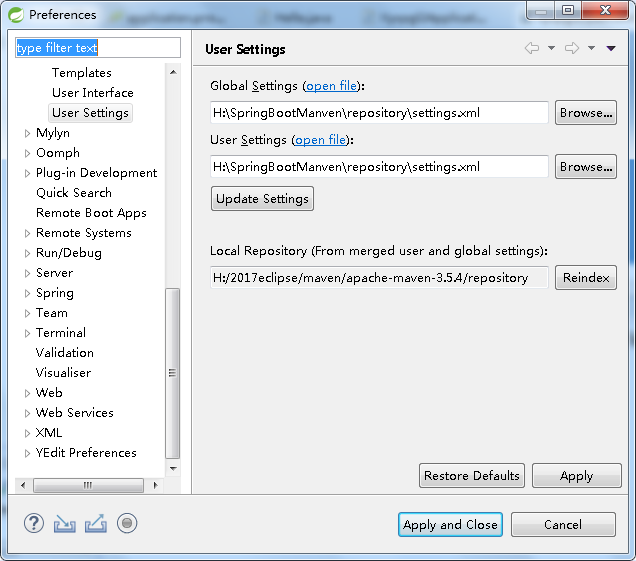
这里记录迁移时出现的一个错误,就是springboot与之前共用了一个maven本地仓库,莫名其妙pom文件报了80个错误,貌似是jar包有问题,我这里又新建了一个springboot项目用的maven本地仓库。就没报错了。
记录SSM框架项目迁移SpringBoot框架-----pom.xml的迁移的更多相关文章
- maven项目(引入依赖失败, pom.xml 报错\爆红)
引入项目过程中,idea引入磁盘的某个的maven项目 这里以springboot项目以例子,发现pom.xml 的依赖大面积爆红,springboot的版本依赖也报错了,然后发现下面有进度条在下载, ...
- 安装时后的idea,项目不能运行,pom.xml文件不能下载到本地仓库,maven配置是正确的
安装时后的idea,项目不能运行,pom.xml文件不能下载到本地仓库,maven配置是正确的 项目上传到svn后,同事下载项目后,没有识别出来mavn中的pom.xml文件,导致idea不能自动下载 ...
- intellij idea 新建springboot工程pom.xml报错
今天使用idea新建的springboot工程pom.xml文件报错如下 1. 问题 'settings.xml' has syntax errors less... (Ctrl+F1) Inspec ...
- 小程序后端项目【Springboot框架】部署到阿里云服务器【支持https访问】
前言: 我的后端项目是Java写的,用的Springboot框架.在部署服务器并配置https访问过程中,因为做了一些令人窒息的操作(事后发现),所以老是不能成功. 不成功具体点说就是:域名地址可以正 ...
- Eclipse使用之将Git项目转为Maven项目, ( 注意: 最后没有pom.xml文件的, 要转化下 )
Eclipse使用之将Git项目转为Maven项目(全图解) 2017年08月11日 09:24:31 阅读数:427 1.打开Eclipse,File->Import 2.Git->Pr ...
- 【Java】SVN下载maven项目到eclipse之后,项目红叉,pom.xml出现Missing artifact fakepath:dubbo:jar:2.8.5等缺少jar包情况
刚入公司,从svn上把代码弄下来之后导入eclipse,一般是maven项目,往往项目都会有红叉.如果排除代码本身问题,一般是jar包没有. 鼠标点开pom.xml文件,在约束那里一般有红叉,鼠标放上 ...
- eclipse中 使用maven搭建ssh项目 思路复习(含有pom.xml)
首先在web.xml中配置监听器 在服务器启动的时候 进行bean对象的创建(只会创建单例对象 dao service 多例对象action可不会创建 每个多例对象是不同的 创建了有什么意义呢 ...
- 项目出现红色感叹号, pom.xml并出错
问题描述: eclipse出现红色感叹号,pom.xml 文件也报错 但没有提示具体是那里出错了. 打开 Java Build Path 找到 Librarices 你在看到 Maven Dep ...
- 二、初步认识springBoot的pom.xml
1. 大体结构 <project xmlns="http://maven.apache.org/POM/4.0.0" xmlns:xsi="http://www. ...
随机推荐
- UVA1434-The Rotation Game(迭代加深搜索)
Problem UVA1434-The Rotation Game Accept:2209 Submit:203 Time Limit: 3000 mSec Problem Description ...
- Python:Day20 模块
模块是用来组织函数的. 模块一共3种: python标准库 第三方模块 应用程序自定义模块 模块搜索路径:sys.path import sys print(sys.path) import calc ...
- PAT A1055 The World's Richest (25 分)——排序
Forbes magazine publishes every year its list of billionaires based on the annual ranking of the wor ...
- [MicroPython]TPYBoard开发板DIY小型家庭气象站
对于喜欢登山的人来说,都会非常关心自己所处的高度跟温度,海拔高度的测量方法,海拔测量一般常用的有两种方式,一是通过GPS全球定位系统,二是通过测出大气压,根据气压值算出海拔高度. BMP180是一直常 ...
- Google Protocol Buffers学习
参考资料:http://www.cnblogs.com/royenhome/archive/2010/10/29/1864860.html 参考资料:http://www.jianshu.com/p/ ...
- Spring和SpringMvc详细讲解
转载自:https://www.cnblogs.com/doudouxiaoye/p/5693399.html 1. 为什么使用Spring ? 1). 方便解耦,简化开发 通过Spring提供的Io ...
- Windows Community Toolkit 3.0 - CameraPreview
概述 Windows Community Toolkit 3.0 于 2018 年 6 月 2 日 Release,同时正式更名为 Windows Community Toolkit,原名为 UWP ...
- JAVA 最新 环境搭建(JDK 1.8 + Tomcat 9 + eclipse oxygen + mysql 5.7)
一.JDK的安装与配置 1.从官网下载jdk,注意是jdk不是jre.jdk包里面包含了jre.最好从官网下载.传送门:http://www.oracle.com/technetwork/java/j ...
- MySQL之索引原理
--------------------------------------------------------------------------------堕落的状态,无疑是慢性自杀.想想自己为什 ...
- Python_练习题_49
# 3.用map来处理字符串列表,把列表中所有人都变成sb,比方alex_sb name=['alex','wupeiqi','yuanhao','nezha'] def func(item): re ...