
ESP8266 HTTP 项目(1)在刻度盘上进行ESP8266 NodeMCU模拟读取的步骤
https://circuits4you.com/2018/02/03/esp8266-nodemcu-adc-analog-value-on-dial-gauge/
ESP8266(NodeMCU)ADC表盘上的模拟值
这是它使用JavaScripts,ESP8266,CSS和HTML知识的高级教程。在此示例中,我们正在读取ADC的模拟值并将其显示在HTML网页上,该网页由ESP8266或NodeMCU Web服务器提供。要获得有关ESP8266中基本HTML页面创建的更多详细信息,请阅读此内容。
ESP8266只有一个adc频道。让我们开始阅读模拟并做一些很酷的事情
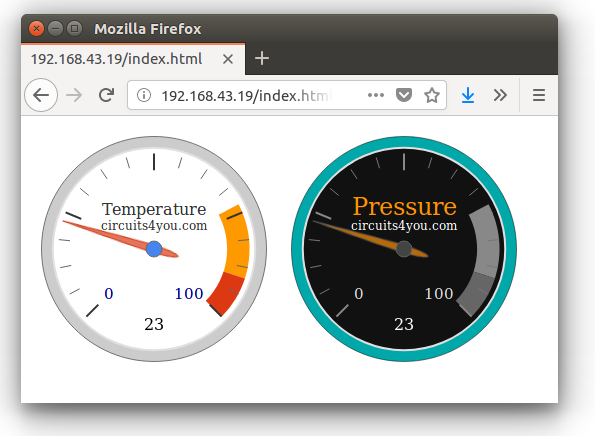
在刻度盘上进行ESP8266 NodeMCU模拟读取的步骤
步骤1:编写ESP NodeMCU代码,如下所示
此代码在ESP上创建Web服务器并连接到给定的wifi网络配置。根据您的wifi网络更改WiFi配置
代码分为多个部分让我们来了解什么是什么?
1.连接到WiFi网络
|
1
2
3
4
5
6
7
8
9
10
11
12
13
14
15
16
|
//Connect to wifi Network
WiFi.begin(ssid, password); //Connect to your WiFi router
Serial.println("");
// Wait for connection
while (WiFi.status() != WL_CONNECTED) {
delay(500);
Serial.print(".");
}
//If connection successful show IP address in serial monitor
Serial.println("");
Serial.print("Connected to ");
Serial.println(ssid);
Serial.print("IP address: ");
Serial.println(WiFi.localIP()); //IP address assigned to your ESP
|
2.在onRoot,onNotFound上创建Web服务器,最后读取ADC
Server Initializer有关此内容的更多信息,请参见此处
|
1
2
3
4
5
|
//Initialize Webserver
server.on("/",handleRoot);
server.on("/getADC",handleADC); //Reads ADC function is called from out index.html
server.onNotFound(handleWebRequests); //Set setver all paths are not found so we can handle as per URI
server.begin();
|
Web服务器主页位于root上。notFound Handler执行诸如向客户端发送javascripts,jQuery和Css文件之类的任务。 ESP重定向在这里解释
|
1
2
3
4
5
6
7
8
9
10
11
12
13
14
15
16
|
void handleWebRequests(){
if(loadFromSpiffs(server.uri())) return;
String message = "File Not Detected\n\n";
message += "URI: ";
message += server.uri();
message += "\nMethod: ";
message += (server.method() == HTTP_GET)?"GET":"POST";
message += "\nArguments: ";
message += server.args();
message += "\n";
for (uint8_t i=0; i<server.args(); i++){
message += " NAME:"+server.argName(i) + "\n VALUE:" + server.arg(i) + "\n";
}
server.send(404, "text/plain", message);
Serial.println(message);
}
|
上面的代码实际上首先解码未找到的URL,然后将这些参数传递给spiffs loader。ESP8266 SPIFFS在这里解释
|
1
2
3
4
5
6
7
8
9
10
11
12
13
14
15
16
17
18
19
20
21
22
23
24
|
bool loadFromSpiffs(String path){
String dataType = "text/plain";
if(path.endsWith("/")) path += "index.htm";
if(path.endsWith(".src")) path = path.substring(0, path.lastIndexOf("."));
else if(path.endsWith(".html")) dataType = "text/html";
else if(path.endsWith(".htm")) dataType = "text/html";
else if(path.endsWith(".css")) dataType = "text/css";
else if(path.endsWith(".js")) dataType = "application/javascript";
else if(path.endsWith(".png")) dataType = "image/png";
else if(path.endsWith(".gif")) dataType = "image/gif";
else if(path.endsWith(".jpg")) dataType = "image/jpeg";
else if(path.endsWith(".ico")) dataType = "image/x-icon";
else if(path.endsWith(".xml")) dataType = "text/xml";
else if(path.endsWith(".pdf")) dataType = "application/pdf";
else if(path.endsWith(".zip")) dataType = "application/zip";
File dataFile = SPIFFS.open(path.c_str(), "r");
if (server.hasArg("download")) dataType = "application/octet-stream";
if (server.streamFile(dataFile, dataType) != dataFile.size()) {
}
dataFile.close();
return true;
}
|
一旦你知道了所有编程技术,我们就可以转向实际的编程。
最终完整代码
将此代码复制并粘贴到arduino中。然后上传它
ESP8266(NodeMCU)ADC表盘上的模拟值

2018年2月3日ESP8266 esp,html,Javascript,NodeMCU,web服务器

这是它使用JavaScripts,ESP8266,CSS和HTML知识的高级教程。在此示例中,我们正在读取ADC的模拟值并将其显示在HTML网页上,该网页由ESP8266或NodeMCU Web服务器提供。要获得有关ESP8266中基本HTML页面创建的更多详细信息,请阅读此内容。

ESP8266只有一个adc频道。让我们开始阅读模拟并做一些很酷的事情

ESP8266-模拟读数表盘

在刻度盘上进行ESP8266 NodeMCU模拟读取的步骤

步骤1:编写ESP NodeMCU代码,如下所示

此代码在ESP上创建Web服务器并连接到给定的wifi网络配置。根据您的wifi网络更改WiFi配置

代码分为多个部分让我们来了解什么是什么?

1.连接到WiFi网络

  //Connect to wifi Network

  WiFi.begin(ssid, password);     //Connect to your WiFi router

  Serial.println("");

  // Wait for connection

  while (WiFi.status() != WL_CONNECTED) {

    delay(500);

    Serial.print(".");

  }

  //If connection successful show IP address in serial monitor

  Serial.println("");

  Serial.print("Connected to ");

  Serial.println(ssid);

  Serial.print("IP address: ");

  Serial.println(WiFi.localIP());  //IP address assigned to your ESP

1

2

3

4

5

6

7

8

9

10

11

12

13

14

15

16

  //Connect to wifi Network

  WiFi.begin(ssid, password);     //Connect to your WiFi router

  Serial.println("");

  // Wait for connection

  while (WiFi.status() != WL_CONNECTED) {

    delay(500);

    Serial.print(".");

  }

  //If connection successful show IP address in serial monitor

  Serial.println("");

  Serial.print("Connected to ");

  Serial.println(ssid);

  Serial.print("IP address: ");

  Serial.println(WiFi.localIP());  //IP address assigned to your ESP

2.在onRoot,onNotFound上创建Web服务器,最后读取ADC

Server Initializer有关此内容的更多信息,请参见此处

  //Initialize Webserver

  server.on("/",handleRoot);

  server.on("/getADC",handleADC); //Reads ADC function is called from out index.html

  server.onNotFound(handleWebRequests); //Set setver all paths are not found so we can handle as per URI

  server.begin();

1

2

3

4

5

  //Initialize Webserver

  server.on("/",handleRoot);

  server.on("/getADC",handleADC); //Reads ADC function is called from out index.html

  server.onNotFound(handleWebRequests); //Set setver all paths are not found so we can handle as per URI

  server.begin();

Web服务器主页位于root上。notFound Handler执行诸如向客户端发送javascripts,jQuery和Css文件之类的任务。  ESP重定向在这里解释

void handleWebRequests(){

  if(loadFromSpiffs(server.uri())) return;

  String message = "File Not Detected\n\n";

  message += "URI: ";

  message += server.uri();

  message += "\nMethod: ";

  message += (server.method() == HTTP_GET)?"GET":"POST";

  message += "\nArguments: ";

  message += server.args();

  message += "\n";

  for (uint8_t i=0; i<server.args(); i++){

    message += " NAME:"+server.argName(i) + "\n VALUE:" + server.arg(i) + "\n";

  }

  server.send(404, "text/plain", message);

  Serial.println(message);

}

1

2

3

4

5

6

7

8

9

10

11

12

13

14

15

16

void handleWebRequests(){

  if(loadFromSpiffs(server.uri())) return;

  String message = "File Not Detected\n\n";

  message += "URI: ";

  message += server.uri();

  message += "\nMethod: ";

  message += (server.method() == HTTP_GET)?"GET":"POST";

  message += "\nArguments: ";

  message += server.args();

  message += "\n";

  for (uint8_t i=0; i<server.args(); i++){

    message += " NAME:"+server.argName(i) + "\n VALUE:" + server.arg(i) + "\n";

  }

  server.send(404, "text/plain", message);

  Serial.println(message);

}

上面的代码实际上首先解码未找到的URL,然后将这些参数传递给spiffs loader。ESP8266 SPIFFS在这里解释

bool loadFromSpiffs(String path){

  String dataType = "text/plain";

  if(path.endsWith("/")) path += "index.htm";

  if(path.endsWith(".src")) path = path.substring(0, path.lastIndexOf("."));

  else if(path.endsWith(".html")) dataType = "text/html";

  else if(path.endsWith(".htm")) dataType = "text/html";

  else if(path.endsWith(".css")) dataType = "text/css";

  else if(path.endsWith(".js")) dataType = "application/javascript";

  else if(path.endsWith(".png")) dataType = "image/png";

  else if(path.endsWith(".gif")) dataType = "image/gif";

  else if(path.endsWith(".jpg")) dataType = "image/jpeg";

  else if(path.endsWith(".ico")) dataType = "image/x-icon";

  else if(path.endsWith(".xml")) dataType = "text/xml";

  else if(path.endsWith(".pdf")) dataType = "application/pdf";

  else if(path.endsWith(".zip")) dataType = "application/zip";

  File dataFile = SPIFFS.open(path.c_str(), "r");

  if (server.hasArg("download")) dataType = "application/octet-stream";

  if (server.streamFile(dataFile, dataType) != dataFile.size()) {

  }

  dataFile.close();

  return true;

}

1

2

3

4

5

6

7

8

9

10

11

12

13

14

15

16

17

18

19

20

21

22

23

24

bool loadFromSpiffs(String path){

  String dataType = "text/plain";

  if(path.endsWith("/")) path += "index.htm";

  if(path.endsWith(".src")) path = path.substring(0, path.lastIndexOf("."));

  else if(path.endsWith(".html")) dataType = "text/html";

  else if(path.endsWith(".htm")) dataType = "text/html";

  else if(path.endsWith(".css")) dataType = "text/css";

  else if(path.endsWith(".js")) dataType = "application/javascript";

  else if(path.endsWith(".png")) dataType = "image/png";

  else if(path.endsWith(".gif")) dataType = "image/gif";

  else if(path.endsWith(".jpg")) dataType = "image/jpeg";

  else if(path.endsWith(".ico")) dataType = "image/x-icon";

  else if(path.endsWith(".xml")) dataType = "text/xml";

  else if(path.endsWith(".pdf")) dataType = "application/pdf";

  else if(path.endsWith(".zip")) dataType = "application/zip";

  File dataFile = SPIFFS.open(path.c_str(), "r");

  if (server.hasArg("download")) dataType = "application/octet-stream";

  if (server.streamFile(dataFile, dataType) != dataFile.size()) {

  }

  dataFile.close();

  return true;

}

一旦你知道了所有编程技术,我们就可以转向实际的编程。

最终完整代码

将此代码复制并粘贴到arduino中。然后上传它
上传程序后等待你需要做更多的事情
第2步:将网页和jQuery,Javascripts和CSS上传到ESP8266 NodeMCU闪存
为此,请在草图文件夹中创建名为“ data”的文件夹,即保存上述.ino文件的位置。然后下载并解压缩这些文件ESP8266-analog-gauge-data。
文件夹结构是带有数据文件夹的.ino文件。在数据文件夹中,您有这些文件index.html,style.css,jQuery.min.js,d3-gauge.js。
不将这些文件上传到ESP8266 NodeMCU Flash文件系统。这个怎么做 ?阅读此处加载文件需要一些时间。
第3步:测试
假设您已上传程序和SPIFFS文件。打开串行监视器并重置ESP。您将获得IP地址,在Web浏览器中打开它。确保您的ESP和笔记本电脑在同一网络中
你会得到漂亮的界面。正如我们在开始时所展示的那样。
ESP8266 HTTP 项目(1)在刻度盘上进行ESP8266 NodeMCU模拟读取的步骤的更多相关文章
- Android项目,从web上取下汉字,中文部分乱码
Android项目,从web上取下汉字,中文部分乱码. 常见问题,搜索一下,网上有很多办法解决.如果还没有试过这个办法,可以尝试一下. BufferedReader in = new Buffered ...
- 如何部署Java_web项目到云服务器上
步骤 1:购买 Linux 实例(略) 步骤2:安装JDK 本节介绍如何安装java jdk. 软件包中包含的软件及版本如下: Tomcat:1.8.0_121 说明:这是写文档时参考的软件版本.您下 ...
- javaWeb开发中关于eclipse等ide重新部署或重启项目等原因造成上传文件丢失问题解决方案
在开发项目时,有时候需要用到上传功能,比如头像上传等,其文件会保存到服务器中.但是我发现在用eclipse做项目的过程中,每次重新部署项目,原来上传的文件就会丢失. 其原因是因为每次项目修改后,ecl ...
- Springboot项目如何把项目运行在服务器上
作为一个开发者,不可避免的要把本地项目变成可以接入外网的上线项目,今天来记录下springboot框架下如果把项目打包放在服务器上运行 第一步,首先要买个服务器,这个一般甲方会提供 第二步,导入jar ...
- 用eclipse怎样将本地的项目打成jar包上传到maven仓库
使用maven的项目中,有时需要把本地的项目打成jar包上传到mevan仓库. 操作如下: 前提:pom文件中配置好远程库的地址,否则会报错 1.将maven 中的settings文件配置好用户名和密 ...
- git操作+一个本地项目推到github上+注意
git init 创建新文件夹,打开,然后执行以创建新的 git 仓库. git config --global user.name "xxx" git config --glob ...
- 将项目添加到服务上时报web modules的错误
将项目添加到服务上时报web modules的错误如下图: 这是tomcat的版本和web modules的版本不支持造成的,如果在如下地方修改不了: 这时候就要在项目的根目录修改如下图: 用工具打开 ...
- 把项目挂载到composer上
1.打开composer的安装包列表网站,点击submit 2.把刚才初始化了composer的项目push到github上(至于怎么push,最简单就是用git了) 3.然后把github的网址复制 ...
- 微服务开发有道之把项目迁移到Kubernetes上的5个小技巧
我们将在本文中提供5个诀窍帮你将项目迁移到Kubernetes上,这些诀窍来源于过去12个月中OpenFaas社区的经验.下文的内容与Kubernetes 1.8兼容,并且已经应用于OpenFaaS ...
随机推荐
- Ubuntu、deepin 安装 mysql
在 Ubuntu 和 deepin 安装 mysql 是很简单的,只需要几条简单的命令即可 1. sudo apt-get install mysql-server 2. sudo apt-get ...
- IntelliJ IDEA安装、配置、测试
IntelliJ IDEA安装.配置.测试(win7_64bit) 目录 1.概述 2.本文用到的工具 3.安装.激活与配置 4.开发测试 4.1 JavaSE开发测试(确保JDK已正确安装) 4.2 ...
- 修改minifest使桌面软件支持高dpi
在VisualStudio中可以很方便的设置manifest以支持高dpi的用户界面.当然也可以手工修改manifest文件来添加对高dpi的支持. QQ在高dpi方面做的尤其差,对高dpi的支持迟迟 ...
- 使用vuejs2.0和element-ui 搭建的一个后台管理界面
说明: 这是一个用vuejs2.0和element-ui搭建的后台管理界面. 相关技术: vuejs2.0:一套构建用户界面的渐进式JavaScript框架,易用.灵活.高效. element-ui: ...
- tkinter进阶版——ttk
很长的一段时间里,我都是用tkinter进行GUI设计的,还写过一篇<tkinter模块常用参数>. 但后来慢慢地觉得,这个tkinter真的是有点丑啊. 于是,找到了现在的ttk. tt ...
- HttpWebRequest 请求带OAuth2 授权的webapi
OAuth 2.0注意事项: 1. 获取access_token时,请使用POST private static string GetAuthorization(string username, st ...
- L2-024. 部落
在一个社区里,每个人都有自己的小圈子,还可能同时属于很多不同的朋友圈.我们认为朋友的朋友都算在一个部落里,于是要请你统计一下,在一个给定社区中,到底有多少个互不相交的部落?并且检查任意两个人是否属于同 ...
- Keras深度学习框架安装及快速入门
1.下载安装Keras 如果你是安装的Anaconda组合套件,可以直接在Prompt上执行安装命令:pip install keras 注意:最下面为Successfully...表示安装成功! 2 ...
- openstack nova工作流程
工作流程请求:nova boot --image ttylinux --flavor 1 i-01nova-api 接受请求,一个tcp REST请求.nova-api 发送一个创建虚拟机的请求到消息 ...
- mssql sqlserver存储过程专题
MSSQL存储过程简介及创建方式 mssql_DB_存储过程类型简介 MSSQL sql存储过程创建简介及应用举例 MSSQL SQl server 2008 CLR 存储过程创建举例 MSSQL ...