
关于 pip安装的可能错误的排除
今天安装selenium总是报错(下为错误信息)
C:\Python27\Scripts>pip install selenium
Collecting selenium
C:\Python27\lib\site-packages\pip-10.0.0b2-py2.7.egg\pip\_vendor\urllib3\util\ss
l_.py:339: SNIMissingWarning: An HTTPS request has been made, but the SNI (Subje
ct Name Indication) extension to TLS is not available on this platform. This may
cause the server to present an incorrect TLS certificate, which can cause valid
ation failures. You can upgrade to a newer version of Python to solve this. For
more information, see https://urllib3.readthedocs.io/en/latest/advanced-usage.ht
ml#ssl-warnings
SNIMissingWarning
C:\Python27\lib\site-packages\pip-10.0.0b2-py2.7.egg\pip\_vendor\urllib3\util\ss
l_.py:137: InsecurePlatformWarning: A true SSLContext object is not available. T
his prevents urllib3 from configuring SSL appropriately and may cause certain SS
L connections to fail. You can upgrade to a newer version of Python to solve thi
s. For more information, see https://urllib3.readthedocs.io/en/latest/advanced-u
sage.html#ssl-warnings
InsecurePlatformWarning
Retrying (Retry(total=4, connect=None, read=None, redirect=None, status=None))
after connection broken by 'SSLError(SSLError(1, '_ssl.c:507: error:1407742E:SS
L routines:SSL23_GET_SERVER_HELLO:tlsv1 alert protocol version'),)': /simple/sel
enium/
C:\Python27\lib\site-packages\pip-10.0.0b2-py2.7.egg\pip\_vendor\urllib3\util\ss
l_.py:137: InsecurePlatformWarning: A true SSLContext object is not available. T
his prevents urllib3 from configuring SSL appropriately and may cause certain SS
L connections to fail. You can upgrade to a newer version of Python to solve thi
s. For more information, see https://urllib3.readthedocs.io/en/latest/advanced-u
sage.html#ssl-warnings
InsecurePlatformWarning
Retrying (Retry(total=3, connect=None, read=None, redirect=None, status=None))
after connection broken by 'SSLError(SSLError(1, '_ssl.c:507: error:1407742E:SS
L routines:SSL23_GET_SERVER_HELLO:tlsv1 alert protocol version'),)': /simple/sel
enium/
C:\Python27\lib\site-packages\pip-10.0.0b2-py2.7.egg\pip\_vendor\urllib3\util\ss
l_.py:137: InsecurePlatformWarning: A true SSLContext object is not available. T
his prevents urllib3 from configuring SSL appropriately and may cause certain SS
L connections to fail. You can upgrade to a newer version of Python to solve thi
s. For more information, see https://urllib3.readthedocs.io/en/latest/advanced-u
sage.html#ssl-warnings
InsecurePlatformWarning
Retrying (Retry(total=2, connect=None, read=None, redirect=None, status=None))
after connection broken by 'SSLError(SSLError(1, '_ssl.c:507: error:1407742E:SS
L routines:SSL23_GET_SERVER_HELLO:tlsv1 alert protocol version'),)': /simple/sel
enium/
C:\Python27\lib\site-packages\pip-10.0.0b2-py2.7.egg\pip\_vendor\urllib3\util\ss
l_.py:137: InsecurePlatformWarning: A true SSLContext object is not available. T
his prevents urllib3 from configuring SSL appropriately and may cause certain SS
L connections to fail. You can upgrade to a newer version of Python to solve thi
s. For more information, see https://urllib3.readthedocs.io/en/latest/advanced-u
sage.html#ssl-warnings
InsecurePlatformWarning
Retrying (Retry(total=1, connect=None, read=None, redirect=None, status=None))
after connection broken by 'SSLError(SSLError(1, '_ssl.c:507: error:1407742E:SS
L routines:SSL23_GET_SERVER_HELLO:tlsv1 alert protocol version'),)': /simple/sel
enium/
C:\Python27\lib\site-packages\pip-10.0.0b2-py2.7.egg\pip\_vendor\urllib3\util\ss
l_.py:137: InsecurePlatformWarning: A true SSLContext object is not available. T
his prevents urllib3 from configuring SSL appropriately and may cause certain SS
L connections to fail. You can upgrade to a newer version of Python to solve thi
s. For more information, see https://urllib3.readthedocs.io/en/latest/advanced-u
sage.html#ssl-warnings
InsecurePlatformWarning
Retrying (Retry(total=0, connect=None, read=None, redirect=None, status=None))
after connection broken by 'SSLError(SSLError(1, '_ssl.c:507: error:1407742E:SS
L routines:SSL23_GET_SERVER_HELLO:tlsv1 alert protocol version'),)': /simple/sel
enium/
C:\Python27\lib\site-packages\pip-10.0.0b2-py2.7.egg\pip\_vendor\urllib3\util\ss
l_.py:137: InsecurePlatformWarning: A true SSLContext object is not available. T
his prevents urllib3 from configuring SSL appropriately and may cause certain SS
L connections to fail. You can upgrade to a newer version of Python to solve thi
s. For more information, see https://urllib3.readthedocs.io/en/latest/advanced-u
sage.html#ssl-warnings
InsecurePlatformWarning
Could not fetch URL https://pypi.python.org/simple/selenium/: There was a prob
lem confirming the ssl certificate: HTTPSConnectionPool(host='pypi.python.org',
port=443): Max retries exceeded with url: /simple/selenium/ (Caused by SSLError(
SSLError(1, '_ssl.c:507: error:1407742E:SSL routines:SSL23_GET_SERVER_HELLO:tlsv
1 alert protocol version'),)) - skipping
Could not find a version that satisfies the requirement selenium (from version
s: )
No matching distribution found for selenium
C:\Python27\lib\site-packages\pip-10.0.0b2-py2.7.egg\pip\_vendor\urllib3\util\ss
l_.py:137: InsecurePlatformWarning: A true SSLContext object is not available. T
his prevents urllib3 from configuring SSL appropriately and may cause certain SS
L connections to fail. You can upgrade to a newer version of Python to solve thi
s. For more information, see https://urllib3.readthedocs.io/en/latest/advanced-u
sage.html#ssl-warnings
InsecurePlatformWarning
Could not fetch URL https://pypi.python.org/simple/pip/: There was a problem con
firming the ssl certificate: HTTPSConnectionPool(host='pypi.python.org', port=44
3): Max retries exceeded with url: /simple/pip/ (Caused by SSLError(SSLError(1,
'_ssl.c:507: error:1407742E:SSL routines:SSL23_GET_SERVER_HELLO:tlsv1 alert prot
ocol version'),)) - skipping
可以解决问题的解决方法:
此情况只用于网络不畅的安装模块背景:
总出现红色的
Could not find a version that satisfies the requirement pymongo(from version:)
你可能会遇到下面这样的情况:
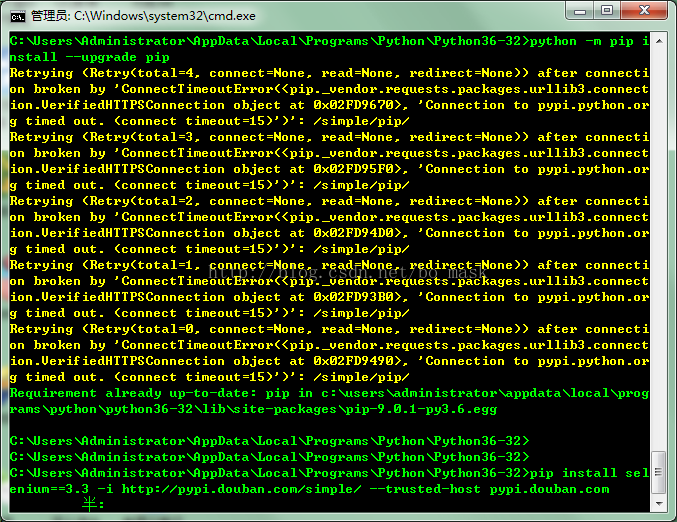
是因为网络的问题,要使用国内的镜像源来加速
解决办法:
你需要的是在你的命令行下面添加一句
例如:原本执行的命令是:
pip install selenium
改为:
pip install selenium -i http://pypi.douban.com/simple/ --trusted-host pypi.douban.com
结果会就成功:
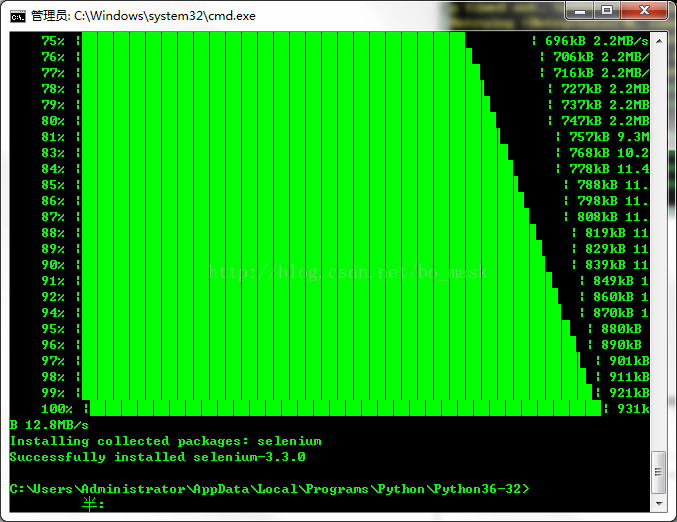
ok!问题解决!
关于 pip安装的可能错误的排除的更多相关文章
- python pip安装模块提示错误failed to create process
python pip安装模块提示错误failed to create process 原因: 报这个错误的原因,是因为python的目录名称或位置发生改动. 解决办法: 1.找到修改python所在的 ...
- 当利用pip安装模块出现错误时咋办
>在DOS窗口中到Python安装路径的scripts中执行 pip install pyperclip 出现错误 >>错误提示:Fatal error in launcher: ...
- Python:Ubuntu上使用pip安装opencv-python出现错误
Ubuntu 18.04 上 使用 pip 安装 opencv-python,出现的错误如下: 1 ~$: pip install opencv-python -i https://pypi.tuna ...
- windows下PIP安装模块编码错误解决
原因是pip安装Python包会加载我的用户目录,我的用户目录恰好是中文的,ascii不能编码.解决办法是: python目录 Python27\Lib\site-packages 建一个文件site ...
- pip 安装psycopg的错误
psycopg包安装有点问题,特别是在windows下,pip从requirements.txt批量安装总是出错,发现是这个包的问题. 这里需要用easy_install来装,因为gfw的问题,最好下 ...
- python2 使用pip安装psycopg2出现错误:Command "python setup.py egg_info" failed with error code 1 in /tmp/pip-install-mvzdNj/psycopg2/
公司业务需求,开发语言python2,需要使用数据库:postgresql,需要安装模块psycopg2这个模块, 使用pip install psycopg2 报错: Command "p ...
- 【原】python3.7 无法pip安装提示ssl错误解决方案
问题 pip is configured with locations that require TLS/SSL, however the ssl module in Python is not av ...
- Python从2.6升级到2.7,使用pip安装module,报错:No Module named pip.log(转载)
From:http://blog.csdn.net/iefreer/article/details/8086834 python升级后,使用pip安装module,错误: 错误原因:版本升级后,之前的 ...
- 使用pip安装python插件的时候出现Microsoft Visual C++ 9.0缺失错误
使用pip安装python插件的时候出现Microsoft Visual C++ 9.0缺失错误 使用pip安装python插件的时候出现Microsoft Visual C++ 9.0缺失错误 : ...
随机推荐
- CharacterController平滑移动到某点
通常使用CharacterController控制玩家移动时,我们都会写以下代码: void Update() { var move = (moveTarget - transform.Positio ...
- SMB协议利用之ms17-010-永恒之蓝漏洞抓包分析SMB协议
SMB协议利用之ms17-010-永恒之蓝漏洞抓包分析SMB协议 实验环境: Kali msf以及wireshark Win7开启网络共享(SMB协议) 实验步骤: 1.查看本机数据库是否开启,发现数 ...
- python发展史
一:Python介绍 python的创始人为吉多·范罗苏姆(Guido van Rossum)(龟叔).1989年的圣诞节期间,吉多·范罗苏姆为了在阿姆斯特丹 打发时间,决心开发一个新的脚本解释程序, ...
- live555源码学习1---Socket流程架构图
怎么说呢,换了工作环境,好多软件公司禁止使用了,有道笔记也无法使用了.发现博客园还可以上传图片,以后只能在这里记录了. 越发的感觉需要尽快把live555的代码拿下.因为工作环境问题,webrtc的源 ...
- winfrom之datagridview分页显示
这次datagridview绑定数据并分页操作,因为用到了webservice,所以代码会详细讲解.QueryByCondition是一个查询函数 客户端: PageData pageData=new ...
- 原生js获取鼠标坐标方法全面讲解:clientX/Y,pageX/Y,offsetX/Y,layerX/Y,screenX/Y
关于js鼠标事件综合各大浏览器能获取到坐标的属性总共以下五种 event.clientX/Y event.pageX/Y event.offsetX/Y event.layerX/Y event.sc ...
- WPF模板(二)应用
本次内容来源于电子书,和上一篇一样. 在WPF中有三大模板ControlTemplate,ItemsPanelTemplate,DataTemplate.其中ControlTemplate和Items ...
- 转://通过udev创建ASM共享磁盘(RAC)
OS:RedHat EL6.0 Oracle: Oracle 11gR2 在Oracle 11gR2,构建RAC时可以通过ASM创建asm disk,但是需要安装asmlib相关软件:对于RedH ...
- jenkins+svn+python+appium启动+mail+html报告
第一步:jenkins从svn中获取最新的测试代码 1.jenkins启动,进入jenkins目录,使用“java -jar jenkins.war”启动(安装后,jenkins已自启动,不用再自己启 ...
- 如何理解render: h => h(App)
学习vuejs的时候对这句代码不理解 new Vue({ el: '#app', router, store, i18n, render: h => h(App) }) 查找了有关资料,以下为结 ...