
spring boot 笔记1
demon 目录,公共配置
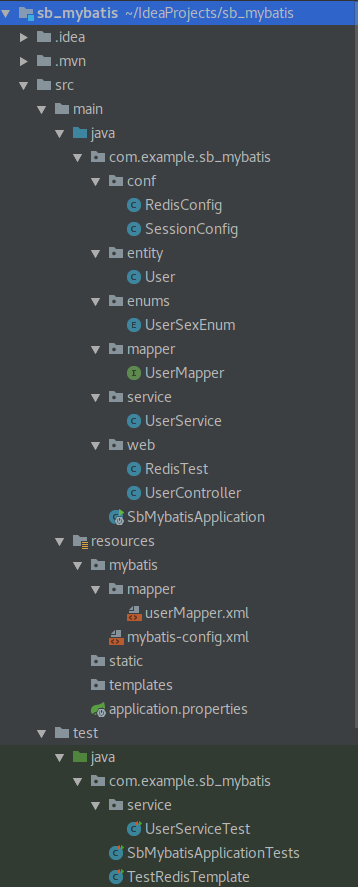
SbMybatisApplication.java
package com.example.sb_mybatis;

import org.mybatis.spring.annotation.MapperScan;

import org.springframework.boot.SpringApplication;

import org.springframework.boot.autoconfigure.SpringBootApplication;

import org.springframework.boot.web.servlet.ServletComponentScan;

@SpringBootApplication

@MapperScan("com.example.sb_mybatis.mapper")

@ServletComponentScan

public class SbMybatisApplication {

    public static void main(String[] args) {

        SpringApplication.run(SbMybatisApplication.class, args);

    }

}
pom.xml:
<?xml version="1.0" encoding="UTF-8"?>

<project xmlns="http://maven.apache.org/POM/4.0.0" xmlns:xsi="http://www.w3.org/2001/XMLSchema-instance"

         xsi:schemaLocation="http://maven.apache.org/POM/4.0.0 http://maven.apache.org/xsd/maven-4.0.0.xsd">

    <modelVersion>4.0.0</modelVersion>

    <groupId>com.example</groupId>

    <artifactId>sb_mybatis</artifactId>

    <version>0.0.1-SNAPSHOT</version>

    <packaging>jar</packaging>

    <name>sb_mybatis</name>

    <description>Demo project for Spring Boot</description>

    <parent>

        <groupId>org.springframework.boot</groupId>

        <artifactId>spring-boot-starter-parent</artifactId>

        <version>1.5.8.RELEASE</version>

        <relativePath/> <!-- lookup parent from repository -->

    </parent>

    <properties>

        <project.build.sourceEncoding>UTF-8</project.build.sourceEncoding>

        <project.reporting.outputEncoding>UTF-8</project.reporting.outputEncoding>

        <java.version>1.8</java.version>

    </properties>

    <dependencies>

        <dependency>

            <groupId>org.springframework.boot</groupId>

            <artifactId>spring-boot-starter-web</artifactId>

        </dependency>

        <dependency>

            <groupId>org.springframework.boot</groupId>

            <artifactId>spring-boot-devtools</artifactId>

            <scope>runtime</scope>

        </dependency>

        <dependency>

            <groupId>org.projectlombok</groupId>

            <artifactId>lombok</artifactId>

            <optional>true</optional>

        </dependency>

        <dependency>

            <groupId>org.springframework.boot</groupId>

            <artifactId>spring-boot-starter-test</artifactId>

            <scope>test</scope>

        </dependency>

        <dependency>

            <groupId>org.mybatis.spring.boot</groupId>

            <artifactId>mybatis-spring-boot-starter</artifactId>

            <version>1.3.1</version>

        </dependency>

        <dependency>

            <groupId>org.apache.commons</groupId>

            <artifactId>commons-lang3</artifactId>

            <version>3.6</version>

        </dependency>

        <dependency>

            <groupId>mysql</groupId>

            <artifactId>mysql-connector-java</artifactId>

        </dependency>

        <dependency>

            <groupId>com.alibaba</groupId>

            <artifactId>druid-spring-boot-starter</artifactId>

            <version>1.1.5</version>

        </dependency>

        <dependency>

            <groupId>org.springframework.boot</groupId>

            <artifactId>spring-boot-starter-data-redis</artifactId>

        </dependency>

        <dependency>

            <groupId>org.springframework.boot</groupId>

            <artifactId>spring-boot-starter-cache</artifactId>

        </dependency>

        <dependency>

            <groupId>org.springframework.session</groupId>

            <artifactId>spring-session-data-redis</artifactId>

        </dependency>

    </dependencies>

    <build>

        <plugins>

            <plugin>

                <groupId>org.springframework.boot</groupId>

                <artifactId>spring-boot-maven-plugin</artifactId>

            </plugin>

        </plugins>

    </build>

</project>
application.properties:
mybatis.config-locations=classpath:mybatis/mybatis-config.xml

mybatis.mapper-locations=classpath:mybatis/mapper/*.xml

mybatis.type-aliases-package=com.example.sb_mybatis.entity

spring.datasource.driverClassName=com.mysql.jdbc.Driver

spring.datasource.url=jdbc:mysql://127.0.0.1:3306/test?useUnicode=true&characterEncoding=utf-8

spring.datasource.username=root

spring.datasource.password=123456

#Druid

spring.datasource.druid.initial-size=3

spring.datasource.druid.min-idle=3

spring.datasource.druid.max-active=10

spring.datasource.druid.max-wait=60000

spring.datasource.druid.stat-view-servlet.login-username=admin

spring.datasource.druid.stat-view-servlet.login-password=admin

spring.datasource.druid.filter.stat.log-slow-sql=true

spring.datasource.druid.filter.stat.slow-sql-millis=2000

#Redis

# Redis 数据库索引(默认为0)

spring.redis.database=0

# Redis 服务器地址

spring.redis.host=127.0.0.1

# Redis 服务器连接端口

spring.redis.port=6379

# Redis 服务器连接密码(默认为空)

spring.redis.password=

# 连接池最大连接数(使用负值表示没有限制)

spring.redis.pool.max-active=8

# 连接池最大阻塞等待时间(使用负值表示没有限制)

spring.redis.pool.max-wait=-1

# 连接池中的最大空闲连接

spring.redis.pool.max-idle=8

# 连接池中的最小空闲连接

spring.redis.pool.min-idle=0

# 连接超时时间(毫秒)

spring.redis.timeout=10000
spring boot + mybatis
User.java
package com.example.sb_mybatis.entity;

import com.example.sb_mybatis.enums.UserSexEnum;

import lombok.Data;

import java.io.Serializable;

@Data

public class User  implements Serializable {

    private Long id;

    private String userName;

    private String passWord;

    private UserSexEnum userSex;

    private String nickName;

    public User(String userName, String passWord, UserSexEnum userSex, String nickName) {

        this.userName = userName;

        this.passWord = passWord;

        this.userSex = userSex;

        this.nickName = nickName;

    }

    public User() {

    }

}
UserSexEnum.java
package com.example.sb_mybatis.enums;

public enum UserSexEnum {

	MAN, WOMAN

}
UserMapper.java
package com.example.sb_mybatis.mapper;

import com.example.sb_mybatis.entity.User;

import java.util.List;

public interface UserMapper {

    List<User> getAll();

    User getOne(Long id);

    void insert(User user);

    void update(User user);

    void delete(Long id);

}
userMapper.xml
<?xml version="1.0" encoding="UTF-8" ?>

<!DOCTYPE mapper

        PUBLIC "-//mybatis.org//DTD Mapper 3.0//EN"

        "http://mybatis.org/dtd/mybatis-3-mapper.dtd">

<mapper namespace="com.example.sb_mybatis.mapper.UserMapper">

    <resultMap id="BaseResultMap" type="com.example.sb_mybatis.entity.User">

        <id column="id" property="id" jdbcType="BIGINT"/>

        <result column="userName" property="userName" jdbcType="VARCHAR"/>

        <result column="passWord" property="passWord" jdbcType="VARCHAR"/>

        <result column="user_sex" property="userSex" javaType="com.example.sb_mybatis.enums.UserSexEnum"/>

        <result column="nick_name" property="nickName" jdbcType="VARCHAR"/>

    </resultMap>

    <sql id="Base_Column_List">

        id, userName, passWord, user_sex, nick_name

    </sql>

    <select id="getAll" resultMap="BaseResultMap">

        SELECT

        <include refid="Base_Column_List"/>

        FROM users

    </select>

    <select id="getOne" parameterType="Long" resultMap="BaseResultMap">

        SELECT

        <include refid="Base_Column_List"/>

        FROM users where id = #{id}

    </select>

    <insert id="insert" parameterType="User">

        INSERT INTO users

        (userName, passWord, user_sex, nick_name)

        values (#{userName},#{passWord},#{userSex},#{nickName})

    </insert>

    <update id="update" parameterType="User" >

        UPDATE users SET

        userName=#{userName},passWord=#{passWord},user_sex=#{userSex},nick_name=#{nickName}

    </update>

    <delete id="delete" parameterType="Long" >

        DELETE FROM users where id=#{id}

    </delete>

</mapper>
mybatis-config.xml
<?xml version="1.0" encoding="UTF-8" ?>

<!DOCTYPE configuration

        PUBLIC "-//mybatis.org//DTD Config 3.0//EN"

        "http://mybatis.org/dtd/mybatis-3-config.dtd">

<configuration>

    <typeAliases>

        <typeAlias alias="Integer" type="java.lang.Integer"/>

        <typeAlias alias="Long" type="java.lang.Long"/>

        <typeAlias alias="HashMap" type="java.util.HashMap"/>

        <typeAlias alias="LinkedHashMap" type="java.util.LinkedHashMap"/>

        <typeAlias alias="ArrayList" type="java.util.ArrayList"/>

        <typeAlias alias="LinkedList" type="java.util.LinkedList"/>

        <typeAlias alias="User" type="com.example.sb_mybatis.entity.User"/>

    </typeAliases>

</configuration>
测试类,UserService就是直接调用mapper的发方法(代码略)
package com.example.sb_mybatis.service;

import com.example.sb_mybatis.entity.User;

import com.example.sb_mybatis.enums.UserSexEnum;

import org.junit.Test;

import org.junit.runner.RunWith;

import org.springframework.beans.factory.annotation.Autowired;

import org.springframework.boot.test.context.SpringBootTest;

import org.springframework.test.context.junit4.SpringRunner;

import static org.junit.Assert.*;

@RunWith(SpringRunner.class)

@SpringBootTest

public class UserServiceTest {

    @Autowired

    UserService service;

    @Test

    public void getAll() {

        System.out.println(service.getAll());

    }

    @Test

    public void getOne() {

        System.out.println(service.getOne(123L));

    }

    @Test

    public void insert() {

        User u = new User("aaa", "123456", UserSexEnum.MAN, "nickname");

        service.insert(u);

    }

    @Test

    public void update() {

        User u = service.getOne(123L);

        u.setNickName("hello");

        service.update(u);

    }

    @Test

    public void delete() {

        service.delete(123L);

    }

}
spring boot + redis
缓存
package com.example.sb_mybatis.conf;

import org.springframework.cache.CacheManager;

import org.springframework.cache.annotation.CachingConfigurerSupport;

import org.springframework.cache.annotation.EnableCaching;

import org.springframework.cache.interceptor.KeyGenerator;

import org.springframework.context.annotation.Bean;

import org.springframework.context.annotation.Configuration;

import org.springframework.data.redis.cache.RedisCacheManager;

import org.springframework.data.redis.core.RedisTemplate;

import java.lang.reflect.Method;

@Configuration

@EnableCaching

public class RedisConfig extends CachingConfigurerSupport {

    @Bean

    public KeyGenerator keyGenerator() {

        return new KeyGenerator() {

            @Override

            public Object generate(Object target, Method method, Object... params) {

                StringBuilder sb = new StringBuilder();

                sb.append(target.getClass().getName());

                sb.append(method.getName());

                for (Object obj : params) {

                    sb.append(obj.toString());

                }

                return sb.toString();

            }

        };

    }

    @Bean

    public CacheManager cacheManager(RedisTemplate redisTemplate) {

        RedisCacheManager rcm = new RedisCacheManager(redisTemplate);

        //设置缓存过期时间

        //rcm.setDefaultExpiration(60);//秒

        return rcm;

    }

}
RedisHttpSession
package com.example.sb_mybatis.conf;

import org.springframework.context.annotation.Configuration;

import org.springframework.session.data.redis.config.annotation.web.http.EnableRedisHttpSession;

@Configuration

@EnableRedisHttpSession(maxInactiveIntervalInSeconds = 86400*30)

public class SessionConfig {

}
测试类
package com.example.sb_mybatis.web;

import com.example.sb_mybatis.entity.User;

import com.example.sb_mybatis.service.UserService;

import org.springframework.beans.factory.annotation.Autowired;

import org.springframework.cache.annotation.CacheEvict;

import org.springframework.cache.annotation.CachePut;

import org.springframework.cache.annotation.Cacheable;

import org.springframework.web.bind.annotation.RequestMapping;

import org.springframework.web.bind.annotation.RequestMethod;

import org.springframework.web.bind.annotation.RestController;

import javax.servlet.http.HttpServletRequest;

import java.util.HashMap;

import java.util.List;

import java.util.Map;

@RestController

public class RedisTest {

    @Autowired

    UserService userService;

    @RequestMapping("/hello")

    @Cacheable(value = "helloCache")

    public String hello(String name) {

        System.out.println("没有走缓存!");

        return "hello " + name;

    }

    @RequestMapping("/condition")

    @Cacheable(value = "condition", condition = "#name.length() <= 4")

    public String condition(String name) {

        System.out.println("没有走缓存!");

        return "hello " + name;

    }

    @RequestMapping("/u_list")

    @Cacheable(value = "usersCache", key = "#k")

    public List<User> getUsers(String k) {

        List<User> users = userService.getAll();

        System.out.println("执行了数据库操作");

        return users;

    }

    @RequestMapping("/u_list_update")

    @CachePut(value = "usersCache", key = "#k")

    public List<User> getUsers_update(String k) {

        List<User> users = userService.getAll();

        System.out.println("执行了数据库操作");

        return users;

    }

    @RequestMapping("/u_list_del")

    @CacheEvict(value = "usersCache", allEntries = true)

    public List<User> getUsers_del() {

        List<User> users = userService.getAll();

        System.out.println("执行了数据库操作");

        return users;

    }

    @RequestMapping(value = "/setSession", method = RequestMethod.GET)

    public Map<String, Object> setSession (HttpServletRequest request){

        Map<String, Object> map = new HashMap<>();

        request.getSession().setAttribute("request_Url", request.getRequestURL());

        request.getSession().setAttribute("message", request.getRequestURL());

        map.put("request Url", request.getRequestURL());

        return map;

    }

    @RequestMapping(value = "/getSession")

    public Object getSession (HttpServletRequest request){

        Map<String, Object> map = new HashMap<>();

        map.put("sessionId", request.getSession().getId());

        map.put("message", request.getSession().getAttribute("message"));

        map.put("request_Url", request.getSession().getAttribute("request_Url"));

        System.out.println("==getSession==");

        return map;

    }

}
注意:
@Cacheable(value = "usersCache", key = "#k") 和@CachePut(value = "usersCache", key = "#k")需要指定一个相同的key,
访问时url后加上 ?k=123
如果不指定,@CachePut不能更新redis里@Cacheable对应的值,不知道是不是bug,有待进一步了解。
spring boot 笔记1的更多相关文章
- spring boot 笔记--第三章
spring boot 笔记 第三章,使用Spring boot 构建系统: 强烈建议支持依赖管理的构建系统,Maven或Gradle 依赖管理: Spring Boot的每版本都会提供它支持的依赖列 ...
- Spring Boot笔记二:快速创建以及yml文件自动注入
上个笔记写了如何自己去创建Spring boot,以及如何去打jar包,其实,还是有些麻烦的,我们还自己新建了几个文件夹不是. Idea可以让我们快速的去创建Spring boot应用,来看 一.快速 ...
- Spring Boot 笔记 (1) - Maven、基本配置、Profile的使用
一. Spring Boot 简介 开箱即用的一站式 Java EE 解决方案 Spring 技术栈的大整合 核心问题 暂时无法回答 Spring Boot 和 SOA 有什么区别? Spring B ...
- Spring Boot笔记(一)
Spring Boot是由Pivotal团队提供的全新框架,其设计目的是用来简化新Spring应用的初始搭建以及开发过程.该框架使用了特定的方式来进行配置,从而使开发人员不再需要定义样板化的配置.通过 ...
- Spring Boot笔记六:Thymeleaf介绍
目录 什么是thymeleaf? 创建最简单的thymeleaf thymeleaf语法 什么是thymeleaf? thymeleaf是一个模板引擎,是用来在Spring Boot中代替JSP的 引 ...
- Spring Boot笔记五: Web开发之Webjar和静态资源映射规则
目录 Webjar /** 访问当前项目的任何资源 欢迎页 标签页图标 Webjar 开始讲到Spring Boot的Web开发了,先介绍Webjar,这个其实就是把一些前端资源以jar包的形式导入到 ...
- Spring Boot笔记四:日志框架介绍
我是一名程序员,我喜欢写System.out.println来打印一些重要的信息...后来我学了面向对象,我把这些输出语句整合到了一个工具类里面,可以打印,也可以保存日志. 我是一名积极思考的程序员, ...
- Spring Boot笔记一 输出hello
开始学习Spring Boot了,本篇文章你可以学到 1.Spring Boot的基本配置,输出一句hello 许嵩 2.Spring boot打包成jar包 一.Spring boot的基本配置 这 ...
- Spring Boot笔记之自定义启动banner
控制banner内容 Spring Boot启动的时候默认的banner是spring的字样,看多了觉得挺单调的,Spring Boot为我们提供了自定义banner的功能. 自定义banner只需要 ...
随机推荐
- Visual Studio 2015中设计UML类图
1.UML简介 Unified Modeling Language (UML)又称统一建模语言或标准建模语言. 简单说就是以图形方式表现模型,根据不同模型进行分类,在UML 2.0中有13种图,以下是 ...
- Ajax的请求规范(二)
第一种方式:send()不带参数 function doAjax(url,fnSucc,fnFaild) { //1.创建Ajax对象 if (window.XMLHttpRequest) {//判断 ...
- CSS外边框、边界样式常用组合
一.CSS框线一览表 border-top : 1px solid #6699cc; /*上框线*/ border-bottom : 1px solid #6699cc; /*下框线*/ border ...
- 基于jieba,TfidfVectorizer,LogisticRegression进行搜狐新闻文本分类
一.简介 此文是对利用jieba,word2vec,LR进行搜狐新闻文本分类的准确性的提升,数据集和分词过程一样,这里就不在叙述,读者可参考前面的处理过程 经过jieba分词,产生24000条分词结果 ...
- MapReduce框架原理-MapTask工作机制
MapReduce框架原理-MapTask工作机制 作者:尹正杰 版权声明:原创作品,谢绝转载!否则将追究法律责任. maptask的并行度决定map阶段的任务处理并发度,进而影响到整个job的处理速 ...
- Linux下常用的shell操作
# 设定hosts解析记录 sh-4.2# echo "$(ifconfig ens192 | awk '/\<inet\>/{print $2}') $(hostname)&q ...
- JVM 内存初学 堆(heap)、栈(stack)和方法区(method)
这两天看了一下深入浅出JVM这本书,推荐给高级的java程序员去看,对你了解JAVA的底层和运行机制有比较大的帮助.废话不想讲了.入主题:先了解具体的概念:JAVA的JVM的内存可分为3个区:堆(he ...
- js和jQuery中的事件绑定与普通事件
普通事件,是指直接对元素进行事件注册,然后触发 而事件绑定是将事件注册到元素上 两者区别就是在于普通事件不可以重复添加多个事件,若添加也会覆盖,只会触发其中一个事件(最后注册的那个) 而事件绑定是可以 ...
- jmeter元件执行顺序及简介
最近在学习Jmeter,在进行实操之前,先查看了官方文档.因为官方文档是英文的,为了方便以后查看,自己翻译了一部分,中间个别地方根据自己的理解简单地翻译了部分.如果翻译等有问题,欢迎指正. 一.执行顺 ...
- python 面向对象(三)类与类之间的关系 初始化方法一些类
###################总结################# 面试的时候 让写python一些特殊方法 __init__ 创建对象的时候初始化 __new__对象实例化调用第一个方法 ...