
Bootstrap 表格
Bootstrap 提供了一个清晰的创建表格的布局。下表列出了 Bootstrap 支持的一些表格元素:
| 标签 | 描述 |
|---|---|
| <table> | 为表格添加基础样式。 |
| <thead> | 表格标题行的容器元素(<tr>),用来标识表格列。 |
| <tbody> | 表格主体中的表格行的容器元素(<tr>)。 |
| <tr> | 一组出现在单行上的表格单元格的容器元素(<td> 或 <th>)。 |
| <td> | 默认的表格单元格。 |
| <th> | 特殊的表格单元格,用来标识列或行(取决于范围和位置)。必须在 <thead> 内使用。 |
| <caption> | 关于表格存储内容的描述或总结。 |
基本的表格
如果您想要一个只带有内边距(padding)和水平分割的基本表,请添加 class .table,如下面实例所示:
<!DOCTYPE html>

<html>

<head>

   <title>Bootstrap 实例 - 基本的表格</title>

   <link href="/bootstrap/css/bootstrap.min.css" rel="stylesheet">

   <script src="/scripts/jquery.min.js"></script>

   <script src="/bootstrap/js/bootstrap.min.js"></script>

</head>

<body>

<table class="table">

   <caption>基本的表格布局</caption>

   <thead>

      <tr>

         <th>名称</th>

         <th>城市</th>

      </tr>

   </thead>

   <tbody>

      <tr>

         <td>Tanmay</td>

         <td>Bangalore</td>

      </tr>

      <tr>

         <td>Sachin</td>

         <td>Mumbai</td>

      </tr>

   </tbody>

</table>

</body>

</html>
结果如下所示:

可选的表格类
除了基本的表格标记和 .table class,还有一些可以用来为标记定义样式的类。下面将向您介绍这些类。
条纹表格
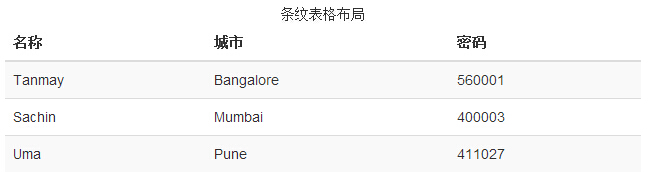
通过添加 .table-striped class,您将在 <tbody> 内的行上看到条纹,如下面的实例所示:
<!DOCTYPE html>

<html>

<head>

   <title>Bootstrap 实例 - 条纹表格</title>

   <link href="/bootstrap/css/bootstrap.min.css" rel="stylesheet">

   <script src="/scripts/jquery.min.js"></script>

   <script src="/bootstrap/js/bootstrap.min.js"></script>

</head>

<body>

<table class="table table-striped">

   <caption>条纹表格布局</caption>

   <thead>

      <tr>

         <th>名称</th>

         <th>城市</th>

         <th>密码</th>

      </tr>

   </thead>

   <tbody>

      <tr>

         <td>Tanmay</td>

         <td>Bangalore</td>

         <td>560001</td>

      </tr>

      <tr>

         <td>Sachin</td>

         <td>Mumbai</td>

         <td>400003</td>

      </tr>

      <tr>

         <td>Uma</td>

         <td>Pune</td>

         <td>411027</td>

      </tr>

   </tbody>

</table>

</body>

</html>
结果如下所示:
结果如下所示:
边框表格
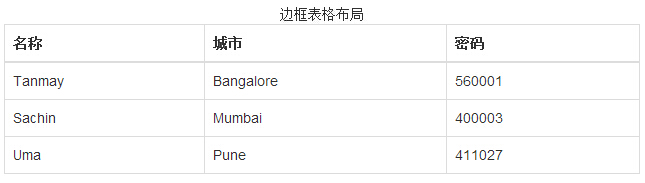
通过添加 .table-bordered class,您将看到每个元素周围都有边框,且占整个表格是圆角的,如下面的实例所示:
<!DOCTYPE html>

<html>

<head>

   <title>Bootstrap 实例 - 边框表格</title>

   <link href="/bootstrap/css/bootstrap.min.css" rel="stylesheet">

   <script src="/scripts/jquery.min.js"></script>

   <script src="/bootstrap/js/bootstrap.min.js"></script>

</head>

<body>

<table class="table table-bordered">

   <caption>边框表格布局</caption>

   <thead>

      <tr>

         <th>名称</th>

         <th>城市</th>

         <th>密码</th>

      </tr>

   </thead>

   <tbody>

      <tr>

         <td>Tanmay</td>

         <td>Bangalore</td>

         <td>560001</td>

      </tr>

      <tr>

         <td>Sachin</td>

         <td>Mumbai</td>

         <td>400003</td>

      </tr>

      <tr>

         <td>Uma</td>

         <td>Pune</td>

         <td>411027</td>

      </tr>

   </tbody>

</table>

</body>

</html>
结果如下所示:
悬停表格
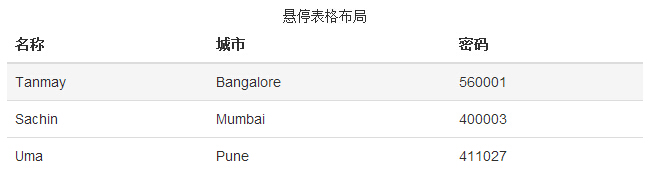
通过添加 .table-hover class,当指针悬停在行上时会出现浅灰色背景,如下面的实例所示:
<!DOCTYPE html>

<html>

<head>

   <title>Bootstrap 实例 - 悬停表格</title>

   <link href="/bootstrap/css/bootstrap.min.css" rel="stylesheet">

   <script src="/scripts/jquery.min.js"></script>

   <script src="/bootstrap/js/bootstrap.min.js"></script>

</head>

<body>

<table class="table table-hover">

   <caption>悬停表格布局</caption>

   <thead>

      <tr>

         <th>名称</th>

         <th>城市</th>

         <th>密码</th>

      </tr>

   </thead>

   <tbody>

      <tr>

         <td>Tanmay</td>

         <td>Bangalore</td>

         <td>560001</td>

      </tr>

      <tr>

         <td>Sachin</td>

         <td>Mumbai</td>

         <td>400003</td>

      </tr>

      <tr>

         <td>Uma</td>

         <td>Pune</td>

         <td>411027</td>

      </tr>

   </tbody>

</table>

</body>

</html>
结果如下所示:
上下文类
下表中所列出的上下文类允许您改变表格行或单个单元格的背景颜色。
| 类 | 描述 |
|---|---|
| .active | 对某一特定的行或单元格应用悬停颜色 |
| .success | 表示一个成功的或积极的动作 |
| .warning | 表示一个需要注意的警告 |
| .danger | 表示一个危险的或潜在的负面动作 |
这些类可被应用到 <tr>、<td> 或 <th>。
<!DOCTYPE html>

<html>

<head>

   <title>Bootstrap 实例 - 上下文类</title>

   <link href="/bootstrap/css/bootstrap.min.css" rel="stylesheet">

   <script src="/scripts/jquery.min.js"></script>

   <script src="/bootstrap/js/bootstrap.min.js"></script>

</head>

<body>

<table class="table">

   <caption>上下文表格布局</caption>

   <thead>

      <tr>

         <th>产品</th>

         <th>付款日期</th>

         <th>状态</th>

      </tr>

   </thead>

   <tbody>

      <tr class="active">

         <td>产品1</td>

         <td>23/11/2013</td>

         <td>待发货</td>

      </tr>

      <tr class="success">

         <td>产品2</td>

         <td>10/11/2013</td>

         <td>发货中</td>

      </tr>

      <tr  class="warning">

         <td>产品3</td>

         <td>20/10/2013</td>

         <td>待确认</td>

      </tr>

      <tr  class="danger">

         <td>产品4</td>

         <td>20/10/2013</td>

         <td>已退货</td>

      </tr>

   </tbody>

</table>

</body>

</html>
结果如下所示:

响应式表格
通过把任意的 .table 包在 .table-responsive class 内,您可以让表格水平滚动以适应小型设备(小于 768px)。当在大于 768px 宽的大型设备上查看时,您将看不到任何的差别。
<!DOCTYPE html>

<html>

<head>

   <title>Bootstrap 实例 - 响应式表格</title>

   <link href="/bootstrap/css/bootstrap.min.css" rel="stylesheet">

   <script src="/scripts/jquery.min.js"></script>

   <script src="/bootstrap/js/bootstrap.min.js"></script>

</head>

<body>

<div class="table-responsive">

   <table class="table">

      <caption>响应式表格布局</caption>

      <thead>

         <tr>

            <th>产品</th>

            <th>付款日期</th>

            <th>状态</th>

         </tr>

      </thead>

      <tbody>

         <tr>

            <td>产品1</td>

            <td>23/11/2013</td>

            <td>待发货</td>

         </tr>

         <tr>

            <td>产品2</td>

            <td>10/11/2013</td>

            <td>发货中</td>

         </tr>

         <tr>

            <td>产品3</td>

            <td>20/10/2013</td>

            <td>待确认</td>

         </tr>

         <tr>

            <td>产品4</td>

            <td>20/10/2013</td>

            <td>已退货</td>

         </tr>

      </tbody>

   </table>

</div>

</body>

</html>
结果如下所示:

Bootstrap 表格的更多相关文章
- Bootstrap 表格 笔记
Bootstrap 表格 Bootstrap 提供了一个清晰的创建表格的布局.下表列出了 Bootstrap 支持的一些表格元素: 标签 描述 <table> 为表格添加基础样式. < ...
- 【原创】bootstrap框架的学习 第七课 -[bootstrap表格]
Bootstrap 表格 标签 描述 <table> 为表格添加基础样式. <thead> 表格标题行的容器元素(<tr>),用来标识表格列. <tbody& ...
- Bootstrap表格样式(附源码文件)--Bootstrap
1.表格默认样式 <h4>表格默认样式</h4><table><!--默认样式--> <tr><th>序号</th> ...
- Bootstrap -- 表格样式、表单布局
Bootstrap -- 表格样式.表单布局 1. 表格的一些样式 举例: <!DOCTYPE html> <html> <head> <meta http- ...
- bootstrap表格添加按钮、模态框实现
bootstrap表格添加按钮.模态框实现 原创 2017年07月20日 17:35:48 标签: bootstrap 1723 bootstrap表格添加按钮.模态框实现 - 需求: 需要表格后面每 ...
- jQuery动态生成Bootstrap表格
<%@ page language="java" import="java.util.*" pageEncoding="UTF-8"% ...
- Bootstrap表格类名及对应图形
.table:基础表格 不管制作哪种表格都离不开类名“table”.所以大家在使用Bootstrap表格时,千万注意,你的<table>元素中一定不能缺少类名“table”. .table ...
- 第二百三十三节,Bootstrap表格和按钮
Bootstrap表格和按钮 学习要点: 1.表格 2.按钮 本节课我们主要学习一下 Bootstrap 表格和按钮功能,通过内置的 CSS 定义,显示各 种丰富的效果. 一.表格 Bootstrap ...
- Bootstrap Bootstrap表格插件bootstrap-table配置与应用小结
Bootstrap表格插件bootstrap-table配置与应用小结 by:授客 QQ:1033553122 1. 测试环境 win7 JQuery-3.2.1.min.js 下载地址: h ...
- 实现Bootstrap表格拖拽
实现Bootstrap表格拖拽: 需要引入jquery.min.js.bootstrap相关文件,以及jquery.dragsort-0.5.2.js 代码如下: <html> <h ...
随机推荐
- Android Studio 有用的插件
从Eclipse切换到Android Studio 有一段时间了,发现as同,github,已经很多插件的集合有强大的合成效应. 安装插件请参考:http://blog.csdn.net/hyr839 ...
- Ubuntu15.04装机配置脚本
#!/bin/bash echo "vim" sudo apt-get install vim cp -r ./vim/.vim ~/ cp ./vim/.vimrc ~/ ech ...
- poj2528 Mayor's posters(线段树之成段更新)
Mayor's posters Time Limit: 1000MSMemory Limit: 65536K Total Submissions: 37346Accepted: 10864 Descr ...
- 探索 OpenStack 之(11):cinder-api Service 启动过程分析 以及 WSGI / Paste deploy / Router 等介绍
OpenStack 中的每一个提供 REST API Service 的组件,比如 cinder-api,nova-api 等,其实是一个 WSGI App,其主要功能是接受客户端发来的 HTTP R ...
- Web性能优化之动态合并JS/CSS文件并缓存客户端
来源:微信公众号CodeL 在Web开发过程中,会产生很多的js/css文件,传统的引用外部文件的方式会产生多次的http请求,从而加重服务器负担且网页加载缓慢,如何在一次请求中将多个文件一次加载出来 ...
- Ngrok远程桌面及ssh配置
上一篇Ngrok 内网穿透利器 使用教程我们讲到Ngrok的基本使用教程,这篇描述一下Ngrok的远程桌面及ssh配置 Step 1 修改配置文件ngrok.cfg server_addr: &quo ...
- redis 一二事 - 设置过期时间,以文件夹形式展示key显示缓存数据
在使用redis时,有时回存在大量数据的时候,而且分类相同,ID相同 可以使用hset来设置,这样有一个大类和一个小分类和一个value组成 但是hset不能设置过期时间 过期时间只能在set上设置 ...
- Unity3D实现赛车的灯光效果
车灯的需求 在赛车游戏中,遇到灯光弱的环境,赛车车可以打开前车灯照亮路边及前方,那一定是非常酷! 也见过虚拟现实项目通过Unity模拟汽车车灯的效果,但是我还没有想到好的思路来实现. 我的思路 使用( ...
- TestLink学习五:TestLink1.9.13和JIRA6.3.6的集成
testlink和jira的集成,一般步骤: 第1步:System-Issue Tracker Management添加JIRA的db模式.第2步:测试项目管理,“Issue Tracker Inte ...
- Python-json 和 pickle
这是用于序列化的两个模块 json:用于字符串和python数据类型间进行转换 pickle:用于python特有的类型和python的数据类型间进行转换 json模块提供了四个功能:dumps du ...