
CSS3 之高级动画(6)CSS3 clip-path属性实现的几何图形变形动画
clip-path
属性介绍:
clip-path属性可以创建一个只有元素的部分区域可以显示的剪切区域。
区域内的部分显示,区域外的隐藏。
剪切区域是被引用内嵌的URL定义的路径或者外部svg的路径。
使用:
具体还支持SVG路径
maker工具,你画好图形,代码就在下面: http://bennettfeely.com/clippy/
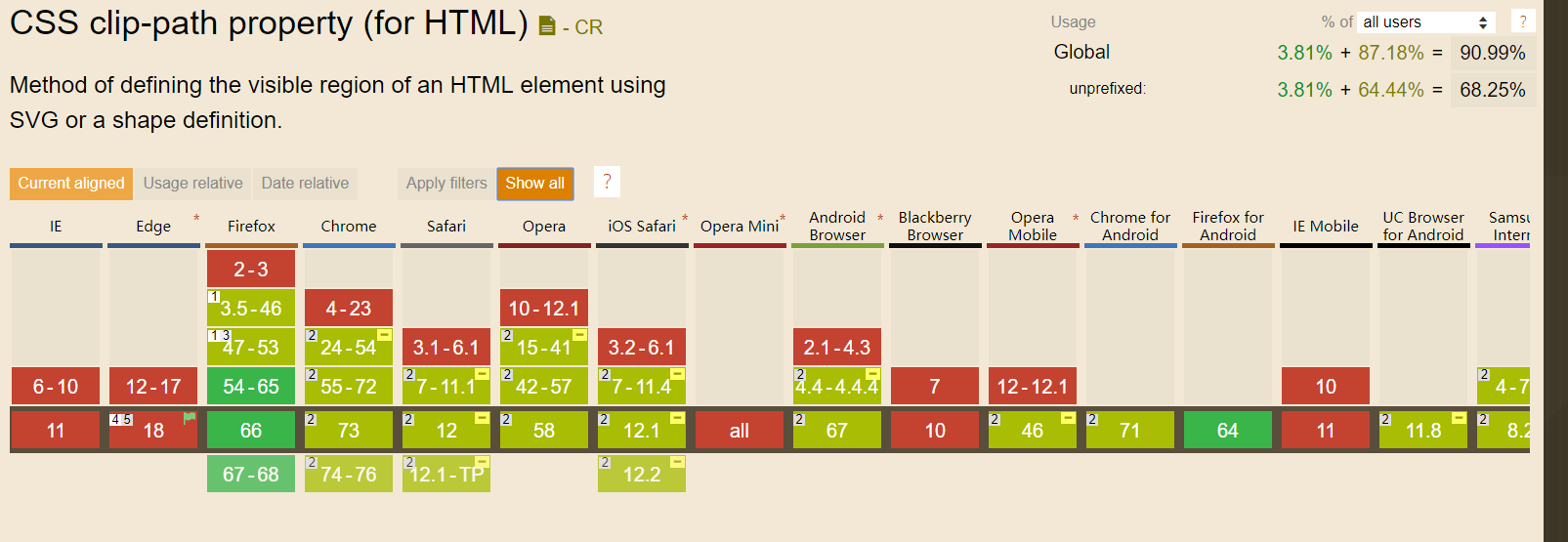
主流浏览器支持情况:
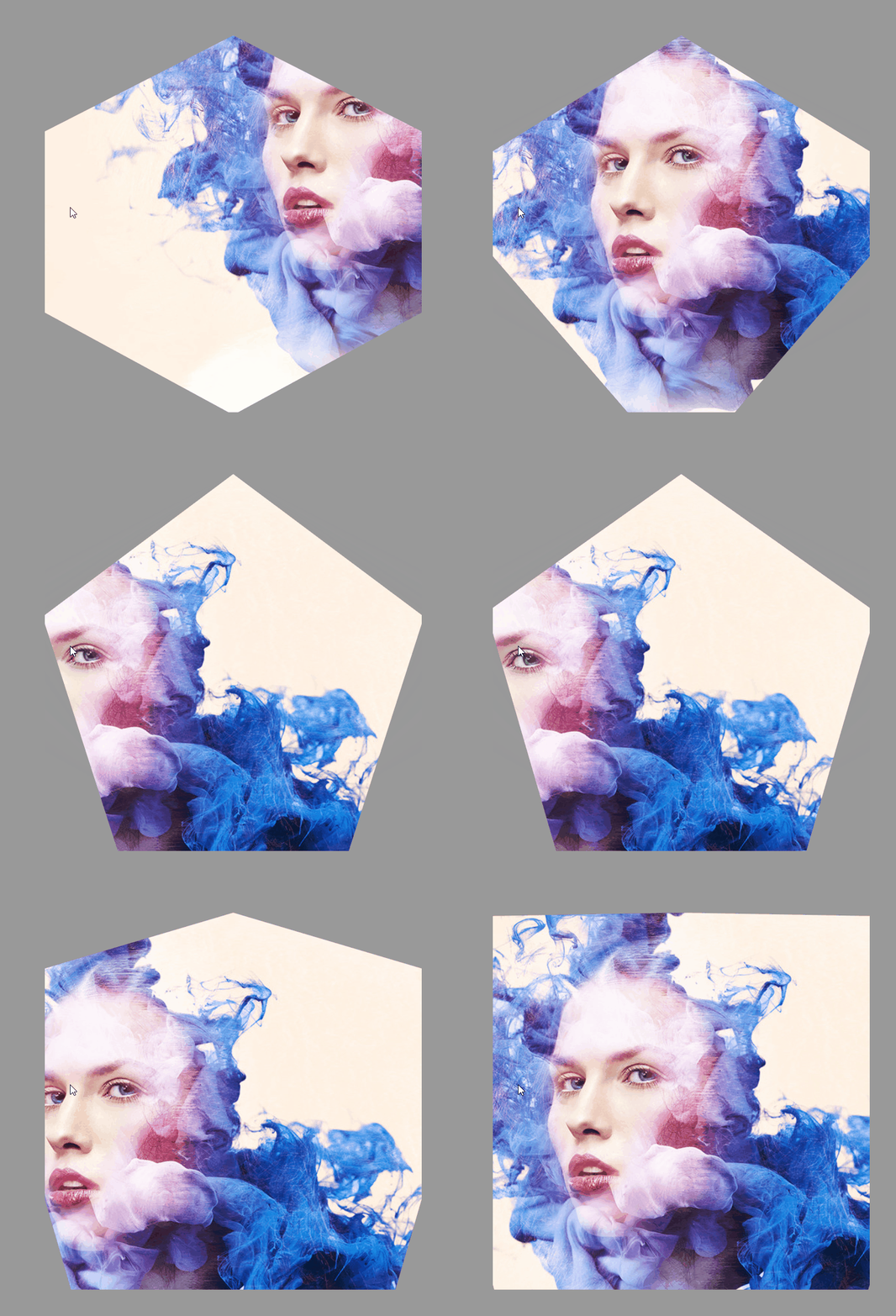
效果实现:
html:
<div></div>
css:
html,
body {
  height: 100%;
}

body {
  display: -webkit-flex;
  display: -ms-flexbox;
  display: flex;
  -webkit-justify-content: center;
  -ms-flex-pack: center;
  justify-content: center;
  -webkit-align-items: center;
  -ms-flex-align: center;
  align-items: center;
  background: #999999;
}

div {
  width: 75vmin;
  height: 75vmin;
  -webkit-animation: shape 10s ease-in-out infinite both;
  animation: shape 10s ease-in-out infinite both;
}

@-webkit-keyframes shape {

  from,
  to {
    -webkit-clip-path: polygon(30% 0%, 70% 0%, 100% 30%, 100% 70%, 70% 100%, 30% 100%, 0% 70%, 0% 30%);
    clip-path: polygon(30% 0%, 70% 0%, 100% 30%, 100% 70%, 70% 100%, 30% 100%, 0% 70%, 0% 30%);
    background: url('./267323.jpg') center;
  }

  14.28571% {
    -webkit-clip-path: polygon(30% 0%, 70% 0%, 100% 30%, 100% 70%, 70% 100%, 30% 100%, 0% 70%, 0% 30%);
    clip-path: polygon(30% 0%, 70% 0%, 100% 30%, 100% 70%, 70% 100%, 30% 100%, 0% 70%, 0% 30%);
    background: url('./267323.jpg') left top;
  }

  28.57143% {
    -webkit-clip-path: polygon(50% 0, 50% 0, 90% 20%, 100% 60%, 75% 100%, 25% 100%, 0 60%, 10% 20%);
    clip-path: polygon(50% 0, 50% 0, 90% 20%, 100% 60%, 75% 100%, 25% 100%, 0 60%, 10% 20%);
    background: url('./267323.jpg') right bottom;
  }

  42.85714% {
    -webkit-clip-path: polygon(50% 0, 50% 0, 100% 25%, 100% 75%, 50% 100%, 50% 100%, 0 75%, 0 25%);
    clip-path: polygon(50% 0, 50% 0, 100% 25%, 100% 75%, 50% 100%, 50% 100%, 0 75%, 0 25%);
    background: url('./267323.jpg') left bottom;
  }

  57.14286% {
    -webkit-clip-path: polygon(50% 0, 50% 0, 100% 38%, 100% 38%, 82% 100%, 18% 100%, 0 38%, 0 38%);
    clip-path: polygon(50% 0, 50% 0, 100% 38%, 100% 38%, 82% 100%, 18% 100%, 0 38%, 0 38%);
    background: url('./267323.jpg') right top;
  }

  71.42857% {
    -webkit-clip-path: polygon(50% 0, 50% 0, 100% 0, 100% 100%, 100% 100%, 0 100%, 0 100%, 0 0);
    clip-path: polygon(50% 0, 50% 0, 100% 0, 100% 100%, 100% 100%, 0 100%, 0 100%, 0 0);
    background: url('./267323.jpg') right right;
  }

  85.71429% {
    -webkit-clip-path: polygon(50% 0, 50% 0, 50% 0, 100% 100%, 100% 100%, 0 100%, 0 100%, 50% 0);
    clip-path: polygon(50% 0, 50% 0, 50% 0, 100% 100%, 100% 100%, 0 100%, 0 100%, 50% 0);
    background: url('./267323.jpg') left center;
  }
}

@keyframes shape {

  from,
  to {
    -webkit-clip-path: polygon(30% 0%, 70% 0%, 100% 30%, 100% 70%, 70% 100%, 30% 100%, 0% 70%, 0% 30%);
    clip-path: polygon(30% 0%, 70% 0%, 100% 30%, 100% 70%, 70% 100%, 30% 100%, 0% 70%, 0% 30%);
    background: url('./267323.jpg') center;
  }

  14.28571% {
    -webkit-clip-path: polygon(30% 0%, 70% 0%, 100% 30%, 100% 70%, 70% 100%, 30% 100%, 0% 70%, 0% 30%);
    clip-path: polygon(30% 0%, 70% 0%, 100% 30%, 100% 70%, 70% 100%, 30% 100%, 0% 70%, 0% 30%);
    background: url('./267323.jpg') left top;
  }

  28.57143% {
    -webkit-clip-path: polygon(50% 0, 50% 0, 90% 20%, 100% 60%, 75% 100%, 25% 100%, 0 60%, 10% 20%);
    clip-path: polygon(50% 0, 50% 0, 90% 20%, 100% 60%, 75% 100%, 25% 100%, 0 60%, 10% 20%);
    background: url('./267323.jpg') right bottom;
  }

  42.85714% {
    -webkit-clip-path: polygon(50% 0, 50% 0, 100% 25%, 100% 75%, 50% 100%, 50% 100%, 0 75%, 0 25%);
    clip-path: polygon(50% 0, 50% 0, 100% 25%, 100% 75%, 50% 100%, 50% 100%, 0 75%, 0 25%);
    background: url('./267323.jpg') left bottom;
  }

  57.14286% {
    -webkit-clip-path: polygon(50% 0, 50% 0, 100% 38%, 100% 38%, 82% 100%, 18% 100%, 0 38%, 0 38%);
    clip-path: polygon(50% 0, 50% 0, 100% 38%, 100% 38%, 82% 100%, 18% 100%, 0 38%, 0 38%);
    background: url('./267323.jpg') right top;
  }

  71.42857% {
    -webkit-clip-path: polygon(50% 0, 50% 0, 100% 0, 100% 100%, 100% 100%, 0 100%, 0 100%, 0 0);
    clip-path: polygon(50% 0, 50% 0, 100% 0, 100% 100%, 100% 100%, 0 100%, 0 100%, 0 0);
    background: url('./267323.jpg') right right;
  }

  85.71429% {
    -webkit-clip-path: polygon(50% 0, 50% 0, 50% 0, 100% 100%, 100% 100%, 0 100%, 0 100%, 50% 0);
    clip-path: polygon(50% 0, 50% 0, 50% 0, 100% 100%, 100% 100%, 0 100%, 0 100%, 50% 0);
    background: url('./267323.jpg') left center;
  }
}
CSS3 之高级动画(6)CSS3 clip-path属性实现的几何图形变形动画的更多相关文章
- Unity插件 - MeshEditor(六) 变形动画状态机
变形动画状态机--MeshAnimator,是针对MeshAnimation的状态管理器,有大量类似Unity animator的功能,但MeshAnimator操作会更加简便,更加直观,居家旅(zh ...
- CSS3实践之路(六):CSS3的过渡效果(transition)与动画(animation)
刚开始W3C CSS Workgroup拒绝将CSS3 transition与animation加入官方标准,一些成员认为过渡效果和动画并非样式属性,而且已经可以用脚本实现.所以请大家明白,特别是We ...
- CSS3展现精彩的动画效果 css3的动画属性
热火朝天的css3无疑吸引了很多前端开发者的眼球,然而在css3中的动画属性则是新功能中的主打招牌,说到css3的动画属性不得不让人想起这三个属性:Transform﹑Transition﹑Anima ...
- css3学习--css3动画详解一(animation属性)
***介绍的属性并不完全,写的都是我认为容易混淆的难点属性,所以属性会在最后综合案例展示~ 一.Keyframes介绍: Keyframes被称为关键帧,其类似于Flash中的关键帧.在CSS3中其主 ...
- (一)CSS3动画应用 - CSS3 实现 侧边栏展开收起
@keyframes 规则用于创建动画. @keyframes 中规定某项 CSS 样式,就能创建由当前样式逐渐改为新样式的动画效果 @keyframes 中创建动画时,请把它捆绑到某个选择器,否则不 ...
- CSS3集锦之新增选择器、圆角、阴影、透明度、transition动画、transform变形、animation动画
---恢复内容开始--- 一.CSS3新增选择器 1.nth-chlid(n)用法 selector:nth-chlid(n)指找到第n个子元素并且该元素为selector标签 <!DOCTYP ...
- 关于JS动画和CSS3动画的性能差异
本文章为综合其它资料所得. 根据Google Developer,Chromium项目里,渲染线程分为main thread和compositor thread. 如果CSS动画只是改变transfo ...
- CSS3 基本属性 浅析(含选择器、背景阴影、3D转换、动画等)
1渐进增强原则 2私有前缀 不同浏览器在发布不同版本(一般测试版)时会加前缀,新增属性加上前缀进行支持测试: Chrome浏览器:-webkit-border-radius: 5px; ...
- 使用jquery封装的动画脚本(无动画、css3动画、js动画)
自己封装好的showhide.js 包含无动画.css3动画.js动画 包括:fade(淡入淡出) slideUpDown(上下滑动) slideLeftRight(左右滑动) fadeSlid ...
随机推荐
- php面向对象的三大特性——封装、继承、多态
1.封装 目的:为了使类更加安全,类里面的成员变量对外界隐藏 做法: 1)将成员变量变成私有的: 2)在类中做方法间接访问成员变量: 3)在方法里面加控制条件. 例: class ren{ priva ...
- Android程序的入口点是什么,不是Main()吗
很多初入Android开发的网页可能不知道Android程序的入口点是什么,不是main()吗,当然我相信回复onCreate的在字面上不算错,但是你们想的是Activity中的onCreate 方法 ...
- 题解 CF1131C 【Birthday】
CF大水题 题意:给你n个人,他们的身高是a[i],让你将这几个人排成一个环,使得他们两两之间身高差的和最小. 思路:简单到爆了,恶意评分上蓝.直接将那几个人排个序,然后按序左右放就行了,也就是说1号 ...
- CSS-font
font:[ [ <' font-style '> || <' font-variant '> || <' font-weight '> ]? <' font ...
- 设备树DTS 学习:Linux DTS文件加载过程
背景 了解机制有利于对内核有更深的认识. wget https://mirrors.aliyun.com/linux-kernel/v3.x/linux-3.2.61.tar.xz 内核 在drive ...
- ThinkPad重大更新!5款创意设计PC齐发2日
导读 日前,ThinkPad巨匠P系列专业移动工作站迎来全线更新,包括ThinkPad P1隐士2019.ThinkPad P53.ThinkPad P73.ThinkPad P43s.ThinkPa ...
- 论文阅读:Blink-Fast Connectivity Recovery Entirely in the Data Plane
1.背景 在网络中,链路故障的发生在所难免,为了降低故障带来的影响,就需要重新路由,将数据传输到合适的链路上.当因为链路故障发生处的不同,也有不同的解决方法. AS(Autonomous System ...
- java.io.IOException: Error: JSP Buffer overflow
错误 jsp页面报错如下: Stacktrace: org.apache.jasper.servlet.JspServletWrapper.service(JspServletWrapper.java ...
- yum 安装 tomcat
前言对于一个新安装的 centos 系统来说,是没有 tomcat 服务器的.用下面的命令可以查看 tomcat 服务的状态. systemctl status tomcat.service//或者 ...
- 吴裕雄--天生自然java开发常用类库学习笔记:NumberFormat
import java.text.* ; public class NumberFormatDemo01{ public static void main(String args[]){ Number ...