
SpringCloud学习之Feign 的使用(五)
Feign 是一个声明式的伪RPC的REST客户端,它用了基于接口的注解方式,很方便的客户端配置,刚开始使用时还不习惯,感觉是在客户端写服务端的代码,Spring Cloud 给 Feign 添加了支持Spring MVC注解,并整合Ribbon及Eureka进行支持负载均衡。
Feign的使用很简单,有以下几步:
1、添加依赖
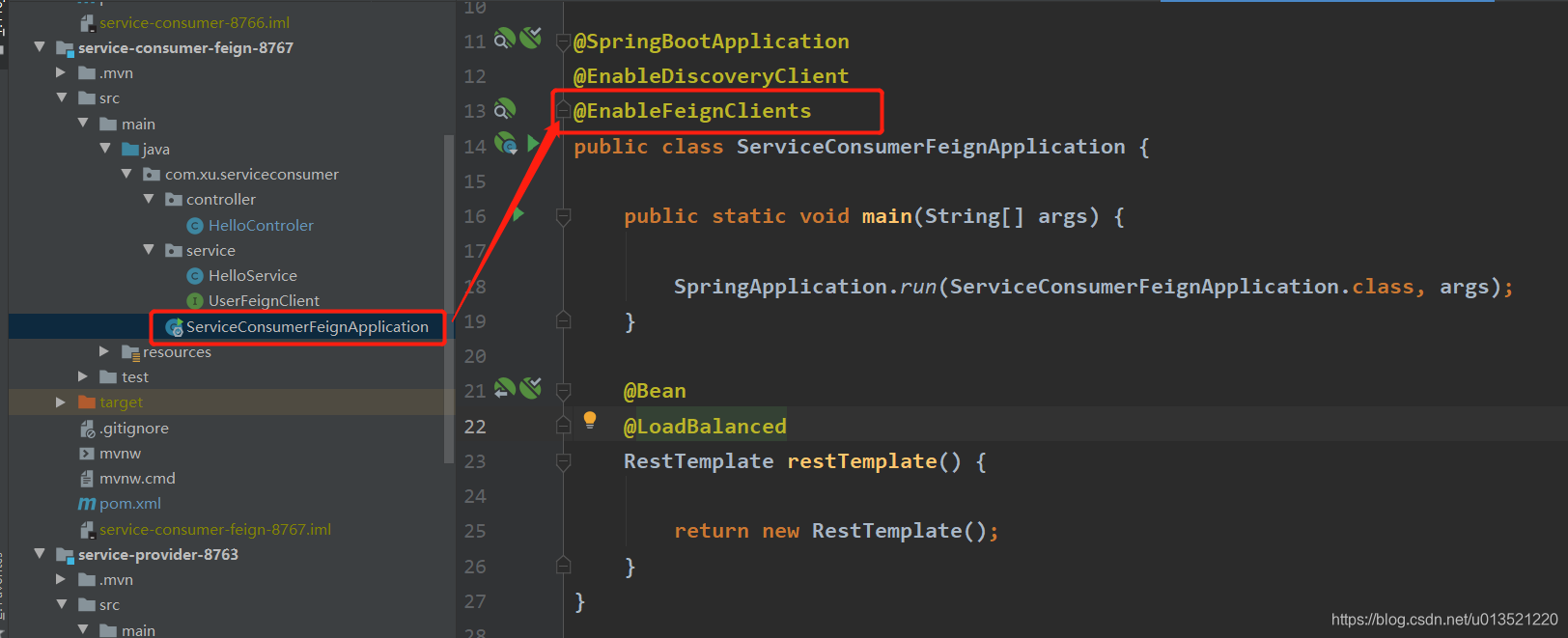
2、启动类添加 @EnableFeignClients 注解支持
3、建立Client接口,并在接口中定义需调用的服务方法
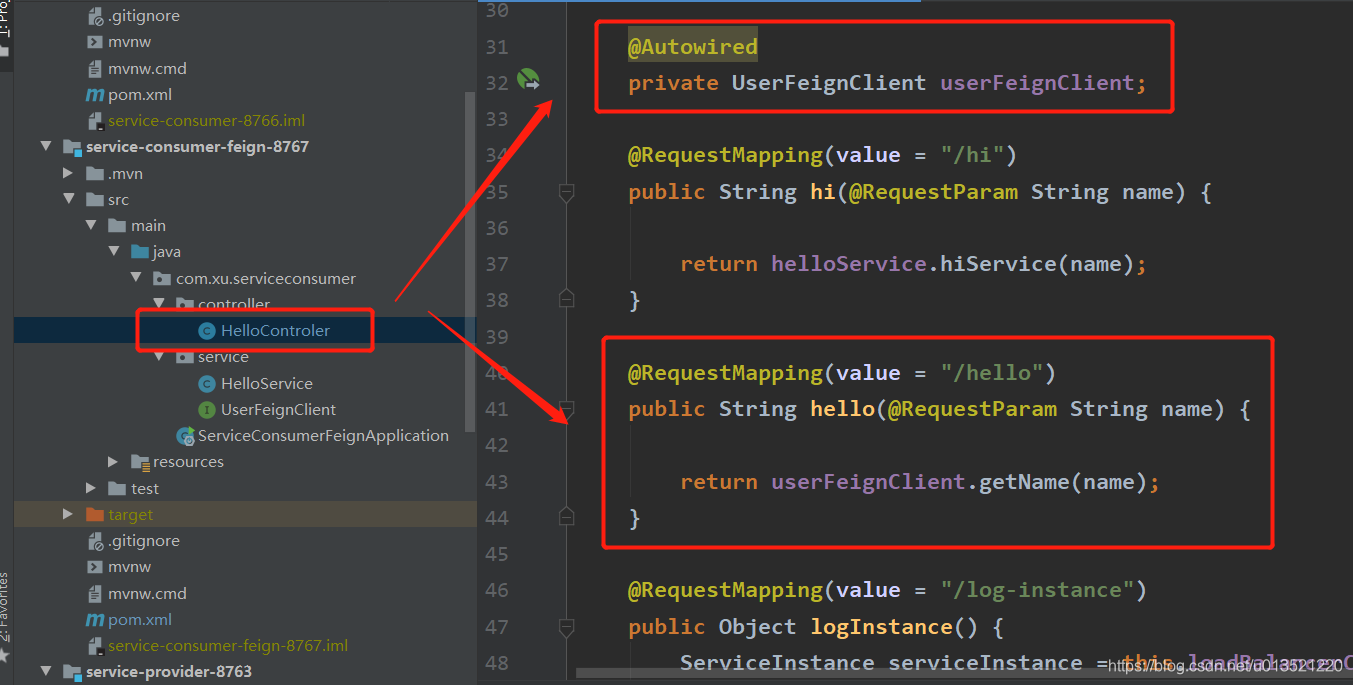
4、使用Client接口。
具体如下首先先添加feign需要的依赖


1、添加 spring-cloud-starter-openfeign 依赖
<dependency>

    <groupId>org.springframework.cloud</groupId>

    <artifactId>spring-cloud-starter-openfeign</artifactId>

</dependency>
完整的 pom.xml
<?xml version="1.0" encoding="UTF-8"?>

<project xmlns="http://maven.apache.org/POM/4.0.0" xmlns:xsi="http://www.w3.org/2001/XMLSchema-instance"

         xsi:schemaLocation="http://maven.apache.org/POM/4.0.0 https://maven.apache.org/xsd/maven-4.0.0.xsd">

    <modelVersion>4.0.0</modelVersion>

    <parent>

        <groupId>org.springframework.boot</groupId>

        <artifactId>spring-boot-starter-parent</artifactId>

        <version>2.2.0.RELEASE</version>

        <relativePath/> <!-- lookup parent from repository -->

    </parent>

    <groupId>com.xu</groupId>

    <artifactId>service-consumer-feign</artifactId>

    <version>0.0.1-SNAPSHOT</version>

    <name>service-consumer-feign</name>

    <description>Demo project for Spring Boot</description>

    <properties>

        <java.version>1.8</java.version>

        <spring-cloud.version>Hoxton.M3</spring-cloud.version>

    </properties>

    <dependencies>

        <dependency>

            <groupId>org.springframework.cloud</groupId>

            <artifactId>spring-cloud-starter-netflix-eureka-server</artifactId>

        </dependency>

        <dependency>

            <groupId>org.springframework.cloud</groupId>

            <artifactId>spring-cloud-starter-netflix-hystrix</artifactId>

        </dependency>

        <dependency>

            <groupId>org.springframework.cloud</groupId>

            <artifactId>spring-cloud-starter-openfeign</artifactId>

        </dependency>

        <dependency>

            <groupId>org.springframework.boot</groupId>

            <artifactId>spring-boot-starter-test</artifactId>

            <scope>test</scope>

            <exclusions>

                <exclusion>

                    <groupId>org.junit.vintage</groupId>

                    <artifactId>junit-vintage-engine</artifactId>

                </exclusion>

            </exclusions>

        </dependency>

        <dependency>

            <groupId>com.alibaba</groupId>

            <artifactId>fastjson</artifactId>

            <version>1.2.48</version>

        </dependency>

        <dependency>

            <groupId>org.springframework.boot</groupId>

            <artifactId>spring-boot-starter-web</artifactId>

        </dependency>

    </dependencies>

    <dependencyManagement>

        <dependencies>

            <dependency>

                <groupId>org.springframework.cloud</groupId>

                <artifactId>spring-cloud-dependencies</artifactId>

                <version>${spring-cloud.version}</version>

                <type>pom</type>

                <scope>import</scope>

            </dependency>

        </dependencies>

    </dependencyManagement>

    <build>

        <plugins>

            <plugin>

                <groupId>org.springframework.boot</groupId>

                <artifactId>spring-boot-maven-plugin</artifactId>

            </plugin>

        </plugins>

    </build>

    <repositories>

        <repository>

            <id>spring-milestones</id>

            <name>Spring Milestones</name>

            <url>https://repo.spring.io/milestone</url>

        </repository>

    </repositories>

</project>
2、启动类添加 @EnableFeignClients 注解支持
package com.xu.serviceconsumer;

import org.springframework.boot.SpringApplication;

import org.springframework.boot.autoconfigure.SpringBootApplication;

import org.springframework.cloud.client.discovery.EnableDiscoveryClient;

import org.springframework.cloud.client.loadbalancer.LoadBalanced;

import org.springframework.cloud.openfeign.EnableFeignClients;

import org.springframework.context.annotation.Bean;

import org.springframework.web.client.RestTemplate;

@SpringBootApplication

@EnableDiscoveryClient

@EnableFeignClients

public class ServiceConsumerFeignApplication {

    public static void main(String[] args) {

        SpringApplication.run(ServiceConsumerFeignApplication.class, args);

    }

    @Bean

    @LoadBalanced

    RestTemplate restTemplate() {

        return new RestTemplate();

    }

}
3、建立Client接口,并在接口中定义需调用的服务方法
package com.xu.serviceconsumer.service;

import org.springframework.cloud.openfeign.FeignClient;

import org.springframework.web.bind.annotation.RequestMapping;

import org.springframework.web.bind.annotation.RequestMethod;

import org.springframework.web.bind.annotation.RequestParam;

@FeignClient(name = "service-hello")

public interface UserFeignClient {

    @RequestMapping(value="/hi",method = RequestMethod.GET)

    String getName(@RequestParam String name);

}

说明:>> name="service-hello",这里的"service-hello"是注册到Eureka 中的要调用的应用名
>> @GetMapping("/hi") 这里的“/hi”是要调用的应用里的相应的方法(这里需注意,如果service-hello服务下面的 访问路径是 /hi/hello ,则这里也要写"/hi/hello")。
4、使用Client接口
package com.xu.serviceconsumer.controller;

import com.alibaba.fastjson.JSONObject;

import com.fasterxml.jackson.databind.util.JSONPObject;

import com.xu.serviceconsumer.service.HelloService;

import com.xu.serviceconsumer.service.UserFeignClient;

import org.slf4j.Logger;

import org.slf4j.LoggerFactory;

import org.springframework.beans.factory.annotation.Autowired;

import org.springframework.cloud.client.ServiceInstance;

import org.springframework.cloud.client.loadbalancer.LoadBalancerClient;

import org.springframework.web.bind.annotation.RequestMapping;

import org.springframework.web.bind.annotation.RequestParam;

import org.springframework.web.bind.annotation.RestController;

import org.springframework.web.client.RestTemplate;

import java.util.HashMap;

import java.util.Map;

@RestController

public class HelloControler {

    private static final Logger LOGGER = LoggerFactory.getLogger(HelloControler.class);

    @Autowired

    private HelloService helloService;

    @Autowired

    private LoadBalancerClient loadBalancerClient;

    @Autowired

    private UserFeignClient userFeignClient;

    @RequestMapping(value = "/hi")

    public String hi(@RequestParam String name) {

        return helloService.hiService(name);

    }

    @RequestMapping(value = "/hello")

    public String hello(@RequestParam String name) {

        return userFeignClient.getName(name);

    }

    @RequestMapping(value = "/log-instance")

    public Object logInstance() {

        ServiceInstance serviceInstance = this.loadBalancerClient.choose("SERVICE-HELLO");

        LOGGER.info("{}:{}:{}", serviceInstance.getServiceId(),

                serviceInstance.getHost(),serviceInstance.getPort());

        JSONObject object1 = new JSONObject();

        object1.put("ServiceId",serviceInstance.getServiceId());

        object1.put("Host",serviceInstance.getHost());

        object1.put("Port",serviceInstance.getPort());

        return object1.toJSONString();

    }

}
打开浏览器,访问上面Controller中的RestApi请求http://localhost:8767/hello?name=Ronnie结果如下:

看到这里显然我们的请求响应成功了,成功调用了服务提供者的服务,本节课程到此就结束了,各位如有疑问请再下方留言,我会尽快答复,谢谢观赏!
===============================================================================
如果您觉得此文有帮助,可以打赏点钱给我支付宝或扫描二维码


SpringCloud学习之Feign 的使用(五)的更多相关文章
- SpringCloud学习之feign
一.关于feigin feigin是一种模板化,声明式的http客户端,feign可以通过注解绑定到接口上来简化Http请求访问.当然我们也可以在创建Feign对象时定制自定义解码器(xml或者jso ...
- SpringCloud学习(5)——Feign负载均衡
Feign概述 Feign是声明式的Web服务客户端, 使得编写Web服务客户端变的非常容易, 只需要创建一个接口, 然后在上面添加注解即可. Feign旨在使编写Java Http客户端变的更容易. ...
- SpringCloud学习之Ribbon
一.负载均衡与Ribbon 负载均衡,在集群中是很常见的一个“名词”,顾名思义是根据一定的算法将请求分摊至对应的服务节点上,常见的算法有如下几种: 轮询法:所有请求被依次分发到每台应用服务器上,每台服 ...
- SpringCloud学习笔记(3):使用Feign实现声明式服务调用
简介 Feign是一个声明式的Web Service客户端,它简化了Web服务客户端的编写操作,相对于Ribbon+RestTemplate的方式,开发者只需通过简单的接口和注解来调用HTTP API ...
- SpringCloud学习笔记(9)----Spring Cloud Netflix之声明式 REST客户端 -Feign的使用
1. 什么是Feign? Feign是一种声明式.模板化的HTTP客户端,在SpringCloud中使用Feign.可以做到使用HTTP请求远程服务时能与调用本地方法一样的编码体验,开发者完全感知不到 ...
- SpringCloud学习笔记(六):Feign+Ribbon负载均衡
简介 官网解释: http://projects.spring.io/spring-cloud/spring-cloud.html#spring-cloud-feign Feign是一个声明式WebS ...
- SpringCloud学习系列之三----- 断路器(Hystrix)和断路器监控(Dashboard)
前言 本篇主要介绍的是SpringCloud中的断路器(Hystrix)和断路器指标看板(Dashboard)的相关使用知识. SpringCloud Hystrix Hystrix 介绍 Netfl ...
- SpringCloud学习(二):微服务入门实战项目搭建
一.开始使用Spring Cloud实战微服务 1.SpringCloud是什么? 云计算的解决方案?不是 SpringCloud是一个在SpringBoot的基础上构建的一个快速构建分布式系统的工具 ...
- java框架之SpringCloud(4)-Ribbon&Feign负载均衡
在上一章节已经学习了 Eureka 的使用,SpringCloud 也提供了基于 Eureka 负载均衡的两种方案:Ribbon 和 Feign. Ribbon负载均衡 介绍 SpringCloud ...
随机推荐
- 洛谷 P1247 取火柴游戏
题目传送门 暴力 \((\)由于我这样的初中蒟蒻不\((bu)\)喜\((hui)\)欢\((xie)\)数学证明,所以题解中的证明全是其他大佬的题解已经多次证明过的,这里就不再啰嗦了.\()\) - ...
- 数学软件实训1-MATLAB程序设计及应用初步
数学软件实训任务一 一 题目:MATLAB程序设计及应用初步 二 目的:掌握MATLAB程序设计的基本方法,会利用MATLAB程序设计思想编程处理一些简单问题. 三 要求: 1 掌握控制流的基本语法结 ...
- java理解抽象类 2.19
// Telphone.java public abstract class Telphone{ public abstract void call(); public abstract void m ...
- CheckBox标签和属性
CheckBox的作用:可以提供复选 下面是我点击按钮查看所选内容的代码:定义按钮监听器,并在onClick方法中调用shoeAlt方法(此方法会在第二块代码定义) Button btn=(Butto ...
- 关于连接查询主要是左右连接查询中,where和on的区别
工作中,今天用到左连接查询,我自己造的数据,需要根据条件进行筛选,但是筛选不符合我的要求,最终发现是左右连接中where和on的区别,在作怪,工作中用的表关联太多,我下面简化要点,仅仅把注意点写个简单 ...
- Docker Yearning + Inception SQL审核平台搭建
[一]安装[1.1]系统环境系统环境:CentOS Linux release 7.6.1708 (Core)系统内存:4G系统内核:1Python:3.6.4关闭iptables and selin ...
- tomcat启动报错The JRE could not be found.Edit the server and change the JRE location
解决: 在Windows->Preferences->Server->Runtime Environments 选择Tomcat->Edit,在jre中选择相应的jdk版本,完 ...
- oracle开机启动
第一步 修改oratab (root用户执行) /etc/oratab的配置格式如下: $ORACLE_SID:$ORACLE_HOME:Y 例如:orclqdgw:/var/app/oracle/p ...
- JPA#复杂查询#自定义查询
编写自定义SQL基于下面信息:1. SpringData JPA 在为Repository接口生成实现的时候,会查找是否有 "接口名称"+"Impl"的类,如果 ...
- 好记性不如烂笔头--shell参数及shell判断if系列
$0 当前脚本的文件名$n 传递给脚本或函数的参数.n 是一个数字,表示第几个参数.例如,第一个参数是$1,第二个参数是$2$# 传递给脚本或函数的参数个数$* 传递给脚本或函数的所有参数$@ 传递给 ...