
SpringCloud学习之feign
一、关于feigin
feigin是一种模板化,声明式的http客户端,feign可以通过注解绑定到接口上来简化Http请求访问。当然我们也可以在创建Feign对象时定制自定义解码器(xml或者json等格式解析)和错误处理。
二、添加SpringCloud对feign的支持
gradle配置:
compile('org.springframework.cloud:spring-cloud-starter-feign')
feigin最基本使用方法:
 interface GitHub {

   @RequestLine("GET /repos/{owner}/{repo}/contributors")

   List<Contributor> contributors(@Param("owner") String owner, @Param("repo") String repo);

 }

 static class Contributor {

   String login;

   int contributions;

 }

 public static void main(String... args) {

   GitHub github = Feign.builder()

                        .decoder(new GsonDecoder())

                        .target(GitHub.class, "https://api.github.com");

   // Fetch and print a list of the contributors to this library.

   List<Contributor> contributors = github.contributors("OpenFeign", "feign");

   for (Contributor contributor : contributors) {

     System.out.println(contributor.login + " (" + contributor.contributions + ")");

   }

 }
feign发送json与xml的格式的http请求:
 interface LoginClient {

   @RequestLine("POST /")

   @Headers("Content-Type: application/xml")

   @Body("<login \"user_name\"=\"{user_name}\" \"password\"=\"{password}\"/>")

   void xml(@Param("user_name") String user, @Param("password") String password);

   @RequestLine("POST /")

   @Headers("Content-Type: application/json")

   // json curly braces must be escaped!

   @Body("%7B\"user_name\": \"{user_name}\", \"password\": \"{password}\"%7D")

   void json(@Param("user_name") String user, @Param("password") String password);

 }
注意示例中需要添加对gson的支持
feign发送https信任所有证书的代码:
 final TrustManager[] trustAllCerts = new TrustManager[]{new X509TrustManager() {

             @Override

             public void checkClientTrusted(

                     java.security.cert.X509Certificate[] chain,

                     String authType) {

             }

             @Override

             public void checkServerTrusted(

                     java.security.cert.X509Certificate[] chain,

                     String authType) {

             }

             @Override

             public java.security.cert.X509Certificate[] getAcceptedIssuers() {

                 return null;

             }

         }};

         final SSLContext sslContext = SSLContext.getInstance("TLSv1");

         sslContext.init(null, trustAllCerts,

                 new java.security.SecureRandom());

         // Create an ssl socket factory with our all-trusting manager

         final SSLSocketFactory sslSocketFactory = sslContext

                 .getSocketFactory();

         Feign.builder().client(new Client.Default(sslSocketFactory, (s, sslSession) -> true));
三、在SpringCloud中使用Feign
比如说注册中心有如下服务:
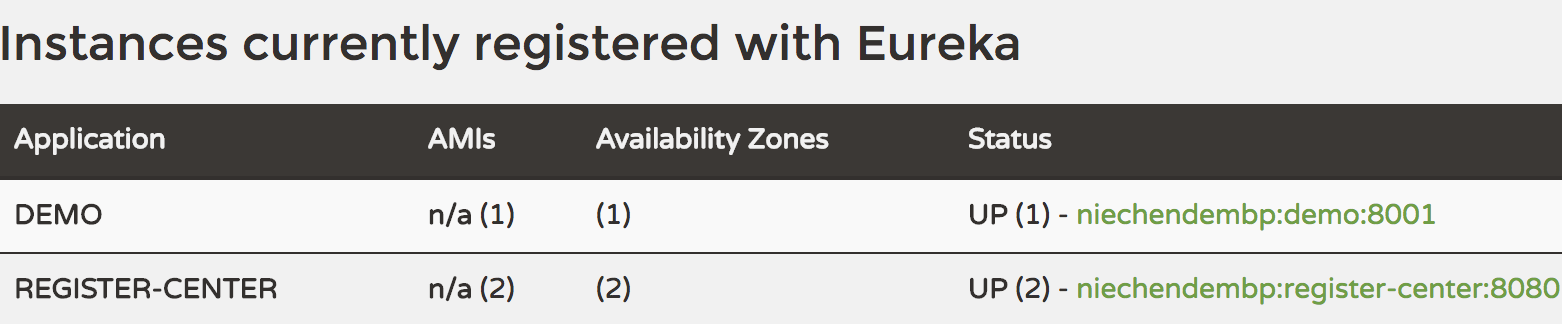
1)application.yml的配置:
spring:

  application:

    name: demo-consumer

eureka:

  client:

    service-url:

      defaultZone: http://localhost:8080/eureka,http://localhost:8081/eureka

server:

  port: 8090
2)创建接口
 package com.bdqn.lyrk.consumer.demo.api;

 import org.springframework.cloud.netflix.feign.FeignClient;

 import org.springframework.web.bind.annotation.RequestMapping;

 @FeignClient("demo")

 public interface DemoConfigService {

     @RequestMapping("/demo.do")

     String demoService();

 }
注意在接口上加上注解:@FeignClient("demo") 注解里的参数是在eureka注册的服务名
3)编写启动类:
package com.bdqn.lyrk.consumer.demo;

import com.bdqn.lyrk.consumer.demo.api.DemoConfigService;

import org.springframework.boot.SpringApplication;

import org.springframework.boot.autoconfigure.SpringBootApplication;

import org.springframework.cloud.client.discovery.EnableDiscoveryClient;

import org.springframework.cloud.netflix.feign.EnableFeignClients;

import org.springframework.context.ConfigurableApplicationContext;

@EnableDiscoveryClient

@EnableFeignClients

@SpringBootApplication

public class DemoConsumerProvider {

    public static void main(String[] args) {

        ConfigurableApplicationContext applicationContext = SpringApplication.run(DemoConsumerProvider.class, args);

        DemoConfigService demoConfigService = applicationContext.getBean(DemoConfigService.class);

        System.out.println(demoConfigService.demoService());

    }

}
注意在启动类上加上@EnableFeignClients来开启Feign功能
运行后输出:

此时我们可以发现使用feign客户端我们访问服务的代码简洁了好多
4) feign多参数设置方法
service-api模块的接口定义:

public interface IBillService {

    @PostMapping("/queryBill")

    List<BillDTO> queryOrders(@RequestBody  BillsVO billsVO);

}

相关服务实现类:

@RestController

public class BillServiceImpl implements IBillService {

    @Autowired

    private BillMapper billMapper;

    @PostMapping("/queryBill")

    @Override

    public List<BillDTO> queryOrders(@RequestBody BillsVO billsVO) {

        return billMapper.query(BeanMap.create(billsVO));

    }

}

注意 需要在接口定义与实现类的参数上加@RequestBody注解
四、feign中的使用Hystrix
1) 在@FeignClient中有两个属性我们值得关注一下,它们分别是fallBack和fallBackFactory,当然我们系统里要添加Hystrix支持并且在属性文件里设置:
feign.hystrix.enabled=true
同样我们要在启动类里加上@EnableCircuitBreaker注解打开Hystrix保护
2) fallBack属性很简单,用来设置降级方法,当feign请求服务失败时所调用的方法, 这里我给出接口的例子:
首先定义一个接口:IOrderService
package com.bdqn.lyrk.service.api;

import com.bdqn.lyrk.service.dto.OrderDTO;

import org.springframework.web.bind.annotation.GetMapping;

import org.springframework.web.bind.annotation.PathVariable;

public interface IOrderService {

    @GetMapping("/orderId/{orderId}")

    OrderDTO getOrderById(@PathVariable("orderId") Integer orderId);

    @GetMapping("/errorOrder")

    OrderDTO getErrorOrder();

}
其次定义Feign的接口OrderServiceClient继承IOrderService
package com.bdqn.lyrk.order.service.consumer.feign;

import com.bdqn.lyrk.service.api.IOrderService;

import org.springframework.cloud.openfeign.FeignClient;

import org.springframework.context.annotation.Primary;

@Primary

@FeignClient(value = "ORDER-SERVER", fallBack="FailedOrderServiceClientImpl.class")

public interface OrderServiceClient extends IOrderService {

}
由于IOrderService不在同一个项目里,而且SpringCloud不推荐服务端和客户端使用同一个接口,所以我采用继承的方式,注意加上@Primary注解以免使用@Autowired时注入失败
在定义实现类:
package com.bdqn.lyrk.order.service.consumer.feign;

import com.bdqn.lyrk.service.dto.OrderDTO;

import org.springframework.stereotype.Component;

@Component

public class FailedOrderServiceClientImpl implements OrderServiceClient {

    @Override

    public OrderDTO getOrderById(Integer orderId) {

        OrderDTO orderDTO = new OrderDTO();

        orderDTO.setId(orderId);

        orderDTO.setOrderName("服务中失败的订单,id为:" + orderId);

        return null;

    }

    @Override

    public OrderDTO getErrorOrder() {

        OrderDTO orderDTO = new OrderDTO();

        orderDTO.setOrderName("服务中失败的订单");

        orderDTO.setId(-1);

        return orderDTO;

    }

}
最后@FeignClient中设置属性fallBack="FailedOrderServiceClientImpl.class" 就可以了
3) 当我们需要封装服务端的异常信息时,可以指定fallbackFactory属性,请看下面的例子:
package com.bdqn.lyrk.order.service.consumer.feign;

import com.bdqn.lyrk.service.dto.OrderDTO;

import feign.hystrix.FallbackFactory;

import org.springframework.stereotype.Component;

@Component

public class OrderServiceFallbackFactoryImpl implements FallbackFactory<OrderServiceClient> {

    @Override

    public OrderServiceClient create(Throwable cause) {

       return new OrderServiceClient() {

           @Override

           public OrderDTO getOrderById(Integer orderId) {

               OrderDTO orderDTO = new OrderDTO();

               orderDTO.setOrderName(cause.getMessage());

               return orderDTO;

           }

           @Override

           public OrderDTO getErrorOrder() {

               OrderDTO orderDTO = new OrderDTO();

               orderDTO.setOrderName(cause.getMessage());

               return orderDTO;

           }

       };

    }

}
注意:FallbackFactory的泛型参数一定要指定为@FeignClient修饰的接口,同时不建议fallback与fallbackFactory同时使用
最后 我贴一下服务端的实现代码:
package com.bdqn.lyrk.springcloud.order.service;

import com.bdqn.lyrk.service.api.IOrderService;

import com.bdqn.lyrk.service.dto.OrderDTO;

import com.netflix.hystrix.contrib.javanica.annotation.HystrixCommand;

import com.netflix.hystrix.contrib.javanica.annotation.HystrixProperty;

import org.springframework.web.bind.annotation.GetMapping;

import org.springframework.web.bind.annotation.PathVariable;

import org.springframework.web.bind.annotation.RestController;

import java.util.concurrent.TimeUnit;

@RestController

public class OrderServiceImpl implements IOrderService {

    @HystrixCommand(fallbackMethod = "errorDTO",

            commandProperties = {@HystrixProperty(name = "execution.isolation.thread.timeoutInMilliseconds", value = "3000")}

    )

    @GetMapping("/orderId/{orderId}")

    @Override

    public OrderDTO getOrderById(@PathVariable("orderId") Integer orderId) {

        OrderDTO orderDTO = new OrderDTO();

        orderDTO.setId(orderId);

        orderDTO.setOrderName("订单ID为" + orderId + "的订单");

        try {

            TimeUnit.SECONDS.sleep(orderId);

        } catch (InterruptedException e) {

            throw new RuntimeException(e);

        }

        return orderDTO;

    }

    @Override

    public OrderDTO getErrorOrder() {

        System.out.println(1 / 0);

        return null;

    }

    public OrderDTO errorDTO(Integer orderId) {

        OrderDTO orderDTO = new OrderDTO();

        orderDTO.setId(-1);

        orderDTO.setOrderName("错误的订单,请重试");

        return orderDTO;

    }

}
对于Hystrix可以参考:SpringCloud学习之Hystrix
SpringCloud学习之feign的更多相关文章
- SpringCloud学习之Feign 的使用(五)
Feign 是一个声明式的伪RPC的REST客户端,它用了基于接口的注解方式,很方便的客户端配置,刚开始使用时还不习惯,感觉是在客户端写服务端的代码,Spring Cloud 给 Feign 添加了 ...
- SpringCloud学习(5)——Feign负载均衡
Feign概述 Feign是声明式的Web服务客户端, 使得编写Web服务客户端变的非常容易, 只需要创建一个接口, 然后在上面添加注解即可. Feign旨在使编写Java Http客户端变的更容易. ...
- SpringCloud学习之Ribbon
一.负载均衡与Ribbon 负载均衡,在集群中是很常见的一个“名词”,顾名思义是根据一定的算法将请求分摊至对应的服务节点上,常见的算法有如下几种: 轮询法:所有请求被依次分发到每台应用服务器上,每台服 ...
- SpringCloud学习笔记(3):使用Feign实现声明式服务调用
简介 Feign是一个声明式的Web Service客户端,它简化了Web服务客户端的编写操作,相对于Ribbon+RestTemplate的方式,开发者只需通过简单的接口和注解来调用HTTP API ...
- SpringCloud学习笔记(9)----Spring Cloud Netflix之声明式 REST客户端 -Feign的使用
1. 什么是Feign? Feign是一种声明式.模板化的HTTP客户端,在SpringCloud中使用Feign.可以做到使用HTTP请求远程服务时能与调用本地方法一样的编码体验,开发者完全感知不到 ...
- SpringCloud学习笔记(六):Feign+Ribbon负载均衡
简介 官网解释: http://projects.spring.io/spring-cloud/spring-cloud.html#spring-cloud-feign Feign是一个声明式WebS ...
- SpringCloud学习系列之三----- 断路器(Hystrix)和断路器监控(Dashboard)
前言 本篇主要介绍的是SpringCloud中的断路器(Hystrix)和断路器指标看板(Dashboard)的相关使用知识. SpringCloud Hystrix Hystrix 介绍 Netfl ...
- java框架之SpringCloud(4)-Ribbon&Feign负载均衡
在上一章节已经学习了 Eureka 的使用,SpringCloud 也提供了基于 Eureka 负载均衡的两种方案:Ribbon 和 Feign. Ribbon负载均衡 介绍 SpringCloud ...
- SpringCloud学习系列之七 ----- Zuul路由网关的过滤器和异常处理
前言 在上篇中介绍了SpringCloud Zuul路由网关的基本使用版本,本篇则介绍基于SpringCloud(基于SpringBoot2.x,.SpringCloud Finchley版)中的路由 ...
随机推荐
- Spring MVC Restful Put方法无法获取参数值
Spring MVC Restful 无法通过@ReqeustParam获取参数值 原因是Tomcat只支持POST/GET获取参数值,对于PUT这些方法需要通过HttpPutFormContentF ...
- PostgreSQL 客户端乱码问题
关于客户端和服务器端的乱码问题, POSTGRESQL字符集问题总结 总结的很详细, 特别棒. 这里让我头痛了很久的问题在于 终端 上字符编码的问题, 由于我的mbp上的 iterm2 的默认编码为 ...
- react中的DOM操作
前面的话 某些情况下需要在典型数据流外强制修改子代.要修改的子代可以是 React 组件实例,也可以是 DOM 元素.这时就要用到refs来操作DOM 使用场景 下面是几个适合使用 refs 的情况 ...
- Spring Security 入门(1-9)国际化的使用
- 记录安装centos6.5的几个要紧步骤
1.安装新系统 因为是服务器,不是普通电脑,貌似对usb支持不好,所以用的光盘安装. centos 6.5 64位 2.跳过测试 3.服务器语言 选择english,键盘是english.US 4.选 ...
- CSS Box Model 盒子模型
1. 介绍 1.1 什么是 Box Model 在HTML中的每个element(元素)都可以看作一个矩形的盒子,矩形从内到外依次由元素的内容(content).内边距(padding).边框(bor ...
- reportng优化
本来呢,我是看到报告中没有输出@Test的description 的属性,想优化一下,没想到在找reportng的源码的时候,发现一个大神也优化了reportNG,他优化了下面几个内容: 1).测试结 ...
- 【Python3.6+Django2.0+Xadmin2.0系列教程一】环境搭建及项目创建
由于工作需要,接触了大半年时间的Django+xadmin框架,一直没空对这块对进行相关的梳理.最近在同事的怂恿下,就在这分享下笔者的学习及工作经验吧. 好了,话不多说,下面开始进入正题: 环境需求: ...
- JavaScript高级程序设计(第3版)
准备开始分享阅读笔记 自己收获的同时 让更多的人收益 这也是我力荐的学习javascript基础的书籍
- MyBatis 与 Spring 整合
MyBatis-Spring 项目 目前大部分的 Java 互联网项目,都是用 Spring MVC + Spring + MyBatis 搭建平台的. 使用 Spring IoC 可以有效的管理各类 ...