
SpringCloud教程第2篇:Ribbon(F版本)
一、ribbon简介
Spring cloud有两种服务调用方式,一种是ribbon+restTemplate,另一种是feign。在这一篇文章首先讲解下基于ribbon+rest。
ribbon是一个负载均衡客户端,可以很好的控制http和tcp的一些行为。Feign默认集成了ribbon。
ribbon 已经默认实现了这些配置bean:
IClientConfig ribbonClientConfig: DefaultClientConfigImpl
IRule ribbonRule: ZoneAvoidanceRule
IPing ribbonPing: NoOpPing
ServerList ribbonServerList: ConfigurationBasedServerList
ServerListFilter ribbonServerListFilter: ZonePreferenceServerListFilter
ILoadBalancer ribbonLoadBalancer: ZoneAwareLoadBalance
二、准备工作
这一篇文章基于上一篇文章的工程,启动eureka-server 工程;启动service-hi工程,它的端口为8762;将service-hi的配置文件的端口改为8763,并启动,这时你会发现:service-hi在eureka-server注册了2个实例,这就相当于一个小的集群。
如何在idea下启动多个实例,请参照这篇文章: https://blog.csdn.net/forezp/article/details/76408139
访问localhost:8761如图所示: 如何一个工程启动多个实例,请看这篇文章:https://blog.csdn.net/forezp/article/details/76408139

三、建一个服务消费者
重新新建一个spring-boot工程,取名为:service-ribbon; 在它的pom.xml继承了父pom文件,并引入了以下依赖:(父工程跟上一篇一样)
<?xml version="1.0" encoding="UTF-8"?>

<project xmlns="http://maven.apache.org/POM/4.0.0" xmlns:xsi="http://www.w3.org/2001/XMLSchema-instance"

    xsi:schemaLocation="http://maven.apache.org/POM/4.0.0 https://maven.apache.org/xsd/maven-4.0.0.xsd">

    <modelVersion>4.0.0</modelVersion>

    <groupId>com.forezp</groupId>

    <artifactId>service-ribbon</artifactId>

    <version>0.0.1-SNAPSHOT</version>

    <name>service-ribbon</name>

    <description>Demo project for Spring Boot</description>

    <parent>

        <groupId>com.forezp</groupId>

        <artifactId>sc-f-chapter2</artifactId>

        <version>1.0-SNAPSHOT</version>

    </parent>

    <dependencies>

        <dependency>

            <groupId>org.springframework.boot</groupId>

            <artifactId>spring-boot-starter-web</artifactId>

        </dependency>

        <dependency>

            <groupId>org.springframework.cloud</groupId>

            <artifactId>spring-cloud-starter-netflix-eureka-client</artifactId>

        </dependency>

        <dependency>

            <groupId>org.springframework.cloud</groupId>

            <artifactId>spring-cloud-starter-netflix-ribbon</artifactId>

        </dependency>

        <dependency>

            <groupId>org.springframework.boot</groupId>

            <artifactId>spring-boot-starter-test</artifactId>

            <scope>test</scope>

            <exclusions>

                <exclusion>

                    <groupId>org.junit.vintage</groupId>

                    <artifactId>junit-vintage-engine</artifactId>

                </exclusion>

            </exclusions>

        </dependency>

    </dependencies>

</project>
在工程的配置文件指定服务的注册中心地址为http://localhost:8761/eureka/,程序名称为 service-ribbon,程序端口为8764。配置文件application.yml如下:
eureka:

  client:

    serviceUrl:

      defaultZone: http://localhost:8761/eureka/

server:

  port: 8764

spring:

  application:

    name: service-ribbon
在工程的启动类中,通过@EnableDiscoveryClient向服务中心注册;并且向程序的ioc注入一个bean: restTemplate;并通过@LoadBalanced注解表明这个restRemplate开启负载均衡的功能。
package com.forezp.serviceribbon;

import org.springframework.boot.SpringApplication;

import org.springframework.boot.autoconfigure.SpringBootApplication;

import org.springframework.cloud.client.discovery.EnableDiscoveryClient;

import org.springframework.cloud.client.loadbalancer.LoadBalanced;

import org.springframework.cloud.netflix.eureka.EnableEurekaClient;

import org.springframework.context.annotation.Bean;

import org.springframework.web.client.RestTemplate;

@SpringBootApplication

@EnableEurekaClient//向服务中心注册;

@EnableDiscoveryClient

public class ServiceRibbonApplication {

    public static void main(String[] args) {

        SpringApplication.run(ServiceRibbonApplication.class, args);

    }

    @Bean//向程序的ioc注入一个bean  restTemplate

    @LoadBalanced//表明这个restRemplate开启负载均衡的功能。

    RestTemplate restTemplate() {

        return new RestTemplate();

    }

}
写一个测试类HelloService,通过之前注入ioc容器的restTemplate来消费service-hi服务的“/hi”接口,在这里我们直接用的程序名替代了具体的url地址,在ribbon中它会根据服务名来选择具体的服务实例,根据服务实例在请求的时候会用具体的url替换掉服务名,代码如下:
package com.forezp.serviceribbon.service;

import org.springframework.beans.factory.annotation.Autowired;

import org.springframework.stereotype.Service;

import org.springframework.web.client.RestTemplate;

/**

 * @Auther: chengmr

 * @Date: 2020/6/23 11:24

 * @Description:

 */

@Service

public class HelloService {

    @Autowired

    RestTemplate restTemplate;

    public String hiService(String name){

        return restTemplate.getForObject("http://SERVICE-HI/hi?name="+name,String.class);

    }

}
写一个controller,在controller中用调用HelloService 的方法,代码如下:
package com.forezp.serviceribbon.controller;

import com.forezp.serviceribbon.service.HelloService;

import org.springframework.beans.factory.annotation.Autowired;

import org.springframework.web.bind.annotation.RequestMapping;

import org.springframework.web.bind.annotation.RestController;

/**

 * @Auther: chengmr

 * @Date: 2020/6/23 11:26

 * @Description:

 */

@RestController

public class HelloControler {

    @Autowired

    HelloService helloService;

    @RequestMapping("/hi")

    public String hi(String name){

        return helloService.hiService(name);

    }

}
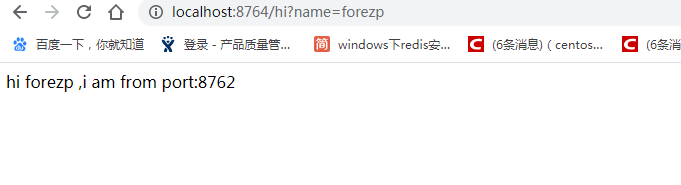
在浏览器上多次访问http://localhost:8764/hi?name=forezp,浏览器交替显示:、

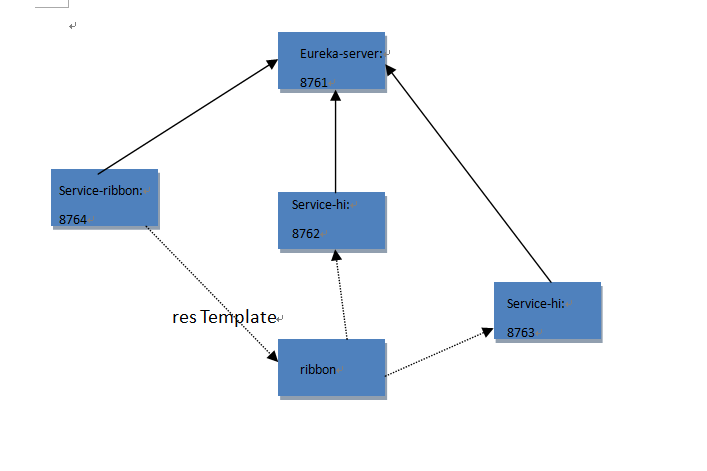
- 一个服务注册中心,eureka server,端口为8761
- service-hi工程跑了两个实例,端口分别为8762,8763,分别向服务注册中心注册
- sercvice-ribbon端口为8764,向服务注册中心注册
- 当sercvice-ribbon通过restTemplate调用service-hi的hi接口时,因为用ribbon进行了负载均衡,会轮流的调用service-hi:8762和8763 两个端口的hi接口;
源码下载:https://github.com/CMRcircle/learnspringcloud/tree/master/sc-f-chapter2
SpringCloud教程第2篇:Ribbon(F版本)的更多相关文章
- 史上最简单的SpringCloud教程 | 第三篇: 服务消费者(Feign)
转载请标明出处: https://www.fangzhipeng.com/springcloud/2017/07/12/sc03-feign/ 本文出自方志朋的博客 最新Finchley版本请访问: ...
- 史上最简单的SpringCloud教程 | 第十篇: 高可用的服务注册中心(Finchley版本)
转载请标明出处: 原文首发于 https://www.fangzhipeng.com/springcloud/2018/08/30/sc-f10-eureka/ 本文出自方志朋的博客 文章 史上最简单 ...
- SpringCloud教程 | 第十篇: 高可用的服务注册中心
版权声明:本文为博主原创文章,欢迎转载,转载请注明作者.原文超链接 ,博主地址:http://blog.csdn.net/forezp. http://blog.csdn.net/forezp/art ...
- SpringCloud教程第4篇:Hystrix(F版本)
在微服务架构中,根据业务来拆分成一个个的服务,服务与服务之间可以相互调用(RPC),在Spring Cloud可以用RestTemplate+Ribbon和Feign来调用.为了保证其高可用,单个服务 ...
- SpringCloud教程第1篇:Eureka(F版本)
一.创建服务注册中心(Eureka组件) 1.1 首先创建一个maven主工程. 1.创建maven项目 是一个主Maven工程,spring Boot版本为2.0.3.RELEASE,Spring ...
- SpringCloud教程第6篇:config(F版本)
一.简介 在分布式系统中,由于服务数量巨多,为了方便服务配置文件统一管理,实时更新,所以需要分布式配置中心组件.在Spring Cloud中,有分布式配置中心组件spring cloud config ...
- SpringCloud教程 | 第四篇:断路器(Hystrix)(Finchley版本)
在微服务架构中,根据业务来拆分成一个个的服务,服务与服务之间可以相互调用(RPC),在Spring Cloud可以用RestTemplate+Ribbon和Feign来调用.为了保证其高可用,单个服务 ...
- 史上最简单的SpringCloud教程 | 第四篇:断路器(Hystrix)(Finchley版本)
转载请标明出处: 原文首发于:https://www.fangzhipeng.com/springcloud/2018/08/30/sc-f4-hystrix/ 本文出自方志朋的博客 在微服务架构中, ...
- SpringCloud教程 | 第三篇: 服务消费者(Feign)(Finchley版本)
上一篇文章,讲述了如何通过RestTemplate+Ribbon去消费服务,这篇文章主要讲述如何通过Feign去消费服务. 一.Feign简介 Feign是一个声明式的伪Http客户端,它使得写Htt ...
随机推荐
- Linux passwd 提权
利用条件,passwd 可写 ls -al /etc/passwd 利用方式: 生成密钥 openssl passwd -1 -salt test 123456 写入passwd echo 'tes ...
- JVM系列.JVM内存模型
<Java虚拟机规范>将虚拟机的内存分为以下几个区域: 堆区:堆区是JVM中最大的一块内存区域,按照垃圾分代收集的角度划分,又可以分成年轻代和老年代,而年轻代内存又被分成三部分,Eden空 ...
- 使用setTimeout()代替setInterval()
背景: 在JavaScript中,有两种定时器:setTimeout()和setInterval():setTimeout()只执行一次定时操作,setInterval()执行无限次定时操作:但是大多 ...
- Java实现 LeetCode 771 宝石与石头(这是真暴力)
771. 宝石与石头 给定字符串J 代表石头中宝石的类型,和字符串 S代表你拥有的石头. S 中每个字符代表了一种你拥有的石头的类型,你想知道你拥有的石头中有多少是宝石. J 中的字母不重复,J 和 ...
- (Java实现) 零件分组
零件分组(Stick)-动态规划-中高级 Case Time Limit:1000MS Time Limit: 3000MS Memory Limit: 65536K Total Submission ...
- Java实现 LeetCode 689 三个无重叠子数组的最大和(换方向筛选)
689. 三个无重叠子数组的最大和 给定数组 nums 由正整数组成,找到三个互不重叠的子数组的最大和. 每个子数组的长度为k,我们要使这3*k个项的和最大化. 返回每个区间起始索引的列表(索引从 0 ...
- Java实现 LeetCode 331 验证二叉树的前序序列化
331. 验证二叉树的前序序列化 序列化二叉树的一种方法是使用前序遍历.当我们遇到一个非空节点时,我们可以记录下这个节点的值.如果它是一个空节点,我们可以使用一个标记值记录,例如 #. _9_ / \ ...
- Java实现 蓝桥杯VIP 算法训练 蜜蜂飞舞
时间限制:1.0s 内存限制:512.0MB 问题描述 "两只小蜜蜂呀,飞在花丛中呀--" 话说这天天上飞舞着两只蜜蜂,它们在跳一种奇怪的舞蹈.用一个空间直角坐标系来描述这个世界, ...
- Java GUI 鼠标事件
import java.awt.Button; import java.awt.FlowLayout; import java.awt.Frame; import java.awt.event.Mou ...
- Java实现复数运算
1 问题描述 编程实现两个复数的运算.设有两个复数 和 ,则他们的运算公式为: 要求:(1)定义一个结构体类型来描述复数. (2)复数之间的加法.减法.乘法和除法分别用不用的函数来实现. (3)必须使 ...