
骨骼动画 cocos2d-x + cocoStudio <cocos2d-x : version 2.2.0>
cocos2d-x version 2.2.0
首先,在 HelloWorldScene.cpp 中的 init()函数中 添加如下代码 (资源文件可以直接到 cocos2d-x 中获取)
#include "CCArmature/utils/CCArmatureDataManager.h" //(头文件添加)
//! create a new thread to load data(异步加载)

        /**

        * @brief Add ArmatureFileInfo, it is managed by CCArmatureDataManager.

        *   It will load data in a new thread

        *  添加ArmatureFileInfo,它是由CCArmatureDataManager管理。 它将数据加载在一个新线程

        */

        extension::CCArmatureDataManager::sharedArmatureDataManager()

            ->addArmatureFileInfoAsync("cyborg.png", "cyborg.plist", "cyborg.xml", this, NULL/*schedule_selector(TestArmatureNesting::close)*/);

        CCLayer *pLayer = new TestArmatureNesting();

        this->addChild(pLayer);
其次,TestArmatureNesting 类实现
//.h

class TestArmatureNesting : public cocos2d::CCLayer

{

public:

    virtual void onEnter();

    virtual void onExit();

    virtual bool ccTouchBegan(cocos2d::CCTouch *pTouch, cocos2d::CCEvent *pEvent);

    virtual void registerWithTouchDispatcher();

    void close(float percent);

    cocos2d::extension::CCArmature *armature;

    int weaponIndex;

};

//.cpp

void TestArmatureNesting::onEnter()

{

    CCLayer::onEnter();

    setTouchEnabled(true);//触摸事件开启   与registerWithTouchDispatcher() 对应


    armature = cocos2d::extension::CCArmature::create("cyborg");

    /** playByIndex()

     * Play animation by index, the other param is the same to play.

     * @param  _animationIndex  the animation index you want to play

     */

    armature->getAnimation()->playByIndex();

    armature->setPosition(ccp(,));

    armature->setScale(1.2f);

    armature->getAnimation()->setSpeedScale(0.4f);

    addChild(armature);

    weaponIndex = ;

}

void TestArmatureNesting::onExit()

{

    CCDirector::sharedDirector()->getTouchDispatcher()->removeDelegate(this);

    CCLayer::onExit();

}

bool TestArmatureNesting::ccTouchBegan( CCTouch *pTouch, CCEvent *pEvent )

{

    ++weaponIndex;

    weaponIndex = weaponIndex % ;

    /** virtual CCBone *getBone(const char *name) const;

     * Get a bone with the specified name

     *

     * @param name The bone's name you want to get

     */

    if(armature != NULL)

    {

        armature->getBone("armInside")->getChildArmature()->getAnimation()->playByIndex(weaponIndex);

        armature->getBone("armOutside")->getChildArmature()->getAnimation()->playByIndex(weaponIndex);

    }

    return false;

}

//registerWithTouchDispatcher() 注册触摸事件(触摸事件)    -1>0  先触发
void TestArmatureNesting::registerWithTouchDispatcher()

{

    CCDirector::sharedDirector()->getTouchDispatcher()->addTargetedDelegate(this, INT_MIN + , true);

}

void TestArmatureNesting::close(float percent)

{

}
点击屏幕 切换装备:(如图)
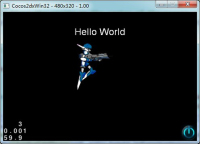
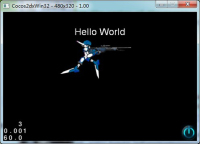
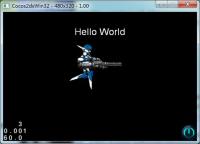
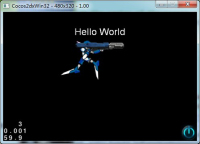
打开 .json 或者 .xml 文件我们会发现 一个动作的组成结构:
<mov name="fall" dr="5" to="6" drTW="5" lp="1" twE="NaN">
…… …… …… ……
</mov>
表示一个动作
这也就是 armature->getAnimation()->playByIndex(1); 这里的参数 1 的由来。
骨骼动画 cocos2d-x + cocoStudio <cocos2d-x : version 2.2.0>的更多相关文章
- cocostudio 骨骼动画 setContentScaleFactor
最近在看骨骼动画,看上去挺容易的,但是照着例子做的时候却出现问题了,骨骼之间出现了很大的缝隙,找了很久才发现原来setContentScaleFactor的原因, 出现间隙,是因为各个骨骼是单独在做缩 ...
- cocos2dx骨骼动画Armature源码分析(三)
代码目录结构 cocos2dx里骨骼动画代码在cocos -> editor-support -> cocostudio文件夹中,win下通过筛选器,文件结构如下.(mac下没有分,是整个 ...
- cocos2d-x 3.0 版本 骨骼动画设置shader
因为骨骼动画是由多个sprite组成, 所以需要遍历每个sprite 才能修改整体, 开头这样设置,在游戏中发现走路状态没问题,攻击状态就有部分sprite没效果 for (auto & ob ...
- cocos2dx - v2.3.3编辑器骨骼动画
接上一节内容:cocos2dx - v2.3.3编辑器简单使用及不同分辨率适配 本节主要Cocos骨骼动画的创建及使用 一.新建 用Cocos Studio工具新建一个状态栏项目.如下图: 当然也可以 ...
- cocos2dx加载骨骼动画,获取骨骼位置
2015/05/13 需求: (1)希望在骨骼上绑定一个粒子特效 (2)获取骨骼的位置 (3)获取骨骼动画的大小 (4)lua 1. cocostudio动画编辑器 (1)绑定粒子特效(跟随骨骼的移动 ...
- cocos2dx骨骼动画Armature源码分析(一)
源码分析一body { font-family: Helvetica, arial, sans-serif; font-size: 14px; line-height: 1.6; padding-to ...
- HTML5骨骼动画Demo | 使用min2d、createjs、pixi播放spine动画
Spine做骨骼动画是比较流行的,使用起来可能相对复杂,但功能毕竟强大,所以市场占有率较大. 在unity.cocos2d.starling中使用spine已经很成熟了,而HTML5这一块可能刚刚起步 ...
- cocos2d-x开发记录:二,基本概念(骨骼动画)
九,骨骼动画 1.骨骼动画vs Sprite sheets 你能使用sprite sheets 创建动画,它很快又容易.直到你意识到你的游戏需要大量的动画并且内存消耗越来越高,并且需要时间载入全部数据 ...
- 初尝2D骨骼动画编辑工具SPINE,并into Unity3D
一.SPINE使用 研究2D骨骼动画,CYou的朋友介绍我SPINE这个工具,开发自Esoteric Software的一款专门制作2D动画的软件,网络上的资料还很少,我这从半吊子美术技术的角度简单说 ...
随机推荐
- PAT 天梯赛 L1-040. 最佳情侣身高差 【水】
题目链接 https://www.patest.cn/contests/gplt/L1-040 AC代码 #include <iostream> #include <cstdio&g ...
- Hibernate多对多关联
多对多关联: 示例:Teacher和Student,一个Teacher可以教很多student,一个Student也可以被很多teacher教 多对多单向关联 Teacher知道自己教了哪些学生, ...
- JAVA 判断对象内容是否含有空值
简单判断对象是否含有NULL值,以及信息描述. package com.sicdt.sicsign.bill.api.util; import java.lang.reflect.Invocation ...
- 【Tech】mac下svn和scp使用笔记
1.命令行从svn下载代码 mac本身自带svn,所以使用非常简单,在本地创建代码存放的文件夹,然后cd到该文件夹下,运行: svn checkout svn://ip地址/文件路径 . 然后出现要求 ...
- 【CodeChef】Factorial(n!末尾0的个数)
The most important part of a GSM network is so called Base Transceiver Station (BTS). These transcei ...
- Hadoop单机搭建
单机Hadoop搭建 1.下载hadoop-2.7.3.tar.gz http://www.apache.org/dyn/closer.cgi/hadoop/common/hadoop-2.7.3/h ...
- Windos Server Tomcat 双开配置
Tomcat 双开配置 tomcat_1 server.mxl文件 # 修改端口 <Connector port=" protocol="HTTP/1.1" c ...
- windows7下手工搭建Apache2.2 php5.3 Mysql5.5开发环境
Apache2.2(apache_2.2.2-win32-x86-no_ssl)php5.3.5(php-5.3.5-Win32-VC6-x86,请注意选择VC6版本,否则无法加载php5apache ...
- 让iOS项目允许使用http协议请求
苹果官方已经默认不让开发者使用不安全的http通信协议了,而是建议开发者使用安全的https协议.若我们还是需要使用http协议可以这样配置XCode: 1.打开info.plist文件 2.点击加号 ...
- linux环境下的python安装过程(含setuptools)
这里我不想采用诸如ubuntu下的apt-get install方式进行python的安装,而是在linux下采用源码包的方式进行python的安装. 一.下载python源码包 打开ubuntu下的 ...