
OpenCASCADE Shape Location
OpenCASCADE Shape Location
Abstract. The TopLoc package of OpenCASCADE gives resources to handle 3D local coordinate systems called Locations. A Location is a composition of elementary coordinate systems, each one is called a Datum. The Location keeps track of this composition. The paper will use the Draw Test Harness to illustrate the Location concept.
Key Words. Transformation, Location, Local Coordinate Systems
1.Introduction
对于三维空间中的各种模型,总是想要摆放到合适的位置,最终形成一个工厂的模型,一艘船的模型,一个建筑物的模型,等等。目前来看,所有的几何相关的库对模型变换的实现一般都是使用了矩阵变换。有的可能只保留了最终变换的结果矩阵数据,而OpenCASCADE的TopoDS_Shape中保留了Location信息。从其文档可以看出,Location中保留了模型变换一系列的变换组合,并可以对这个变换进行Track追踪。如何来正确理解这个Location的意义呢?下面结合Draw Test Harness来进行说明。
2.Draw Test
在Draw Test Harness中对模型进行变换的命令有:ttranslate, trotate, tmove, reset, tmirror, tscale.其中ttranslate, trotate, tmove, reset命令只会对模型位置进行调整,并不能让模型发生变形,即是刚性变换。下面就通过对一个Box进行移动和旋转,来看看TopoDS_Shape中的Location是如何变化的。在Draw Test Harness中输入以下命令:
pload ALL

box b

vdisplay b

vtrihedron vt

dump b
可以看到此时box的Location是没有的:
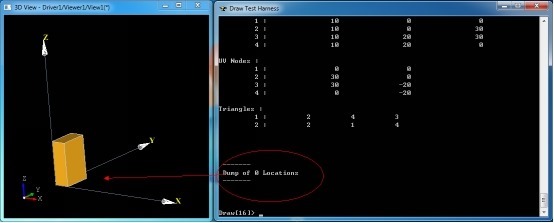
Figure 2.1 Box Location in Original
当将box沿X方向移动一段距离后:
# translate by x direction

ttranslate b

vdisplay b

dump b
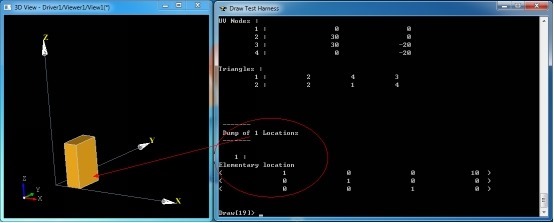
Figure 2.2 Location of the translation box
由上图可知,当对模型进行变换后,TopoDS_Shape中即有了Location数据,变换矩阵的平移部分(第4列数据)发生了变化。下面继续沿X轴方向移动10:
# translate by x direction

ttranslate b

vdisplay b

dump b
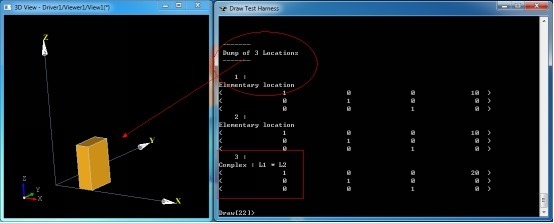
Figure 2.3 Translate Box in X Direction
由图2.3可知,模型现在的位置是通过两个Elementary变换得来的。最后一个Complex变换是上述所有变换的复合。下面再对模型进行绕Y轴旋转45度:
# rotate by y axis

trotate b

vdisplay b

dump b
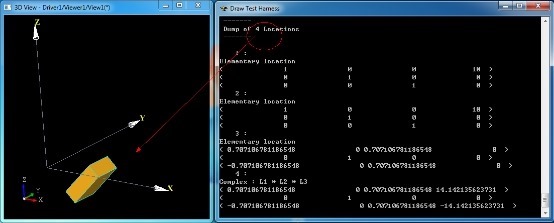
Figure 2.4 Rotate the Box
由上图可知,经过旋转变换后的模型有了4个Location:三个基本变换和一个复合变换,复合变换是所有基本变换的组合。
通过上面的示例,已经可以清晰理解OpenCASCADE中的Location的概念,虽然处理得有点复杂,通过Location可以对模型的变换轨迹有个详细的跟踪。这样处理的好处就是对模型的变换过程进行了记录,可以方便地回到历史上的任意一个时刻;不好的地方就是程序理解起来麻烦,而且还需要有额外的内存来保存这些数据。
以下为上述所有Tcl脚本:
#

# test TopoDS_Shape location.

# Shing Liu(eryar@163.com)

# 2016-09-06 22:50

#

pload ALL

# initialize

box b

vdisplay b

vtrihedron vt

dump b

# translate by x direction

ttranslate b

vdisplay b

dump b

# translate by x direction

ttranslate b

vdisplay b

dump b

# rotate by y axis

trotate b

vdisplay b

dump b
3.Draw Code
每个Draw Test Harness命令都可以方便地找到其实现代码,其中模型变换命令的实现代码如下:
//=======================================================================

// transform

//=======================================================================

static Standard_Integer transform(Draw_Interpretor& ,Standard_Integer n,const char** a)

{

  if (n <= ) return ;

  gp_Trsf T;

  Standard_Integer last = n;

  const char* aName = a[];

  Standard_Boolean isBasic = Standard_False;

  if (!strcmp(aName,"reset")) {

  }

  else {

    isBasic = (aName[] == 'b');

    aName++;

    if (!strcmp(aName,"move")) {

      if (n < ) return ;

      TopoDS_Shape SL = DBRep::Get(a[n-]);

      if (SL.IsNull()) return ;

      T = SL.Location().Transformation();

      last = n-;

    }

    else if (!strcmp(aName,"translate")) {

      if (n < ) return ;

      T.SetTranslation(gp_Vec(Draw::Atof(a[n-]),Draw::Atof(a[n-]),Draw::Atof(a[n-])));

      last = n-;

    }

    else if (!strcmp(aName,"rotate")) {

      if (n < ) return ;

      T.SetRotation(gp_Ax1(gp_Pnt(Draw::Atof(a[n-]),Draw::Atof(a[n-]),Draw::Atof(a[n-])),

                    gp_Vec(Draw::Atof(a[n-]),Draw::Atof(a[n-]),Draw::Atof(a[n-]))),

                    Draw::Atof(a[n-])* (M_PI / 180.0));

      last = n-;

    }

    else if (!strcmp(aName,"mirror")) {

      if (n < ) return ;

      T.SetMirror(gp_Ax2(gp_Pnt(Draw::Atof(a[n-]),Draw::Atof(a[n-]),Draw::Atof(a[n-])),

                  gp_Vec(Draw::Atof(a[n-]),Draw::Atof(a[n-]),Draw::Atof(a[n-]))));

      last = n-;

    }

    else if (!strcmp(aName,"scale")) {

      if (n < ) return ;

      T.SetScale(gp_Pnt(Draw::Atof(a[n-]),Draw::Atof(a[n-]),Draw::Atof(a[n-])),Draw::Atof(a[n-]));

      last = n-;

    }

  }

  if (T.Form() == gp_Identity || isBasic) {

    TopLoc_Location L(T);

    for (Standard_Integer i = ; i < last; i++) {

      TopoDS_Shape S = DBRep::Get(a[i]);

      if (S.IsNull())

      {

        std::cerr << "Error: " << a[i] << " is not a valid shape\n";

        return ;

      }

      else

        DBRep::Set(a[i],S.Located(L));

    }

  }

  else {

    BRepBuilderAPI_Transform trf(T);

    for (Standard_Integer i = ; i < last; i++) {

      TopoDS_Shape S = DBRep::Get(a[i]);

      if (S.IsNull()) {

        std::cerr << "Error: " << a[i] << " is not a valid shape\n";

        return ;

      }

      else {

        trf.Perform(S);

        if (!trf.IsDone())

          return ;

        DBRep::Set(a[i],trf.Shape());

      }

    }

  }

  return ;

}
对模型的变换主要使用类BRepBuilderAPI_Transform来完成。
4.Conclusion
通过上面的示例,已经可以清晰理解OpenCASCADE中的Location的概念,虽然处理得有点复杂,通过Location可以对模型的变换轨迹有个详细的跟踪。这样处理的好处就是对模型的变换过程进行了记录,可以方便地回到历史上的任意一个时刻;不好的地方就是程序理解起来麻烦,而且还需要有额外的内存来保存这些数据。
理解了Location的概念,也就理解了OpenCASCADE的Brep文件中的一项基本内容,方便开发一些转换接口。
关于矩阵变换在图形学中的应用可以参考《3D数学基础:图形与游戏开发》。
5.References
1.Fletcher Dunn, Ian Parberry. 3D Math Primer for Graphics and Game Development. 清华大学出版社. 2005
2.OpenCASCADE Draw Test Harness User Guide.
PDF Version: OpenCASCADE Shape Location
OpenCASCADE Shape Location的更多相关文章
- OpenCascade Shape Representation in OpenSceneGraph
OpenCascade Shape Representation in OpenSceneGraph eryar@163.com 摘要Abstract:本文通过程序实例,将OpenCascade中的拓 ...
- Locations Section of OpenCascade BRep
Locations Section of OpenCascade BRep eryar@163.com 摘要Abstract:本文结合OpenCascade的BRep格式描述文档和源程序,对BRep格 ...
- Open Cascade DataExchange IGES
Open Cascade DataExchange IGES eryar@163.com 摘要Abstract:本文结合OpenCascade和Initial Graphics Exchange Sp ...
- Scipy教程 - 统计函数库scipy.stats
http://blog.csdn.net/pipisorry/article/details/49515215 统计函数Statistical functions(scipy.stats) Pytho ...
- scipy.stats
scipy.stats Scipy的stats模块包含了多种概率分布的随机变量,随机变量分为连续的和离散的两种.所有的连续随机变量都是rv_continuous的派生类的对象,而所有的离散随机变量都是 ...
- elasticsearch 口水篇(6) Mapping 定义索引
前面我们感觉ES就想是一个nosql数据库,支持Free Schema. 接触过Lucene.solr的同学这时可能会思考一个问题——怎么定义document中的field?store.index.a ...
- cvpr2015papers
@http://www-cs-faculty.stanford.edu/people/karpathy/cvpr2015papers/ CVPR 2015 papers (in nicer forma ...
- elasticsearch Mapping 定义索引
Mapping is the process of defining how a document should be mapped to the Search Engine, including i ...
- Split Shape by Plane in OpenCASCADE
Split Shape by Plane in OpenCASCADE eryar@163.com Abstract. Sometimes you want to split a shape by p ...
随机推荐
- ExtJS 4.2 第一个程序
本篇介绍如何创建一个ExtJS应用程序.并通过创建目录.导入文件.编写代码及分析代码等步骤来解释第一个ExtJS程序. 目录 1. 创建程序 1.1 创建目录建议 1.2 实际目录 1.3 index ...
- Android数据存储之Android 6.0运行时权限下文件存储的思考
前言: 在我们做App开发的过程中基本上都会用到文件存储,所以文件存储对于我们来说是相当熟悉了,不过自从Android 6.0发布之后,基于运行时权限机制访问外置sdcard是需要动态申请权限,所以以 ...
- 学习ASP.NET Core,怎能不了解请求处理管道[1]: 中间件究竟是个什么东西?
ASP.NET Core管道虽然在结构组成上显得非常简单,但是在具体实现上却涉及到太多的对象,所以我们在 "通过重建Hosting系统理解HTTP请求在ASP.NET Core管道中的处理流 ...
- JavaScript模仿块级作用域
avaScript 没有块级作用域的概念.这意味着在块语句中定义的变量,实际上是在包含函数中而非语句中创建的,来看下面的例子: function outputNumbers(count){ for ( ...
- 谈谈JS中的函数节流
好吧,一直在秋招中,都没怎么写博客了...今天赶紧来补一补才行...我发现,在面试中,讲到函数节流好像可以加分,尽管这并不是特别高深的技术,下面就聊聊吧! ^_^ 备注:以下内容部分来自<Jav ...
- RMS去除在线认证
在微软 OS 平台创建打开 RMS 文档如何避免时延 相信我们在企业内部的环境中已经部署了微软最新的OS平台,Windows 7和Windows 2008 R2,在这些OS平台上使用IRM功能时,您有 ...
- 简述我的SOA服务治理
SOA服务治理 1.解决业务部门服务冲突和纠纷2.版本定义与版本管理3.服务备案与服务管理4.业务监督与服务监控 SOA的战略目的 一.业务价值胜过技术策略 二.战略目标胜过具体项目的效益 三.内置的 ...
- 完美解决CodeSmith无法获取MySQL表及列Description说明注释的方案
问题描述: CodeSmith是现在比较实用的代码生成器,但是我们发现一个问题: 使用CodeSmith编写MySQL模板的时候,会发现一个问题:MySQL数据表中的列说明获取不到,也就是column ...
- 【一起学OpenFOAM】03 OpenFOAM基本使用流程
OpenFOAM初学者常常对于软件的使用流程感到很迷惑,与其他的具有GUI的CFD软件不同,OpenFOAM的所有操作均为基于文本操作,譬如说里面各种计算模型.计算参数.流程控制参数等,均为通过修改对 ...
- FineReport:任意时刻只允许在一个客户端登陆账号的插件
在使用FineReport报表系统中,处于账户安全考虑,有些企业希望同一账号在任意时刻智能在统一客户端登录.那么当A用户在C1客户端登陆后,该账号又在另外一个C2客户端登陆,服务器如何取判断呢? 开发 ...