
7. Android框架和工具之 android-percent-support-lib-sample(百分比支持)
1. android-percent-support-lib-sample介绍:
谷歌最新的百分比布局库的示例项目。其实LinearLayout的layout_weight也能实现百分比效果,不过这个更直接。
android-percent-support-lib-sample项目地址:
https://github.com/JulienGenoud/android-percent-support-lib-sample
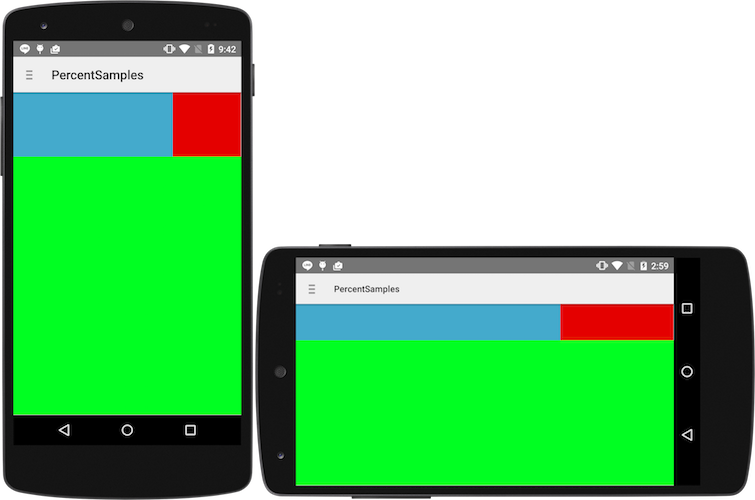
简单效果:
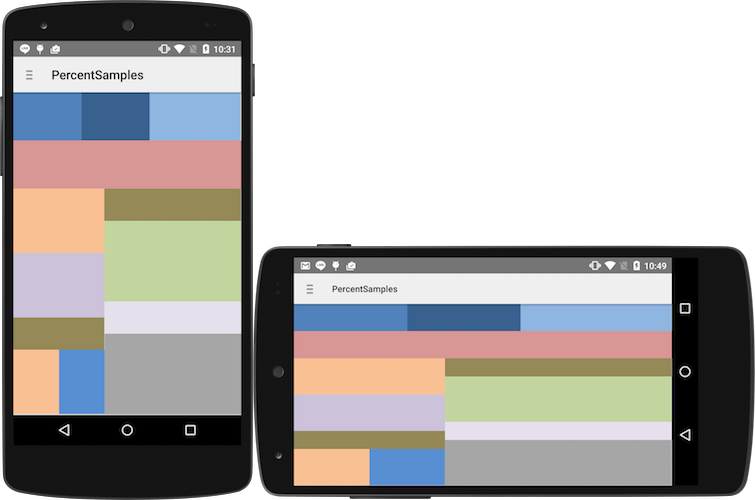
复杂效果:
2. 百分比库使用Demo:
这里的Eclipse版本库代码(包含示例代码),我已经完整提交到Github。地址如下:
https://github.com/PocketBoy/Local/tree/master/Eclipse_android_percent_support
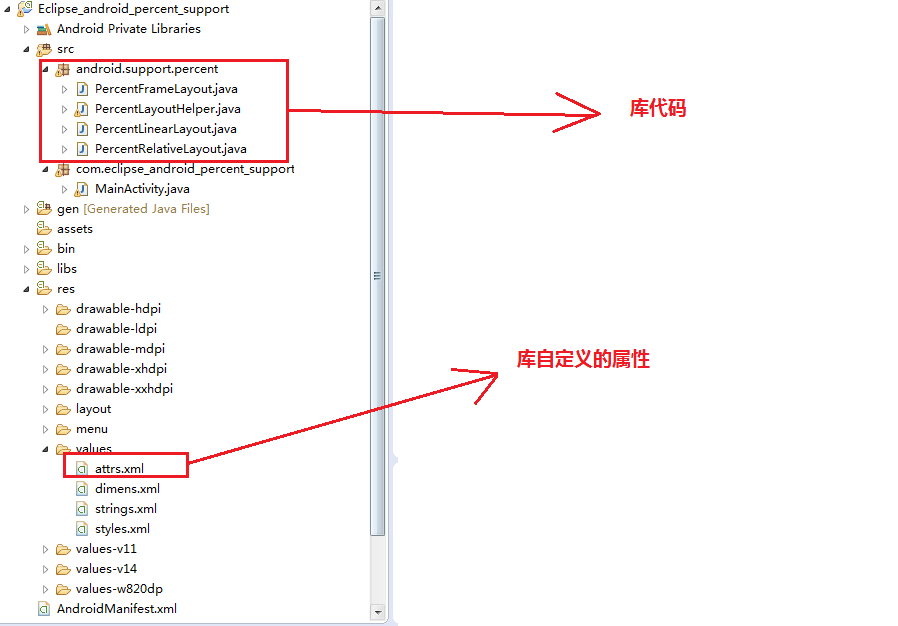
(1)点击上面的链接,下载库代码,解压,导入Eclipse之中:
(2)这里我们新建一个Android工程,命名位"PercentDemo",如下:
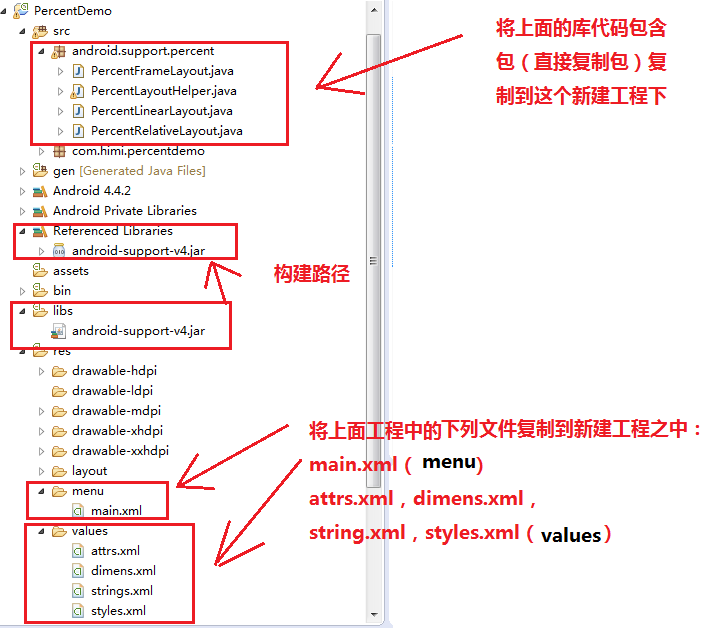
上面库文件需要引用android-support-v4.jar
(3)来到上面自定义属性文件attrs.xml,如下:
<?xml version="1.0" encoding="utf-8"?>

<resources>

    <declare-styleable name="PercentLayout_Layout">

        <attr name="layout_widthPercent" format="string"/>

        <attr name="layout_heightPercent" format="string"/>

        <attr name="layout_marginPercent" format="string"/>

        <attr name="layout_marginLeftPercent" format="string"/>

        <attr name="layout_marginTopPercent" format="string"/>

        <attr name="layout_marginRightPercent" format="string"/>

        <attr name="layout_marginBottomPercent" format="string"/>

        <attr name="layout_marginStartPercent" format="string"/>

        <attr name="layout_marginEndPercent" format="string"/>

        <attr name="layout_textSizePercent" format="string"/>

        <attr name="layout_maxWidthPercent" format="string"/>

        <attr name="layout_maxHeightPercent" format="string"/>

        <attr name="layout_minWidthPercent" format="string"/>

        <attr name="layout_minHeightPercent" format="string"/>

    </declare-styleable>

</resources>
至于怎么使用自定义属性,请参照笔记:
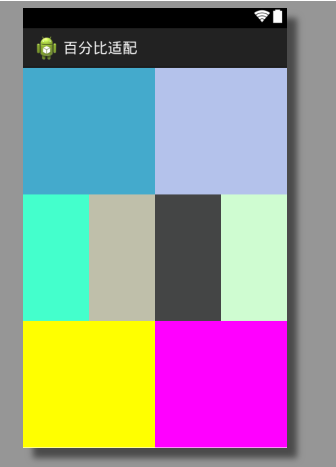
(4)来到activity_main.xml布局文件之中:
<?xml version="1.0" encoding="utf-8"?>

<android.support.percent.PercentLinearLayout xmlns:android="http://schemas.android.com/apk/res/android"

    xmlns:app="http://schemas.android.com/apk/res-auto"

    android:layout_width="match_parent"

    android:layout_height="match_parent"

    android:orientation="vertical" >

    <android.support.percent.PercentLinearLayout

        xmlns:android="http://schemas.android.com/apk/res/android"

        xmlns:app="http://schemas.android.com/apk/res-auto"

        android:layout_width="match_parent"

        android:layout_height="0dp"

        app:layout_heightPercent="33.3%"

        android:orientation="horizontal" >

        <View

            android:id="@+id/view_11"

            android:layout_width="0dp"

            android:layout_height="match_parent"

            app:layout_widthPercent="50%"

            android:background="#ff44aacc" />

        <View

            android:id="@+id/view_12"

            android:layout_width="0dp"

            android:layout_height="match_parent"

            app:layout_widthPercent="50%"

            android:background="#664466cc" />

    </android.support.percent.PercentLinearLayout>

     <android.support.percent.PercentLinearLayout

        xmlns:android="http://schemas.android.com/apk/res/android"

        xmlns:app="http://schemas.android.com/apk/res-auto"

        android:layout_width="match_parent"

        android:layout_height="0dp"

        app:layout_heightPercent="33.3%"

        android:orientation="horizontal" >

        <View

            android:id="@+id/view_21"

            android:layout_width="0dp"

            android:layout_height="match_parent"

            app:layout_widthPercent="25%"

            android:background="#ff44ffcc" />

        <View

            android:id="@+id/view_22"

            android:layout_width="0dp"

            android:layout_height="match_parent"

            app:layout_widthPercent="25%"

            android:background="#8585855c" />

        <View

            android:id="@+id/view_23"

            android:layout_width="0dp"

            android:layout_height="match_parent"

            app:layout_widthPercent="25%"

            android:background="#ff444545" />

        <View

            android:id="@+id/view_24"

            android:layout_width="0dp"

            android:layout_height="match_parent"

            app:layout_widthPercent="25%"

            android:background="#556ff776" />

    </android.support.percent.PercentLinearLayout>

      <android.support.percent.PercentLinearLayout

        xmlns:android="http://schemas.android.com/apk/res/android"

        xmlns:app="http://schemas.android.com/apk/res-auto"

        android:layout_width="match_parent"

        android:layout_height="0dp"

        app:layout_heightPercent="33.3%"

        android:orientation="horizontal" >

        <View

            android:id="@+id/view_31"

            android:layout_width="0dp"

            android:layout_height="match_parent"

            app:layout_widthPercent="50%"

            android:background="#ffffff00" />

        <View

            android:id="@+id/view_32"

            android:layout_width="0dp"

            android:layout_height="match_parent"

            app:layout_widthPercent="50%"

            android:background="#ffff00ff" />

    </android.support.percent.PercentLinearLayout>

</android.support.percent.PercentLinearLayout>
布局效果如下:
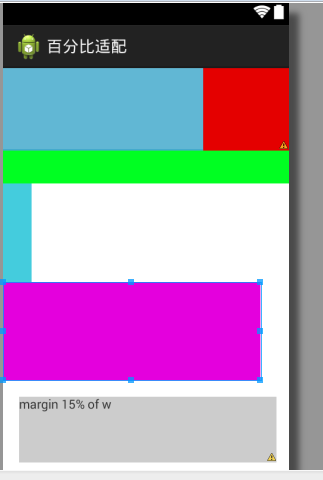
(5)来到activity_main1.xml,如下:
<android.support.percent.PercentRelativeLayout

    xmlns:android="http://schemas.android.com/apk/res/android"

    xmlns:app="http://schemas.android.com/apk/res-auto"

    android:layout_width="match_parent"

    android:layout_height="match_parent"

    android:background="@android:color/white" >

    <View

        android:id="@+id/top_left"

        android:layout_width="0dp"

        android:layout_height="0dp"

        android:layout_alignParentTop="true"

        app:layout_heightPercent="20%"

        app:layout_widthPercent="70%"

        android:background="#ff44aacc" />

    <View

        android:id="@+id/top_right"

        android:layout_width="0dp"

        android:layout_height="0dp"

        android:layout_alignParentTop="true"

        android:layout_toRightOf="@+id/top_left"

        app:layout_heightPercent="20%"

        app:layout_widthPercent="30%"

        android:background="#ffe40000" />

    <android.support.percent.PercentFrameLayout

        android:id="@+id/bottom"

        android:layout_width="match_parent"

        android:layout_height="0dp"

        android:layout_below="@+id/top_left"

        android:layout_gravity="center"

        app:layout_heightPercent="80%"

        android:background="#ff00ff22" >

        <android.support.percent.PercentLinearLayout

            android:layout_width="fill_parent"

            android:layout_height="0dp"

            app:layout_heightPercent="100%"

            app:layout_marginTopPercent="10%"

            android:background="@android:color/white"

            android:orientation="vertical"

            >

            <View

                android:layout_width="0dp"

                android:layout_height="0dp"

                app:layout_heightPercent="30%"

                app:layout_widthPercent="10%"

                android:background="#ff44ccdd" />

            <View

                android:layout_width="0dp"

                android:layout_height="0dp"

                app:layout_heightPercent="30%"

                app:layout_widthPercent="90%"

                android:background="#ffe400dd" />

            <TextView

                android:layout_width="0dp"

                 android:layout_height="0dp"

                app:layout_heightPercent="20%"

                app:layout_widthPercent="90%"

                android:background="#ccc"

                android:text="margin 15% of w"

                app:layout_marginPercent="5%h"

                />

        </android.support.percent.PercentLinearLayout>

    </android.support.percent.PercentFrameLayout>

</android.support.percent.PercentRelativeLayout>
布局效果如下:
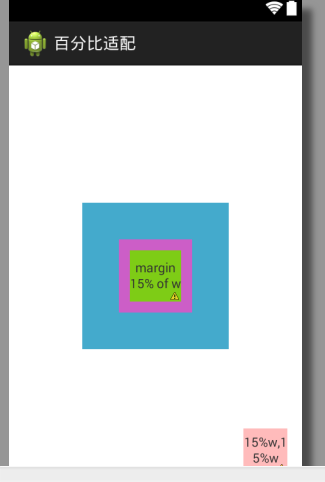
(6)activity_main2.xml,如下:
<?xml version="1.0" encoding="utf-8"?>

<android.support.percent.PercentFrameLayout

    xmlns:android="http://schemas.android.com/apk/res/android"

    xmlns:app="http://schemas.android.com/apk/res-auto"

    android:layout_width="match_parent"

    android:layout_height="match_parent"

    android:orientation="vertical">

    <android.support.percent.PercentFrameLayout

        android:layout_width="0dp"

        android:layout_height="0dp"

        android:layout_gravity="center"

        android:background="#ff44aacc"

        app:layout_heightPercent="50%w"

        app:layout_widthPercent="50%w">

        <android.support.percent.PercentFrameLayout

            android:layout_width="0dp"

            android:layout_height="0dp"

            android:layout_gravity="center"

            android:background="#ffcc5ec7"

            app:layout_heightPercent="50%w"

            app:layout_widthPercent="50%w">

            <TextView

                android:layout_width="match_parent"

                android:layout_height="match_parent"

                android:layout_gravity="center"

                android:background="#ff7ecc16"

                android:gravity="center"

                android:text="margin 15% of w"

                app:layout_marginPercent="15%w"

                />

        </android.support.percent.PercentFrameLayout>

    </android.support.percent.PercentFrameLayout>

    <TextView android:layout_width="0dp"

              android:layout_height="0dp"

              android:layout_gravity="bottom|right"

              android:background="#44ff0000"

              android:gravity="center"

              android:text="15%w,15%w"

              app:layout_heightPercent="15%w"

              app:layout_marginPercent="5%w"

              app:layout_widthPercent="15%w"/>

</android.support.percent.PercentFrameLayout>
布局效果如下:
7. Android框架和工具之 android-percent-support-lib-sample(百分比支持)的更多相关文章
- 13. Android框架和工具之 Android Drawable Factory
1. AndroidDrawableFactory 一个生成Android应用所需尺寸图片的工具. 托管在Github之中: https://github.com/tizionario/Android ...
- 3. Android框架和工具之 xUtils(DbUtils )
1. xUtils简介 xUtils 包含了很多实用的android工具.xUtils 最初源于Afinal框架,进行了大量重构,使得xUtils支持大文件上传,更全面的http请求协议支持(10种谓 ...
- 3. Android框架和工具之 xUtils(BitmapUtils)
1. BitmapUtils 作用: 加载bitmap的时候无需考虑bitmap加载过程中出现的oom和android容器快速滑动时候出现的图片错位等现象: 支持加载网络图片和本地图片: 内存管理使用 ...
- 3. Android框架和工具之 xUtils(HttpUtils)
1. HttpUtils 作用: 支持同步,异步方式的请求: 支持大文件上传,上传大文件不会oom: 支持GET,POST,PUT,MOVE,COPY,DELETE,HEAD请求: 下载支持301/3 ...
- 10. Android框架和工具之 AppMsg(消息提示)
1. AppMsg 优雅的弹出类似Toast的消息提示,支持3种状态Alert(警告),Confirm(确认)以及Info(消息). 2. AppMsg使用: (1)AppMsg下载地址 ...
- 5. Android框架和工具之 ZXing(二维码)
Android进阶笔记06:Android 实现扫描二维码实现网页登录
- 3. Android框架和工具之 xUtils(ViewUtils )
1. ViewUtils 作用: 完全注解方式就可以进行UI绑定和事件绑定. 无需findViewById和setClickListener等. 2. UI绑定 和 事件绑定 (1)UI绑定 下面我們 ...
- Android框架式编程之Android Architecture Components
1. 当前Android开发面临的问题 Android开发不同于传统的桌面程序开发,桌面程序一般都有唯一的快捷方式入口,并且常作为单进程存在:而一个典型的Android应用通常由多个应用组件构成,包括 ...
- 6. Android框架和工具之 JSON解析
Android进阶笔记17:3种JSON解析工具(org.json.fastjson.gson)
随机推荐
- GLSL Notes
[GLSL Notes] API of shader: glCreateShader(), glShaderSource(), glCompileShader(), glGetShadrInfoLog ...
- How to run a terminal inside of vim?
[How to run a terminal inside of vim?] :sh turn vim into shell mode d+trl back to vim 参考:http://stac ...
- 51Nod 1201 整数划分 (经典dp)
题目链接:http://www.51nod.com/onlineJudge/questionCode.html#!problemId=1201 题意不多说了. dp[i][j]表示i这个数划分成j个数 ...
- Jupyter增加内核
本例的Jupyter安装在Python3下,以增加Python2内核为例. 首先确认在Python3下已安装了内核: ipython kernel install --user #or python3 ...
- visual studio 设计器上出现蓝色的点和箭头
visual studio 设计器上出现蓝色的点和箭头: 突然发现打开visual studio 的时候出现了很多蓝色的点和箭头,解决办法是:按组合快捷键 Ctrl+R,Ctrl+W 或 Ctrl+E ...
- CDocument类的UpdateAllViews()成员函数
(一)UpdateAllViews() 与 Invalidate()的区别 UpdateAllViews()是在DOC/VIEW结构中,当一个视图的数据改变后,通知所有视图作相应的改变,和重画毫无关系 ...
- Linux 批量添加用户
#!/bin/bashfor i in $(seq 1 50) #会建立1-50的用户douseradd student$i -g studentecho student$i |passwd ...
- JPA的主键生成策略
数据的唯一性是很平常的要求,但是如果框架不能提供相关的控制而由程序员完全控制是很危险的,在JPA中,有下面四种策略.A.容器自动生成---GeneratorType.AUTO 由JPA自动生成B.使用 ...
- SQL扫描并执行文件夹里的sql脚本
场景:项目数据库操作全部使用存储过程实现.每天都会有很多存储过程更新/增加,人工对测试环境中存储过程更新,会有一定概率出现遗漏,也麻烦!所以,需要一个工具将文件夹中所有存 储过程执行一 ...
- jcmd命令使用
概述 在JDK 1.7之后,新增了一个命令行工具jcmd. 它是一个多功能工具,能够用来导出堆,查看java进程,导出线程信息.运行GC等. 使用演示样例 以下这个命令能够列出当前运行的全部虚拟机: ...