
10. Android框架和工具之 AppMsg(消息提示)
1. AppMsg
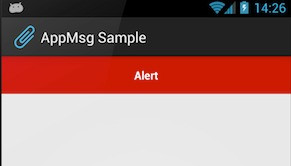
优雅的弹出类似Toast的消息提示,支持3种状态Alert(警告),Confirm(确认)以及Info(消息)。
2. AppMsg使用:
(1)AppMsg下载地址:
https://github.com/johnkil/Android-AppMsg
(2)下载成功之后,解压如下:
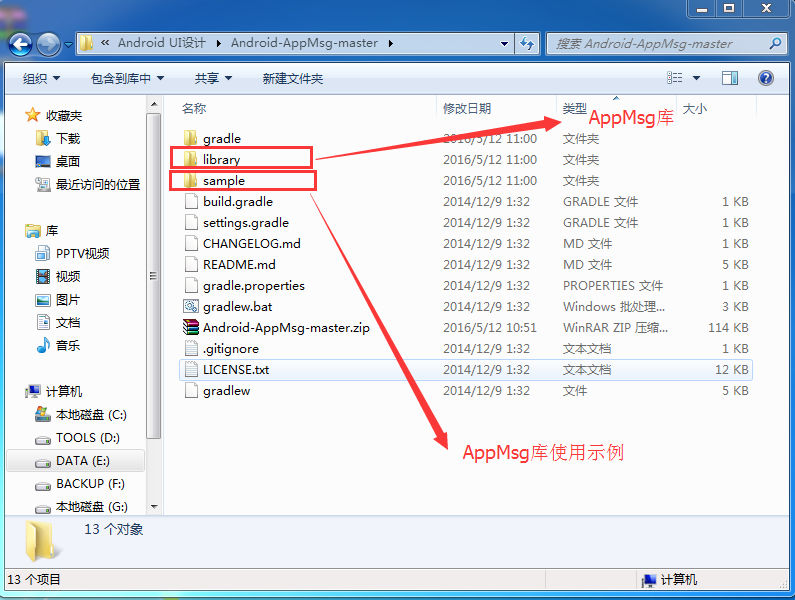
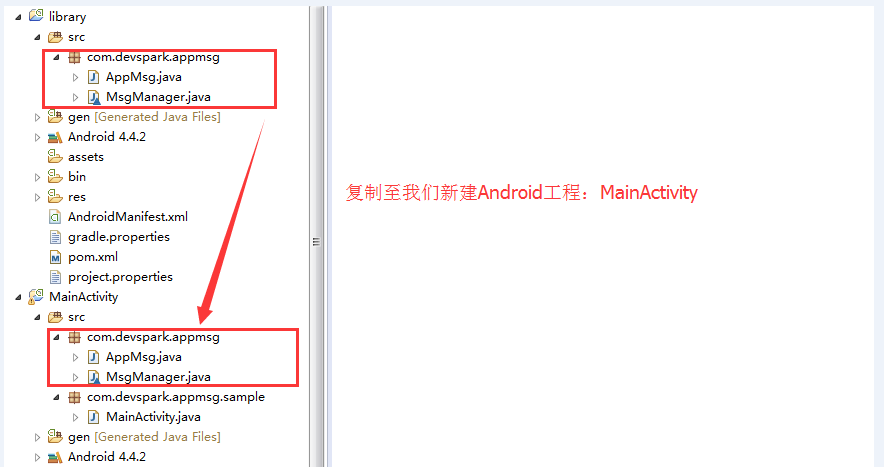
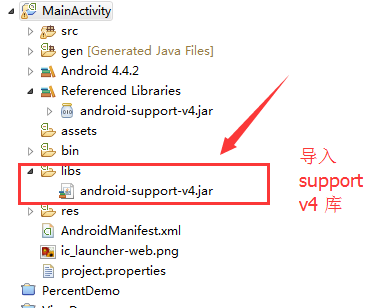
(3)导入library 和 sample 分别导入Eclipse如下:
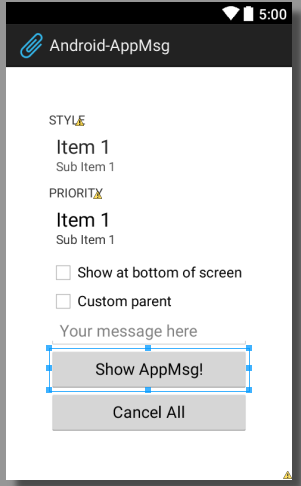
(4)首先我们来到主布局文件activity_main.xml,如下:
 <ScrollView xmlns:android="http://schemas.android.com/apk/res/android"

     xmlns:tools="http://schemas.android.com/tools"

     android:layout_width="match_parent"

     android:layout_height="match_parent"

     android:fillViewport="true">

     <LinearLayout

         android:id="@+id/animated_root"

         android:layout_width="match_parent"

         android:layout_height="match_parent"

         android:gravity="center"

         android:orientation="vertical"

         android:animateLayoutChanges="true"

         android:padding="48dp">

         <TextView

             android:layout_width="wrap_content"

             android:layout_height="wrap_content"

             android:layout_gravity="left"

             android:textAllCaps="true"

             android:text="@string/style"

             />

         <Spinner

             android:id="@+id/style_spnr"

             android:layout_width="match_parent"

             android:layout_height="wrap_content"

             android:minHeight="48dp"

             android:spinnerMode="dropdown"

             android:entries="@array/styles"

             android:prompt="@string/style"

             />

         <TextView

             android:layout_width="wrap_content"

             android:layout_height="wrap_content"

             android:layout_gravity="left"

             android:textAllCaps="true"

             android:text="@string/priority"

             />

         <Spinner

             android:id="@+id/priority_spnr"

             android:layout_width="match_parent"

             android:layout_height="wrap_content"

             android:minHeight="48dp"

             android:spinnerMode="dropdown"

             android:entries="@array/priorities"

             android:prompt="@string/priority"

             />

         <CheckBox

             android:id="@+id/bottom"

             android:layout_width="match_parent"

             android:layout_height="wrap_content"

             android:text="@string/bottom" />

         <LinearLayout

             android:id="@+id/alt_parent"

             android:visibility="gone"

             android:layout_width="match_parent"

             android:layout_height="wrap_content"

             android:minHeight="48dp"

             android:orientation="vertical" />

         <CheckBox

             android:id="@+id/parent_chk"

             android:layout_width="match_parent"

             android:layout_height="wrap_content"

             android:text="@string/custom_parent" />

         <EditText

             android:id="@+id/provided_txt"

             android:layout_width="match_parent"

             android:layout_height="wrap_content"

             android:hint="@string/your_message_here"

             />

         <Button

             android:id="@+id/show"

             android:layout_width="match_parent"

             android:layout_height="wrap_content"

             android:onClick="buttonClick"

             android:text="@string/show_appmsg" />

         <Button

             android:id="@+id/cancel_all"

             android:layout_width="match_parent"

             android:layout_height="wrap_content"

             android:onClick="buttonClick"

             android:text="@string/cancel_all" />

     </LinearLayout>

 </ScrollView>
布局效果如下:
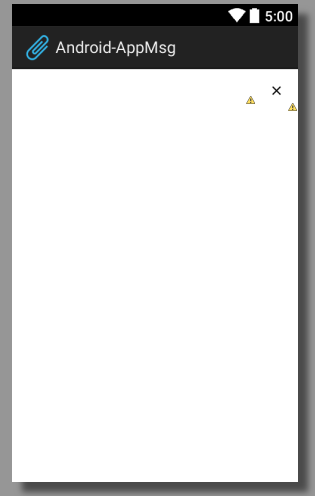
前面提到可以显示Alert、Confirm、Info三种消息样式,其实还可以显示自定义的消息样式,这里我们自定义一个消息样式为sticky.xml,如下:
 <?xml version="1.0" encoding="utf-8"?>

 <RelativeLayout xmlns:android="http://schemas.android.com/apk/res/android"

                 android:layout_width="match_parent"

                 android:layout_height="wrap_content"

                 android:minHeight="48dp">

     <ImageButton

             android:id="@+id/remove_btn"

             android:layout_width="wrap_content"

             android:layout_height="wrap_content"

             android:layout_alignParentRight="true"

             android:layout_centerVertical="true"

             android:minWidth="48dp"

             android:minHeight="48dp"

             android:src="@drawable/ic_action_cancel_inset"

             style="@style/SelectableItem"/>

     <TextView

             android:id="@android:id/message"

             android:layout_width="match_parent"

             android:layout_height="wrap_content"

             android:layout_toLeftOf="@id/remove_btn"

             android:layout_centerVertical="true"

             android:gravity="center"

             android:padding="8dp"

             android:textColor="#ff222222"

             android:textIsSelectable="false"

             android:textSize="14sp"

             android:textStyle="bold"/>

 </RelativeLayout>
布局效果图,如下:
(5)在MainActivity工程之中找到主Activity,修改为extends Activity,如下:
 /*

  * Copyright 2012 Evgeny Shishkin

  *

  * Licensed under the Apache License, Version 2.0 (the "License");

  * you may not use this file except in compliance with the License.

  * You may obtain a copy of the License at

  *

  *      http://www.apache.org/licenses/LICENSE-2.0

  *

  * Unless required by applicable law or agreed to in writing, software

  * distributed under the License is distributed on an "AS IS" BASIS,

  * WITHOUT WARRANTIES OR CONDITIONS OF ANY KIND, either express or implied.

  * See the License for the specific language governing permissions and

  * limitations under the License.

  */

 package com.devspark.appmsg.sample;

 import android.app.Activity;

 import android.animation.LayoutTransition;

 import android.annotation.TargetApi;

 import android.os.Bundle;

 import android.view.View;

 import android.view.ViewGroup;

 import android.widget.CheckBox;

 import android.widget.CompoundButton;

 import android.widget.EditText;

 import android.widget.Spinner;

 import static android.os.Build.VERSION.SDK_INT;

 import static android.os.Build.VERSION_CODES.ICE_CREAM_SANDWICH;

 import static android.os.Build.VERSION_CODES.JELLY_BEAN;

 import static android.text.TextUtils.isEmpty;

 import static android.view.Gravity.BOTTOM;

 import static android.view.View.GONE;

 import static android.view.View.VISIBLE;

 import com.devspark.appmsg.AppMsg;

 /**

  * Sample of AppMsg library.

  *

  * @author hebao

  */

 public class  MainActivity  extends Activity {

     private static final int NORMAL_POSITION = 1;

     private static final int INFO_POSITION = 2;

     private int mMsgCount;

     private Spinner mStyle;

     private Spinner mPriority;

     private EditText mProvidedMsg;

     private CheckBox mBottom;

     private CheckBox mParent;

     private ViewGroup mAltParent;

     public void onCreate(Bundle savedInstanceState) {

         super.onCreate(savedInstanceState);

         setContentView(R.layout.activity_main);

         mProvidedMsg = (EditText) findViewById(R.id.provided_txt);

         mStyle = (Spinner) findViewById(R.id.style_spnr);

         mStyle.setSelection(INFO_POSITION);

         mPriority = (Spinner) findViewById(R.id.priority_spnr);

         mPriority.setSelection(NORMAL_POSITION);

         mBottom = (CheckBox) findViewById(R.id.bottom);

         mParent = (CheckBox) findViewById(R.id.parent_chk);

         mAltParent = (ViewGroup) findViewById(R.id.alt_parent);

         mParent.setOnCheckedChangeListener(new CompoundButton.OnCheckedChangeListener() {

             @Override

             public void onCheckedChanged(CompoundButton buttonView, boolean isChecked) {

                 mAltParent.setVisibility(isChecked ? VISIBLE : GONE);

                 mBottom.setVisibility(isChecked ? GONE : VISIBLE);

             }

         });

         if (SDK_INT >= JELLY_BEAN) {

             enableChangingTransition();

         }

     }

     /**

      * 指使用该注解的方法适用于系统版本Android 4.1

      * 注:Android 4.1的版本代号是Jelly Bean

      */

     @TargetApi(JELLY_BEAN)

     private void enableChangingTransition() {

         ViewGroup animatedRoot = (ViewGroup) findViewById(R.id.animated_root);

         animatedRoot.getLayoutTransition().enableTransitionType(LayoutTransition.CHANGING);

     }

     /**

      * Button onClick listener.

      *

      * @param v

      */

     public void buttonClick(View v) {

         switch (v.getId()) {

             case R.id.show:

                 showAppMsg();

                 break;

             case R.id.cancel_all:

                 AppMsg.cancelAll(this);

                 break;

             default:

                 return;

         }

     }

     /**

      * 显示App Message

      */

     private void showAppMsg() {

         mMsgCount++;

         final int styleSelected = mStyle.getSelectedItemPosition();

         final int priority = positionToPriority(mPriority.getSelectedItemPosition());

         final CharSequence providedMsg = mProvidedMsg.getText();

         final CharSequence msg = isEmpty(providedMsg)

                 ? new StringBuilder().append(mStyle.getSelectedItem())

                 .append(" ").append(mPriority.getSelectedItem())

                 .append(" msg#").append(mMsgCount).toString()

                 : providedMsg;

         final AppMsg.Style style;

         boolean customAnimations = false;

         AppMsg provided = null;

         switch (styleSelected) {

             case 0:

                 style = AppMsg.STYLE_ALERT;

                 break;

             case 1:

                 style = AppMsg.STYLE_CONFIRM;

                 break;

             case 3:

                 style = new AppMsg.Style(AppMsg.LENGTH_SHORT, R.color.custom);

                 customAnimations = true;

                 break;

             case 4:

                 style = new AppMsg.Style(AppMsg.LENGTH_STICKY, R.color.sticky);

                 provided = AppMsg.makeText(this, msg, style, R.layout.sticky);

                 provided.getView()

                         .findViewById(R.id.remove_btn)

                         .setOnClickListener(new CancelAppMsg(provided));

                 break;

             default:

                 style = AppMsg.STYLE_INFO;

                 break;

         }

         // create {@link AppMsg} with specify type

         AppMsg appMsg = provided != null ? provided : AppMsg.makeText(this, msg, style);

         appMsg.setPriority(priority);

         if (mParent.isChecked()) {

             appMsg.setParent(mAltParent);

         } else {

             if (mBottom.isChecked()) {

                 appMsg.setLayoutGravity(BOTTOM);

             }

         }

         if (customAnimations) {

             appMsg.setAnimation(android.R.anim.slide_in_left, android.R.anim.slide_out_right);

         }

         appMsg.show();

     }

     private static int positionToPriority(int selectedItemPosition) {

         switch (selectedItemPosition) {

             case 0:

                 return AppMsg.PRIORITY_HIGH;

             case 2:

                 return AppMsg.PRIORITY_LOW;

             default:

                 return AppMsg.PRIORITY_NORMAL;

         }

     }

     @Override

     protected void onPause() {

         super.onPause();

         // This is optional for 14+,

         // also you may want to call it at your later convenience, e.g. onDestroy

         if (SDK_INT < ICE_CREAM_SANDWICH) {

             AppMsg.cancelAll(this);

         }

     }

     static class CancelAppMsg implements View.OnClickListener {

         private final AppMsg mAppMsg;

         CancelAppMsg(AppMsg appMsg) {

             mAppMsg = appMsg;

         }

         @Override

         public void onClick(View v) {

             mAppMsg.cancel();

         }

     }

 }
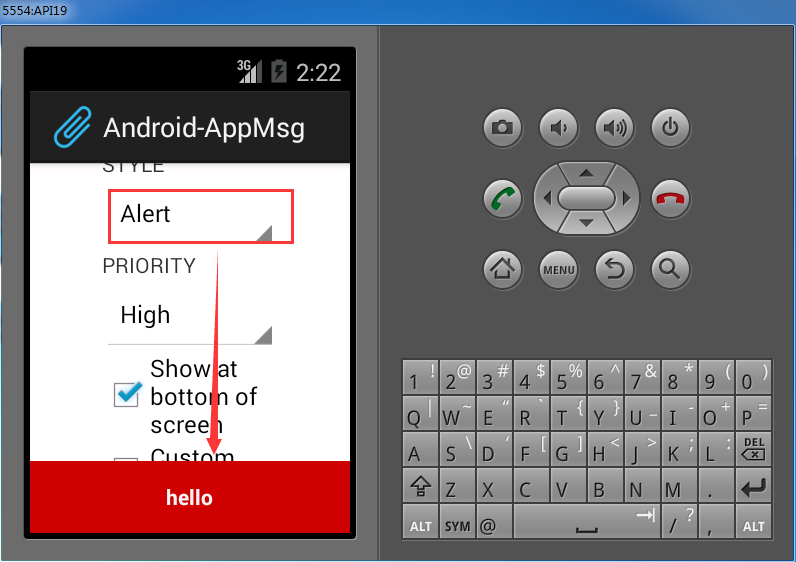
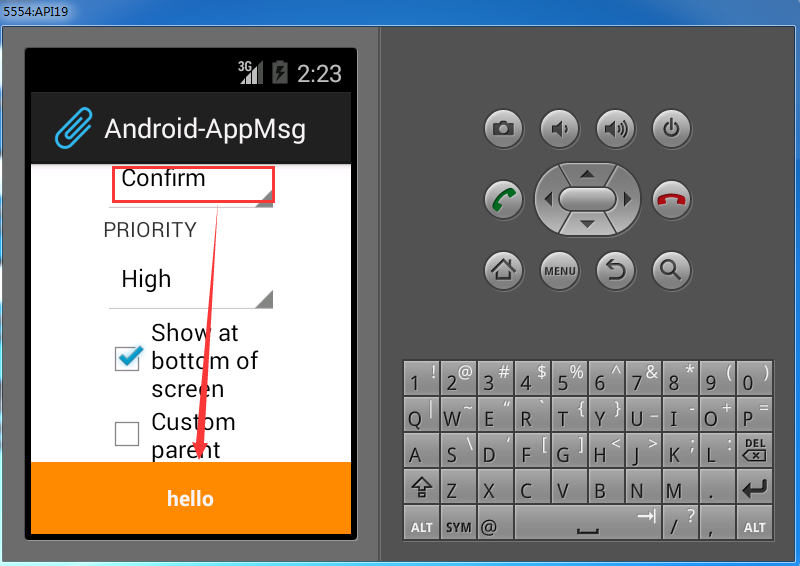
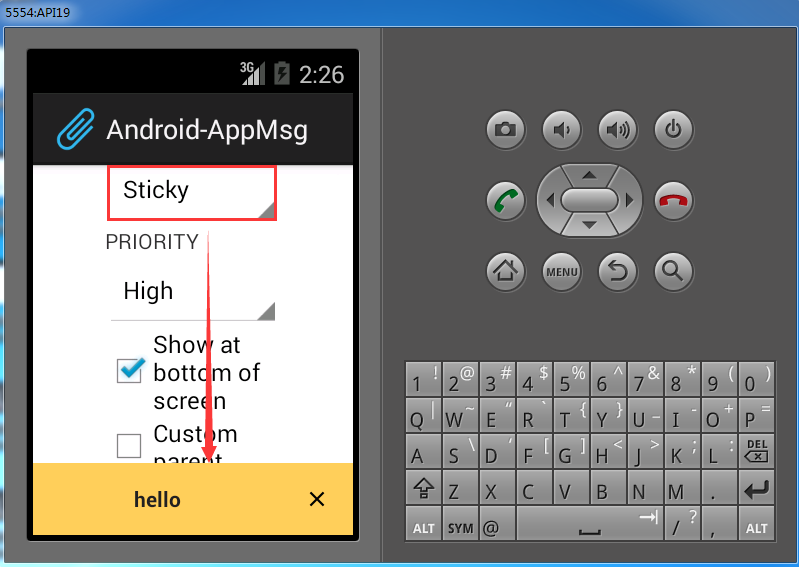
部署到模拟器上,如下:

10. Android框架和工具之 AppMsg(消息提示)的更多相关文章
- 7. Android框架和工具之 android-percent-support-lib-sample(百分比支持)
1. android-percent-support-lib-sample介绍: 谷歌最新的百分比布局库的示例项目.其实LinearLayout的layout_weight也能实现百分比效果,不过这个 ...
- Android应用开发学习之Toast消息提示框
作者:刘昊昱 博客:http://blog.csdn.net/liuhaoyutz 本文我们来看Toast消息提示框的用法.使用Toast消息提示框一般有三个步骤: 1. 创建一个Toast对象.可 ...
- Android学习笔记通过Toast显示消息提示框
显示消息提示框的步骤 这个很简单我就直接上代码了: Button show = (Button)findViewById(R.id.show); show.setOnClickListener(new ...
- 4. Android框架和工具之 android-async-http
1. android-async-http 简介 主要有以下功能: (1)发送异步http请求,在匿名callback对象中处理response信息: (2)http请求发生在UI(主)线程之外的 ...
- 3. Android框架和工具之 xUtils(DbUtils )
1. xUtils简介 xUtils 包含了很多实用的android工具.xUtils 最初源于Afinal框架,进行了大量重构,使得xUtils支持大文件上传,更全面的http请求协议支持(10种谓 ...
- 3. Android框架和工具之 xUtils(HttpUtils)
1. HttpUtils 作用: 支持同步,异步方式的请求: 支持大文件上传,上传大文件不会oom: 支持GET,POST,PUT,MOVE,COPY,DELETE,HEAD请求: 下载支持301/3 ...
- 13. Android框架和工具之 Android Drawable Factory
1. AndroidDrawableFactory 一个生成Android应用所需尺寸图片的工具. 托管在Github之中: https://github.com/tizionario/Android ...
- 6. Android框架和工具之 JSON解析
Android进阶笔记17:3种JSON解析工具(org.json.fastjson.gson)
- 3. Android框架和工具之 xUtils(BitmapUtils)
1. BitmapUtils 作用: 加载bitmap的时候无需考虑bitmap加载过程中出现的oom和android容器快速滑动时候出现的图片错位等现象: 支持加载网络图片和本地图片: 内存管理使用 ...
随机推荐
- 查询processlist具体信息
SELECT * FROM information_schema.PROCESSLIST WHERE HOST LIKE '%172.16.10.22%' AND COMMAND <> ' ...
- Spring Boot 所提供的配置优先级顺序
按照优先级从高到低的顺序,具体的列表如下所示. 命令行参数. 通过 System.getProperties() 获取的 Java 系统参数. 操作系统环境变量. 从 java:comp/env 得到 ...
- CodeForces 709B Checkpoints (数学,最短路)
题意:给定你的坐标,和 n 个点,问你去访问至少n-1个点的最短路是多少. 析:也是一个很简单的题,肯定是访问n-1个啊,那么就考虑从你的位置出发,向左访问和向右访问总共是n-1个,也就是说你必须从1 ...
- 通过set和waitOne来控制子线程的运行和停止
public partial class Form1 : Form { //自动重置事件类 //主要用到其两个方法 WaitOne() 和 Set() , 前者阻塞当前线程,后者通知阻塞线程继续往下执 ...
- Weka中EM算法详解
private void EM_Init (Instances inst) throws Exception { int i, j, k; // 由于EM算法对初始值较敏感,故选择run k mean ...
- TemplateBinding vs TemplatedParent【PluraSight】
TemplateBinding:TemplateBinding是一个Markup Extension
- css去掉a标签点击后的虚线框(转自网络)
outline是css3的一个属性,用的很少. 声明,这是个不能兼容的css属性,在ie6.ie7.遨游浏览器都不兼容. outline控制的到底是什么呢? 当聚焦a标签的时候,在a标签的区域周围会有 ...
- LVS 单独完成--负载均衡
原文地址:http://blog.sina.com.cn/s/blog_5f54f0be0101eyiu.html LVS 是通过 IPVS 模块来实现的.IPVS是LVS集群的核心,主要用于完成用户 ...
- Windows API 磁盘
这里的磁盘就是你的C,D,E,F,G盘啦 那么来看看吧windows Api来获取信息的呢 (1)DWORD GetLogicalDrives(void) 返回值是一个32位整形 32位每一位表示一个 ...
- 推荐系统之基于二部图的个性化推荐系统原理及C++实现
1.引言 许多网站都喜欢让用户点击“喜欢/不喜欢”,“顶/反对”,也正是这种很简单的信息也可以利用起来对用户进行推荐!这里介绍一种基于网络结构的推荐系统! 由于推荐系统深深植根于互联网,用户与用户之间 ...