
idea使用EasyCode集成ruoyi框架自动生成代码
1、ruoyi框架源码获取
https://gitee.com/zhangmrit/ruoyi-cloud/tree/nacos/
2、需要ruoyi调整部分代码
public class BaseController

{

    protected final Logger logger = LoggerFactory.getLogger(BaseController.class);

    /**

     * 将前台传递过来的日期格式的字符串,自动转化为Date类型

     */

    @InitBinder

    public void initBinder(WebDataBinder binder)

    {

        // Date 类型转换

        binder.registerCustomEditor(Date.class, new PropertyEditorSupport()

        {

            @Override

            public void setAsText(String text)

            {

                setValue(DateUtils.parseDate(text));

            }

        });

    }

    /**

     * 设置请求分页数据

     */

    protected void startPage()

    {

        PageDomain pageDomain = TableSupport.buildPageRequest();

        Integer pageNum = pageDomain.getPageNum();

        Integer pageSize = pageDomain.getPageSize();

        if (null != pageNum && null != pageSize)

        {

            String orderBy = SqlUtil.escapeOrderBySql(pageDomain.getOrderBy());

            PageHelper.startPage(pageNum, pageSize, orderBy);

        }

    }

    /**

     * 获取request

     */

    public HttpServletRequest getRequest()

    {

        return ServletUtils.getRequest();

    }

    /**

     * 获取response

     */

    public HttpServletResponse getResponse()

    {

        return ServletUtils.getResponse();

    }

    /**

     * 获取session

     */

    public HttpSession getSession()

    {

        return getRequest().getSession();

    }

    public long getCurrentUserId()

    {

        String currentId = getRequest().getHeader(Constants.CURRENT_ID);

        if (StringUtils.isNotBlank(currentId))

        {

            return Long.valueOf(currentId);

        }

        return 0l;

    }

    public String getLoginName()

    {

        return getRequest().getHeader(Constants.CURRENT_USERNAME);

    }

    /**

     * 响应请求分页数据

     */

    @SuppressWarnings({"rawtypes", "unchecked"})

    protected TableDataInfo getDataTable(List<?> list)

    {

        TableDataInfo rspData = new TableDataInfo();

        rspData.setCode(0);

        rspData.setRows(list);

        rspData.setTotal(new PageInfo(list).getTotal());

        return rspData;

    }

    @SuppressWarnings({"rawtypes", "unchecked"})

    protected R result(List<?> list)

    {

        PageInfo<?> pageInfo = new PageInfo(list);

        Map<String, Object> m = new HashMap<String, Object>();

        m.put("list", list);

        m.put("pageNum", pageInfo.getPageNum());

        m.put("total", pageInfo.getTotal());

        return R.ok().put("data",m);

    }

    /**

     * 响应返回结果

     *

     * @param rows 影响行数

     * @return 操作结果

     */

    protected R toAjax(int rows,String successMsg,String errorMsg)

    {

        return rows > 0 ? R.ok(successMsg) : R.error(errorMsg);

    }

    /**

     * 响应返回结果

     *

     * @param rows 影响行数

     * @return 操作结果

     */

    protected R toAjax(int rows)

    {

        return rows > 0 ? R.ok() : R.error();

    }

    /**

     * 响应返回结果

     *

     * @param result 结果

     * @return 操作结果

     */

    protected R toAjax(boolean result)

    {

        return result ? R.ok() : R.error();

    }

}
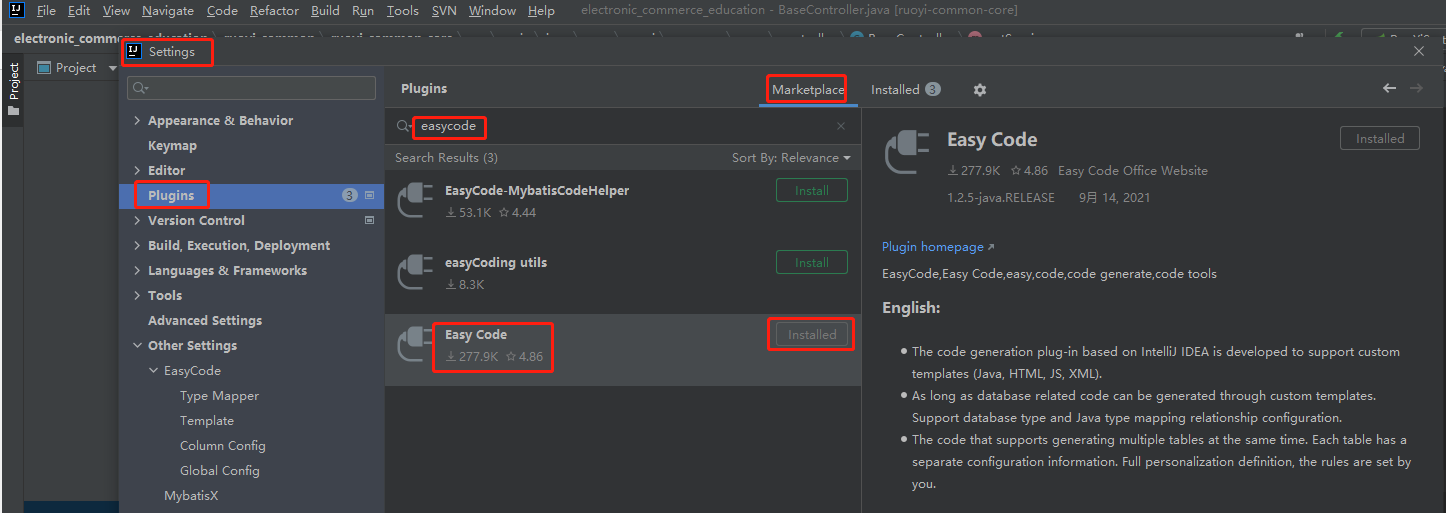
3、下载EasyCode插件
4、配置EasyCode
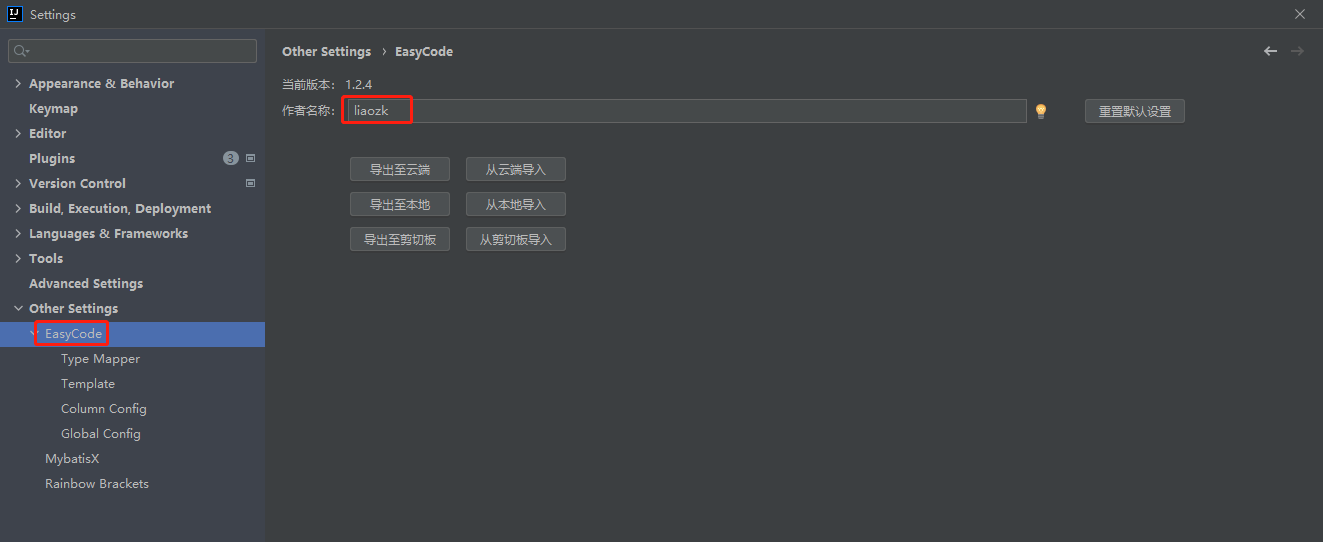
4.1、配置作者名称
4.2、配置代码内容生成模板

controller.java.vm
##定义初始变量
#set($tableName = $tool.append($tableInfo.name, "Controller"))
##设置回调
$!callback.setFileName($tool.append($tableName, ".java"))
$!callback.setSavePath($tool.append($tableInfo.savePath, "/controller"))
##拿到主键
#if(!$tableInfo.pkColumn.isEmpty())
#set($pk = $tableInfo.pkColumn.get(0))
#end
#if($tableInfo.savePackageName)package $!{tableInfo.savePackageName}.#{end}controller;
import $!{tableInfo.savePackageName}.service.$!{tableInfo.name}Service;
import org.springframework.web.bind.annotation.*;
import org.springframework.beans.factory.annotation.Autowired;
import com.ruoyi.common.core.controller.BaseController;
import com.ruoyi.common.core.domain.R;
import com.ruoyi.common.core.page.PageDomain;
import com.ruoyi.common.log.annotation.OperLog;
import com.ruoyi.common.log.enums.BusinessType;
/**
* 表控制层
*
* @author $!author
* @since $!time.currTime()
*/
@RestController
@RequestMapping("$!tool.firstLowerCase($tableInfo.name)")
public class $!{tableName} extends BaseController{
/**
* 服务对象
*/
@Autowired
private $!{tableInfo.name}Service $!tool.firstLowerCase($tableInfo.name)Service;
/**
* 分页查询
*
* @param $!{tool.firstLowerCase($tableInfo.name)} 筛选条件
* @param page 分页对象
* @return 查询结果
*/
@GetMapping("list")
public R queryByPage($!{tableInfo.name} $!{tool.firstLowerCase($tableInfo.name)}, PageDomain page) {
startPage();
return result(this.$!{tool.firstLowerCase($tableInfo.name)}Service.queryByPage($!{tool.firstLowerCase($tableInfo.name)}));
}
/**
* 通过主键查询单条数据
*
* @param $!{tool.firstLowerCase($tableInfo.name)} 实体
* @return 单条数据
*/
@PostMapping("get")
public R queryById(@RequestBody $!{tableInfo.name} $!{tool.firstLowerCase($tableInfo.name)}) {
return R.data(this.$!{tool.firstLowerCase($tableInfo.name)}Service.queryById($!{tool.firstLowerCase($tableInfo.name)}.getId()));
}
/**
* 新增数据
*
* @param $!{tool.firstLowerCase($tableInfo.name)} 实体
* @return 新增结果
*/
@OperLog(title = "新增", businessType = BusinessType.INSERT)
@PostMapping("save")
public R addSave(@RequestBody $!{tableInfo.name} $!{tool.firstLowerCase($tableInfo.name)}) {
return toAjax(this.$!{tool.firstLowerCase($tableInfo.name)}Service.insert($!{tool.firstLowerCase($tableInfo.name)}),"新增成功","新增失败");
}
/**
* 编辑数据
*
* @param $!{tool.firstLowerCase($tableInfo.name)} 实体
* @return 编辑结果
*/
@OperLog(title = "修改", businessType = BusinessType.UPDATE)
@PostMapping("update")
public R editSave(@RequestBody $!{tableInfo.name} $!{tool.firstLowerCase($tableInfo.name)}) {
return toAjax(this.$!{tool.firstLowerCase($tableInfo.name)}Service.update($!{tool.firstLowerCase($tableInfo.name)}),"修改成功","修改失败");
}
/**
* 批量或单条删除数据
*
* @param $!{tool.firstLowerCase($tableInfo.name)} 实体
* @return 删除是否成功
*/
@OperLog(title = "批量删除", businessType = BusinessType.DELETE)
@PostMapping("delete")
public R batchDelete(@RequestBody $!{tableInfo.name} $!{tool.firstLowerCase($tableInfo.name)}) {
return toAjax(this.$!{tool.firstLowerCase($tableInfo.name)}Service.batchDelete($!{tool.firstLowerCase($tableInfo.name)}.getIds()),"删除成功","删除失败");
}
}
entity.java.vm
##引入宏定义

$!{define.vm}

##使用宏定义设置回调(保存位置与文件后缀)

#save("/domain", ".java")

##使用宏定义设置包后缀

#setPackageSuffix("domain")

##使用全局变量实现默认包导入

$!{autoImport.vm}

import java.io.Serializable;

import lombok.Data;

##使用宏定义实现类注释信息

#tableComment("实体类")

@Data

public class $!{tableInfo.name} {

    private static final long serialVersionUID = $!tool.serial();

#foreach($column in $tableInfo.fullColumn)

    #if(${column.comment})/**

     * ${column.comment}

     */#end

    private $!{tool.getClsNameByFullName($column.type)} $!{column.name};

#end

    private String ids;

}
mapper.xml.vm
##引入mybatis支持

$!{mybatisSupport.vm}

##设置保存名称与保存位置

$!callback.setFileName($tool.append($!{tableInfo.name}, "Mapper.xml"))

$!callback.setSavePath($tool.append($modulePath, "/src/main/resources/mapper"))

##拿到主键

#if(!$tableInfo.pkColumn.isEmpty())

    #set($pk = $tableInfo.pkColumn.get(0))

#end

<?xml version="1.0" encoding="UTF-8"?>

<!DOCTYPE mapper PUBLIC "-//mybatis.org//DTD Mapper 3.0//EN" "http://mybatis.org/dtd/mybatis-3-mapper.dtd">

<mapper namespace="$!{tableInfo.savePackageName}.mapper.$!{tableInfo.name}Mapper">

    <resultMap type="com.ruoyi.system.domain.$!{tableInfo.name}" id="$!{tableInfo.name}Map">

#foreach($column in $tableInfo.fullColumn)

        <result property="$!column.name" column="$!column.obj.name" jdbcType="$!column.ext.jdbcType"/>

#end

    </resultMap>

    <!--查询单个-->

    <select id="queryById" resultMap="$!{tableInfo.name}Map">

        select

          #allSqlColumn()

        from $!tableInfo.obj.name

        where $!pk.obj.name = #{$!pk.name}

    </select>

    <!--查询指定行数据-->

    <select id="queryAllByLimit" resultMap="$!{tableInfo.name}Map">

        select

          #allSqlColumn()

        from $!tableInfo.obj.name

        <where>

#foreach($column in $tableInfo.fullColumn)

            <if test="$!column.name != null#if($column.type.equals("java.lang.String")) and $!column.name != ''#end">

                and $!column.obj.name = #{$!column.name}

            </if>

#end

        </where>

    </select>

    <!--统计总行数-->

    <select id="count" resultType="java.lang.Long">

        select count(1)

        from $!tableInfo.obj.name

        <where>

#foreach($column in $tableInfo.fullColumn)

            <if test="$!column.name != null#if($column.type.equals("java.lang.String")) and $!column.name != ''#end">

                and $!column.obj.name = #{$!column.name}

            </if>

#end

        </where>

    </select>

    <!--新增所有列-->

    <insert id="insert" keyProperty="$!pk.name" useGeneratedKeys="true">

        insert into $!{tableInfo.obj.name}(#foreach($column in $tableInfo.otherColumn)$!column.obj.name#if($velocityHasNext), #end#end)

        values (#foreach($column in $tableInfo.otherColumn)#{$!{column.name}}#if($velocityHasNext), #end#end)

    </insert>

    <insert id="insertBatch" keyProperty="$!pk.name" useGeneratedKeys="true">

        insert into $!{tableInfo.obj.name}(#foreach($column in $tableInfo.otherColumn)$!column.obj.name#if($velocityHasNext), #end#end)

        values

        <foreach collection="entities" item="entity" separator=",">

        (#foreach($column in $tableInfo.otherColumn)#{entity.$!{column.name}}#if($velocityHasNext), #end#end)

        </foreach>

    </insert>

    <insert id="insertOrUpdateBatch" keyProperty="$!pk.name" useGeneratedKeys="true">

        insert into $!{tableInfo.obj.name}(#foreach($column in $tableInfo.otherColumn)$!column.obj.name#if($velocityHasNext), #end#end)

        values

        <foreach collection="entities" item="entity" separator=",">

            (#foreach($column in $tableInfo.otherColumn)#{entity.$!{column.name}}#if($velocityHasNext), #end#end)

        </foreach>

        on duplicate key update

        #foreach($column in $tableInfo.otherColumn)$!column.obj.name = values($!column.obj.name)#if($velocityHasNext),

        #end#end

    </insert>

    <!--通过主键修改数据-->

    <update id="update">

        update $!{tableInfo.obj.name}

        <set>

#foreach($column in $tableInfo.otherColumn)

            <if test="$!column.name != null#if($column.type.equals("java.lang.String")) and $!column.name != ''#end">

                $!column.obj.name = #{$!column.name},

            </if>

#end

        </set>

        where $!pk.obj.name = #{$!pk.name}

    </update>

    <!--通过主键批量删除-->

    <delete id="bathDeleteByIds">

        delete from $!{tableInfo.obj.name} where $!pk.obj.name in

        <if test="ids != null and ids != ''">

            <foreach collection="ids.split(',')" item="id"  open="(" separator="," close=")">

                #{id}

            </foreach>

        </if>

    </delete>

</mapper>
service.java.vm
##定义初始变量

#set($tableName = $tool.append($tableInfo.name, "Service"))

##设置回调

$!callback.setFileName($tool.append($tableName, ".java"))

$!callback.setSavePath($tool.append($tableInfo.savePath, "/service"))

##拿到主键

#if(!$tableInfo.pkColumn.isEmpty())

    #set($pk = $tableInfo.pkColumn.get(0))

#end

#if($tableInfo.savePackageName)package $!{tableInfo.savePackageName}.#{end}service;

import java.util.List;

/**

 * $!{tableInfo.comment}($!{tableInfo.name})表服务接口

 * @author $!author

 * @since $!time.currTime()

 */

public interface $!{tableName} {

    /**

     * 通过ID查询单条数据

     * @param $!pk.name 主键

     * @return 实例对象

     */

    $!{tableInfo.name} queryById($!pk.shortType $!pk.name);

    /**

     * 分页查询

     * @param $!tool.firstLowerCase($!{tableInfo.name}) 筛选条件

     * @return 查询结果

     */

    List<$!{tableInfo.name}> queryByPage($!{tableInfo.name} $!tool.firstLowerCase($!{tableInfo.name}));

    /**

     * 新增数据

     *

     * @param $!tool.firstLowerCase($!{tableInfo.name}) 实例对象

     * @return 实例对象

     */

    int insert($!{tableInfo.name} $!tool.firstLowerCase($!{tableInfo.name}));

    /**

     * 修改数据

     *

     * @param $!tool.firstLowerCase($!{tableInfo.name}) 实例对象

     * @return 实例对象

     */

    int update($!{tableInfo.name} $!tool.firstLowerCase($!{tableInfo.name}));

    /**

     * 通过主键批量删除数据

     *

     * @param ids 主键

     * @return 是否成功

     */

    int batchDelete(String ids);

}
serviceImpl.java.vm
##定义初始变量

#set($tableName = $tool.append($tableInfo.name, "ServiceImpl"))

##设置回调

$!callback.setFileName($tool.append($tableName, ".java"))

$!callback.setSavePath($tool.append($tableInfo.savePath, "/service/impl"))

##拿到主键

#if(!$tableInfo.pkColumn.isEmpty())

    #set($pk = $tableInfo.pkColumn.get(0))

#end

#if($tableInfo.savePackageName)package $!{tableInfo.savePackageName}.#{end}service.impl;

import java.util.List;

import org.springframework.beans.factory.annotation.Autowired;

import $!{tableInfo.savePackageName}.mapper.$!{tableInfo.name}Mapper;

import $!{tableInfo.savePackageName}.service.$!{tableInfo.name}Service;

import org.springframework.stereotype.Service;

import org.springframework.transaction.annotation.Transactional;

/**

 * $!{tableInfo.comment}($!{tableInfo.name})表服务实现类

 *

 * @author $!author

 * @since $!time.currTime()

 */

@Service("$!tool.firstLowerCase($!{tableInfo.name})Service")

public class $!{tableName} implements $!{tableInfo.name}Service {

    @Autowired

    private $!{tableInfo.name}Mapper $!tool.firstLowerCase($!{tableInfo.name})Mapper;

    /**

     * 通过ID查询单条数据

     *

     * @param $!pk.name 主键

     * @return 实例对象

     */

    @Override

    public $!{tableInfo.name} queryById($!pk.shortType $!pk.name) {

        return this.$!{tool.firstLowerCase($!{tableInfo.name})}Mapper.queryById($!pk.name);

    }

    /**

     * 分页查询

     *

     * @param $!{tool.firstLowerCase($tableInfo.name)} 筛选条件

     * @return 查询结果

     */

    @Override

    public List<$!{tableInfo.name}> queryByPage($!{tableInfo.name} $!{tool.firstLowerCase($tableInfo.name)}) {

        return this.$!{tool.firstLowerCase($tableInfo.name)}Mapper.queryAllByLimit($!{tool.firstLowerCase($tableInfo.name)});

    }

    /**

     * 新增数据

     *

     * @param $!tool.firstLowerCase($!{tableInfo.name}) 实例对象

     * @return 实例对象

     */

    @Override

    @Transactional(rollbackFor = Exception.class)

    public int insert($!{tableInfo.name} $!tool.firstLowerCase($!{tableInfo.name})) {

        return this.$!{tool.firstLowerCase($!{tableInfo.name})}Mapper.insert($!tool.firstLowerCase($!{tableInfo.name}));

    }

    /**

     * 修改数据

     *

     * @param $!tool.firstLowerCase($!{tableInfo.name}) 实例对象

     * @return 实例对象

     */

    @Override

    @Transactional(rollbackFor = Exception.class)

    public int update($!{tableInfo.name} $!tool.firstLowerCase($!{tableInfo.name})) {

       return this.$!{tool.firstLowerCase($!{tableInfo.name})}Mapper.update($!tool.firstLowerCase($!{tableInfo.name}));

    }

     /**

     * 通过主键批量删除数据

     *

     * @param ids 主键

     * @return 是否成功

     */

    @Override

    @Transactional(rollbackFor = Exception.class)

    public int batchDelete(String ids) {

        return this.$!{tool.firstLowerCase($!{tableInfo.name})}Mapper.bathDeleteByIds(ids);

    }

}
mapper.java.vm
##定义初始变量

#set($tableName = $tool.append($tableInfo.name, "Mapper"))

##设置回调

$!callback.setFileName($tool.append($tableName, ".java"))

$!callback.setSavePath($tool.append($tableInfo.savePath, "/mapper"))

##拿到主键

#if(!$tableInfo.pkColumn.isEmpty())

    #set($pk = $tableInfo.pkColumn.get(0))

#end

#if($tableInfo.savePackageName)package $!{tableInfo.savePackageName}.#{end}mapper;

import org.apache.ibatis.annotations.Param;

import java.util.List;

/**

 * $!{tableInfo.comment}($!{tableInfo.name})表数据库访问层

 *

 * @author $!author

 * @since $!time.currTime()

 */

public interface $!{tableName} {

    /**

     * 通过ID查询单条数据

     *

     * @param $!pk.name 主键

     * @return 实例对象

     */

    $!{tableInfo.name} queryById($!pk.shortType $!pk.name);

    /**

     * 查询指定行数据

     *

     * @param $!tool.firstLowerCase($!{tableInfo.name}) 查询条件

     * @return 对象列表

     */

    List<$!{tableInfo.name}> queryAllByLimit($!{tableInfo.name} $!tool.firstLowerCase($!{tableInfo.name}));

    /**

     * 统计总行数

     *

     * @param $!tool.firstLowerCase($!{tableInfo.name}) 查询条件

     * @return 总行数

     */

    long count($!{tableInfo.name} $!tool.firstLowerCase($!{tableInfo.name}));

    /**

     * 新增数据

     *

     * @param $!tool.firstLowerCase($!{tableInfo.name}) 实例对象

     * @return 影响行数

     */

    int insert($!{tableInfo.name} $!tool.firstLowerCase($!{tableInfo.name}));

    /**

     * 批量新增数据(MyBatis原生foreach方法)

     *

     * @param entities List<$!{tableInfo.name}> 实例对象列表

     * @return 影响行数

     */

    int insertBatch(@Param("entities") List<$!{tableInfo.name}> entities);

    /**

     * 批量新增或按主键更新数据(MyBatis原生foreach方法)

     *

     * @param entities List<$!{tableInfo.name}> 实例对象列表

     * @return 影响行数

     * @throws org.springframework.jdbc.BadSqlGrammarException 入参是空List的时候会抛SQL语句错误的异常,请自行校验入参

     */

    int insertOrUpdateBatch(@Param("entities") List<$!{tableInfo.name}> entities);

    /**

     * 修改数据

     *

     * @param $!tool.firstLowerCase($!{tableInfo.name}) 实例对象

     * @return 影响行数

     */

    int update($!{tableInfo.name} $!tool.firstLowerCase($!{tableInfo.name}));

    /**

     * 通过主键批量删除数据

     *

     * @param ids 主键

     * @return 影响行数

     */

    int bathDeleteByIds(@Param("ids")String ids);

}
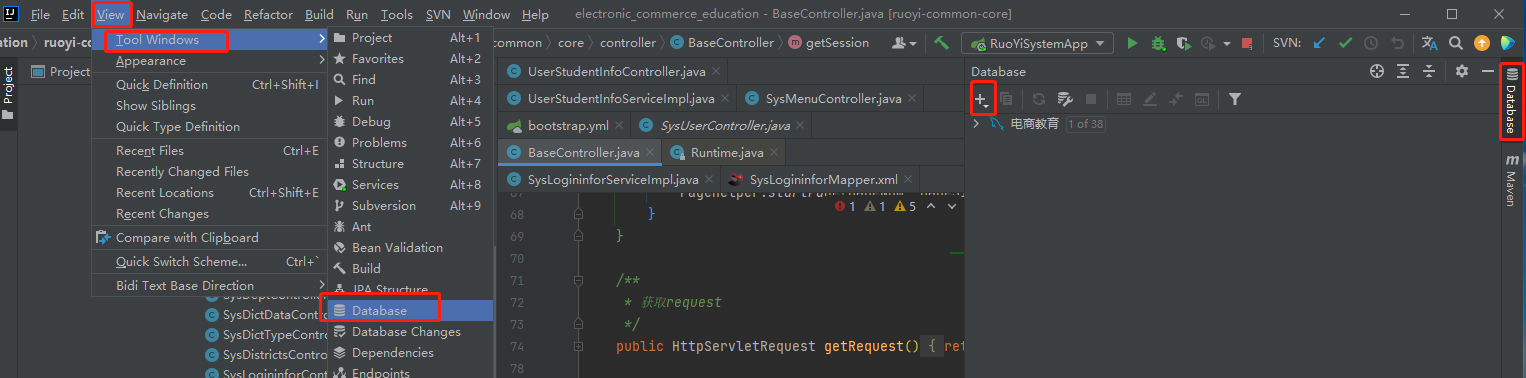
5、连接数据库
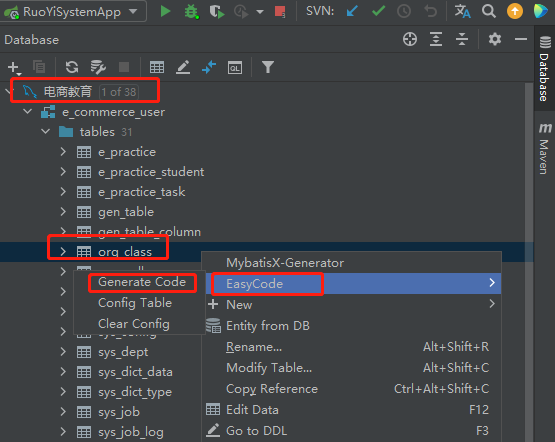
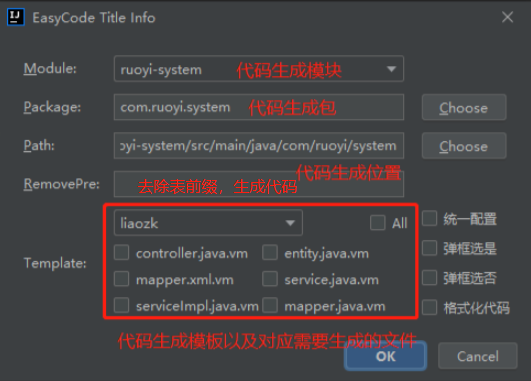
6、使用代码内容生成模板
idea使用EasyCode集成ruoyi框架自动生成代码的更多相关文章
- SSM 框架基于ORACLE集成TKMYBATIS 和GENERATOR自动生成代码(Github源码)
基于前一个博客搭建的SSM框架 https://www.cnblogs.com/jiangyuqin/p/9870641.html 源码:https://github.com/JHeaven/ssm- ...
- [技巧]使用Xcode集成的HeaderDoc自动生成注释和开发文档
[技巧]使用Xcode集成的HeaderDoc自动生成注释和开发文档 Doxygen本来是一个很好的工具,可是我感觉在mac系统下,如果用doxygen最后生成的CHM文件感觉就不是那么恰当, ...
- (转)MyBatis框架的学习(七)——MyBatis逆向工程自动生成代码
http://blog.csdn.net/yerenyuan_pku/article/details/71909325 什么是逆向工程 MyBatis的一个主要的特点就是需要程序员自己编写sql,那么 ...
- Intellij IDEA集成mybatis-generator插件自动生成数据库实体操作类
Intellij IDEA集成mybatis-generator插件自动生成数据库实体操作类 转载至:https://blog.csdn.net/fishinhouse/article/details ...
- MyBatis框架之mybatis逆向工程自动生成代码
http://www.jb51.net/article/82062.htm Mybatis属于半自动ORM,在使用这个框架中,工作量最大的就是书写Mapping的映射文件,由于手动书写很容易出错,我们 ...
- 组件化框架设计之apt编译时期自动生成代码&动态类加载(二)
阿里P7移动互联网架构师进阶视频(每日更新中)免费学习请点击:https://space.bilibili.com/474380680 本篇文章将继续从以下两个内容来介绍组件化框架设计: apt编译时 ...
- mybatis 自动生成代码(mybatis generator)
pom.xml 文件配置 引入 mybatis generator <properties> <mysql.connector.version>5.1.44</mysql ...
- 【MyBatis】MyBatis自动生成代码查询之爬坑记
前言 项目使用SSM框架搭建Web后台服务,前台后使用restful api,后台使用MyBatisGenerator自动生成代码,在前台使用关键字进行查询时,遇到了一些很宝贵的坑,现记录如下.为展示 ...
- SpringBoot入门篇--整合mybatis+generator自动生成代码+druid连接池+PageHelper分页插件
原文链接 我们这一篇博客讲的是如何整合Springboot和Mybatis框架,然后使用generator自动生成mapper,pojo等文件.然后再使用阿里巴巴提供的开源连接池druid,这个连接池 ...
- 使用mybatis-generator-core自动生成代码
SSM框架可以使用mybatis-generator-core-1.3.2.jar来自动生成代码,以下是配置和使用的代码. generatorConfig.xml <?xml version=& ...
随机推荐
- 【SSO单点系列】(8):CAS4.0 之整合CMS
一.描术 CMS 是采用shiro来认证的: 过程 1.调用 login.do get方式 来打开登录页面 2.录入用户名密码后调用/login.do的post来提交 并且只能是post提交 Jar ...
- NGAC下一代访问控制
NGAC,即下一代访问控制,采用将访问决定数据建模为图形的方法.NGAC 可以实现系统化.策略一致的访问控制方法,以高精细度授予或拒绝用户管理能力. 在这张图中,我们可以看到 /hr-docs 文件夹 ...
- Vue I18n Vue.js 的国际化插件+elementUI的使用
先附上插件官网 vue-i18n中文官网 我们的vue项目需要支持多语言时,可以使用这个插件 安装插件教程在官网可以找到 代码结构可以如下 zh.js 查看代码 export default { lo ...
- Spring 自定义注解 操作日志
1.自定义注解 package com.jay.demo3.aop1.myannotation; import java.lang.annotation.Documented; imp ...
- [Swift]Xcode格式化代码快捷键
写代码最常用的快捷键莫过于格式化代码了,最近玩Swift,百度上没有找到简单明了的内容,特意记录一下. Control + I 自动调整缩进 可以选中相应的代码 或 Command + A全选 ...
- vue3文档学习
1.vue的核心功能 1.声明式渲染2.响应性: vue会自动跟踪JavaScript状态并在其发生变化时响应式的更新DOM. 2.渐进式框架 根据不同的需求场景,可以用不同的方式使用vue: 1.无 ...
- ARM-THUMB procedure call standard(ATPCS是ARM-Thumb过程调用标准的简称)
为了使单独编译的c语言和汇编程序之间能够相互调用,必须为子程序之间的调用规定一定的规则.ATPCS就是ARM程序和Thumb程序中子程序的基本规则. 基本ATPCS规定了在子程序调用时的一些基本规则, ...
- 路由器、集线器、交换机分别工作在OSI七层协议模型的哪一层
路由器三层(网络层): 集线器一层(物理层): 普通交换机二层(数据链路层). 现在也有工作在第三层的交换机. OSI七层网络模型由下至上为1至7层,分别为物理层(Physical layer),数据 ...
- Virtualbox EFI 写入startup.nsh
安装好的Debian系统,重启后会因为找不到入口而无法启动.定位grubx64.efi文件,可用ls直接查找或一步一步查找ls fs0:\EFI\debian\grubx64.efi edit fs0 ...
- oracle之如何获取执行计划方法
1.什么是执行计划 为了执行sql语句,Oracle在内部必须实现许多步骤,这些步骤可能是从数据库中物理检索数据行,或者用某种方法来准备数据行等,接着Oracle会按照一定的顺序一次执行这些步骤,最后 ...