
camunda如何调用HTTP REST(Service Task)服务节点
Camunda中的Service Task(服务任务)用于调用服务。在Camunda中,可以通过调用本地Java代码、外部工作项、web服务形式实现的逻辑来完成的。
本文重点描述如何使用web服务实现Camunda服务调用,即如何使用camunda Connector连接器调用HTTP服务,本地Java代码和外部工作项后续文章中再详细介绍。
Camunda Connect提供HTTP和SOAP HTTP连接器。本示例演示了使用http连接器从Camunda BPM中的服务任务调用REST服务。
一、添加项目依赖
给项目中添加camunda connect 和 camunda spin 包依赖,重新启动camunda Platform。
<dependency>
<groupId>org.camunda.bpm</groupId>
<artifactId>camunda-engine-plugin-connect</artifactId>
<version>7.15.0</version>
</dependency>
<dependency>
<groupId>org.camunda.bpm</groupId>
<artifactId>camunda-engine-plugin-spin</artifactId>
<version>7.15.0</version>
</dependency>
<dependency>
<groupId>org.camunda.spin</groupId>
<artifactId>camunda-spin-dataformat-json-jackson</artifactId>
<version>1.10.1</version>
</dependency>
<dependency>
<groupId>org.camunda.spin</groupId>
<artifactId>camunda-spin-core</artifactId>
<version>1.10.1</version>
</dependency>
<dependency>
<groupId>org.camunda.spin</groupId>
<artifactId>camunda-spin-dataformat-all</artifactId>
<version>1.10.1</version>
</dependency>
二、设计流程图
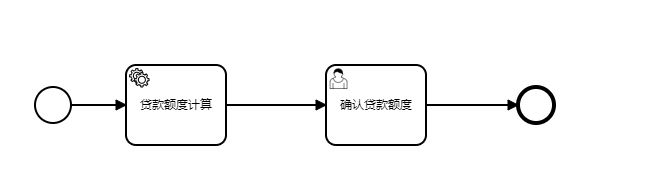
 编辑
编辑
以下时服务节点的关键配置项:
HTTP连接器可用于创建新请求、设置HTTP方法、URL、内容类型和有效负载。
The HTTP connector can be used to create a new request, set a HTTP method, URL, content type and payload.
|
Parameter |
Description |
|
method |
Sets the HTTP method of the request |
|
url |
Sets the URL of the request |
|
headers |
Contains a map of the configured HTTP headers of the request |
|
payload |
Sets the payload of the request |
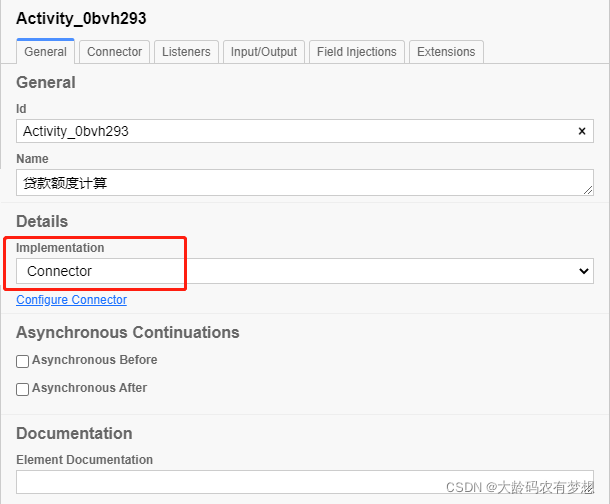 编辑
编辑
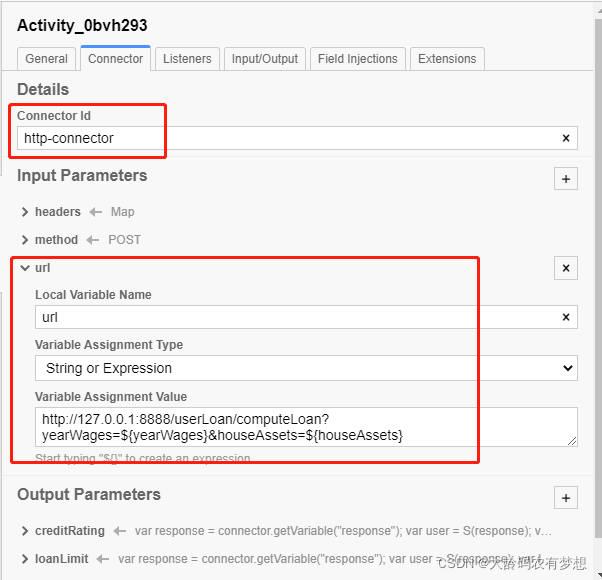 编辑
编辑
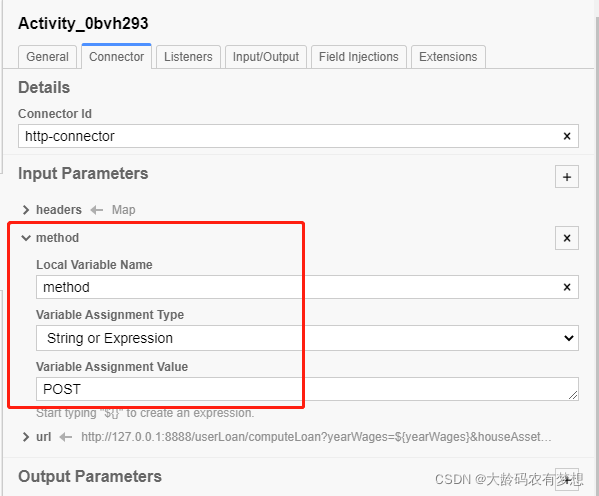 编辑
编辑
 编辑
编辑
返回值包含状态码、响应头和响应体。
A response contains the status code, response headers and body.
|
Parameter |
Description |
|
statusCode |
Contains the status code of the response |
|
headers |
Contains a map with the HTTP headers of the response |
|
response |
Contains the response body |
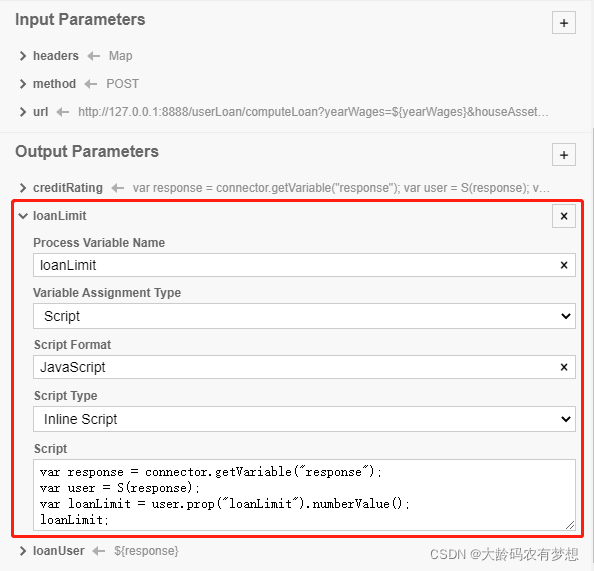 编辑
编辑
以下是完整的BPMN模型文件:
<?xml version="1.0" encoding="UTF-8"?>
<bpmn:definitions xmlns:bpmn="http://www.omg.org/spec/BPMN/20100524/MODEL" xmlns:bpmndi="http://www.omg.org/spec/BPMN/20100524/DI" xmlns:dc="http://www.omg.org/spec/DD/20100524/DC" xmlns:camunda="http://camunda.org/schema/1.0/bpmn" xmlns:di="http://www.omg.org/spec/DD/20100524/DI" xmlns:modeler="http://camunda.org/schema/modeler/1.0" id="Definitions_1qvw7a2" targetNamespace="http://bpmn.io/schema/bpmn" exporter="Camunda Modeler" exporterVersion="4.8.1" modeler:executionPlatform="Camunda Platform" modeler:executionPlatformVersion="7.15.0">
<bpmn:process id="Process_0a6gw7u" name="贷款申请流程HTTP" isExecutable="true">
<bpmn:startEvent id="StartEvent_1">
<bpmn:outgoing>Flow_0kzdck2</bpmn:outgoing>
</bpmn:startEvent>
<bpmn:sequenceFlow id="Flow_0kzdck2" sourceRef="StartEvent_1" targetRef="Activity_0bvh293" />
<bpmn:sequenceFlow id="Flow_07gaddc" sourceRef="Activity_0bvh293" targetRef="Activity_0kimj7k" />
<bpmn:serviceTask id="Activity_0bvh293" name="贷款额度计算">
<bpmn:extensionElements>
<camunda:connector>
<camunda:inputOutput>
<camunda:inputParameter name="headers">
<camunda:map>
<camunda:entry key="Content-Type">text/plain</camunda:entry>
<camunda:entry key="Accept">application/json</camunda:entry>
</camunda:map>
</camunda:inputParameter>
<camunda:inputParameter name="method">POST</camunda:inputParameter>
<camunda:inputParameter name="url">http://127.0.0.1:8888/userLoan/computeLoan?yearWages=${yearWages}&houseAssets=${houseAssets}</camunda:inputParameter>
<camunda:outputParameter name="creditRating">
<camunda:script scriptFormat="JavaScript">var response = connector.getVariable("response");
var user = S(response);
var creditRating = user.prop("creditRating").stringValue();
creditRating;</camunda:script>
</camunda:outputParameter>
<camunda:outputParameter name="loanLimit">
<camunda:script scriptFormat="JavaScript">var response = connector.getVariable("response");
var user = S(response);
var loanLimit = user.prop("loanLimit").numberValue();
loanLimit;</camunda:script>
</camunda:outputParameter>
<camunda:outputParameter name="loanUser">${response}</camunda:outputParameter>
</camunda:inputOutput>
<camunda:connectorId>http-connector</camunda:connectorId>
</camunda:connector>
</bpmn:extensionElements>
<bpmn:incoming>Flow_0kzdck2</bpmn:incoming>
<bpmn:outgoing>Flow_07gaddc</bpmn:outgoing>
</bpmn:serviceTask>
<bpmn:userTask id="Activity_0kimj7k" name="确认贷款额度" camunda:assignee="demo">
<bpmn:incoming>Flow_07gaddc</bpmn:incoming>
<bpmn:outgoing>Flow_09mofy3</bpmn:outgoing>
</bpmn:userTask>
<bpmn:sequenceFlow id="Flow_09mofy3" sourceRef="Activity_0kimj7k" targetRef="Event_0myx83u" />
<bpmn:endEvent id="Event_0myx83u">
<bpmn:incoming>Flow_09mofy3</bpmn:incoming>
</bpmn:endEvent>
</bpmn:process>
<bpmndi:BPMNDiagram id="BPMNDiagram_1">
<bpmndi:BPMNPlane id="BPMNPlane_1" bpmnElement="Process_0a6gw7u">
<bpmndi:BPMNEdge id="Flow_09mofy3_di" bpmnElement="Flow_09mofy3">
<di:waypoint x="570" y="117" />
<di:waypoint x="662" y="117" />
</bpmndi:BPMNEdge>
<bpmndi:BPMNEdge id="Flow_07gaddc_di" bpmnElement="Flow_07gaddc">
<di:waypoint x="370" y="117" />
<di:waypoint x="470" y="117" />
</bpmndi:BPMNEdge>
<bpmndi:BPMNEdge id="Flow_0kzdck2_di" bpmnElement="Flow_0kzdck2">
<di:waypoint x="215" y="117" />
<di:waypoint x="270" y="117" />
</bpmndi:BPMNEdge>
<bpmndi:BPMNShape id="_BPMNShape_StartEvent_2" bpmnElement="StartEvent_1">
<dc:Bounds x="179" y="99" width="36" height="36" />
</bpmndi:BPMNShape>
<bpmndi:BPMNShape id="Activity_0rfgq1k_di" bpmnElement="Activity_0bvh293">
<dc:Bounds x="270" y="77" width="100" height="80" />
</bpmndi:BPMNShape>
<bpmndi:BPMNShape id="Activity_16ovae8_di" bpmnElement="Activity_0kimj7k">
<dc:Bounds x="470" y="77" width="100" height="80" />
</bpmndi:BPMNShape>
<bpmndi:BPMNShape id="Event_0myx83u_di" bpmnElement="Event_0myx83u">
<dc:Bounds x="662" y="99" width="36" height="36" />
</bpmndi:BPMNShape>
</bpmndi:BPMNPlane>
</bpmndi:BPMNDiagram>
</bpmn:definitions>
三、开发HTTP服务
1. 新建springboot工程,开发User类
import java.io.Serializable;

public class User implements Serializable {

    private String userName; //姓名

    private int userAge; //年龄

    private double yearWages; //年薪

    private double houseAssets; //房产

    private String creditRating; //信用等级

    private double loanLimit; //贷款额度

    private String isTransferAccount;  //是否已放贷

    public String getUserName() {

        return userName;

    }

    public void setUserName(String userName) {

        this.userName = userName;

    }

    public int getUserAge() {

        return userAge;

    }

    public void setUserAge(int userAge) {

        this.userAge = userAge;

    }

    public double getYearWages() {

        return yearWages;

    }

    public void setYearWages(double yearWages) {

        this.yearWages = yearWages;

    }

    public double getHouseAssets() {

        return houseAssets;

    }

    public void setHouseAssets(double houseAssets) {

        this.houseAssets = houseAssets;

    }

    public String getCreditRating() {

        return creditRating;

    }

    public void setCreditRating(String creditRating) {

        this.creditRating = creditRating;

    }

    public double getLoanLimit() {

        return loanLimit;

    }

    public void setLoanLimit(double loanLimit) {

        this.loanLimit = loanLimit;

    }

    public String getIsTransferAccount() {

        return isTransferAccount;

    }

    public void setIsTransferAccount(String isTransferAccount) {

        this.isTransferAccount = isTransferAccount;

    }

}
2. 开发REST服务类
import org.springframework.web.bind.annotation.GetMapping;

import org.springframework.web.bind.annotation.PostMapping;

import org.springframework.web.bind.annotation.RequestMapping;

import org.springframework.web.bind.annotation.RestController;

@RestController

@RequestMapping("/userLoan")

public class UserLoanController {

    @PostMapping("/computeLoan")

    public User computeLoan(double yearWages,double houseAssets){

        User user=new User();

        user.setYearWages(yearWages);

        user.setHouseAssets(houseAssets);

        double sum = yearWages + houseAssets;

        if(sum<=0){

            user.setCreditRating("C");

            user.setLoanLimit(0);

        }else  if(sum>0 && sum <=100){

            user.setCreditRating("B");

            user.setLoanLimit(sum*0.8);

        }else  if(sum>100){

            user.setCreditRating("A");

            user.setLoanLimit(sum*1.2);

        }

        return user;

    }

}
四、发起流程测试
登录:http://localhost:8080/camunda/app/admin/default/#/login
1、发起流程,输入流程变量,后面的服务节点需要这两个流程变量
 编辑
编辑
2、提交流程后,查看流程图,HTTP服务节点已经成功执行了
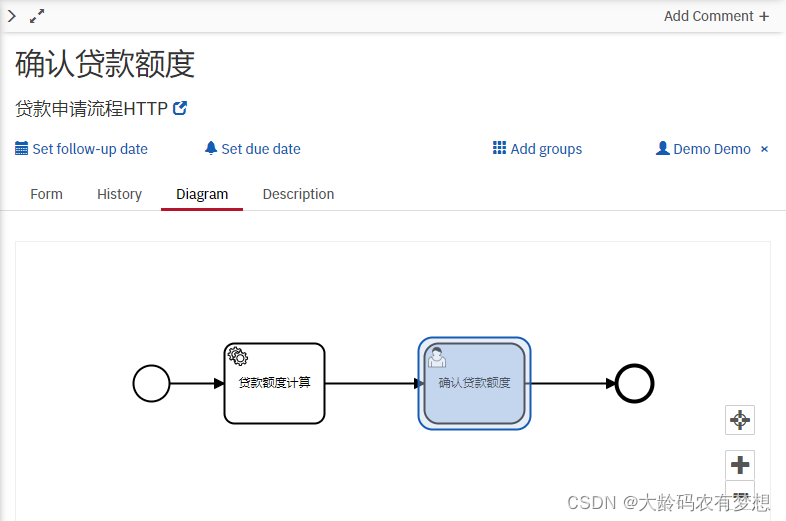 编辑
编辑
3、查看表单中的流程变量,HTTP服务节点计算后的返回值已经成功写入了。
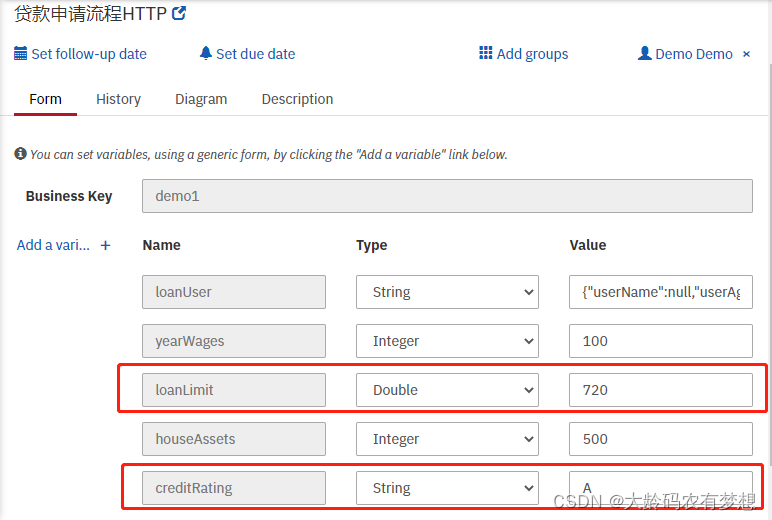 编辑
编辑
更多参考:
Camunda Connector Reference | docs.camunda.org
camunda-bpm-examples/servicetask at 7.15 · camunda/camunda-bpm-examples · GitHub
camunda如何调用HTTP REST(Service Task)服务节点的更多相关文章
- 翻译-使用Spring调用SOAP Web Service
原文链接: http://spring.io/guides/gs/consuming-web-service/ 调用SOAP web service 本指南将指导你使用Spring调用一个基于SOAP ...
- C#创建、安装、卸载、调试Windows Service(Windows 服务)的简单教程
前言:Microsoft Windows 服务能够创建在它们自己的 Windows 会话中可长时间运行的可执行应用程序.这些服务可以在计算机启动时自动启动,可以暂停和重新启动而且不显示任何用户界面.这 ...
- WebService学习总结(四)——调用第三方提供的webService服务
http://www.cnblogs.com/xdp-gacl/p/4260627.html 互联网上面有很多的免费webService服务,我们可以调用这些免费的WebService服务,将一些其他 ...
- java程序调用xfire发布的webService服务(二)
在上一篇的调用xfire发布的webService服务中,我只是从服务端返回了一个字符串给客户端,却没有测试从客户端传递数据给服务端.而实际应用中一般是不太可能只出现这样的应用场景的,因此我便更进一步 ...
- WebService学习--(四)调用第三方提供的webService服务
互联网上面有很多的免费webService服务,我们可以调用这些免费的WebService服务,将一些其他网站的内容信息集成到我们的Web应用中显示,下面就以获取天气预报数据和查询国内手机号码归属地为 ...
- C#作为客户端调用gsoap生成的C++服务端
近日在学习C++,偶然遇到网友想用C#调用gsoap生成的C++服务的问题,遂决定研究一下,网上搜索了很久,大多数是C++调用C#的应用.... 经过本人的不断努力,终于找到一种解决问题的方法,总结如 ...
- WebService学习总结——调用第三方提供的webService服务
互联网上面有很多的免费webService服务,我们可以调用这些免费的WebService服务,将一些其他网站的内容信息集成到我们的Web应用中显示,下面就以获取天气预报数据. 气象中心的管理系统将收 ...
- 延迟调用或多次调用第三方的Web API服务
当我们调用第三方的Web API服务的时候,不一定每次都是成功的.这时候,我们可能会再多尝试几次,也有可能延迟一段时间再去尝试调用服务. Task的静态方法Delay允许我们延迟执行某个Task,此方 ...
- 在Android中调用KSOAP2库访问webservice服务出现的服务端传入参数为null的问题解决
ksoap2-android-3.0.0-jar 第三方库来调用.net 写的Web Service 如果没有参数,那么调用一切顺利,但是如果服务是带参数的,那么服务端接收的参数都是nul. ...
随机推荐
- python---复杂度、斐波那切数列、汉诺塔
时间复杂度 用来估计算法运行时间的一个式子. 一般来说, 时间复杂度高的算法比复杂度低的算法慢. 常见的时间复杂度: O(1) < O(logn) < O(n) < O( ...
- docker更新portainer-ce2.0
前两天,我在使用portainer的过程中发现左下角提醒有新版本的portainer需要安装,google了一圈如何升级portainer,并没有找到我需要的资料,就算获取了portainer:las ...
- nginx负载均衡的五种方式
文章目录 前言 :负载均衡是什么 一.方式1:轮询 二.方式2:权重 方式3:iphash 方式4:最小连接 方式5:fair 总结:根据这几种方式可以猜测处nginx的底层使用了计数器,从而可以将海 ...
- 1.5 万字 + 40 张图解 HTTP 常见面试题
作者:小林coding 图解计算机基础网站:https://xiaolincoding.com 大家好,我是小林,我最开始写的第一篇图解文章就是这篇: 那时候我也就不到 100 读者,如今这篇阅读都快 ...
- vue3 - 事件处理之事件修饰符
内容取自>> <!-- 阻止单击事件冒泡 --> <a v-on:click.stop="doThis"></a> <!-- ...
- 爬虫亚马逊Bestselling类别产品数据TOP100
1 # -*- coding: utf-8 -*- 2 # @Time : 2020/9/11 16:23 3 # @Author : Chunfang 4 # @Email : 3470959534 ...
- MySQL数据库常识之储存引擎
我的博客 储存引擎分类 show engines; 这个命令可以查看数据库的数据引擎,可以看到InnoDB是默认的引擎. 命令除了在终端运行,也可以在查询数据库可视化工具中运行. 而,(我是5.7版本 ...
- 2. flddler响应显示乱码问题解决方案
Fiddler是一款强大Web调试工具,它能记录所有客户端和服务器的HTTP请求. Fiddler启动的时候,默认IE的代理设为了127.0.0.1:8888,而其他浏览器是需要手动设置.但是一开始使 ...
- 攻防世界-MISC:base64÷4
这是攻防世界高手进阶区的第一题,题目如下: 点击下载附件一,发现是一个文本文档,打开后得到一串字符串 由题意猜测这些字符串应该是base16加密过的,写个脚本跑一下 import base64 s = ...
- ucore lab8 文件系统 学习笔记
最后一战果然过瘾.代码量够多,新机制够复杂度,都管饱.做这一课就像从高山上往下走,坡急且路险,还不知自己的方位,琢磨不透系统的架构.待到下了山,回头一看豁然开朗,原来方才自己所下的山是这般模样.在这里 ...