
Vue学习之--------插槽【默认插槽、具名插槽、作用域插槽】(2022/8/30)
插槽Vue.js官网介绍:https://vuejs.org/guide/components/slots.html
会牵涉到template的用法、占位、实际不渲染到页面中
1、默认插槽:
1.1 基本结构及介绍
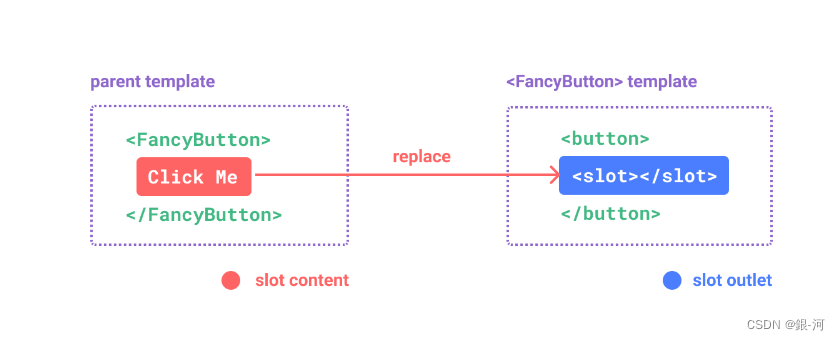
个人理解:在A组件中定义一个插槽(相当于一个占位符),在B组件中使用A组件,可以放入一些内容到A组件中,放置的位置就放到插槽中。将占位符的内容替换掉。(默认只有一个插槽的时候,直接放入这个插槽)
1.2 用法
      父组件中:

              <Category>

                 <div>html结构1</div>

              </Category>

      子组件中:

              <template>

                  <div>

                     <!-- 定义插槽 -->

                     <slot>插槽默认内容...</slot>

                  </div>

              </template>
1.3 实际应用
1.3.1 项目结构
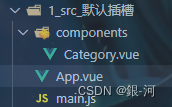
1.3.2 组件Category.vue
<template>

	<div class="category">

		<h3>{{title}}分类</h3>

		<!-- 定义一个插槽(挖个坑,等着组件的使用者进行填充) -->

		<slot>我是一些默认值,当使用者没有传递具体结构时,我会出现</slot>

	</div>

</template>

<script>

	export default {

		name:'Category',

		props:['title']

	}

</script>

<style scoped>

	.category{

		background-color: skyblue;

		width: 200px;

		height: 300px;

	}

	h3{

		text-align: center;

		background-color: orange;

	}

	video{

		width: 100%;

	}

	img{

		width: 100%;

	}

</style>
1.3.3 App.vue
<template>

	<div class="container">

		<Category title="美食" >

			<img src="https://s3.ax1x.com/2021/01/16/srJlq0.jpg" alt="">

		</Category>

		<Category title="游戏" >

			<ul>

				<li v-for="(g,index) in games" :key="index">{{g}}</li>

			</ul>

		</Category>

		<Category title="电影">

			<video controls src="http://clips.vorwaerts-gmbh.de/big_buck_bunny.mp4"></video>

		</Category>

	</div>

</template>

<script>

	import Category from './components/Category'

	export default {

		name:'App',

		components:{Category},

		data() {

			return {

				foods:['火锅','烧烤','小龙虾','牛排'],

				games:['红色警戒','穿越火线','劲舞团','超级玛丽'],

				films:['《教父》','《拆弹专家》','《你好,李焕英》','《尚硅谷》']

			}

		},

	}

</script>

<style scoped>

	.container{

		display: flex;

		justify-content: space-around;

	}

</style>
2、具名插槽:
2.1 基本结构及介绍
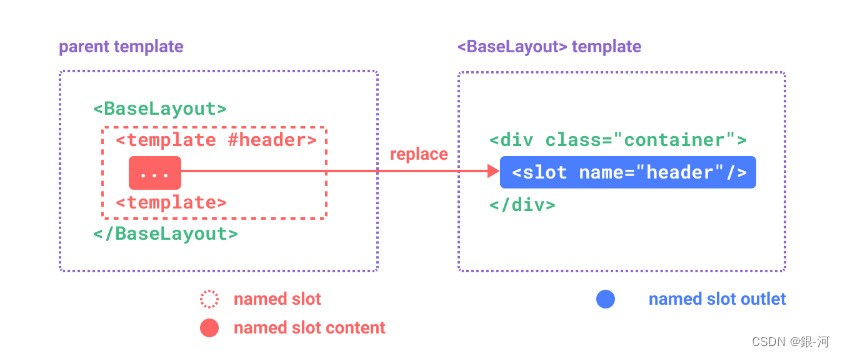
个人理解:当A组件中有多个插槽时,B组件中使用A组件,同时需要向A组件塞内容。应该塞到哪个插槽??? 所以给插槽命名,可以指定内容塞到哪个插槽中。
2.1 用法
     父组件中:

              <Category>

                  <template slot="center">

                    <div>html结构1</div>

                  </template>

                  <template v-slot:footer>

                     <div>html结构2</div>

                  </template>

              </Category>

      子组件中:

              <template>

                  <div>

                     <!-- 定义插槽 -->

                     <slot name="center">插槽默认内容...</slot>

                     <slot name="footer">插槽默认内容...</slot>

                  </div>

              </template>
2.3 实际应用
2.3.1 项目结构
同1.3.1
2.3.2 组件Category.vue
<template>

	<div class="category">

		<h3>{{title}}分类</h3>

		<!-- 定义一个插槽(挖个坑,等着组件的使用者进行填充) -->

		<slot name="center">我是一些默认值,当使用者没有传递具体结构时,我会出现1</slot>

		<slot name="footer">我是一些默认值,当使用者没有传递具体结构时,我会出现2</slot>

	</div>

</template>

<script>

	export default {

		name:'Category',

		props:['title']

	}

</script>

<style scoped>

	.category{

		background-color: skyblue;

		width: 200px;

		height: 300px;

	}

	h3{

		text-align: center;

		background-color: orange;

	}

	video{

		width: 100%;

	}

	img{

		width: 100%;

	}

</style>
2.3.1 App.vue
<template>

	<div class="container">

		<Category title="美食" >

			<img slot="center" src="https://s3.ax1x.com/2021/01/16/srJlq0.jpg" alt="">

			<a slot="footer" href="http://www.atguigu.com">更多美食</a>

		</Category>

		<Category title="游戏" >

			<ul slot="center">

				<li v-for="(g,index) in games" :key="index">{{g}}</li>

			</ul>

			<div class="foot" slot="footer">

				<a href="http://www.atguigu.com">单机游戏</a>

				<a href="http://www.atguigu.com">网络游戏</a>

			</div>

		</Category>

		<Category title="电影">

			<video slot="center" controls src="http://clips.vorwaerts-gmbh.de/big_buck_bunny.mp4"></video>

			<template v-slot:footer>

				<div class="foot">

					<a href="http://www.atguigu.com">经典</a>

					<a href="http://www.atguigu.com">热门</a>

					<a href="http://www.atguigu.com">推荐</a>

				</div>

				<h4>欢迎前来观影</h4>

			</template>

		</Category>

	</div>

</template>

<script>

	import Category from './components/Category'

	export default {

		name:'App',

		components:{Category},

		data() {

			return {

				foods:['火锅','烧烤','小龙虾','牛排'],

				games:['红色警戒','穿越火线','劲舞团','超级玛丽'],

				films:['《教父》','《拆弹专家》','《你好,李焕英》','《尚硅谷》']

			}

		},

	}

</script>

<style scoped>

	.container,.foot{

		display: flex;

		justify-content: space-around;

	}

	h4{

		text-align: center;

	}

</style>
3、作用域插槽:
3.1 基本结构及介绍
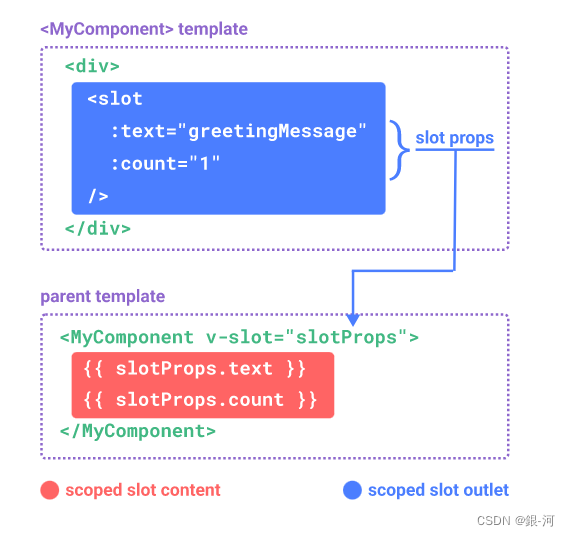
个人理解:当数据在A组件、插槽定义在A组件中。B组件则无法直接访问A组件中的信息,但是当B组件使用A组件的插槽时,A组件主动将数据交给B组件使用。
- 理解:数据在组件的自身,但根据数据生成的结构需要组件的使用者来决定。(games数据在Category组件中,但使用数据所遍历出来的结构由App组件决定)
3.2用法
         父组件中:

         		<Category>

         			<template scope="scopeData">

         				<!-- 生成的是ul列表 -->

         				<ul>

         					<li v-for="g in scopeData.games" :key="g">{{g}}</li>

         				</ul>

         			</template>

         		</Category>

         		<Category>

         			<template slot-scope="scopeData">

         				<!-- 生成的是h4标题 -->

         				<h4 v-for="g in scopeData.games" :key="g">{{g}}</h4>

         			</template>

         		</Category>

         子组件中:

                 <template>

                     <div>

                         <slot :games="games"></slot>

                     </div>

                 </template>

                 <script>

                     export default {

                         name:'Category',

                         props:['title'],

                         //数据在子组件自身

                         data() {

                             return {

                                 games:['红色警戒','穿越火线','劲舞团','超级玛丽']

                             }

                         },

                     }

                 </script>
3.3 实际应用
3.3.1 项目结构
同1.3.1
3.3.2 组件Category.vue
<template>

	<div class="category">

		<h3>{{title}}分类</h3>

		<slot :games="games" msg="hello">我是默认的一些内容</slot>

	</div>

</template>

<script>

	export default {

		name:'Category',

		props:['title'],

		data() {

			return {

				games:['红色警戒','穿越火线','劲舞团','超级玛丽'],

			}

		},

	}

</script>

<style scoped>

	.category{

		background-color: skyblue;

		width: 200px;

		height: 300px;

	}

	h3{

		text-align: center;

		background-color: orange;

	}

	video{

		width: 100%;

	}

	img{

		width: 100%;

	}

</style>
3.3.3 App.vue
<template>

	<div class="container">

		<Category title="游戏">

			<template scope="atguigu">

				<ul>

					<li v-for="(g,index) in atguigu.games" :key="index">{{g}}</li>

				</ul>

			</template>

		</Category>

		<Category title="游戏">

			<template scope="{games}">

				<ol>

					<li style="color:red" v-for="(g,index) in games" :key="index">{{g}}</li>

				</ol>

			</template>

		</Category>

		<Category title="游戏">

			<template slot-scope="{games}">

				<h4 v-for="(g,index) in games" :key="index">{{g}}</h4>

			</template>

		</Category>

	</div>

</template>

<script>

	import Category from './components/Category'

	export default {

		name:'App',

		components:{Category},

	}

</script>

<style scoped>

	.container,.foot{

		display: flex;

		justify-content: space-around;

	}

	h4{

		text-align: center;

	}

</style>
Vue学习之--------插槽【默认插槽、具名插槽、作用域插槽】(2022/8/30)的更多相关文章
- [Vue]组件——插槽:slot(匿名插槽,具名插槽)与slot-scope(作用域插槽)
1.单个插槽 | 匿名插槽 1.1<navigation-link> 子组件定义为: <a v-bind:href="url" class="nav-l ...
- Vue学习之--------深入理解Vuex之模块化编码(2022/9/4)
在以下文章的基础上 1.深入理解Vuex.原理详解.实战应用:https://blog.csdn.net/weixin_43304253/article/details/126651368 2.深入理 ...
- vue2 作用域插槽slot-scope详解
插槽分为单个插槽,具名插槽,还有作用域插槽,前两种比较简单这里就不赘述了,今天的重点是讨论作用域插槽. 简单来说,前两种插槽的内容和样式皆由父组件决定,也就是说显示什么内容和怎样显示都由父组件决定: ...
- VUE3 之 作用域插槽 - 这个系列的教程通俗易懂,适合新手
1. 概述 破窗效应告诉我们: 当一个建筑物窗户的玻璃完好无损时,很少有人想去破坏它,当有一个人破坏了一块窗户的玻璃,其他窗户的玻璃也很快会被人破坏. 同理,一个很干净的地方,人们不好意思去丢垃圾,但 ...
- vue学习之插槽
插槽 插槽(Slot)是Vue提出来的一个概念,正如名字一样,插槽用于决定将所携带的内容,插入到指定的某个位置,从而使模板分块,具有模块化的特质和更大的重用性. 个人理解:我感觉插槽就是父组件控制插槽 ...
- Vue学习笔记-插槽基本使用
为了让我们的组件更加具有扩展性,可以使用插槽 <div id="app"> <cpn> <span>返回</span> <in ...
- Vue.js插槽slot和作用域插槽slot-scope学习小结
一般来说,在Vue项目中使用父子组建时,都是把通用的HTML结构提取出来写成一个子组件,需要动态展示的数据用过prop属性传递,不过有时候我们可能想给子组件传递一个HTML代码,这个时候用prop不太 ...
- vue学习(四)插槽
一 匿名插槽 // 语法 Vue.component('MBtn', { template: ` <button> <slot></slot> </butto ...
- 组件基础(插槽slot)—Vue学习笔记
刚开始我们淡淡提过<slot></slot>现在深入了解一下. slot可以进行父组件传值到子组件. 比如:我们将hiboy通过<slot>传递到组件中. < ...
随机推荐
- 基于LadybugFlow的微服务编排(1.SpringBoot集成)
前言 前面的系列文章里,介绍了ladybugflow的业务可视化的设计以及常见场景的使用方法. 感谢大家对项目的关注. 本篇文章介绍一下基于ladybugflow的微服务编排场景及使用方法. 1. 业 ...
- java日常开发必备:list的四种遍历
在平时的开发过程中使用List的场景很多,你知道List的遍历有多少种方式?今天一起来梳理下List的几种遍历方式.这里以java.util.ArrayList为例来演示. 这里有一个最简单的 ...
- 【安全通报】DolphinScheduler 漏洞情况说明
Apache DolphinScheduler 社区邮件列表最近通告了 2 个漏洞,考虑到有很多用户并未订阅此邮件列表,我们特地在此进行情况说明: CVE-2020-11974[1] 漏洞 (CVE- ...
- Luogu2251 质量检测 (ST表)
我怎么开始划水了... #include <iostream> #include <cstdio> #include <cstring> #include < ...
- 前端须知的 Cookie 知识
文章已收录到我的 GitHub 中,欢迎 star cookie 是什么和使用场景 cookie 是服务器端保存在浏览器的一小段文本信息,浏览器每次向服务器端发出请求,都会附带上这段信息(不是所有都带 ...
- Java NIO全面详解(看这篇就够了)
很多技术框架都使用NIO技术,学习和掌握Java NIO技术对于高性能.高并发网络的应用是非常关键的@mikechen NIO简介 NIO 中的 N 可以理解为 Non-blocking,不单纯是 N ...
- 调用 StatefulWidget 组件的参数时(widget.xxx)报 Invalid Constant Value
一个 Flutter 组件(Widget)在很多情况下都需要接收一些参数.Flutter 插件通常提示使用 const 关键字包裹某 Widget(很多人接受建议且执行),导致通过 widget.xx ...
- 一,DRF入门规范
一 Web应用模式 在开发Web应用中,有两种应用模式: 1.1 前后端不分离 1.2 前后端分离 二 API接口 为了在团队内部形成共识.防止个人习惯差异引起的混乱,我们需要找到一种大家都觉得很好的 ...
- 技术管理进阶——技术Leader需要数据思维
原创不易,求分享.求一键三连 假设我长得很漂亮,拥有众多追求者,但是初出闺房的我对这世界上的男人毫无认知,那么该如何选择呢?这真是一个问题! 妈妈说,愿意为我花钱的男人未必爱我,但不愿意为我花钱的男人 ...
- Star (欧拉函数)
题面 Fernando won a compass for his birthday, and now his favorite hobby is drawing stars: first, he ma ...