
从源码角度深入分析log4j配置文件使用
log4j在日常开发中经常使用,但有时候对 配置文件应该放到什么位置有疑惑。现在我们通过从代码的角度来看待这个问题,
看完后你也许会恍然大悟哦。
开始吧。
Log4j的组成及架构:
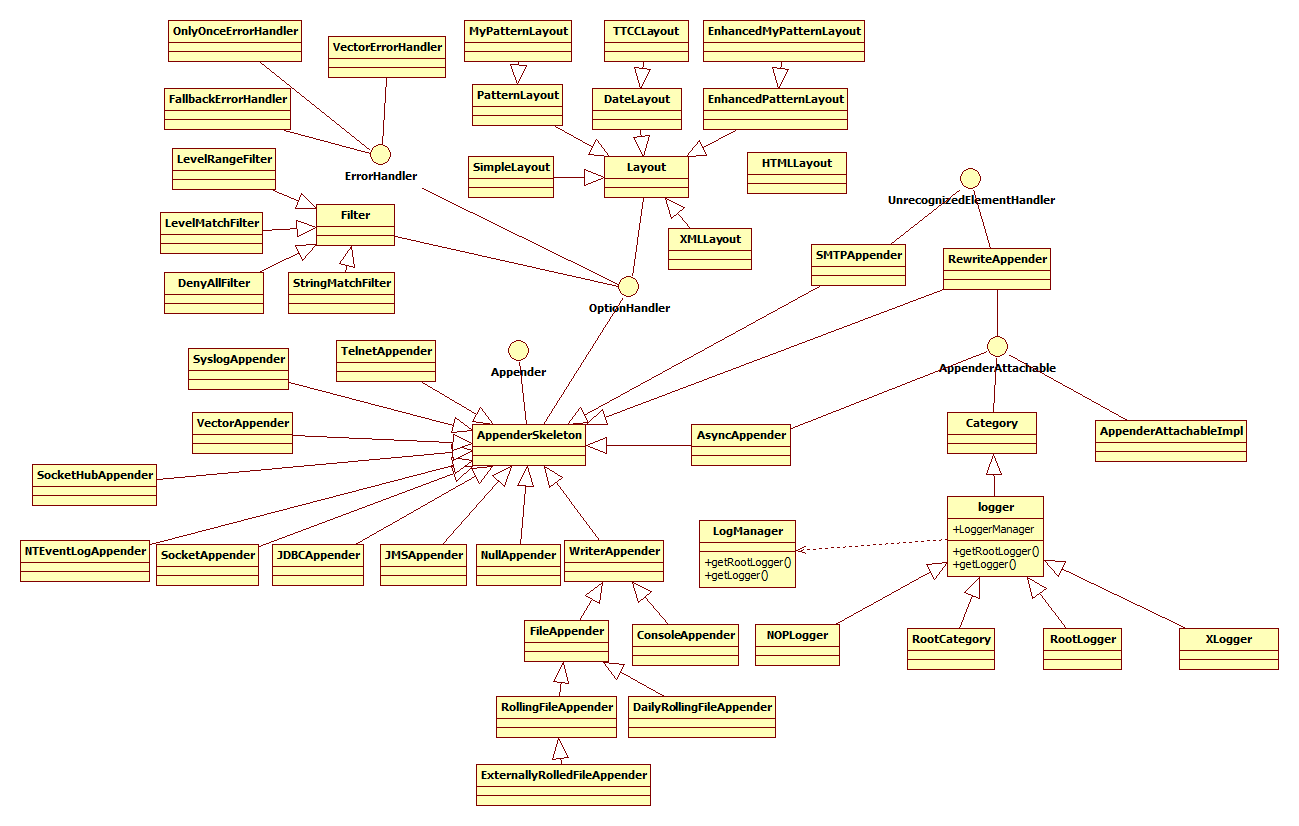
Log4j由三个重要的组成构成:日志记录器(Loggers),输出端(Appenders)和日志格式化器(Layout)。
1.日志记录器(Loggers):控制要输出哪些日志记录语句,对日志信息进行级别限制。
2.输出端(Appenders):指定了日志将打印到控制台还是文件中。
3.日志格式化器(Layout):控制日志信息的显示格式。
类图结构如下(不要眼花缭乱,我辛辛苦苦一个一个画出来的):
log4j初始化
从架构上我们可以看出logger的实现是从logManager来具体完成的,因此初始化在logManager的static块中,如下:
 static {

    // By default we use a DefaultRepositorySelector which always returns 'h'.

    Hierarchy h = new Hierarchy(new RootLogger(Level.DEBUG));

    repositorySelector = new DefaultRepositorySelector(h);

    /** Search for the properties file log4j.properties in the CLASSPATH.  */

    String override =OptionConverter.getSystemProperty(DEFAULT_INIT_OVERRIDE_KEY,

                               null);

    // if there is no default init override, then get the resource

    // specified by the user or the default config file.

    if(override == null || "false".equalsIgnoreCase(override)) {

      String configurationOptionStr = OptionConverter.getSystemProperty(

                              DEFAULT_CONFIGURATION_KEY,

                              null);

      String configuratorClassName = OptionConverter.getSystemProperty(

                                                   CONFIGURATOR_CLASS_KEY,

                           null);

      URL url = null;

      // if the user has not specified the log4j.configuration

      // property, we search first for the file "log4j.xml" and then

      // "log4j.properties"

      if(configurationOptionStr == null) {

    url = Loader.getResource(DEFAULT_XML_CONFIGURATION_FILE);

    if(url == null) {

      url = Loader.getResource(DEFAULT_CONFIGURATION_FILE);

    }

      } else {

    try {

      url = new URL(configurationOptionStr);

    } catch (MalformedURLException ex) {

      // so, resource is not a URL:

      // attempt to get the resource from the class path

      url = Loader.getResource(configurationOptionStr);

    }

      }

      // If we have a non-null url, then delegate the rest of the

      // configuration to the OptionConverter.selectAndConfigure

      // method.

      if(url != null) {

        LogLog.debug("Using URL ["+url+"] for automatic log4j configuration.");

        try {

            OptionConverter.selectAndConfigure(url, configuratorClassName,

                       LogManager.getLoggerRepository());

        } catch (NoClassDefFoundError e) {

            LogLog.warn("Error during default initialization", e);

        }

      } else {

        LogLog.debug("Could not find resource: ["+configurationOptionStr+"].");

      }

    } else {

        LogLog.debug("Default initialization of overridden by " +

            DEFAULT_INIT_OVERRIDE_KEY + "property.");

    }

  }
让我们深入进去看看是怎么初始化的?
第一步:创建一个默认的RepositorySelector,RepositorySelector在logManager中使用,它的实现类对特定的应用上下文提供了一个LoggerRespository。LoggerRespository的实现类负责追踪应用上下文。ResponsitorySelector提供了一个方法:
public LoggerRepository getLoggerRepository();
LoggerRepository从字面上理解,它是一个Logger的容器,它会创建并缓存Logger实例,从而具有相同名字的Logger实例不会多次创建,以提高性能。它的这种特性有点类似Spring的IOC概念。Log4J支持两种配置文件:properties文件和xml文件。Configurator解析配置文件,并将解析后的信息添加到LoggerRepository中。LogManager最终将LoggerRepository和Configurator整合在一起。
LoggerRepository是一个Logger的容器,它负责创建、缓存Logger实例,同时它也维护了Logger之间的关系,因为在Log4J中,所有Logger都组装成以RootLogger为根的一棵树,树的层次由Logger的Name来决定,其中以’.’分隔。
除了做为一个Logger容器,它还有一个Threshold属性,用于过滤所有在Threshold级别以下的日志。以及其他和Logger操作相关的方法和属性。
public interface LoggerRepository {

public void addHierarchyEventListener(HierarchyEventListener listener);

 boolean isDisabled(int level);

 public void setThreshold(Level level);

 public void setThreshold(String val);

public void emitNoAppenderWarning(Category cat);

 public Level getThreshold();

 public Logger getLogger(String name);

public Logger getLogger(String name, LoggerFactory factory);

 public Logger getRootLogger();

public abstract Logger exists(String name);

public abstract void shutdown();

public Enumeration getCurrentLoggers();

 public abstract void fireAddAppenderEvent(Category logger, Appender appender);

 public abstract void resetConfiguration();

}
Hierarchy类
Hierarchy是Log4J中默认对LoggerRepository的实现类,它用于表达其内部的Logger是以层次结构存储的。在对LoggerRepository接口的实现中,getLogger()方法是其最核心的实现,因而首先从这个方法开始。Hierarchy中用一个Hashtable来存储所有Logger实例,它以CategoryKey作为key,Logger作为value,其中CategoryKey是对Logger中Name字符串的封装,之所以要引入这个类是出于性能考虑,因为它会缓存Name字符串的hash code,这样在查找过程中计算hash code时就可以直接取得而不用每次都计算。
第二步:从classpath路径查找log4j.properties属性配置文件。
1. 判断配置文件有没有重写?
    /** Search for the properties file log4j.properties in the CLASSPATH.  */

    String override =OptionConverter.getSystemProperty(DEFAULT_INIT_OVERRIDE_KEY,null);
//public static final String DEFAULT_INIT_OVERRIDE_KEY = "log4j.defaultInitOverride";
 publicstatic String getSystemProperty(String key, String def) {

    try {

      return System.getProperty(key, def);

    } catch(Throwable e) { // MS-Java throws com.ms.security.SecurityExceptionEx

      LogLog.debug("Was not allowed to read system property \""+key+"\".");

      return def;

    }

  }
2. override为null或者为false时没有重写,然后从系统属性中查找key:log4j.configuration和log4j.configuratorClass属性。如果没有设置log4j.configuration属性,就查找log4j.xml,然后查找log4j.properties文件。使用方法:
     if(configurationOptionStr == null) {

    url = Loader.getResource(DEFAULT_XML_CONFIGURATION_FILE);

    if(url == null) {

      url = Loader.getResource(DEFAULT_CONFIGURATION_FILE);

    }
使用java2的线程上下文类加载器来查找资源,如果查找失败,则使用加载该类(loader)的类加载器来加载资源。
3.如果设置了log4j.configuration属性,则使用url形式读取,如果资源不是url,则从classpath获取资源:
    try {

      url = new URL(configurationOptionStr);

    } catch (MalformedURLException ex) {

      // so, resource is not a URL:

      // attempt to get the resource from the class path

      url = Loader.getResource(configurationOptionStr);

    }
4. 如果log4j.configuration属性为url形式:
      // If we have a non-null url, then delegate the rest of the

      // configuration to the OptionConverter.selectAndConfigure

      // method.

      if(url != null) {

        LogLog.debug("Using URL ["+url+"] for automatic log4j configuration.");

        try {

            OptionConverter.selectAndConfigure(url, configuratorClassName,

                       LogManager.getLoggerRepository());

        } catch (NoClassDefFoundError e) {

            LogLog.warn("Error during default initialization", e);

        }

      } else {

        LogLog.debug("Could not find resource: ["+configurationOptionStr+"].");

      }
小结:
The exact default initialization algorithm is defined as follows:
- Setting the log4j.defaultInitOverride system property to any other value then "false" will cause log4j to skip the default initialization procedure (this procedure).
- Set the resource string variable to the value of the log4j.configuration system property. The preferred way to specify the default initialization file is through the log4j.configuration system property. In case the system property log4j.configuration is not defined, then set the string variable resourceto its default value "log4j.properties".
- Attempt to convert the resource variable to a URL.
- If the resource variable cannot be converted to a URL, for example due to a MalformedURLException, then search for the resource from the classpath by calling org.apache.log4j.helpers.Loader.getResource(resource, Logger.class) which returns a URL. Note that the string "log4j.properties" constitutes a malformed URL.
See Loader.getResource(java.lang.String) for the list of searched locations.
- If no URL could not be found, abort default initialization. Otherwise, configure log4j from the URL.
The PropertyConfigurator will be used to parse the URL to configure log4j unless the URL ends with the ".xml" extension, in which case the DOMConfiguratorwill be used. You can optionaly specify a custom configurator. The value of the log4j.configuratorClass system property is taken as the fully qualified class name of your custom configurator. The custom configurator you specify must implement the Configurator interface.
参考文献:
1. http://www.2cto.com/kf/201207/139798.html
2. http://logging.apache.org/log4j/1.2/manual.html
从源码角度深入分析log4j配置文件使用的更多相关文章
- 从源码角度深入分析ant
Ant的基本概念 首先是ant的基本概念:Project,Target,Tasks,Properties,Paths 1.Project <project> build.xml文件最顶层的 ...
- 从源码角度深入分析 ant
[转自] http://www.tuicool.com/articles/eQvIRbA Ant的基本概念 首先是ant的基本概念: Project,Target,Tasks,Properties,P ...
- 从源码角度深入理解Toast
Toast这个东西我们在开发中经常用到,使用也很简单,一行代码就能搞定: 1: Toast.makeText(", Toast.LENGTH_LONG).show(); 但是我们经常会遇到这 ...
- Android -- 带你从源码角度领悟Dagger2入门到放弃
1,以前的博客也写了两篇关于Dagger2,但是感觉自己使用的时候还是云里雾里的,更不谈各位来看博客的同学了,所以今天打算和大家再一次的入坑试试,最后一次了,保证最后一次了. 2,接入项目 在项目的G ...
- Android -- 带你从源码角度领悟Dagger2入门到放弃(二)
1,接着我们上一篇继续介绍,在上一篇我们介绍了简单的@Inject和@Component的结合使用,现在我们继续以老师和学生的例子,我们知道学生上课的时候都会有书籍来辅助听课,先来看看我们之前的Stu ...
- 从源码角度入手实现RecyclerView的Item点击事件
RecyclerView 作为 ListView 和 GridView 的替代产物,相信在Android界已广为流传. RecyclerView 本是不会有类似 ListView 的那种点击事件,但是 ...
- 从template到DOM(Vue.js源码角度看内部运行机制)
写在前面 这篇文章算是对最近写的一系列Vue.js源码的文章(https://github.com/answershuto/learnVue)的总结吧,在阅读源码的过程中也确实受益匪浅,希望自己的这些 ...
- Android布局性能优化—从源码角度看ViewStub延迟加载技术
在项目中,难免会遇到这种需求,在程序运行时需要动态根据条件来决定显示哪个View或某个布局,最通常的想法就是把需要动态显示的View都先写在布局中,然后把它们的可见性设为View.GONE,最后在代码 ...
- Android进阶:二、从源码角度看透 HandlerThread 和 IntentService 本质
上篇文章我们讲日志的存储策略的时候用到了HandlerThread,它适合处理"多而小的任务"的耗时任务的时候,避免产生太多线程影响性能,那这个HandlerThread的原理到底 ...
随机推荐
- 模拟+二分 poj-1019-Number Sequence
题目链接: http://poj.org/problem?id=1019 题目大意: Sk表示123...k 把S1S2S3...Sk排成一行 比如:112123123412345123456.... ...
- WCF - Consuming WCF Service
WCF services allow other applications to access or consume them. A WCF service can be consumed by ma ...
- JAVA - Blowfish加密出现java.security.InvalidKeyException: Illegal key size 解决方案
最近用java进行一个blowfish的加密算法,但是在我们的eclipse上报出Illegal key size的错误.google后发现原因是:ymmetricDS加密symmetric.prop ...
- Enum 枚举
一: 1. foreach (int val in Enum.GetValues(typeof(AppEnum.HarbourStatus))) { ddlStatus.Items.Add(new L ...
- [Tommas] UNION 和 UNION ALL 的区别
UNION指令的目的是将两个 SQL 语句的结果合并起来.从这个角度来看,UNION跟 JOIN 有些许类似,因为这两个指令都可以由多个表格中撷取资料.UNION的一个限制是两个 SQL 语句所产生的 ...
- SSAS使用MDX生成脱机的多维数据集CUB文件
在运用多维数据进行分析的时候,通常很有可能我们需要把这些多维数据脱机进行处理或演示,这其中就要用到cub文件 http://www.cnblogs.com/yunhuasheng/archive/20 ...
- uvalive 7331 Hovering Hornet 半平面交+概率期望
题意:一个骰子在一个人正方形内,蜜蜂在任意一个位置可以出现,问看到点数的期望. 思路:半平面交+概率期望 #include<cstdio> #include<cstring> ...
- 六种简单方法提升ASP.NET Web API性能
ASP.NET Web API 是非常棒的技术.编写 Web API 十分容易,以致于很多开发者没有在应用程序结构设计上花时间来获得很好的执行性能. 在本文中,我将介绍8项提高 ASP.NET Web ...
- HDOJ-ACM1014(JAVA)
这道题题意: 求最大公约数,最大公约数是1,则GOOD,否则BAD 注意: 输出时,如果是System.out.printf("%10d%10d Good Choice\n\n&quo ...
- Fibonacci数列小程序
Fibonacci数列小程序 问题分析:Fibonacci数列特征是前两项数均为1,从第三项起,前两项的和为第三项的数的数值用公式归纳起来为:f1=f2=1.f1=f1+f2.f2=f1+f2. 程序 ...