
关于Web Api的HelpPage文档注释问题
之前使用Microsoft.AspNet.WebApi.HelpPage的时候,一直为返回对象的注释发愁,以为这是个BUG。
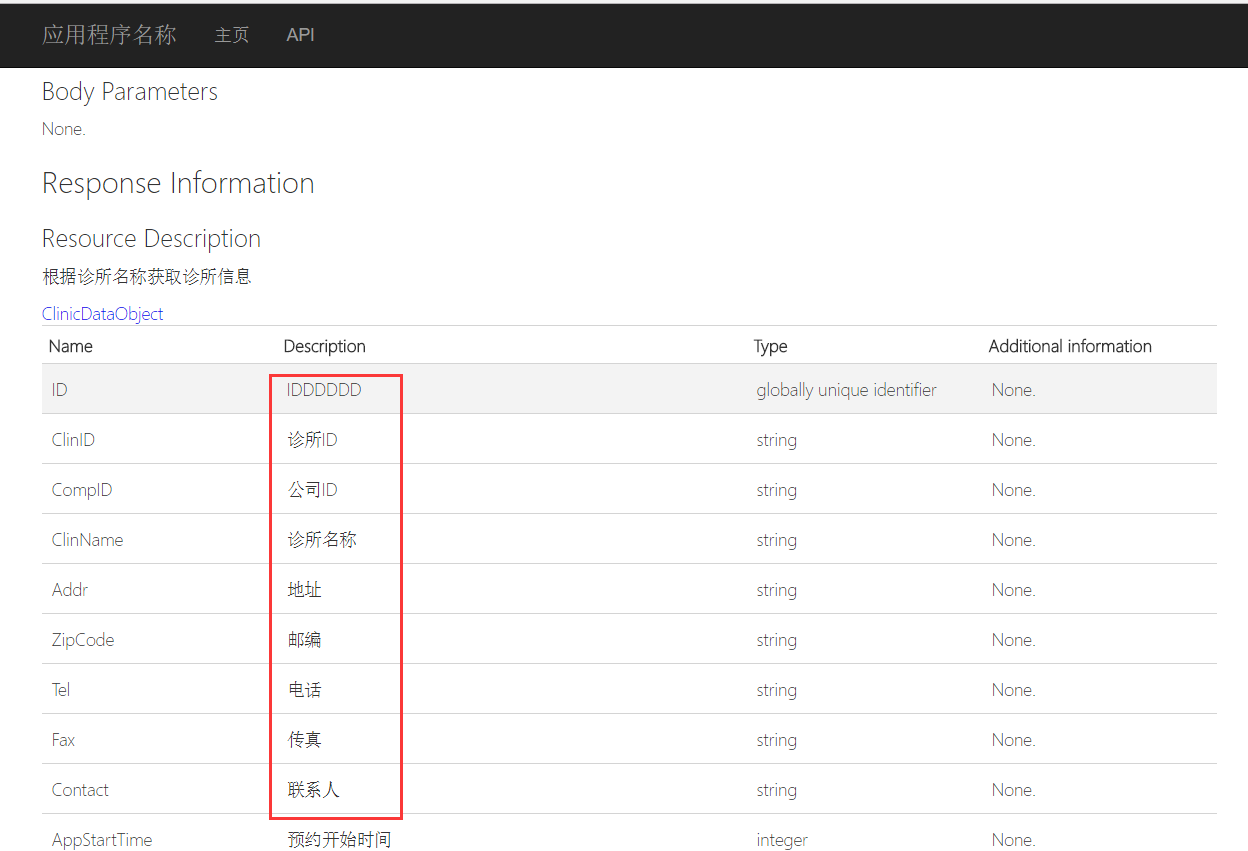
这个注释的解决办法其实要从其原理理解就明白了。
因为HelpPage是读取的XML文件生成的,你的对象没有生成XML文件,当然显示的是空的。
那么解决的办法如下,
1.将你的返回对象所在的库也生成XML文件,右键属性--生成。都选XML项,配置好XML文件生成路径。
2.在原有的基础上,写一个读取多个XML文件的方法。代码如下:
/// <summary>A custom <see cref="IDocumentationProvider"/> that reads the API documentation from a collection of XML documentation files.</summary>

    public class MultiXmlDocumentationProvider : IDocumentationProvider, IModelDocumentationProvider

    {

        /*********

    ** Properties

    *********/

        /// <summary>The internal documentation providers for specific files.</summary>

        private readonly XmlDocumentationProvider[] Providers;

        /*********

        ** Public methods

        *********/

        /// <summary>Construct an instance.</summary>

        /// <param name="paths">The physical paths to the XML documents.</param>

        public MultiXmlDocumentationProvider(params string[] paths)

        {

            this.Providers = paths.Select(p => new XmlDocumentationProvider(p)).ToArray();

        }

        /// <summary>Gets the documentation for a subject.</summary>

        /// <param name="subject">The subject to document.</param>

        public string GetDocumentation(MemberInfo subject)

        {

            return this.GetFirstMatch(p => p.GetDocumentation(subject));

        }

        /// <summary>Gets the documentation for a subject.</summary>

        /// <param name="subject">The subject to document.</param>

        public string GetDocumentation(Type subject)

        {

            return this.GetFirstMatch(p => p.GetDocumentation(subject));

        }

        /// <summary>Gets the documentation for a subject.</summary>

        /// <param name="subject">The subject to document.</param>

        public string GetDocumentation(HttpControllerDescriptor subject)

        {

            return this.GetFirstMatch(p => p.GetDocumentation(subject));

        }

        /// <summary>Gets the documentation for a subject.</summary>

        /// <param name="subject">The subject to document.</param>

        public string GetDocumentation(HttpActionDescriptor subject)

        {

            return this.GetFirstMatch(p => p.GetDocumentation(subject));

        }

        /// <summary>Gets the documentation for a subject.</summary>

        /// <param name="subject">The subject to document.</param>

        public string GetDocumentation(HttpParameterDescriptor subject)

        {

            return this.GetFirstMatch(p => p.GetDocumentation(subject));

        }

        /// <summary>Gets the documentation for a subject.</summary>

        /// <param name="subject">The subject to document.</param>

        public string GetResponseDocumentation(HttpActionDescriptor subject)

        {

            return this.GetFirstMatch(p => p.GetDocumentation(subject));

        }

        /*********

        ** Private methods

        *********/

        /// <summary>Get the first valid result from the collection of XML documentation providers.</summary>

        /// <param name="expr">The method to invoke.</param>

        private string GetFirstMatch(Func<XmlDocumentationProvider, string> expr)

        {

            return this.Providers

                .Select(expr)

                .FirstOrDefault(p => !String.IsNullOrWhiteSpace(p));

        }

    }
3.替换HelpPageConfig里面的读取方法:
//config.SetDocumentationProvider(new XmlDocumentationProvider(HttpContext.Current.Server.MapPath("~/App_Data/XmlDocument.xml")));

config.SetDocumentationProvider(new MultiXmlDocumentationProvider(HttpContext.Current.Server.MapPath("~/App_Data/XmlDocument.xml"), HttpContext.Current.Server.MapPath("~/App_Data/Api.xml")));
Api.xml为你生成的对象XML文件。
然后重新生成就OK了。
当然生成的XML文件路径要根据自己项目的路径配置好。
关于Web Api的HelpPage文档注释问题的更多相关文章
- 关于ASP.NET Web Api的HelpPage文档注释问题
关于ASP.NET Web Api的HelpPage文档注释问题 以前我用微软的HelpPage来自动生成的webAPI帮助文档.在使用了一段时间后发现只能显示Controller上面写的注释文档内容 ...
- Effective Java 第三版——56. 为所有已公开的API元素编写文档注释
Tips 书中的源代码地址:https://github.com/jbloch/effective-java-3e-source-code 注意,书中的有些代码里方法是基于Java 9 API中的,所 ...
- asp.net core web api 生成 swagger 文档
asp.net core web api 生成 swagger 文档 Intro 在前后端分离的开发模式下,文档就显得比较重要,哪个接口要传哪些参数,如果一两个接口还好,口头上直接沟通好就可以了,如果 ...
- ASP.NET Core 中文文档 第二章 指南 (09) 使用 Swagger 生成 ASP.NET Web API 在线帮助测试文档
原文:ASP.NET Web API Help Pages using Swagger 作者:Shayne Boyer 翻译:谢炀(kiler) 翻译:许登洋(Seay) 对于开发人员来说,构建一个消 ...
- 第四十四条:为所有导出的API元素编写文档注释
简而言之,要为API编写文档,文档注释是最好,最有效的途径.对于所有可导出的API元素来说,使用文档注释应该被看作是强制性的.要 采用一致的风格来遵循标准的约定.记住,在文档注释内部出现任何的HTML ...
- 使用swagger实现web api在线接口文档
一.前言 通常我们的项目会包含许多对外的接口,这些接口都需要文档化,标准的接口描述文档需要描述接口的地址.参数.返回值.备注等等:像我们以前的做法是写在word/excel,通常是按模块划分,例如一个 ...
- 1.1 WEB API 在帮助文档页面进行测试
这篇文章http://www.cnblogs.com/landeanfen/p/5210356.html写得比较详细, 我就挑简单的来说. 首先用这功能要在WEB API创建的帮助文档下面,如果你使用 ...
- 使用swagger实现web api在线接口文档(转载)
一.前言 通常我们的项目会包含许多对外的接口,这些接口都需要文档化,标准的接口描述文档需要描述接口的地址.参数.返回值.备注等等:像我们以前的做法是写在word/excel,通常是按模块划分,例如一个 ...
- Web Api 多项目文档生成之SwaggerUI
SwaggerUI 可以生成不错的文档,但默认只能作用于单个api 项目,研究了一下源码发现只需修改一下SwaggerConfig.cs文件即可支持多API项目 1.使用生成脚本把xml文件复制到AP ...
随机推荐
- 自定义鼠标Cursor转变成图片
今天无意做到项目遇到一个好玩的事情,就是当我鼠标移到一个链接上面,并不是像正常那样出现一个小手,而是变成一个小十字架, 下面看图当时第一眼看到总感觉哪里不对,噢噢噢噢 这样的 小手没了,居然是一个图片 ...
- Linq101-Partitioning
using System; using System.Linq; namespace Linq101 { class Partitioning { /// <summary> /// Th ...
- 无法在web服务器上启动调试。调试失败,因为没有启用集成windows身份验证
----注意:以管理员身份运行VS C#中ASP.NET Web应用程序编译时的错误:无法在web服务器上启动调试.调试失败,因为没有启用集成windows身份验证. 解决:打开IIS,在IIS里查看 ...
- c - 根据首字母判断星期几
#include <stdio.h> #include <ctype.h> /* 请输入星期几的第一个字母来判断一下是星期几,如果第一个字母一样,则继续判断第二个字母. */ ...
- 四大跨平台的APP分析
转载:http://blog.csdn.net/kenkao/article/details/50678269
- openstack nova数据库计算结点IP地址
最近遇到一个问题就是在控制结点上查找nova数据库中 select * from compute_nodes\G;中出现IP地址一直是127.0.0.1不是计算结点的IP,就算修改成计算结点的IP,也 ...
- 妙用git rebase --onto指令
有时候,在分支提交更改的时候,会忘记rebase,就直接提交上去,或者忘记和本地远程分支做merge,就直接rebase了别的分支.有时候真希望有一种切片的方式,让自己的分支只需要接上某一段.这个时候 ...
- jQuery获取select、checkbox、radio的方法总结
在进行网页的前后台交互的时候,经常需要获取单选框(radio).复选框(checkbox)以及下拉列表(select/dropdownlist)选中的值. 总结了一下,方便以后复习查看: 1.获取选中 ...
- 关于ligerui和其他前端脚本的学习方法(适用于自己)
特别是看别人的源代码(来源于自己看的那个cms系统),比如ligerui,别人用的juery和ligerui结合的很灵活,比如下面一段代码 var itemiframe = "#framec ...
- java计算一个月有多少天和多少周
import java.util.Calendar; /** * 功能概述:计算指定年月的天数和周数<br> * 创建时间:2010-5-17 下午05:25:58<br> * ...