
关于Web Api的HelpPage文档注释问题
之前使用Microsoft.AspNet.WebApi.HelpPage的时候,一直为返回对象的注释发愁,以为这是个BUG。
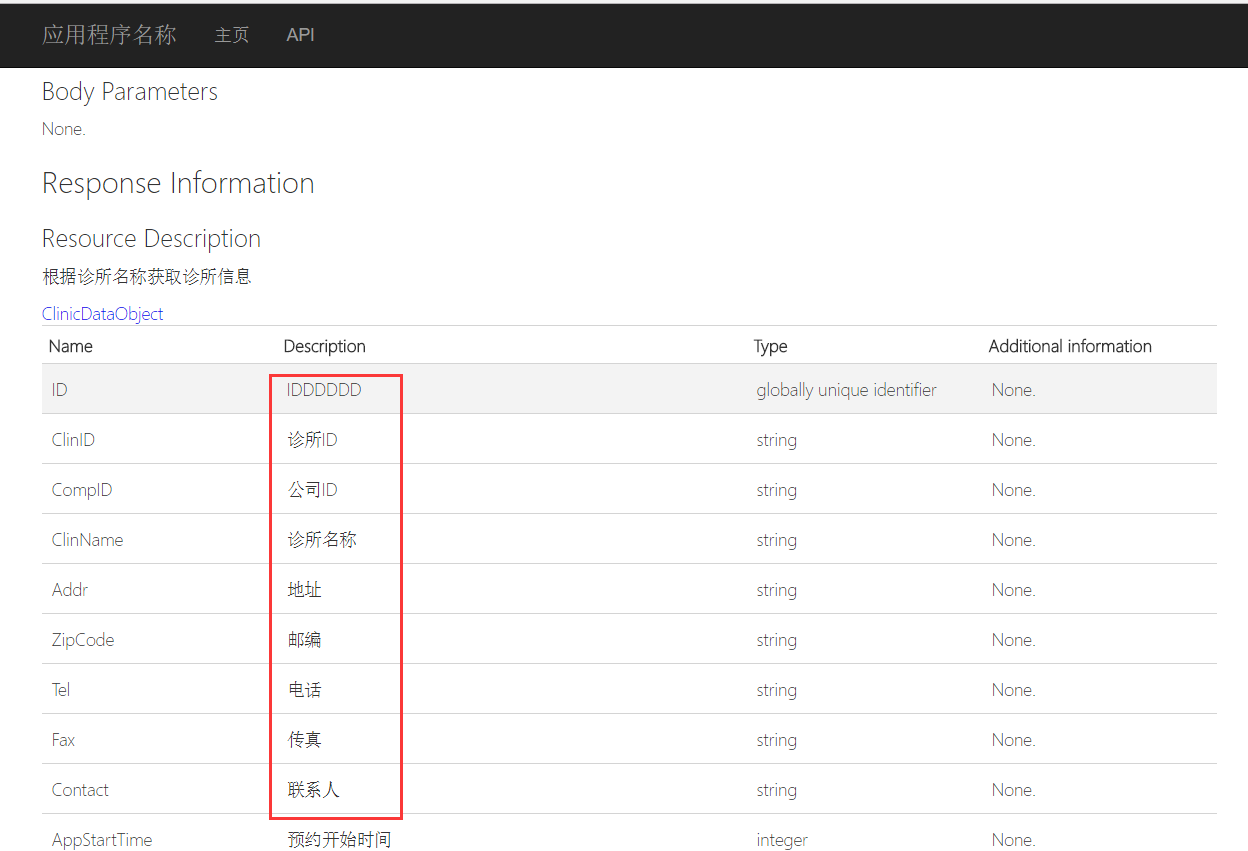
这个注释的解决办法其实要从其原理理解就明白了。
因为HelpPage是读取的XML文件生成的,你的对象没有生成XML文件,当然显示的是空的。
那么解决的办法如下,
1.将你的返回对象所在的库也生成XML文件,右键属性--生成。都选XML项,配置好XML文件生成路径。
2.在原有的基础上,写一个读取多个XML文件的方法。代码如下:
/// <summary>A custom <see cref="IDocumentationProvider"/> that reads the API documentation from a collection of XML documentation files.</summary>

    public class MultiXmlDocumentationProvider : IDocumentationProvider, IModelDocumentationProvider

    {

        /*********

    ** Properties

    *********/

        /// <summary>The internal documentation providers for specific files.</summary>

        private readonly XmlDocumentationProvider[] Providers;

        /*********

        ** Public methods

        *********/

        /// <summary>Construct an instance.</summary>

        /// <param name="paths">The physical paths to the XML documents.</param>

        public MultiXmlDocumentationProvider(params string[] paths)

        {

            this.Providers = paths.Select(p => new XmlDocumentationProvider(p)).ToArray();

        }

        /// <summary>Gets the documentation for a subject.</summary>

        /// <param name="subject">The subject to document.</param>

        public string GetDocumentation(MemberInfo subject)

        {

            return this.GetFirstMatch(p => p.GetDocumentation(subject));

        }

        /// <summary>Gets the documentation for a subject.</summary>

        /// <param name="subject">The subject to document.</param>

        public string GetDocumentation(Type subject)

        {

            return this.GetFirstMatch(p => p.GetDocumentation(subject));

        }

        /// <summary>Gets the documentation for a subject.</summary>

        /// <param name="subject">The subject to document.</param>

        public string GetDocumentation(HttpControllerDescriptor subject)

        {

            return this.GetFirstMatch(p => p.GetDocumentation(subject));

        }

        /// <summary>Gets the documentation for a subject.</summary>

        /// <param name="subject">The subject to document.</param>

        public string GetDocumentation(HttpActionDescriptor subject)

        {

            return this.GetFirstMatch(p => p.GetDocumentation(subject));

        }

        /// <summary>Gets the documentation for a subject.</summary>

        /// <param name="subject">The subject to document.</param>

        public string GetDocumentation(HttpParameterDescriptor subject)

        {

            return this.GetFirstMatch(p => p.GetDocumentation(subject));

        }

        /// <summary>Gets the documentation for a subject.</summary>

        /// <param name="subject">The subject to document.</param>

        public string GetResponseDocumentation(HttpActionDescriptor subject)

        {

            return this.GetFirstMatch(p => p.GetDocumentation(subject));

        }

        /*********

        ** Private methods

        *********/

        /// <summary>Get the first valid result from the collection of XML documentation providers.</summary>

        /// <param name="expr">The method to invoke.</param>

        private string GetFirstMatch(Func<XmlDocumentationProvider, string> expr)

        {

            return this.Providers

                .Select(expr)

                .FirstOrDefault(p => !String.IsNullOrWhiteSpace(p));

        }

    }
3.替换HelpPageConfig里面的读取方法:
//config.SetDocumentationProvider(new XmlDocumentationProvider(HttpContext.Current.Server.MapPath("~/App_Data/XmlDocument.xml")));

config.SetDocumentationProvider(new MultiXmlDocumentationProvider(HttpContext.Current.Server.MapPath("~/App_Data/XmlDocument.xml"), HttpContext.Current.Server.MapPath("~/App_Data/Api.xml")));
Api.xml为你生成的对象XML文件。
然后重新生成就OK了。
当然生成的XML文件路径要根据自己项目的路径配置好。
关于Web Api的HelpPage文档注释问题的更多相关文章
- 关于ASP.NET Web Api的HelpPage文档注释问题
关于ASP.NET Web Api的HelpPage文档注释问题 以前我用微软的HelpPage来自动生成的webAPI帮助文档.在使用了一段时间后发现只能显示Controller上面写的注释文档内容 ...
- Effective Java 第三版——56. 为所有已公开的API元素编写文档注释
Tips 书中的源代码地址:https://github.com/jbloch/effective-java-3e-source-code 注意,书中的有些代码里方法是基于Java 9 API中的,所 ...
- asp.net core web api 生成 swagger 文档
asp.net core web api 生成 swagger 文档 Intro 在前后端分离的开发模式下,文档就显得比较重要,哪个接口要传哪些参数,如果一两个接口还好,口头上直接沟通好就可以了,如果 ...
- ASP.NET Core 中文文档 第二章 指南 (09) 使用 Swagger 生成 ASP.NET Web API 在线帮助测试文档
原文:ASP.NET Web API Help Pages using Swagger 作者:Shayne Boyer 翻译:谢炀(kiler) 翻译:许登洋(Seay) 对于开发人员来说,构建一个消 ...
- 第四十四条:为所有导出的API元素编写文档注释
简而言之,要为API编写文档,文档注释是最好,最有效的途径.对于所有可导出的API元素来说,使用文档注释应该被看作是强制性的.要 采用一致的风格来遵循标准的约定.记住,在文档注释内部出现任何的HTML ...
- 使用swagger实现web api在线接口文档
一.前言 通常我们的项目会包含许多对外的接口,这些接口都需要文档化,标准的接口描述文档需要描述接口的地址.参数.返回值.备注等等:像我们以前的做法是写在word/excel,通常是按模块划分,例如一个 ...
- 1.1 WEB API 在帮助文档页面进行测试
这篇文章http://www.cnblogs.com/landeanfen/p/5210356.html写得比较详细, 我就挑简单的来说. 首先用这功能要在WEB API创建的帮助文档下面,如果你使用 ...
- 使用swagger实现web api在线接口文档(转载)
一.前言 通常我们的项目会包含许多对外的接口,这些接口都需要文档化,标准的接口描述文档需要描述接口的地址.参数.返回值.备注等等:像我们以前的做法是写在word/excel,通常是按模块划分,例如一个 ...
- Web Api 多项目文档生成之SwaggerUI
SwaggerUI 可以生成不错的文档,但默认只能作用于单个api 项目,研究了一下源码发现只需修改一下SwaggerConfig.cs文件即可支持多API项目 1.使用生成脚本把xml文件复制到AP ...
随机推荐
- asp.net Request.ServerVariables[] 读解
获取客户端的IP地址,代码如下: /// <summary> /// 获取客户端IP地址 /// </summary> /// <returns></retu ...
- segue生命周期
segue生命周期:概述: 理解segue工作原理,需要理解一个segue对象的生命周期.segue对象是UIStoryboardSegue的实例或者是它的一个子类.所有iOS app都不能直接创建s ...
- java学习第一阶段——面向对象
你聪明有人会说你心机重, 你靠的是努力有人会说你运气好, 你说自己天生乐观有人会说你虚假, 有时候, 你明明就是一杯白水, 却被人硬生生逼成了满肚子憋屈的碳酸饮料. 人一生要遇见太多人, 即使有些话字 ...
- Linux下安装php加速组件XCache
这里选择的是稳定版本的1.2.2版本,2.0版本的不稳定.wget http://xcache.lighttpd.net/pub/Releases/1.2.2/xcache-1.2.2.tar.gzt ...
- [转载]C++中 引用&与取地址&的区别
一个是用来传值的 一个是用来获取首地址的 &(引用)==>出现在变量声明语句中位于变量左边时,表示声明的是引用. 例如: int &rf; // 声明一个int型的引用r ...
- ASP.NET中实现页面间数据传递的方法
说到页面间数据传递,很多人都会想到通过像Session这样的全局变量,但是向Session中添加的东西太多会增加服务器的压力,页面间数据传递,数据的作用范围越小越好. ASP.NET页面间数据传递 ...
- (转载)图解Linux系统的系统架构
我以下图为基础,说明Linux的架构(architecture).(该图参考<Advanced Programming in Unix Environment>) 最内层是硬件,最外层是用 ...
- jQuery toggle() 方法与实例以及代替方法。
看<jQeury 权威指南>时看到这个toggle()方法.因为之前在慕课网学习接触过.发现两者讲的有细微的不同 以隐藏/显示目标元素效果为例,慕课网是这样讲解的 $("#cli ...
- javascript 16/1/14随记
1.想在一个事件或者函数之后,触发某个事件. var flag=false //定义一个全局变量 function aku(){ if(flag){ } } sizemousedown=functio ...
- TextView 设置超过几行后显示省略号
android:lines="5" android:ellipsize="end"