
读取XML文件的几种方式的效率分析
第一种:使用XmlReader来读取。
 Stopwatch sw = Stopwatch.StartNew();

             List<Dictionary<string, string>> entityInfo = new List<Dictionary<string, string>>();

             using (XmlReader reader = new XmlTextReader(compareXmlName))

             {

                 Dictionary<string, string> xmlValue = null;

                 string key = string.Empty;

                 while (reader.Read())

                 {

                     switch (reader.NodeType)

                     {

                         case XmlNodeType.Element:

                             if (string.Compare(reader.LocalName, "MultiTable",

                                 StringComparison.OrdinalIgnoreCase) == )

                             {

                                 xmlValue = new Dictionary<string, string>();

                             }

                             else if(string.Compare(reader.LocalName,"NewDataSet",

                                 StringComparison.OrdinalIgnoreCase) != )

                             {

                                 key = reader.LocalName;

                             }

                             break;

                         case XmlNodeType.EndElement:

                             if (string.Compare(reader.LocalName, "MultiTable",

                                 StringComparison.OrdinalIgnoreCase) == )

                             {

                                 if (xmlValue != null)

                                 {

                                     entityInfo.Add(xmlValue);

                                     xmlValue = null;

                                 }

                             }

                             break;

                         case XmlNodeType.Text:

                             if (xmlValue != null)

                             {

                                 xmlValue.Add(key, reader.Value);

                             }

                             break;

                     }

                 }

             }

             TimeSpan ts = sw.Elapsed;

             List<Customers> packData = new List<Customers>();

             foreach (var item in entityInfo)

             {

                 Customers temp = new Customers();

                 foreach (var sub in item)

                 {

                     if (sub.Key == "CustomerID")

                     {

                         temp.CustomerID = int.Parse(sub.Value);

                     }

                     else if (sub.Key == "CustomerName")

                     {

                         temp.CustomerName = sub.Value;

                     }

                     else if (sub.Key == "Description")

                     {

                         temp.Description = sub.Value;

                     }

                     else if (sub.Key == "Boolean")

                     {

                         temp.IsEnabled = sub.Value == "true" ? true : false;

                     }

                 }

                 packData.Add(temp);

             }

             dataGridView3.DataSource = packData;

             this.textBox9.Text = ts.TotalMilliseconds.ToString();
这种方式其实是最原始的读取方法,读取的时候一个一个的节点来读取,节点的类型有很多,比如Element类型,EndElement类型,Text类型等等,通过这种方式,我们来读取我们需要的数据。这种方式效率最高。
第二种:使用XmlDocument的方式来读取:
 Stopwatch sw = Stopwatch.StartNew();

             XmlDocument doc = new XmlDocument();

             doc.Load(compareXmlName);

             XmlNode root = doc.DocumentElement;

             XmlNode child = root.FirstChild;

             List<Customers> results = new List<Customers>();

             while (child != null)

             {

                 XmlNode grandSon = child.FirstChild;

                 Customers temp = new Customers();

                 while (grandSon != null)

                 {

                     if (grandSon.Name == "CustomerID")

                     {

                         temp.CustomerID = int.Parse(grandSon.FirstChild.Value);

                     }

                     else if (grandSon.Name == "CustomerName")

                     {

                         temp.CustomerName = grandSon.FirstChild.Value;

                     }

                     else if (grandSon.Name == "Description")

                     {

                         temp.Description = grandSon.FirstChild.Value;

                     }

                     else if (grandSon.Name == "Boolean")

                     {

                         temp.IsEnabled = grandSon.FirstChild.Value == "true" ? true : false;

                     }

                     grandSon = grandSon.NextSibling;

                 }

                 results.Add(temp);

                 child = child.NextSibling;

             }

             TimeSpan ts = sw.Elapsed;

             dataGridView3.DataSource = results;

             textBox10.Text = ts.TotalMilliseconds.ToString();
这种方式其实也是通过xmlLoader来构造节点的,xmlLoader里面也是XmlReader完成的任务,这种方式的效率也比较高。
第三种:直接使用DataSet来读取,自动判断Schema信息。
           DataSet compareDataSet1 = new DataSet("CompareDataSet");

             Stopwatch sw = Stopwatch.StartNew();

             //读取架构信息

             compareDataSet1.ReadXml(compareXmlName, XmlReadMode.Auto);

             TimeSpan ts = sw.Elapsed;

             this.dataGridView3.DataSource = compareDataSet1.Tables[];

             textBox7.Text = ts.TotalMilliseconds.ToString();
这种方式时效率最不高的,在调用ReadXml的时候,也是通过XmlReader来完成的工作,调用XmlLoader来加载数据,加载数据是通过XmlLoader的LoadTable来构造表的数据的。
第四种:也是使用DataSet来读取数据,但是先读取架构信息,并且调用BeginLoadData来关闭通知,索引维护等,这样的速度比第三种要快。
 DataSet compareDataSet1 = new DataSet("CompareDataSet");

             Stopwatch sw = Stopwatch.StartNew();

             //读取架构信息

             compareDataSet1.ReadXmlSchema(compareXmlSchemaName);

             //防止在修改数据的过程中引发各种约束的检查,并可以提高速度

             foreach (DataTable dt in compareDataSet.Tables)

             {

                 dt.BeginLoadData();

             }

             compareDataSet1.ReadXml(compareXmlName, XmlReadMode.IgnoreSchema);

             foreach (DataTable dt in compareDataSet1.Tables)

             {

                 dt.EndLoadData();

             }

             TimeSpan ts = sw.Elapsed;

             this.dataGridView3.DataSource = compareDataSet1.Tables[];

             textBox6.Text = ts.TotalMilliseconds.ToString();
第五种:也还是使用DataSet来读取数据,也读取架构信息,但是不调用BeginLoadData方法,在这里,因为没有添加任何的索引,约束等,所以速度和第四种差不多。
  DataSet compareDataSet1 = new DataSet("CompareDataSet");

             Stopwatch sw = Stopwatch.StartNew();

             //读取架构信息

             compareDataSet1.ReadXmlSchema(compareXmlSchemaName);

             compareDataSet1.ReadXml(compareXmlName, XmlReadMode.IgnoreSchema);

             TimeSpan ts = sw.Elapsed;

             this.dataGridView3.DataSource = compareDataSet1.Tables[];

             textBox8.Text = ts.TotalMilliseconds.ToString();
五种的比较结果,读取10万条数据的结果如下:
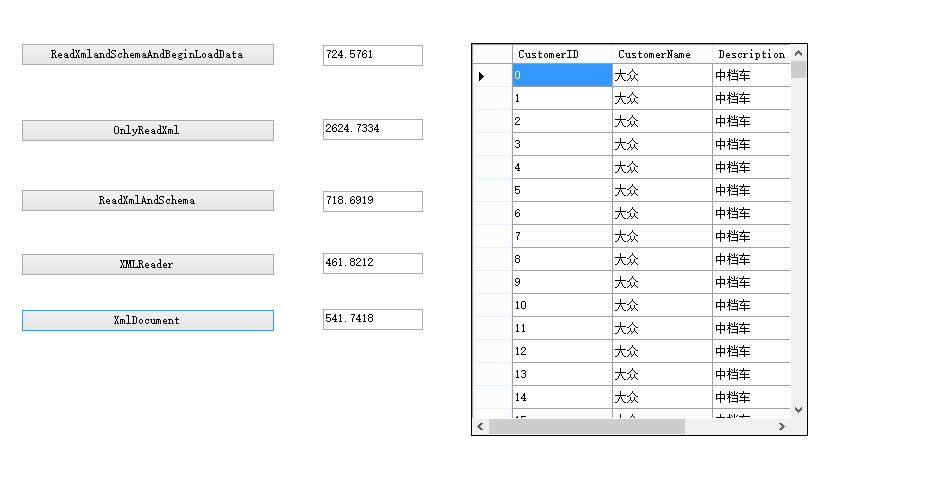
http://files.cnblogs.com/files/monkeyZhong/DataSetXML.zip
读取XML文件的几种方式的效率分析的更多相关文章
- java读取XML文件的四种方式
java读取XML文件的四种方式 Xml代码 <?xml version="1.0" encoding="GB2312"?> <RESULT& ...
- 解析Xml文件的三种方式及其特点
解析Xml文件的三种方式 1.Sax解析(simple api for xml) 使用流式处理的方式,它并不记录所读内容的相关信息.它是一种以事件为驱动的XML API,解析速度快,占用内存少.使用 ...
- 浅谈JS中的!=、== 、!==、===的用法和区别 JS中Null与Undefined的区别 读取XML文件 获取路径的方式 C#中Cookie,Session,Application的用法与区别? c#反射 抽象工厂
浅谈JS中的!=.== .!==.===的用法和区别 var num = 1; var str = '1'; var test = 1; test == num //tr ...
- Java 读取 .properties 文件的几种方式
Java 读取 .properties 配置文件的几种方式 Java 开发中,需要将一些易变的配置参数放置再 XML 配置文件或者 properties 配置文件中.然而 XML 配置文件需要通过 ...
- 解析xml文件的四种方式
什么是 XML? XML 指可扩展标记语言(EXtensible Markup Language) XML 是一种标记语言,很类似 HTML XML 的设计宗旨是传输数据,而非显示数据 XML 标签没 ...
- Android-----解析xml文件的三种方式
SAX解析方法介绍: SAX(Simple API for XML)是一个解析速度快并且占用内存少的XML解析器,非常适合用于Android等移动设备.SAX解析XML文件采用的是事件驱动,也就是说, ...
- 【开发笔记】- Java读取properties文件的五种方式
原文地址:https://www.cnblogs.com/hafiz/p/5876243.html 一.背景 最近,在项目开发的过程中,遇到需要在properties文件中定义一些自定义的变量,以供j ...
- Spring 读取XML配置文件的两种方式
import org.springframework.context.ApplicationContext; import org.springframework.context.support.Cl ...
- 解析XML文件的几种方式及其比较
解析xml文件目前比较流行的主要有四种方式: 1. DOM(Document Object Model)它把整个XML文档当成一个对象加载到内 存,不管文档有多大.它一般处理小文件 2.SAX(Si ...
随机推荐
- JLRoutes--处理复杂的URL schemes-备
关键字:URL,URL schemes,Parse 代码类库:网络(Networking) GitHub链接:https://github.com/joeldev/JLRoutes JLRout ...
- 测试和恢复性的争论:面向对象vs.函数式编程
Michael Feathers最近的博文在博客社区引发了一场异常激烈的论战.Feathers发表言论说一些面向对象编程语言的内嵌特性有助于测试的进行,并且使用面向对象编程语言编写的代码更容易恢复. ...
- [Android] 混音器AudioMixer
AudioMixer是Android的混音器,通过混音器可以把各个音轨的音频数据混合在一起,然后输出到音频设备. 创建AudioMixer AudioMixer在MixerThread的构造函数内创建 ...
- vijosP1499炸毁燃料库
背景 某天,外星人展开了对地球的侵略,OIer们开始与之周旋... 描述 外星人派出了172849个外星人乘着UFO来到地球,curimit神new带领着OIer们奋力抵抗.curimit神new觉得 ...
- 前端工程师和web工程师的差异
摘自园内一篇文章关于web工程师的思考,比较认同其中的一些观点 前端工程师知识结构: 精通: xhtml,css,JavaScript 熟悉:一种后端程序语言( ...
- Hadoop MapReduce中压缩技术的使用
Compression and Input Splits 当我们使用压缩数据作为MapReduce的输入时,需要确认数据的压缩格式是否支持切片? 假设HDFS中有一个未经压缩的大小为1GB的文 ...
- supervisor:进程管理工具
一,安装(任何一种方式) apt-get install supervisor easy_install supervisor pip install supervisor 二,配置 配置superv ...
- shell编程(一)--常用变量及表达式
$? 表示执行上一个命令的返回值:如果为0表示执行成功,非0表示执行失败$1.$2.... 分别表示参数1.参数2....$# 表示这个程序的参数个数$*/$@ 表示这个程序的所有参数$$ 表示这个程 ...
- centos系统安装中文字体几种方法
我们知道centos是基于linux内核的这款系统默认是不带中文字体了,如果我们要使用中文字体就需要自行安装了,下面一起来看看吧. 前天有用户反应,生成的报到单中他的名字少了一个字.仔细检查了一下 ...
- CVPR读书笔记[5]:Gabor特征提取之Gabor核的实现
朱金华 jinhua1982@gmail.com 2014.08.09 本文參考http://blog.csdn.net/njzhujinhua/article/details/38460861 ...