
NodeJs -- URL 模块.
1. url.parse(网址): 将字符串 解析成对象.
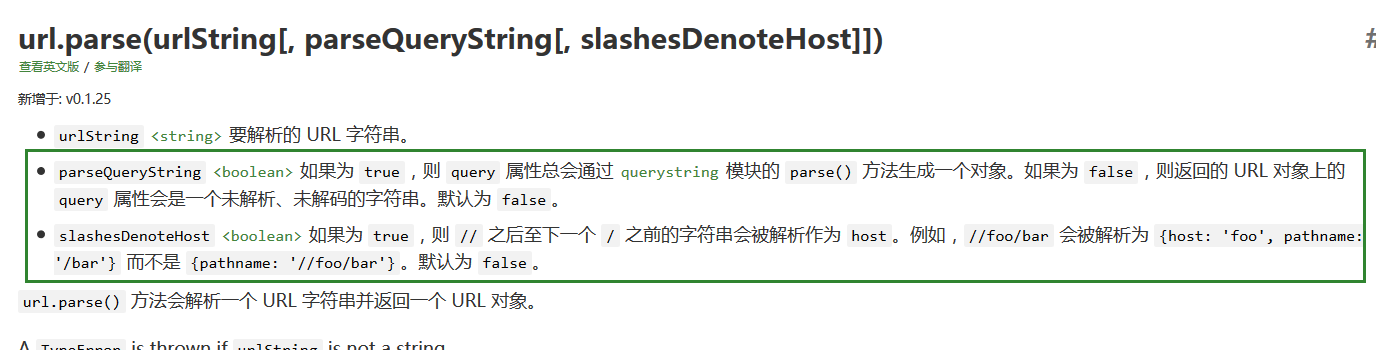
1-1) 一个参数 : 或者 参数1, false(默认), false(默认)
var url = require('url');

console.log(url.parse("http://www.baidu.com:8080/list?c=Cate&a=index#main"));

console.log(url.parse("https://user:pass@sub.host.com:8080/p/a/t/h?query=string#hash"));

console.log(url.parse("http://127.0.0.1/culture/action.php?c=HCourseProxy&a=displaySuccess&courseId=4"));
运行:
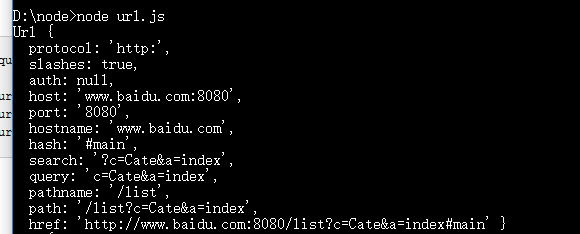
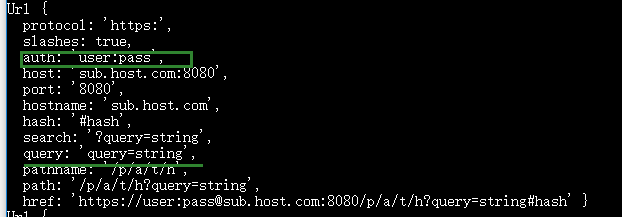
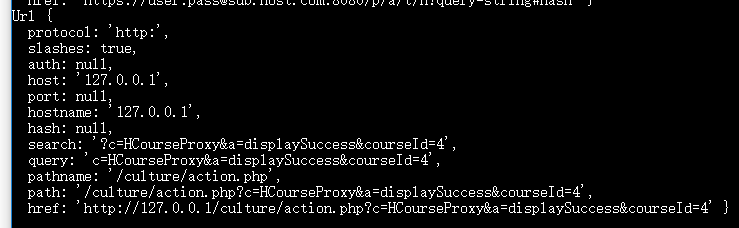
--------------------------------------------------
1-2) 两个参数 或者 是 参数1, true, false(默认)
如果第二个参数设置为 true. 那么 query属性 就会调用 querystring模块的 方法 ,生成一个对象.
 var url = require('url');

 console.log(url.parse("http://www.baidu.com:8080/list?c=Cate&a=index#main", true));

 console.log(url.parse("https://user:pass@sub.host.com:8080/p/a/t/h?query=string#hash", true));

 console.log(url.parse("http://127.0.0.1/culture/action.php?c=HCourseProxy&a=displaySuccess&courseId=4", true));
运行:
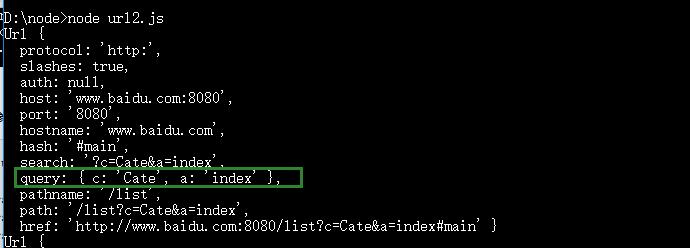
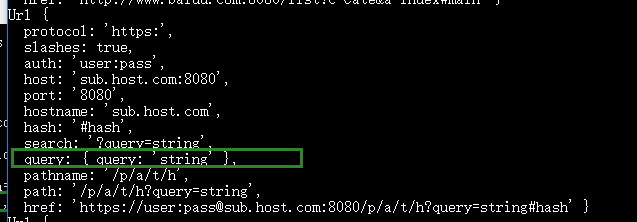
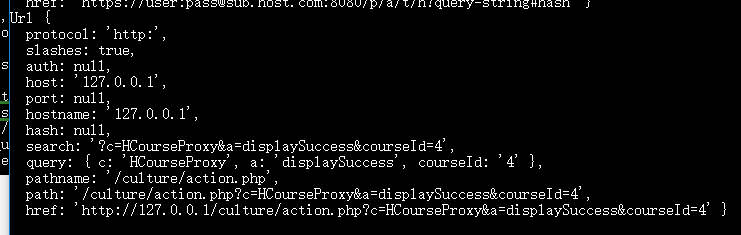
1-3) 三个参数: 参数1 , 参数2(布尔值), true
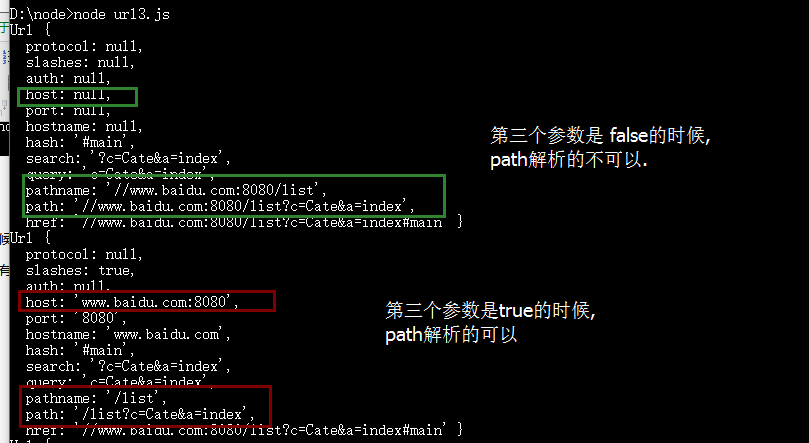
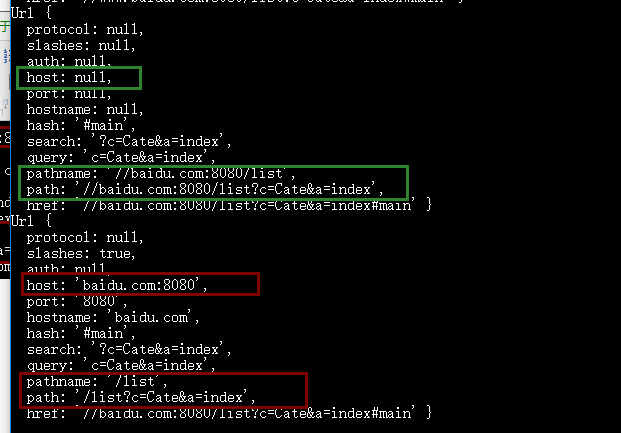
对于 不知道是什么协议的时候, 如果想解析//www.baidu.com:8080/list?c=Cate&a=index#main 这种 , 就可以将第 三个参数设置为 true.
 var url = require('url');

 console.log(url.parse("//www.baidu.com:8080/list?c=Cate&a=index#main"));

 console.log(url.parse("//www.baidu.com:8080/list?c=Cate&a=index#main", false, true));

 console.log(url.parse("//baidu.com:8080/list?c=Cate&a=index#main"));

 console.log(url.parse("//baidu.com:8080/list?c=Cate&a=index#main", false, true));
1-4) 实例:
第一: 入口文件: index.js
1 var server = require('./server');

 server.start();
require('./server'); 引入的是 自己定义的本地模块 . 这里 是 ./server
第二: 服务器文件: server.js
 var http = require("http");

 var url = require("url");

 function start(){

     http.createServer(function(request, response) {

         console.log(url.parse(request.url));

         console.log(url.parse(request.url).query);

         var pathname = url.parse(request.url).pathname;

         console.log('request for [' +pathname+ "] received.");

         response.writeHead(200, {"Content-Type": "text/plain"});

         response.write("Hello World");

           response.end();

     }).listen(8888);

     console.log("server has started.");

 }

 exports.start = start;
访问:

浏览器访问:

结果控制台输出:
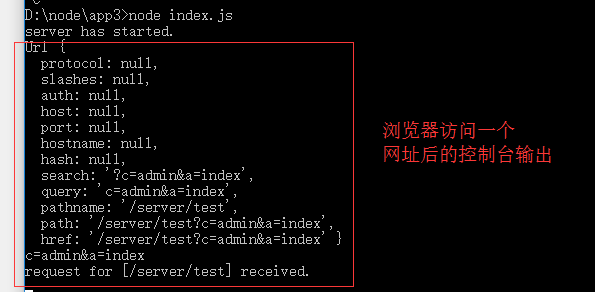
不同的网址的输出: pathname, pathname.query . pathname.pathname
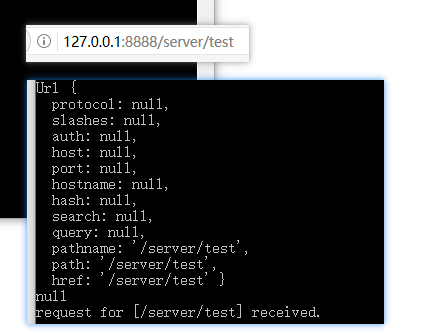
-------
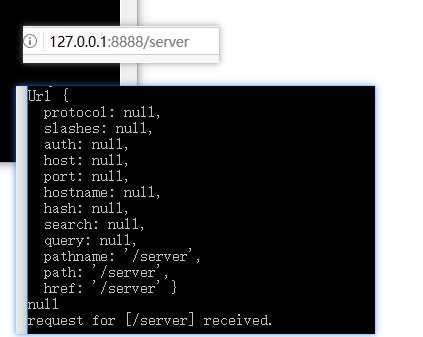
-------
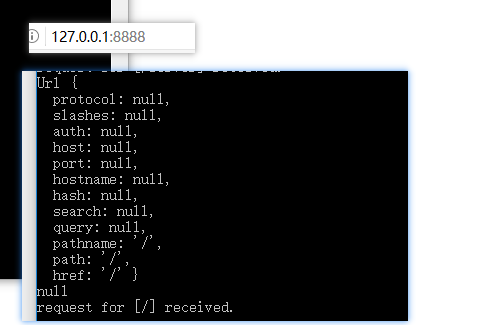
----
2. url.format(对象) 将对象 转成 字符串
var url = require('url');

console.log(url.format({

  protocol: 'https:',

  slashes: true,

  auth: 'user:pass',

  host: 'sub.host.com:8080',

  port: '8080',

  hostname: 'sub.host.com',

  hash: '#hash',

  search: '?query=string',

  query: 'query=string',

  pathname: '/p/a/t/h',

  path: '/p/a/t/h?query=string',

  href: 'https://user:pass@sub.host.com:8080/p/a/t/h?query=string#hash' }));
运行:

3. url.resolve()
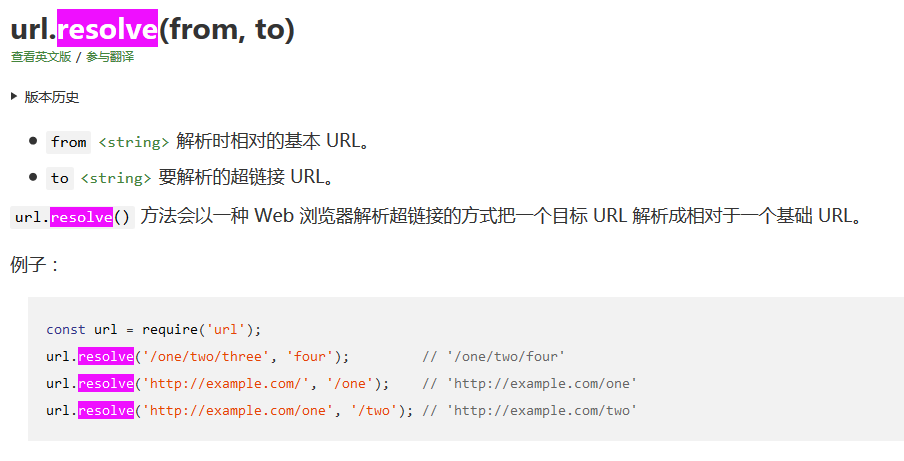
 var url = require('url');

 console.log(url.resolve("http://www.runoob.com/", "nodejs/nodejs-path-module.html"));

 console.log(url.resolve("http://www.runoob.com/", "/nodejs/nodejs-path-module.html"));

 console.log(url.resolve("http://www.runoob.com/list/", "nodejs/nodejs-path-module.html"));

 console.log(url.resolve("http://www.runoob.com/list/", "/nodejs/nodejs-path-module.html"));

 console.log(url.resolve("http://www.runoob.com/list", "/nodejs/nodejs-path-module.html"));

 console.log(url.resolve("http://www.runoob.com/list/cate/", "../nodejs-path-module.html"));

 console.log(url.resolve("http://www.runoob.com/list/cate", "../nodejs-path-module.html"));
运行:
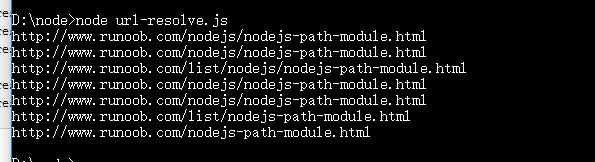
可见:
1)当 第一个参数只是 域名的时候, 第二个参数总是追加在 第一个参数的后面 , 参见 代码 3 ,代码 4
2)当第一个参数 不只是域名,还有path 的时候, 第一个参数末尾是否带有 / , 以及 第二个参数开始是否有/ .都 会对生成的 url地址产生影响.
运行:
--------------
NodeJs -- URL 模块.的更多相关文章
- nodejs之url模块
鄙人初步学习nodejs,目前在读<nodejs入门>这一本书,书很小,但是让我知道了如何用nodejs创建一个简单的小项目.例如如何创建一个服务器啦,例如http.createServe ...
- nodejs学习笔记二(get请求、post请求、 querystring模块,url模块)
请求数据 前台:form.ajax.jsonp 后台:接受请求并返回响应数据 前台<= http协议 =>后台 常用的请求的方式: 1.GET 数据在url ...
- 引用nodejs的url模块实现url路由功能
我们在本地创建服务器之后需要写不同的后缀名来访问同一个站点的不同页面,如果不实现路由功能.则每次访问localhost:3000 不论后面写什么 比如localhost:3000/index.loc ...
- nodejs笔记之路由及util和url模块
路由是URL到函数的映射:对于最简单的静态资源服务器,可以认为,所有URL的映射函数就是一个文件读取操作.对于动态资源,映射函数可能是一个数据库读取操作,也可能是进行一些数据的处理,等等. 如: /u ...
- NodeJS 笔记 URL模块
url模块 ,包含分析和解析 URL 的工具. var url = require('url'); url.parse(urlStr[, parseQueryString][, slashesDeno ...
- nodejs入门API之url模块+querystring模块
关于URL的一些基础内容 URL模块的API解析 URL的参数URLSearchParams类 querystring模块 一.关于URL的一些基础内容 1.1 定义: 在WWW上,每一信息资源都有统 ...
- NodeJS http 模块
#4 NodeJS http 模块 工作目录 server.js var http = require('http'); var fs = require('fs'); var path = requ ...
- NodeJS Web模块
NodeJS Web模块 本文介绍nodeJS的http模块的基本用法,实现简单服务器和客户端 经典Web架构 Client:客户端一般指浏览器,通过HTTP协议向服务器发送请求(request) S ...
- node(03)--利用 HTTP 模块 URl 模块 PATH 模块 FS 模块创建一个 WEB 服务器
Web 服务器一般指网站服务器,是指驻留于因特网上某种类型计算机的程序,可以向浏览器等 Web 客户端提供文档,也可以放置网站文件,让全世界浏览:可以放置数据文件,让全世界下载.目前最主流的三个 We ...
随机推荐
- python3 mail
# !usr/bin/python3# -*-coding=UTF-8-*-import smtplib # python 对SMTP的支持,smtplib这个库负责发送邮件from email.mi ...
- Building Fire Stations ZOJ - 3820 (二分,树的直径)
大意: 给定树, 求两个点, 使得所有其他的点到两点的最短距离的最大值尽量小. 二分答案转为判定选两个点, 向外遍历$x$的距离是否能遍历完整棵树. 取直径两段距离$x$的位置bfs即可. #incl ...
- 20165309 实验四 Android程序设计
2017-2018-2 20165309实验四<Java面向对象程序设计>实验报告 一.实验内容 1.Android Studio的安装测试 2.Activity测试 3.UI测试 4.布 ...
- centos7-jdk快速安装
安装之前先检查一下系统有没有自带open-jdk 命令: rpm -qa |grep java rpm -qa |grep jdk rpm -qa |grep gcj 如果没有输入信息表示没有安装. ...
- 【IDEA】【7】Git更新及提交
如果是Git管理的项目,顶部会出现这样的按钮 绿色代表commit到本地 蓝色代表update最新代码 Push:推送到远程服务器:右键项目->Git->Repository->Pu ...
- [luogu P3628] [APIO2010]特别行动队
[luogu P3628] [APIO2010]特别行动队 题目描述 你有一支由 n 名预备役士兵组成的部队,士兵从 1 到 n 编号,要将他们拆分 成若干特别行动队调入战场.出于默契的考虑,同一支特 ...
- 小Z的袜子(hose)
小Z的袜子(hose) 作为一个生活散漫的人,小Z每天早上都要耗费很久从一堆五颜六色的袜子中找出一双来穿.终于有一天,小Z再也无法忍受这恼人的找袜子过程,于是他决定听天由命……具体来说,小Z把这N只袜 ...
- Linux五种IO模型(同步 阻塞概念)
Linux五种IO模型 同步和异步 这两个概念与消息的通知机制有关. 同步 所谓同步,就是在发出一个功能调用时,在没有得到结果之前,该调用就不返回.比如,调用readfrom系统调用时,必须等待IO操 ...
- linux 文件解锁
//文件 sudo chmod 777 文件名 //文件夹内的文件 sudo chmod 777 文件夹/ * //遍历文件夹下的所有文件 sudo chmod -R 777 文件夹/ *
- Win10系列:VC++ Direct3D图形绘制1
通过前面的介绍,相信读者已经了解了如何新建一个用于开发Direct3D应用程序的项目模版,以及这个项目模版中用于绘制立体图形的主要函数.在本小节中,将通过一个具体的示例来介绍如何使用Visual St ...