
Linux计划任务Crontab实例详解教程
说明:Crontab是Linux系统中在固定时间执行某一个程序的工具,类似于Windows系统中的任务计划程序
下面通过详细实例来说明在Linux系统中如何使用Crontab
操作系统:CentOS
一、安装crontab
yum install vixie-cron #安装
chkconfig crond on #设为开机启动,先要安装chkconfig(yum install chkconfig)
service crond start #启动
service crond stop #停止
/etc/rc.d/init.d/crond restart #重启
/etc/rc.d/init.d/crond reload #不中断服务,重新载入配置
二、设置任务计划
/home/www.osyunwei.com/osyunwei.sh #要自动执行的脚本程序路径
chmod +x /home/www.osyunwei.com/osyunwei.sh #对脚本文件添加执行权限,否则不能执行
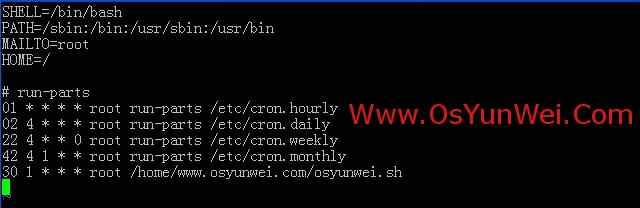
vi /etc/crontab #编辑配置文件,在最后一行添加内容
30 1 * * * root /home/www.osyunwei.com/osyunwei.sh #表示每天凌晨1点30执行备份
:wq! #保存退出
系统运维 www.osyunwei.com 温馨提醒:qihang01原创内容版权所有,转载请注明出处及原文链接
/etc/rc.d/init.d/crond restart #重启
备注:
系统运维 www.osyunwei.com 温馨提醒:qihang01原创内容版权所有,转载请注明出处及原文链接
crontab文件的格式:
minute hour day month weekday username command
minute:分,值为0-59
hour:小时,值为1-23
day:天,值为1-31
month:月,值为1-12
weekday:星期,值为0-6(0代表星期天,1代表星期一,以此类推)
username:要执行程序的用户,一般设置为root
command:要执行的程序路径(设置为绝对路径)例如:/home/www.osyunwei.com/osyunwei.sh
附:crontab规则详细实例
1、每天6:00执行
0 6 * * * root /home/www.osyunwei.com/osyunwei.sh
2、每周六凌晨4:00执行
0 4 * * 6 root /home/www.osyunwei.com/osyunwei.sh
3、每周六凌晨4:05执行
5 4 * * 6 root /home/www.osyunwei.com/osyunwei.sh
4、每周六凌晨4:15执行
15 4 * * 6 root /home/www.osyunwei.com/osyunwei.sh
5、每周六凌晨4:25执行
25 4 * * 6 root /home/www.osyunwei.com/osyunwei.sh
6、每周六凌晨4:35执行
35 4 * * 6 root /home/www.osyunwei.com/osyunwei.sh
7、每周六凌晨5:00执行
5 * * 6 root /home/www.osyunwei.com/osyunwei.sh
8、每天8:40执行
40 8 * * * root /home/www.osyunwei.com/osyunwei.sh
9、每天8:30执行
30 8 * * * root /home/www.osyunwei.com/osyunwei.sh
10、每周一到周五的11:41开始,每隔10分钟执行一次
41,51 11 * * 1-5 root /home/www.osyunwei.com/osyunwei.sh
1-59/10 12-23 * * 1-5 root /home/www.osyunwei.com/osyunwei.sh
11、在每天的10:31开始,每隔2小时重复一次
31 10-23/2 * * * root /home/www.osyunwei.com/osyunwei.sh
12、每天15:00执行
0 15 * * * root /home/www.osyunwei.com/osyunwei.sh
13、每天的10:30开始,每隔2小时重复一次
30 10-23/2 * * * root /home/www.osyunwei.com/osyunwei.sh
14、每天15:30执行
30 15 * * * root /home/www.osyunwei.com/osyunwei.sh
15、每天17:50执行
50 17 * * * root /home/www.osyunwei.com/osyunwei.sh
16、每天8:00执行
0 8 * * * root /home/www.osyunwei.com/osyunwei.sh
17、每天18:00执行
0 18 * * * root /home/www.osyunwei.com/osyunwei.sh
18、每天8:30执行
系统运维 www.osyunwei.com 温馨提醒:qihang01原创内容版权所有,转载请注明出处及原文链接
30 8 * * * root /home/www.osyunwei.com/osyunwei.sh
19、每天20:30
30 20 * * * root /home/www.osyunwei.com/osyunwei.sh
20、每周一到周五2:00
0 2 * * 1-5 root /home/www.osyunwei.com/osyunwei.sh
21、每周一到周五9:30
30 9 * * 1-5 root /home/www.osyunwei.com/osyunwei.sh
22、每周一到周五8:00,每周一到周五9:00
0 8,9 * * 1-5 root /home/www.osyunwei.com/osyunwei.sh
23、每天23:59
59 23 * * * root /home/www.osyunwei.com/osyunwei.sh
24、每周六23:59
59 23 * * 6 root /home/www.osyunwei.com/osyunwei.sh
25、每天0:30
30 0 * * * root /home/www.osyunwei.com/osyunwei.sh
26、每周一到周五9:25到11:35之间、13:00到15:00之间,每隔10分钟运行一次
25,35,45,55 9 * * 1-5 root /home/www.osyunwei.com/osyunwei.sh
5-59/10 10 * * 1-5 root /home/www.osyunwei.com/osyunwei.sh
5,15,25,35 11 * * 1-5 root /home/www.osyunwei.com/osyunwei.sh
*/10 13-15 * * 1-5 root /home/www.osyunwei.com/osyunwei.sh
27、每周一到周五8:30、8:50、9:30、10:00、10:30、11:00、11:30、13:30、14:00、14:30、5:00分别执行一次
30,50 8 * * 1-5 root /home/www.osyunwei.com/osyunwei.sh
30 9 * * 1-5 root /home/www.osyunwei.com/osyunwei.sh
*/30 10-11 * * 1-5 root /home/www.osyunwei.com/osyunwei.sh
30 13 * * 1-5 root /home/www.osyunwei.com/osyunwei.sh
0,30 14-15 * * 1-5 root /home/www.osyunwei.com/osyunwei.sh
28、每天23:50执行
50 23 * * * root /home/www.osyunwei.com/osyunwei.sh
29、每天10:00、16:00执行
0 10,16 * * * root /home/www.osyunwei.com/osyunwei.sh
30、每天5:30执行
30 5 * * * root /home/www.osyunwei.com/osyunwei.sh
31、每周一到周五9:30执行
30 9 * * 1-5 root /home/www.osyunwei.com/osyunwei.sh
32、每周一到周五13:00执行
0 13 * * 1-5 root /home/www.osyunwei.com/osyunwei.sh
33、每天7:51执行
51 7 * * * root /home/www.osyunwei.com/osyunwei.sh
34、每天7:53、12:40分别执行一次
53 7 * * * root /home/www.osyunwei.com/osyunwei.sh
40 12 * * * root /home/www.osyunwei.com/osyunwei.sh
35、每天7:55执行
55 7 * * * root /home/www.osyunwei.com/osyunwei.sh
36、每天8:10、16:00、20:00分别执行一次
10 8 * * * root /home/www.osyunwei.com/osyunwei.sh
0 16 * * * root /home/www.osyunwei.com/osyunwei.sh
0 20 * * * root /home/www.osyunwei.com/osyunwei.sh
37、每天7:57、8:00分别执行一次
57 7 * * * root /home/www.osyunwei.com/osyunwei.sh
0 8 * * * root /home/www.osyunwei.com/osyunwei.sh
至此,Linux计划任务Crontab实例详解教程完成
转自 http://www.osyunwei.com/archives/5039.html
Linux计划任务Crontab实例详解教程的更多相关文章
- Linux计划任务crontab设置详解
crontab文件的格式: minute hour day month weekday username command minute:分,值为0-59 hour:小时,值为1-23 day:天,值为 ...
- 【python3+request】python3+requests接口自动化测试框架实例详解教程
转自:https://my.oschina.net/u/3041656/blog/820023 [python3+request]python3+requests接口自动化测试框架实例详解教程 前段时 ...
- linux基础-磁盘阵列(RAID)实例详解
磁盘阵列(RAID)实例详解 raid技术分类 软raid技术 硬raid技术 Raid和lvm的区别 为什么选择用raid RAID详解 RAID-0 RAID-1 RAID-5 Raid-10 R ...
- Linux的find命令实例详解和mtime ctime atime
这次解释一下三个Linux文件显示的三个时间,然后展示一下find命令的各个功能 在linux操作系统中,每个文件都有很多的时间参数,其中有三个比较主要,分别是ctime,atime,mtime mo ...
- Linux 三剑客之 awk 实战详解教程
我们知道 Linux 三剑客,它们分别是:grep.sed.awk.在前边已经讲过 grep 和 sed,没看过的同学可以直接点击阅读,今天要分享的是更为强大的 awk. sed 可以实现非交互式的字 ...
- Linux 定时任务命令Crontab参数详解
http://xshell.net/linux/crontab.html 实战: * */1 * * * /usr/local/etc/rc.d/lighttpd restart 每一小时重启 ...
- [转载]查看Linux系统硬件信息实例详解
linux查看系统的硬件信息,并不像windows那么直观,这里我罗列了查看系统信息的实用命令,并做了分类,实例解说. cpu lscpu命令,查看的是cpu的统计信息. blue@blue-pc:~ ...
- python+requests接口自动化测试框架实例详解教程
1.首先,我们先来理一下思路. 正常的接口测试流程是什么? 脑海里的反应是不是这样的: 确定测试接口的工具 —> 配置需要的接口参数 —> 进行测试 —> 检查测试结果(有的需要数据 ...
- Linux系统安装IonCube的方法详解教程
ioncube是业内优秀的php加密解密解决方案.和zend guard相比,ioncube具有如下优势: 1. 安全:zend guard的版本不是非常安全,网络上有破解使用zend,下面我们来看I ...
随机推荐
- poj1961 Period
我们考虑KMP算法中fail失配指针的意义. 对于一个模式串(Pattern),位置i对应的失配指针fail[i]是那个位置: 这个位置满足的条件是,子串[0, fail[i])是位置i(不含)的后缀 ...
- A Knight's Journey 分类: POJ 搜索 2015-08-08 07:32 2人阅读 评论(0) 收藏
A Knight's Journey Time Limit: 1000MS Memory Limit: 65536K Total Submissions: 35564 Accepted: 12119 ...
- 周赛-kiki's game 分类: 比赛 2015-08-02 09:24 7人阅读 评论(0) 收藏
kiki's game Time Limit: 5000/1000 MS (Java/Others) Memory Limit: 40000/10000 K (Java/Others) Total S ...
- 程序的链接和装入及Linux下动态链接的实现
http://www.ibm.com/developerworks/cn/linux/l-dynlink/ 程序的链接和装入及Linux下动态链接的实现 程序的链接和装入存在着多种方法,而如今最为流行 ...
- SqlSever基础 union all 联合查询,简单的组合 两个查询结果拼在一起
镇场诗:---大梦谁觉,水月中建博客.百千磨难,才知世事无常.---今持佛语,技术无量愿学.愿尽所学,铸一良心博客.------------------------------------------ ...
- 我的android学习经历15
利用Intent实现有返回结果的页面跳转 主要用的方法: (1)Intent的构造方法:intent(当前界面对象,要跳转的界面.class); (2)接受结果的方法onActivityResult( ...
- ASP.NET文件的上传下载提交分页
<%@ Page Title="" Language="C#" MasterPageFile="~/Site.Master" Auto ...
- iOS—最全的真机测试教程
准备 开发者账号 自从Xcode7 出来之后,一般的真机测试不需要开发者账号,也就不需要看这篇教程,只有app具有“推送”等功能的时候,要真机测试就必须要开发者账号和设置证书.苹果只是让你体验一下它的 ...
- C#处理控制台关闭事件
应用场景 我们开发的控制台应用,在运行阶段很有可能被用户Ctrl+C终止或是被用户直接关闭.如果我们不希望用户通过Ctrl+C终止我们的程序,就需要对Ctrl+C或关闭事件作处理. 处理方法 在.ne ...
- Quartz实用二三事
注意:本文项目使用的Quartz版本为2.2.1 一.关于Trigger Trigger tg = newTrigger().withIdentity("tg3", "g ...