
ASP.net 验证码(C#) MVC
ASP.net 验证码(C#) MVC
http://blog.163.com/xu_shuhao/blog/static/5257748720101022697309/
网站添加验证码,主要为防止机器人程序批量注册,或对特定的注册用户用特定程序暴力破解方式,以进行不断的登录、灌水等危害网站的操作。验证码被广泛应用在注册、登录、留言等提交信息到服务器端处理的页面中。
在ASP.NET网站中应用验证码是很容易的,网上有很多的解决方案。最近在做一个OA项目,因系统采用的ASP.NET MVC框架,同样在登录页中需用到验证码,故需将原来在ASP.NET网站中使用的验证码移植到ASP.NET MVC中。
原ASP.NET网站用来生成验证码的类文件ValidateCode.cs:

using System;
using System.Drawing;
using System.Drawing.Imaging;
using System.Web.UI;
using System.Drawing.Drawing2D;
using System.IO;
namespace SeniOA.MVC
{
/// <summary>
/// 生成验证码的类
/// </summary>
public class ValidateCode
{
public ValidateCode()
{
}
/// <summary>
/// 验证码的最大长度
/// </summary>
public int MaxLength
{
get { return 10; }
}
/// <summary>
/// 验证码的最小长度
/// </summary>
public int MinLength
{
get { return 1; }
}
/// <summary>
/// 生成验证码
/// </summary>
/// <param name="length">指定验证码的长度</param>
/// <returns></returns>
public string CreateValidateCode(int length)
{
int[] randMembers = new int[length];
int[] validateNums = new int[length];
string validateNumberStr = "";
//生成起始序列值
int seekSeek = unchecked((int)DateTime.Now.Ticks);
Random seekRand = new Random(seekSeek);
int beginSeek = (int)seekRand.Next(0, Int32.MaxValue - length * 10000);
int[] seeks = new int[length];
for (int i = 0; i < length; i++)
{
beginSeek += 10000;
seeks[i] = beginSeek;
}
//生成随机数字
for (int i = 0; i < length; i++)
{
Random rand = new Random(seeks[i]);
int pownum = 1 * (int)Math.Pow(10, length);
randMembers[i] = rand.Next(pownum, Int32.MaxValue);
}
//抽取随机数字
for (int i = 0; i < length; i++)
{
string numStr = randMembers[i].ToString();
int numLength = numStr.Length;
Random rand = new Random();
int numPosition = rand.Next(0, numLength - 1);
validateNums[i] = Int32.Parse(numStr.Substring(numPosition, 1));
}
//生成验证码
for (int i = 0; i < length; i++)
{
validateNumberStr += validateNums[i].ToString();
}
return validateNumberStr;
}
/// <summary>
/// 创建验证码的图片
/// </summary>
/// <param name="containsPage">要输出到的page对象</param>
/// <param name="validateNum">验证码</param>
public void CreateValidateGraphic(string validateCode)
{
Bitmap image = new Bitmap((int)Math.Ceiling(validateCode.Length * 12.0), 22);
Graphics g = Graphics.FromImage(image);
try
{
//生成随机生成器
Random random = new Random();
//清空图片背景色
g.Clear(Color.White);
//画图片的干扰线
for (int i = 0; i < 25; i++)
{
int x1 = random.Next(image.Width);
int x2 = random.Next(image.Width);
int y1 = random.Next(image.Height);
int y2 = random.Next(image.Height);
g.DrawLine(new Pen(Color.Silver), x1, y1, x2, y2);
}
Font font = new Font("Arial", 12, (FontStyle.Bold | FontStyle.Italic));
LinearGradientBrush brush = new LinearGradientBrush(new Rectangle(0, 0, image.Width, image.Height),
Color.Blue, Color.DarkRed, 1.2f, true);
g.DrawString(validateCode, font, brush, 3, 2);
//画图片的前景干扰点
for (int i = 0; i < 100; i++)
{
int x = random.Next(image.Width);
int y = random.Next(image.Height);
image.SetPixel(x, y, Color.FromArgb(random.Next()));
}
//画图片的边框线
g.DrawRectangle(new Pen(Color.Silver), 0, 0, image.Width - 1, image.Height - 1);
//保存图片数据
MemoryStream stream = new MemoryStream();
image.Save(stream, ImageFormat.Jpeg);
//输出图片流
containsPage.Response.Clear();
containsPage.Response.ContentType = "image/jpeg";
containsPage.Response.BinaryWrite(stream.ToArray());
}
finally
{
g.Dispose();
image.Dispose();
}
}
/// <summary>
/// 得到验证码图片的长度
/// </summary>
/// <param name="validateNumLength">验证码的长度</param>
/// <returns></returns>
public static int GetImageWidth(int validateNumLength)
{
return (int)(validateNumLength * 12.0);
}
/// <summary>
/// 得到验证码的高度
/// </summary>
/// <returns></returns>
public static double GetImageHeight()
{
return 22.5;
}
}
}
为适合ASP.NET MVC框架,修改其输出图片流的方法CreateValidateGraphic为:
/// <summary>
/// 创建验证码的图片
/// </summary>
/// <param name="containsPage">要输出到的page对象</param>
/// <param name="validateNum">验证码</param>
public byte[] CreateValidateGraphic(string validateCode)
{
Bitmap image = new Bitmap((int)Math.Ceiling(validateCode.Length * 12.0), 22);
Graphics g = Graphics.FromImage(image);
try
{
//生成随机生成器
Random random = new Random();
//清空图片背景色
g.Clear(Color.White);
//画图片的干扰线
for (int i = 0; i < 25; i++)
{
int x1 = random.Next(image.Width);
int x2 = random.Next(image.Width);
int y1 = random.Next(image.Height);
int y2 = random.Next(image.Height);
g.DrawLine(new Pen(Color.Silver), x1, y1, x2, y2);
}
Font font = new Font("Arial", 12, (FontStyle.Bold | FontStyle.Italic));
LinearGradientBrush brush = new LinearGradientBrush(new Rectangle(0, 0, image.Width, image.Height),
Color.Blue, Color.DarkRed, 1.2f, true);
g.DrawString(validateCode, font, brush, 3, 2);
//画图片的前景干扰点
for (int i = 0; i < 100; i++)
{
int x = random.Next(image.Width);
int y = random.Next(image.Height);
image.SetPixel(x, y, Color.FromArgb(random.Next()));
}
//画图片的边框线
g.DrawRectangle(new Pen(Color.Silver), 0, 0, image.Width - 1, image.Height - 1);
//保存图片数据
MemoryStream stream = new MemoryStream();
image.Save(stream, ImageFormat.Jpeg);
//输出图片流
return stream.ToArray();
}
finally
{
g.Dispose();
image.Dispose();
}
}
在Controller.cs中,添加Action,用来设置将生成的验证码存入Session,并输出验证码图片:
public ActionResult GetValidateCode()
{
ValidateCode vCode = new ValidateCode();
string code = vCode.CreateValidateCode(5);
Session["ValidateCode"] = code;
byte[] bytes = vCode.CreateValidateGraphic(code);
return File(bytes, @"image/jpeg");
}
调用方式为:在需要使用验证码的页面中,加入<img>标签:
<img id="valiCode" style="cursor: pointer;" src="../Account/GetValidateCode" alt="验证码" />
效果如下图: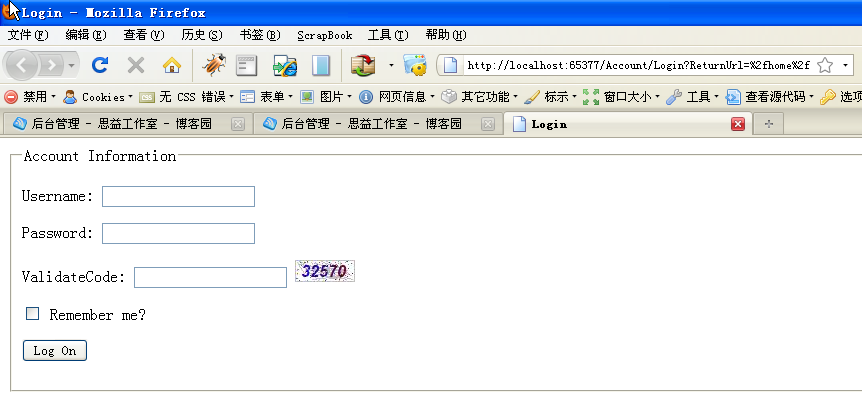
到于Account/Login这个Action中的处理,只需加入对Session中验证码的判断:
[AcceptVerbs(HttpVerbs.Post)]
public ActionResult Login(string userName, string password, bool rememberMe, string returnUrl,string code)
{
if (Session["ValidateCode"].ToString() != code)
{
ModelState.AddModelError("code", "validate code is error");
return View();
}
//此处验证用户名、密码
if (!ValidateLogOn(userName, password))
{
return View();
}
//验证成功
FormsAuthentication.SetAuthCookie(userName, rememberMe);
if (!String.IsNullOrEmpty(returnUrl))
{
return Redirect(returnUrl);
}
else
{
return RedirectToAction("Index", "Home");
}
}
为实现登录页中,点击图片切换验证码,可以登录页中加入此JS代码实现刷新验证码:
<script type="text/javascript" src="http://www.cnblogs.com/Scripts/jquery-1.3.2-vsdoc.js"></script>
<script type="text/javascript">
$(function() {
$("#valiCode").bind("click", function() {
this.src = "../Account/GetValidateCode?time=" + (new Date()).getTime();
});
//alert("good");
});
</script>
至此,ASP.NET MVC中已成功实现验证码功能。
ASP.net 验证码(C#) MVC的更多相关文章
- MVC的验证(模型注解和非侵入式脚本的结合使用) .Net中初探Redis .net通过代码发送邮件 Log4net (Log for .net) 使用GDI技术创建ASP.NET验证码 Razor模板引擎 (RazorEngine) .Net程序员应该掌握的正则表达式
MVC的验证(模型注解和非侵入式脚本的结合使用) @HtmlHrlper方式创建的标签,会自动生成一些属性,其中一些属性就是关于验证 如图示例: 模型注解 通过模型注解后,MVC的验证,包括前台客 ...
- [译]Introducing ASP.NET vNext and MVC 6
原文:http://www.infoq.com/news/2014/05/ASP.NET-vNext?utm_source=tuicool Part of the ASP.NET vNext init ...
- 003. Asp.Net Routing与MVC 之一: 请求如何到达MVC
基础知识 本文用到的基础知识:URL.HttpModule 与 HttpHandler.IIS 的请求处理过程. URL HttpModule与HttpHandler IIS7.0的请求处理过程 OK ...
- 解析ASP.NET WebForm和Mvc开发的区别
因为以前主要是做WebFrom开发,对MVC开发并没有太深入的了解.自从来到创新工场的新团队后,用的技术都是自己以前没有接触过的,比如:MVC 和EF还有就是WCF,压力一直很大.在很多问题都是不清楚 ...
- Introducing ASP.NET vNext and MVC 6
[译]Introducing ASP.NET vNext and MVC 6 原文:http://www.infoq.com/news/2014/05/ASP.NET-vNext?utm_source ...
- 005. Asp.Net Routing与MVC 之三: 路由在MVC的使用
上次讲到请求如何激活Controller和Action,这次讲下MVC中路由的使用.本次两个关注点: 遗留:ModelBinder.BindModel的过程 MVC中路由的使用 MVC 5中的Acti ...
- 解析ASP.NET WebForm和Mvc开发的区别 分类: ASP.NET 2013-12-29 01:59 11738人阅读 评论(5) 收藏
因为以前主要是做WebFrom开发,对MVC开发并没有太深入的了解.自从来到创新工场的新团队后,用的技术都是自己以前没有接触过的,比如:MVC 和EF还有就是WCF,压力一直很大.在很多问题都是不清楚 ...
- Log4Net 在ASP.NET WebForm 和 MVC的全局配置
使用log4net可以很方便地为应用添加日志功能.应用Log4net,开发者可以很精确地控制日志信息的输出,减少了多余信息,提高了日志记录性能.同时,通过外部配置文件,用户可以不用重新编译程序就能改变 ...
- ASP.NET Core 配置 MVC - ASP.NET Core 基础教程 - 简单教程,简单编程
原文:ASP.NET Core 配置 MVC - ASP.NET Core 基础教程 - 简单教程,简单编程 ASP.NET Core 配置 MVC 前面几章节中,我们都是基于 ASP.NET 空项目 ...
随机推荐
- 关于JAVA中URL传递中文参数,取值是乱码的解决办法
前几天看到有网友在问URLDecoder和URLEncoder方面的使用问题,突然想起,原来我刚遇到这两个类时,也觉得很神密,由此可以想想初学者的心情,于是便有了今天的这篇文章. 其实,这两个类的使用 ...
- mysql SQL_CALC_FOUND_ROWS
mysql> ,; +----+ | id | +----+ | | | | | | | | | | +----+ rows | +--------------+ ro ...
- 【转载】C++异常机制的学习
参考了这篇文章:http://blog.chinaunix.net/uid-24517549-id-4079174.html 关于线程 进程和线程的概念相信各位看官早已耳熟能详.在这里,我只想带大家回 ...
- TCP/IP,Http,Socket,XMPP的区别
大学学习网络基础的时候老师讲过,网络由下往上分为物理层.数据链路层.网络层.传输层.会话层.表示层和应用层.通过初步的了解,我知道IP协议对应于网络层,TCP协议对应于传输层,而HTTP协议对应于应用 ...
- word2010表格中的内容怎么设置行距
选中表格,然后根据箭头指示点击 弹出如下对话框,选择行距
- HBase集群搭建
HBase集群搭建 搭建环境:假设我们的linux环境已经准备好,包括网络.JDK.防火墙.主机名.免密登录等都没有问题,而且一定要有zookeeper.下面我们用3台linux虚拟机来搭建Hbase ...
- yum的使用及配置
yum的使用及配置 文章来源:http://www.ilanni.com/?p=9032 最近由于服务器需求,需要在公司内网搭建内网yum源. 搭建内网yum源需要分以下几个步骤,如下: 1. yum ...
- android 客户端 RSA加密 要注意的问题
针对java后端进行的RSA加密,android客户端进行解密,结果是部分乱码的问题:注意两点,编码问题和客户端使用的算法问题 即:都使用UTF-8编码,Base64使用一致,另外,使用下面的代码在后 ...
- dede标签调用
关键描述调用标签: <meta name="keywords" content="{dede:field name='keywords'/}">&l ...
- Ubuntu 修复windows启动项
打开终端输入命令sudo gedit /etc/default/grub修改GRUB_TIMEOUT="10"然后在终端中输入sudo update-grubupdate 命令会自 ...