
生成.m文件的python代码中出现的错误
错误代码
import tempfile

import subprocess

import shlex

import os

import numpy as np

import scipy.io

script_dirname = os.path.abspath(os.path.dirname(__file__))

def get_windows(image_fnames, cmd='selective_search_rcnn',image_tag):

    """

    Run MATLAB Selective Search code on the given image filenames to

    generate window proposals.

    Parameters

    ----------

    image_filenames: strings

        Paths to images to run on.

    cmd: string

        selective search function to call:

            - 'selective_search' for a few quick proposals

            - 'selective_seach_rcnn' for R-CNN configuration for more coverage.

    """

    # Form the MATLAB script command that processes images and write to

    # temporary results file.

    f, output_filename = tempfile.mkstemp(prefix = '{}'.format(image_tag),suffix='.mat',dir='/home/bnrc/formatm')

    os.close(f)

    fnames_cell = '{' + ','.join("'{}'".format(x) for x in image_fnames) + '}'

    command = "{}({}, '{}')".format(cmd, fnames_cell, output_filename)

    print(command)

    # Execute command in MATLAB.

    mc = "matlab -nojvm -r \"try; {}; catch; exit; end; exit\"".format(command)

    pid = subprocess.Popen(

        shlex.split(mc), stdout=open('/dev/null', 'w'), cwd=script_dirname)

    retcode = pid.wait()

    if retcode != 0:

        raise Exception("Matlab script did not exit successfully!")

    # Read the results and undo Matlab's 1-based indexing.

    all_boxes = list(scipy.io.loadmat(output_filename)['all_boxes'][0])

    subtractor = np.array((1, 1, 0, 0))[np.newaxis, :]

    all_boxes = [boxes - subtractor for boxes in all_boxes]

    # Remove temporary file, and return.

    #os.remove(output_filename)

    if len(all_boxes) != len(image_fnames):

        raise Exception("Something went wrong computing the windows!")

    return all_boxes

if __name__ == '__main__':

    """

    Run a demo.

    """

    import time

    image_tag = '/000015.jpg'

    image_filenames = [

        script_dirname + '/000015.jpg',

        script_dirname + '/cat.jpg'

    ]

    t = time.time()

    #boxes = get_windows(image_filenames)

    boxes = get_windows(image_filenames,cmd='selective_search_rcnn',image_tag)

    print(boxes[:2])

    print("Processed {} images in {:.3f} s".format(

        len(image_filenames), time.time() - t))
报的错误:

非默认的参数在默认参数之后。image_tag这个参数在cmd之后,但cmd是默认参数的,image_tag不是默认的。
修改代码
import tempfile

import subprocess

import shlex

import os

import numpy as np

import scipy.io

script_dirname = os.path.abspath(os.path.dirname(__file__))

def get_windows(image_fnames, image_tag,cmd='selective_search_rcnn'):

    """

    Run MATLAB Selective Search code on the given image filenames to

    generate window proposals.

    Parameters

    ----------

    image_filenames: strings

        Paths to images to run on.

    cmd: string

        selective search function to call:

            - 'selective_search' for a few quick proposals

            - 'selective_seach_rcnn' for R-CNN configuration for more coverage.

    """

    # Form the MATLAB script command that processes images and write to

    # temporary results file.

    f, output_filename = tempfile.mkstemp(prefix = '{}'.format(image_tag),suffix='.mat',dir='/home/bnrc/formatm')

    os.close(f)

    fnames_cell = '{' + ','.join("'{}'".format(x) for x in image_fnames) + '}'

    command = "{}({}, '{}')".format(cmd, fnames_cell, output_filename)

    print(command)

    # Execute command in MATLAB.

    mc = "matlab -nojvm -r \"try; {}; catch; exit; end; exit\"".format(command)

    pid = subprocess.Popen(

        shlex.split(mc), stdout=open('/dev/null', 'w'), cwd=script_dirname)

    retcode = pid.wait()

    if retcode != 0:

        raise Exception("Matlab script did not exit successfully!")

    # Read the results and undo Matlab's 1-based indexing.

    all_boxes = list(scipy.io.loadmat(output_filename)['all_boxes'][0])

    subtractor = np.array((1, 1, 0, 0))[np.newaxis, :]

    all_boxes = [boxes - subtractor for boxes in all_boxes]

    # Remove temporary file, and return.

    #os.remove(output_filename)

    if len(all_boxes) != len(image_fnames):

        raise Exception("Something went wrong computing the windows!")

    return all_boxes

if __name__ == '__main__':

    """

    Run a demo.

    """

    import time

    image_tag = '/000015.jpg'

    image_filenames = [

        script_dirname + '/000015.jpg',

        script_dirname + '/cat.jpg'

    ]

    t = time.time()

    #boxes = get_windows(image_filenames)

    boxes = get_windows(image_filenames,image_tag)

    print(boxes[:2])

    print("Processed {} images in {:.3f} s".format(

        len(image_filenames), time.time() - t))
之后又报错:
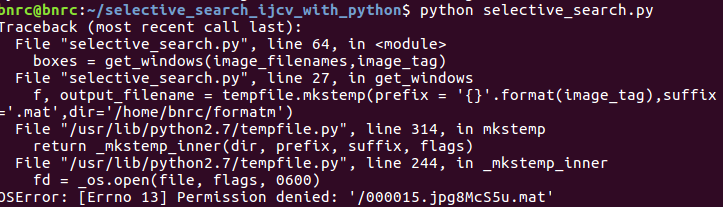
这个把image_tag里的/删除掉就好了
生成.m文件的python代码中出现的错误的更多相关文章
- webservice 服务端例子+客户端例子+CXF整合spring服务端测试+生成wsdl文件 +cxf客户端代码自动生成
首先到CXF官网及spring官网下载相关jar架包,这个不多说.webservice是干嘛用的也不多说. 入门例子 模拟新增一个用户,并返回新增结果,成功还是失败. 大概的目录如上,很简单. Res ...
- Kivy A to Z -- 怎样从python代码中直接訪问Android的Service
在Kivy中,通过pyjnius扩展能够间接调用Java代码,而pyjnius利用的是Java的反射机制.可是在Python对象和Java对象中转来转去总让人感觉到十分别扭.好在android提供了b ...
- Android color(颜色) 在XML文件和java代码中
Android color(颜色) 在XML文件和java代码中,有需要的朋友可以参考下. 1.使用Color类的常量,如: int color = Color.BLUE;//创建一个蓝色 是使用An ...
- pycharm运行Pytest,有没有将Pytest写入Python代码中的区别
初学pytest. 将pytest写进Python代码中 不同运行方式都可正常运行 =======================**********************========= ...
- python代码中判断版本
在python代码中判断python版本: if sys.version_info < (3, 0): lib.make_flows.argtypes = [c_char_p, c_char_p ...
- C语言初学者代码中的常见错误与瑕疵(23)
见:C语言初学者代码中的常见错误与瑕疵(23)
- 一个超复杂的间接递归——C语言初学者代码中的常见错误与瑕疵(6)
问题: 问题出处见 C语言初学者代码中的常见错误与瑕疵(5) . 在该文的最后,曾提到完成的代码还有进一步改进的余地.本文完成了这个改进.所以本文讨论的并不是初学者代码中的常见错误与瑕疵,而是对我自己 ...
- C语言初学者代码中的常见错误与瑕疵(5)
问题: 素数 在世博园某信息通信馆中,游客可利用手机等终端参与互动小游戏,与虚拟人物Kr. Kong 进行猜数比赛. 当屏幕出现一个整数X时,若你能比Kr. Kong更快的发出最接近它的素数答案,你将 ...
- C语言初学者代码中的常见错误与瑕疵(19)
见:C语言初学者代码中的常见错误与瑕疵(19)
随机推荐
- 强联通分量之kosaraju算法
首先定义:强联通分量是有向图G=(V, E)的最大结点集合,满足该集合中的任意一对结点v和u,路径vu和uv同时存在. kosaraju算法用来寻找强联通分量.对于图G,它首先随便找个结点dfs,求出 ...
- 2017-10-24 NOIP模拟赛
括号序列 (bracket) Time Limit:1000ms Memory Limit:128MB 题目描述 LYK有一个括号序列,但这个序列不一定合法. 一个合法的括号序列如下: ()是合法 ...
- code和pre竟然有区别!!!!
坑爹的,今天复习基础,本来写了个获取样式,为了显示出我的代码,才发现了 code和pre标签竟然是不同的. 1.用 JS 的代码注释风格来说 code 就是 // , <pre> 就是 / ...
- CF D. Recovering BST (区间DP)
题意:给你n个节点,每个节点有一个权值,两个点可以连边当且仅当这两个点的gcd>1,问你这n个点能否构成一个二叉搜索树(每个节点最多有两个儿子,且左儿子小于右儿子),输入为递增顺序. 分析: 若 ...
- matplotlib 知识点11:绘制饼图(pie 函数精讲)
饼图英文学名为Sector Graph,又名Pie Graph.常用于统计学模块. 画饼图用到的方法为:matplotlib.pyplot.pie( ) #!/usr/bin/env python # ...
- Gym 100886J Sockets 二分答案 + 贪心
Description standard input/outputStatements Valera has only one electrical socket in his flat. He al ...
- 了解【Docker】从这里开始
一.环境配置的难题 软件开发最大的难题之一就是环境配置的问题.现在用户环境纷乱复杂,并且由于开源社区的进一步推广和许多开源项目不停地迭代更新,项目可能会有越来越多的依赖以及越来越难管理的依赖版本,如何 ...
- 修改response,报错Cannot call getWriter(), getOutputStream() already called
往response里面改数据,然后系统报这个错 此时直接return null即可解决 但是,要想返回相应的页面呢? 可以直接在response里设置返回的页面
- 移植mavlink到stm32详细教程,后面附快速移植方法
一:准备材料: mavlink源码 stm32串口程序 1.mavlink源码: a.进入mavlink官网(http://qgroundcontrol.org/mavlink/s ...
- css清除浮动好方法
1.clear:both ==>IE6,7会有高度,所以去高度需要.clear{ clear:both; height:0px; margin:0; padding:0; width:0; bo ...