
springboot从入门到精通(三)
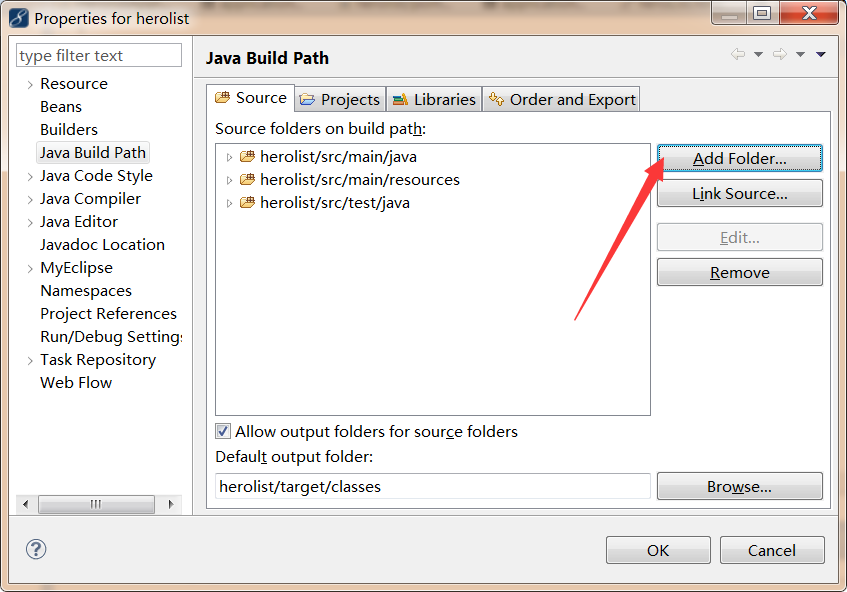
再开始第三节之前,先补充一下第二节里出现的小问题,就是springboot的application.properties,我在文件中添加了server.port=9090这个参数,但是启动项目后并未生效,检查了一下原因,是因为未读取到该文件,这里可以通过buildpath添加source文件夹解决,如下图:
好了,我们一起开始第三节:
这一节我们来扩展我们的应用程序,在pom文件中添加以下依赖:
<dependency>
<groupId>org.springframework.boot</groupId>
<artifactId>spring-boot-starter-security</artifactId>
</dependency>
运行项目,打开之前的页面地址,发现进入了一个登录页面,如下图:
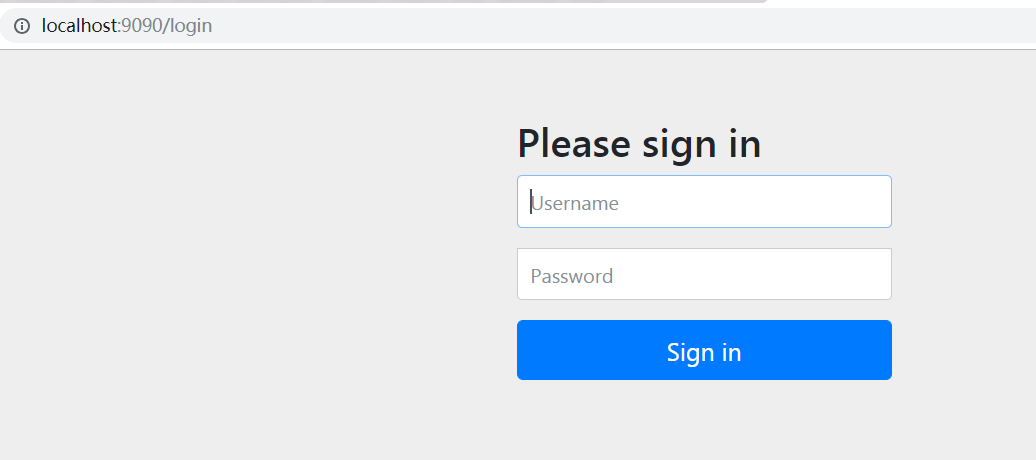
用户名为user,密码在eclipse的控制台可以看到,如下图:

输入之后登录成功,就可以正常访问页面了。
但这样肯定不能满足我们的需求,所以我们需要创建自定义的安全配置,
1、扩展WebSecurityConfigurerAdapter配置类:
package com.dota.herolist.security;
import org.springframework.beans.factory.annotation.Autowired;
import org.springframework.context.annotation.Bean;
import org.springframework.context.annotation.Configuration;
import org.springframework.security.config.annotation.web.builders.HttpSecurity;
import org.springframework.security.config.annotation.web.configuration.EnableWebSecurity;
import org.springframework.security.config.annotation.web.configuration.WebSecurityConfigurerAdapter;
import org.springframework.security.core.userdetails.User;
import org.springframework.security.core.userdetails.UserDetails;
import org.springframework.security.core.userdetails.UserDetailsService;
import org.springframework.security.core.userdetails.UsernameNotFoundException;
import org.springframework.security.crypto.bcrypt.BCryptPasswordEncoder;
import org.springframework.security.provisioning.InMemoryUserDetailsManager;
import com.dota.herolist.repository.UserRepository;
@Configuration
@EnableWebSecurity
public class SecurityConfig extends WebSecurityConfigurerAdapter{
@Autowired
private UserRepository userRepository;
@Override
protected void configure(HttpSecurity http) throws Exception{
http.authorizeRequests()
.antMatchers("/heroList/**").hasRole("player")//查看该路径必须拥有player角色
.and()
.formLogin().loginPage("/login").failureUrl("/login?error=true");
}
@Bean
@Override
public UserDetailsService userDetailsService() {
UserDetails user =
User.withDefaultPasswordEncoder()
.username("user")
.password("password")
.roles("player")
.build();
return new In MemoryUserDetailsManager(user);
}
}
2、定义User实体的JPA实体
package com.dota.herolist.entity;
import java.util.ArrayList;
import java.util.Collection;
import java.util.List;
import javax.persistence.Entity;
import javax.persistence.Id;
import org.springframework.security.core.GrantedAuthority;
import org.springframework.security.core.authority.SimpleGrantedAuthority;
import org.springframework.security.core.userdetails.UserDetails;
@Entity
public class User implements UserDetails{
private static final long serialVersionUID = 1L;
@Id
private String username;
private String password;
public User(String username,String password){
this.username = username;
this.password = password;
}
public User() {
// TODO Auto-generated constructor stub
}
public String getUsername() {
return username;
}
public void setUsername(String username) {
this.username = username;
}
public String getPassword() {
return password;
}
public void setPassword(String password) {
this.password = password;
}
@Override
public Collection<? extends GrantedAuthority> getAuthorities() {
List<SimpleGrantedAuthority> list=new ArrayList<SimpleGrantedAuthority>();
list.add(new SimpleGrantedAuthority("player"));
return list;
}
@Override
public boolean isAccountNonExpired() {
// TODO Auto-generated method stub
return true;
}
@Override
public boolean isAccountNonLocked() {
// TODO Auto-generated method stub
return true;
}
@Override
public boolean isCredentialsNonExpired() {
// TODO Auto-generated method stub
return true;
}
@Override
public boolean isEnabled() {
// TODO Auto-generated method stub
return true;
}
}
3、添加controller层:
package com.dota.herolist.controller;
import org.springframework.stereotype.Controller;
import org.springframework.ui.Model;
import org.springframework.web.bind.annotation.RequestMapping;
import org.springframework.web.bind.annotation.RequestMethod;
@Controller
@RequestMapping("/")
public class LoginController {
@RequestMapping(value="/login",method=RequestMethod.GET)
public String login(Model model){
return "login";
}
}
4、添加html页面:
<!DOCTYPE html>
<html xmlns="http://www.w3.org/1999/xhtml" xmlns:th="http://www.thymeleaf.org"
xmlns:sec="http://www.thymeleaf.org/thymeleaf-extras-springsecurity3">
<head>
<title>dota hero </title>
</head>
<body>
<div th:if="${param.error}">
Invalid username and password.
</div>
<div th:if="${param.logout}">
You have been logged out.
</div>
<form th:action="@{/login}" method="post">
<div><label> User Name : <input type="text" name="username"/> </label></div>
<div><label> Password: <input type="password" name="password"/> </label></div>
<div><input type="submit" value="Sign In"/></div>
</form>
</body>
</html>
启动项目,
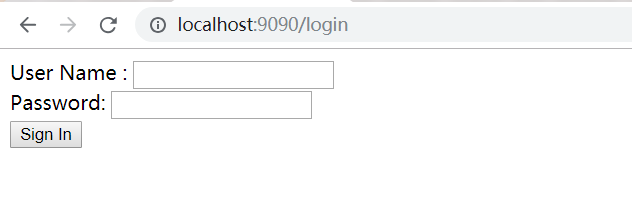
输入user,password登录成功。下一章我们将展示如何连接数据库进行安全认证。
springboot从入门到精通(三)的更多相关文章
- 深入浅出!springboot从入门到精通,实战开发全套教程!
前言 之前一直有粉丝想让我出一套springboot实战开发的教程,我这边总结了很久资料和经验,在最近总算把这套教程的大纲和内容初步总结完毕了,这份教程从springboot的入门到精通全部涵盖在内, ...
- iOS开发-UI 从入门到精通(三)
iOS开发-UI 从入门到精通(三)是对 iOS开发-UI 从入门到精通(一)知识点的综合练习,搭建一个简单地登陆界面,增强实战经验,为以后做开发打下坚实的基础! ※在这里我们还要强调一下,开发环境和 ...
- MyBatis从入门到精通(三):MyBatis XML方式的基本用法之多表查询
最近在读刘增辉老师所著的<MyBatis从入门到精通>一书,很有收获,于是将自己学习的过程以博客形式输出,如有错误,欢迎指正,如帮助到你,不胜荣幸! 1. 多表查询 上篇博客中,我们示例的 ...
- visual studio 2015 搭建python开发环境,python入门到精通[三]
在上一篇博客Windows搭建python开发环境,python入门到精通[一]很多园友提到希望使用visual studio 2013/visual studio 2015 python做demo, ...
- SpringBoot从入门到精通教程(三)
在上一篇中,我们已经讲了,SpringBoot 如何构建项目,和SpringBoot的HelloWorld, 那这一节我们继续讲 Thymeleaf Thymeleaf 官网: Thymeleaf T ...
- SpringBoot从入门到精通二(SpringBoot整合myBatis的两种方式)
前言 通过上一章的学习,我们已经对SpringBoot有简单的入门,接下来我们深入学习一下SpringBoot,我们知道任何一个网站的数据大多数都是动态的,也就是说数据是从数据库提取出来的,而非静态数 ...
- SpringBoot从入门到精通一(idea优雅搭建SpringBoot项目)
前言 在没有SpringBoot之前,我们搭建的是SSM(SpingMVC+Spring+Mybatis)项目,在搭建SSM项目的时候,我们要经过一系列的繁琐配置,例如:application,web ...
- SpringBoot从入门到精通教程(二)
SpringBoot 是为了简化 Spring 应用的创建.运行.调试.部署等一系列问题而诞生的产物,自动装配的特性让我们可以更好的关注业务本身而不是外部的XML配置,我们只需遵循规范,引入相关的依赖 ...
- SpringBoot从入门到精通教程(一)
写在前面的话: 在很早之前,记笔记时候,我就一直在思考一个问题,我记笔记是为了什么,我一直想不明白 ,后面发现技术跟新迭代的速度实在太快了,笔记刚纪完,技术又跟新了,于是我想了想干脆边写博客,边记笔记 ...
随机推荐
- jest+vue-test-utils初步实践
一.起步 1. jest Jest是 Facebook 的一套开源的 JavaScript 测试框架, 它自动集成了断言.JSDom.覆盖率报告等开发者所需要的所有测试工具,配置较少,对vue框架友好 ...
- MySQL Index Condition Pushdown 原理与解析
Index Condition Pushdown(ICP)是针对mysql使用索引从表中检索行数据时的一种优化方法. 原理: 在没有ICP特性之前,存储引擎根据索引去基表查找并将数据返回给mysq ...
- c++语言的学习笔记代码与笔记注释《面向对象部分》
#include <iostream> /*这是C++中关于面向对象部分的具体笔记和代码 */ //定义类的语法形式; //类中的成员项目之间相互引用,直接使用成员; //类外引用成员的时 ...
- 获取WPF窗体/控件的句柄/当前进程的句柄
1.在WPF中,获取当前窗体的句柄与WINFORM中不一样: WINFORM直接获取:this.Handle----------this是窗体的类名,handle就是句柄. 2.WPF中先引用命名空间 ...
- Warning: Static member accessed via instance reference
Warning: Static member accessed via instance reference Shows references to static methods and fields ...
- Lyft Level 5 Challenge 2018 - Final Round (Open Div. 2) B 1075B (思维)
B. Taxi drivers and Lyft time limit per test 1 second memory limit per test 256 megabytes input stan ...
- python依赖文件的生成requirement.txt
移到你的环境中 pip freeze > requirement.txt
- Java技术列表
完整的java技术列表,可以在oracle官网找到: https://www.oracle.com/technetwork/java/javaee/tech/index.html JSR: Java ...
- (转)Selenium-11: Execute JavaScript with JavascriptExecutor
Outline Sometimes we cannot handle some conditions or problems with Webdriver, web controls don’t re ...
- 说Gradle
说Gradle 刚开始认识Gradle这个名词是在蘑菇街的一场 交流会上,当时只是一个概念:第二面,是试图下载编译spring源码的时候:第三面,就是我司较真的安卓主程,有一天兴高彩烈的跟我说,我 ...