
Spring Cloud之Swagger集群搭建
在微服务中,Swagger是每个服务 比如会员服务,订单服务,支付服务 进行继承、
如何将整个微服务中的Swagger进行合成,同一台服务器上。
使用Zuul+Swagger实现管理整个微服务API文档
使用Nginx+Swagger以不同的项目区分跳转到不同的接口文档
Spring Boot支持对Swagger管理,只需要Zuul网关添加对应服务Swagger文档即可
服务配置
1、会员服务和订单服务都引入对swagger的maven支持
        <dependency>

            <groupId>io.springfox</groupId>

            <artifactId>springfox-swagger2</artifactId>

            <version>2.8.0</version>

        </dependency>

        <dependency>

            <groupId>io.springfox</groupId>

            <artifactId>springfox-swagger-ui</artifactId>

            <version>2.8.0</version>

        </dependency>
等于:(Spring Boot已经整合好了)
<dependency>
<groupId>com.spring4all</groupId>
<artifactId>swagger-spring-boot-starter</artifactId>
<version>1.7.0.RELEASE</version>
</dependency>
两者选择其一
然后启动类需要:
@EnableSwagger2Doc
接着,controller中需要:
类上注解
@Api("订单接口")
接口方法上
@ApiOperation("订单服务接口")
@PostMapping("/getOrder")
yml加入扫包范围:
swagger:
base-package: com.toov5.api
(每个服务都一样)
如Member:
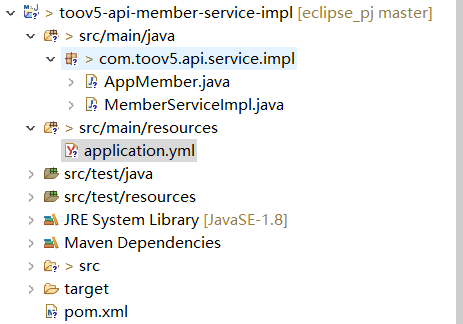
package com.toov5.api.service.impl;

import org.springframework.beans.factory.annotation.Value;

import org.springframework.web.bind.annotation.GetMapping;

import org.springframework.web.bind.annotation.RequestMapping;

import org.springframework.web.bind.annotation.RequestParam;

import org.springframework.web.bind.annotation.RestController;

import com.toov5.api.entity.UserEntity;

import com.toov5.api.service.IMemberService;

import com.toov5.base.BaseApiService;

import com.toov5.base.ResponseBase;

import io.swagger.annotations.Api;

import io.swagger.annotations.ApiImplicitParam;

import io.swagger.annotations.ApiOperation;

@RestController

@Api("会员服务接口")

public class MemberServiceImpl extends BaseApiService implements IMemberService {

    @Value("${server.port}")

    private String serverPort;

     @RequestMapping("/getMember")

    public UserEntity getMember(@RequestParam("name") String name) {

        UserEntity userEntity = new UserEntity();

        userEntity.setName(name);

        userEntity.setAge(10);

        return userEntity;

    }

     @RequestMapping("/getUserInfo")

     public ResponseBase getUserInfo() {

        try {

            Thread.sleep(1500);

        } catch (Exception e) {

        }

        return setResultSuccess("getUserInfo调用成功....");

    }

     @RequestMapping("/")

     public String Index() {

        return "我是member"+serverPort;

    }

        @ApiOperation(value = "获取会员信息接口") // 具体描述

        @ApiImplicitParam(name = "userName", value = "用户信息参数", required = true, dataType = "String") // 传入的参数 ,描述 , 必须传递true                                                                                                    // , 类型String

        @GetMapping("/getMemberInfo")

        public String getMemberInfo(String userName) {

            System.out.println(userName);

            return "userName" + userName;

        }

}
启动:
package com.toov5.api.service.impl;

import org.springframework.boot.SpringApplication;

import org.springframework.boot.autoconfigure.SpringBootApplication;

import org.springframework.cloud.netflix.eureka.EnableEurekaClient;

import org.springframework.cloud.openfeign.EnableFeignClients;

import com.spring4all.swagger.EnableSwagger2Doc;

@SpringBootApplication (scanBasePackages={"com.toov5.*"})

@EnableEurekaClient

@EnableFeignClients

@EnableSwagger2Doc //开启swagger文档)

public class AppMember {

  public static void main(String[] args) {

    SpringApplication.run(AppMember.class, args);

}

}
yml
server:

  port: 8005

spring:

    application:

        name: app-toov5-member

ַ

eureka:

  client:

    service-url:

           defaultZone: http://localhost:8100/eureka

    register-with-eureka: true

    fetch-registry: true

swagger:

  base-package:  com.toov5.api.service.impl
网关gateway配置:
也需要引入相同的pom
<dependency>
<groupId>com.spring4all</groupId>
<artifactId>swagger-spring-boot-starter</artifactId>
<version>1.7.0.RELEASE</version>
</dependency>
然后启动类:
package com.toov5;

import java.util.ArrayList;

import java.util.List;

import org.springframework.boot.SpringApplication;

import org.springframework.boot.autoconfigure.SpringBootApplication;

import org.springframework.cloud.netflix.eureka.EnableEurekaClient;

import org.springframework.cloud.netflix.zuul.EnableZuulProxy;

import org.springframework.context.annotation.Primary;

import org.springframework.stereotype.Component;

import com.spring4all.swagger.EnableSwagger2Doc;

import springfox.documentation.swagger.web.SwaggerResource;

import springfox.documentation.swagger.web.SwaggerResourcesProvider;

@SpringBootApplication

@EnableEurekaClient

@EnableZuulProxy  //开启网关代理

@EnableSwagger2Doc  //开启swagger

public class AppGateway {

   public static void main(String[] args) {

   SpringApplication.run(AppGateway.class, args);

}

       // 添加文档来源

       @Component

       @Primary

       class DocumentationConfig implements SwaggerResourcesProvider {

           public List<SwaggerResource> get() {

               List resources = new ArrayList<Object>();

                 //app-itmayiedu-order

               resources.add(swaggerResource("app-toov5-member", "/api-member/v2/api-docs", "2.0")); // 第一个参数可以随便写 第二个参考yml对应

               resources.add(swaggerResource("app-toov5-order", "/api-order/v2/api-docs", "2.0"));

               return resources;

           }

           private SwaggerResource swaggerResource(String name, String location, String version) {

               SwaggerResource swaggerResource = new SwaggerResource();

               swaggerResource.setName(name);

               swaggerResource.setLocation(location);

               swaggerResource.setSwaggerVersion(version);

               return swaggerResource;

           }

       }


   }
yml配置:
###注册 中心

eureka:

  client:

    serviceUrl:

      defaultZone: http://localhost:8100/eureka/

server:  ##api网关端口号

  port: 81

###网关名称

spring:   ##网关服务名称

  application:

    name: service-zuul

  ###网关名称

  cloud:

    config:

    ####读取后缀

      profile: dev

      ####读取config-server注册地址

      discovery:

        service-id: confi

### 配置网关反向代理

zuul:

  routes:

    api-member:  ##随便写的

     ### 以 /api-member/访问转发到会员服务   通过别名找

      path: /api-member/**

      serviceId: app-toov5-member  ##别名  如果集群的话  默认整合了ribbon 实现轮训 负载均衡

    api-order:   ##随便写的

        ### 以 /api-order/访问转发到订单服务

      path: /api-order/**

      serviceId: app-toov5-order   ##别名

与yml的对应!
启动 eureka zuul member 然后访问

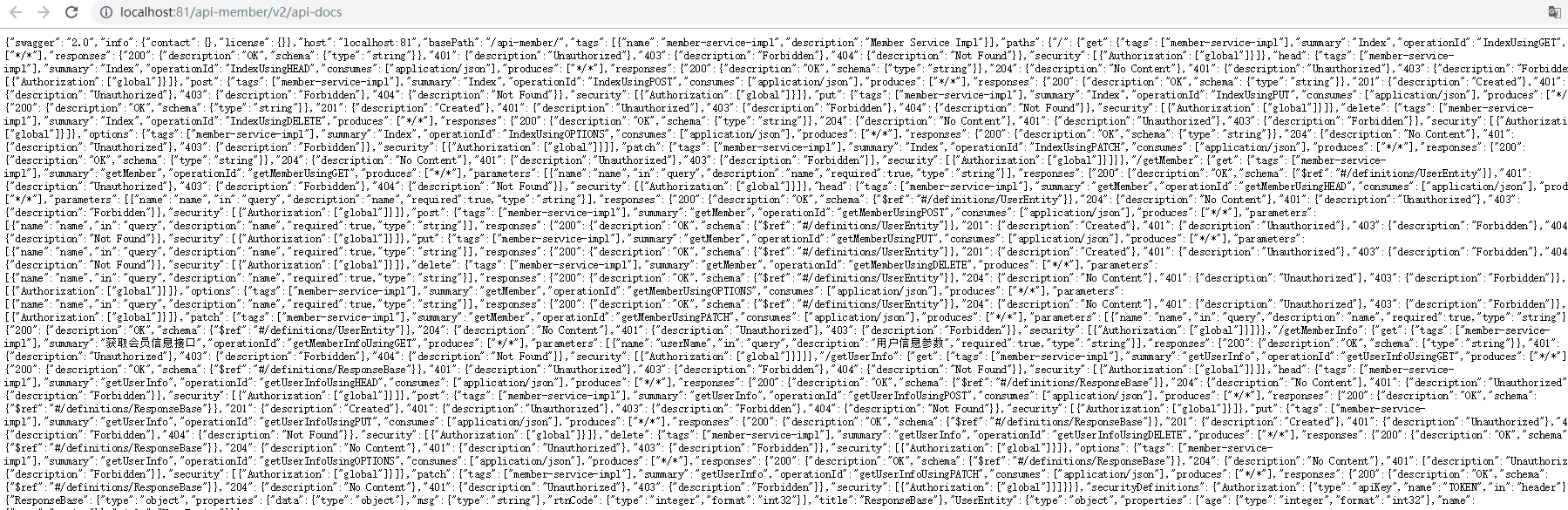
获取接口文档
Spring Cloud之Swagger集群搭建的更多相关文章
- Spring Cloud Alibaba | Nacos集群部署
目录 Spring Cloud Alibaba | Nacos集群部署 1. Nacos支持三种部署模式 2. 集群模式下部署Nacos 2.1 架构图 2.2 下载源码或者安装包 2.3 配置集群配 ...
- Spring Cloud Eureka Server集群Demo级搭建
将上篇随笔Spring Cloud Eureka服务Demo级搭建进行改造,改造成一个在本机的伪集群 1.修改hosts文件(windows10 hosts文件位置:C:\Windows\System ...
- Spring Cloud Eureka的集群配置(六)
1.再次创建2个Eureka工程 工程名:microservicecloud-eureka-7002 工程名:microservicecloud-eureka-7003 2.pom.xml文件 < ...
- Spring Cloud :断路器集群监控(Turbine)
一. 简介 上一篇文章我们已经实现了对单个服务实例的监控,当然在实际应用中,单个实例的监控数据没有多大的价值,我们更需要的是一个集群系统的监控信息,这时我们就需要引入Turbine.Turb ...
- Spring Cloud Config实现集群配置中心
Spring Cloud Config为分布式系统提供了配置服务器和配置客户端,可以管理集群中的配置文件.使用Git.SVN等版本管理系统存放配置文件,配置服务器会到版本管理系统获取配置,集群中的配置 ...
- Spring Cloud Eureka 注册中心集群搭建,Greenwich 最新版!
Spring Cloud 的注册中心可以由 Eureka.Consul.Zookeeper.ETCD 等来实现,这里推荐使用 Spring Cloud Eureka 来实现注册中心,它基于 Netfl ...
- spring cloud 服务注册中心eureka高可用集群搭建
spring cloud 服务注册中心eureka高可用集群搭建 一,准备工作 eureka可以类比zookeeper,本文用三台机器搭建集群,也就是说要启动三个eureka注册中心 1 本文三台eu ...
- 虚拟机下 solr7.1 cloud 集群搭建 (手动解压和官方脚本两种方式)
准备工作: vmware workstation 12,OS使用的是ubuntu16.04,三台虚拟机搭建一个solr集群,zookeeper共用这三台虚拟机组成zookeeper集群. zookee ...
- redis整合Spring集群搭建及业务中的使用
1.redis安装 Redis是c语言开发的. 安装redis需要c语言的编译环境.如果没有gcc需要在线安装.yum install gcc-c++ 安装步骤: 第一步:redis的源码包上传到li ...
随机推荐
- parcel 入门
https://www.gitbook.com/book/dragon8github/fuck-parcel/details
- laravel数据库——迁移
1.简介 迁移就像数据库的版本控制,允许团队简单轻松的编辑并共享应用的数据库表结构,迁移通常和Laravel的结构构建器结对从而可以很容易地构建应用的数据库表结构. Laravel的Schema门面提 ...
- Trie树学习
这几天在看Hadoop的排序,用到了有TotalSortPartition,其中用到了一种叫做trie树的数据结构,每次看到这种自己之前没有听过的数据结构就想去看一下原理,然后再网上看几篇博客,有时间 ...
- 第一篇: Ansible 介绍
应用场景: BOSS:运维帮忙把所有的服务器tomcat 重启一下,谢谢!(tomcat 服务有2K台) 运维:………… 运维: 啪啪啪啪啪啪啪啪..........(键盘的声音响彻办公室) B ...
- spring mvc数据验证
今天来说一下.前段验证,与后端数据验证.大家都知道.在我们.注册与登陆的时候,往往需要对数据进行效验.那么前段我们都知道,可以使用,js去做处理. 今天主要讲解.后端的数据效验.这里我们采用Hiber ...
- sql exist 优化查询时间
1.非exist,查询需要20多秒 2.使用exist后 3.表连接也能优化
- [ACM] POJ 3740 Easy Finding (DLX模板题)
Easy Finding Time Limit: 1000MS Memory Limit: 65536K Total Submissions: 16178 Accepted: 4343 Des ...
- junit spring 测试
http://my.oschina.net/dlpinghailinfeng/blog/336694 http://blog.csdn.net/zhangzikui/article/details/1 ...
- Python 自动化之验证码识别
之前公司的验证码比较简单,可以采取直接破解的方式进行登录 部分代码如下: # -*- coding: utf-8 -*- from selenium import webdriver from sel ...
- 【BZOJ4320】ShangHai2006 Homework 分段+并查集
[BZOJ4320]ShangHai2006 Homework Description 1:在人物集合 S 中加入一个新的程序员,其代号为 X,保证 X 在当前集合中不存在. 2:在当前的人 ...