
使用maven创建工程报错Could not resolve archetype org.apache.maven.archetype
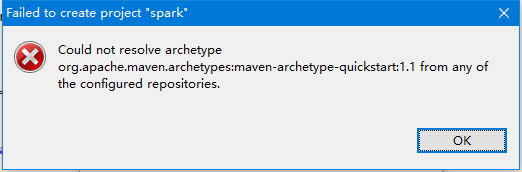
错误:
Could not resolve archetype org.apache.maven.archetypes:maven-archetype-quickstart:1.1 from any of the configured repositories.
Could not resolve artifact org.apache.maven.archetypes:maven-archetype-quickstart:pom:1.1
解决思路:在本地库中装载maven-archetype-quickstart-1.1.jar
第1步.从 http://maven.ibiblio.org/maven2/org/apache/maven/archetypes/maven-archetype-quickstart/maven-archetype-quickstart-1.1.jar
下载最新版maven-archetype-quickstart-1.1.jar

第2步.cmd窗口执行
mvn install:install-file -DgroupId=org.apache.maven.archetypes -DartifactId=maven-archetype-quickstart -Dversion=1.1 -Dpackaging=jar -Dfile=d:\maven-archetype-webapp-1.0.jar
红字是你jar包放在的位置
追加说明:
按照以上步骤仍然还不行,查明了原因。maven配置的镜像库是oschina的,貌似关闭了。后来改用阿里的就可以了。附上MAVEN依赖的比较全的镜像库地址:
     <!--指定阿里云仓库-->

    <mirror>

      <id>alimaven</id>

      <name>aliyun maven</name>

      <url>http://maven.aliyun.com/nexus/content/groups/public/</url>

      <mirrorOf>central</mirrorOf>

    </mirror>

    <mirror>

        <id>central</id>

        <name>Maven Repository Switchboard</name>

        <url>http://repo1.maven.org/maven2/</url>

        <mirrorOf>central</mirrorOf>

    </mirror>

    <mirror>

        <id>repo2</id>

        <mirrorOf>central</mirrorOf>

        <name>Human Readable Name for this Mirror.</name>

        <url>http://repo2.maven.org/maven2/</url>

    </mirror>

    <mirror>

        <id>ibiblio</id>

        <mirrorOf>central</mirrorOf>

        <name>Human Readable Name for this Mirror.</name>

        <url>http://mirrors.ibiblio.org/pub/mirrors/maven2/</url>

    </mirror>

    <mirror>

        <id>jboss-public-repository-group</id>

        <mirrorOf>central</mirrorOf>

        <name>JBoss Public Repository Group</name>

        <url>http://repository.jboss.org/nexus/content/groups/public</url>

    </mirror>

    <!-- 中央仓库在中国的镜像 -->

    <mirror>

        <id>maven.net.cn</id>

        <name>oneof the central mirrors in china</name>

        <url>http://maven.net.cn/content/groups/public/</url>

        <mirrorOf>central</mirrorOf>

    </mirror>
使用maven创建工程报错Could not resolve archetype org.apache.maven.archetype的更多相关文章
- eclipse新建maven项目报错Could not resolve arachetype org.apache.maven.archetypes:mmaven-archetype-quickstart:1.1 from any of the configured repositories
使用eclipse新建maven项目,按下图所示选择后,报错 报错截图 报错详细信息 Could not resolve archetype org.apache.maven.archetypes:m ...
- Maven新建webapp项目报错Could not resolve artifact org.apache.maven.archetypes:maven-archetype-webapp:pom:RELEASE
Windows-Preferences 在搜索框输入maven,点击下面的Archetypes--->Add Remote Catalog... 对应输入 http://repo1.maven. ...
- pom.xml报错:Failure to find org.apache.maven.doxia:doxia-logging-api:jar:1.1 in http://repo.
在maven本地库中找到对应的地址:org.apache.maven.doxia找到对应的文件:doxia-logging-api发现文件中包含有lastUpdated字样,表示该文件并未下载完成,然 ...
- Maven install 报错: Failed to execute goalorg.apache.maven.plugins:maven-gpg-plugin:1.4:sign (sign-art
执行 Maven install 时报错: Failed to execute goalorg.apache.maven.plugins:maven-gpg-plugin:1.4:sign (sign ...
- 【待解决】创建maven web工程报错
报错信息如下: Could not calculate build plan: Plugin org.apache.maven.plugins:maven-resources-plugin:2.6 o ...
- maven创建web报错Cannot read lifecycle mapping metadata for artifact org.apache.maven.plugins:maven-compiler-plugin:maven-compiler-plugin:3.5.1:runtime Cause: error in opening zip file
Cannot read lifecycle mapping metadata for artifact org.apache.maven.plugins:maven-compiler-plugin:m ...
- eclipse导入maven时,pom文件的project一直报错(Failure to transfer org.apache.maven.plugins:maven-surefire-plugin:pom:2.12.)
这里有两种解决办法. 一:右键项目->maven->update project勾选上Force Update of Snapshots/Releases然后ok就可以了. 二:如果第一种 ...
- mvn install 报错Failed to execute goal org.apache.maven.plugins:maven-compiler-plugin:2.3.2 错误: 找不到符号
报错信息 在Eclipse中执行mvn install时,console端显示如下报错信息: [ERROR] Failed to execute goal org.apache.maven.plugi ...
- SpringBoot MAVEN编译报错Failed to execute goal org.apache.maven.plugins:maven-compiler-plugin:3.8.0:
参考了好几篇文章没搞定,直到查询错误关键字 An unknown compilation problem occurred 分别参考了以下博客: https://blog.csdn.net/fanre ...
随机推荐
- HDUOJ------Lovekey
Lovekey Time Limit: 3000/1000 MS (Java/Others) Memory Limit: 65536/32768 K (Java/Others)Total Sub ...
- capacity <<= 1
import java.io.File; import java.io.FileWriter; import java.io.IOException; import java.util.prefs.B ...
- 基于node.js的web框架express
1.安装node.js方法: window :https://nodejs.org/en/ linux:http://www.runoob.com/nodejs/nodejs-install-setu ...
- Windows命令-route
Windows route命令 添加一条永久网关:route add 0.0.0.0 mask 0.0.0.0 192.168.2.1 -p例如: route -p add 192.168.0.0 m ...
- iOS - CodeReview 代码评审
1.CodeReview Code Review 中文应该译作 "代码审查" 或是 "代码评审",这是一个流程,当开发人员写好代码后,需要让别人来 review ...
- DBA_实践指南系列6_Oracle Erp R12工作流通知邮件配置Email(案例)
2013-12-06 Created By BaoXinjian
- mysql 查看是否被锁
SHOW OPEN TABLES FROM huahua
- 将mysql非分区表转换为分区表(转)
查看表的分布状况mysql> select count(*) from justin;+----------+| count(*) |+----------+| 5845246 |+---- ...
- 创建Hive/hbase相关联的表异常
hive> CREATE TABLE hperson(id string, name string,email string) STORED BY 'org.apache.hadoop.hive ...
- Perl的新特性开启
1.perl自从5.8开始,新特性需要开启才可以使用,默认只是5.8版本,而不管当前你使用的是那个版本. 2.开启新特性,当然最高可用版本是你实际安装的版本,假设你安装的是v5.26版 ; #或者这样 ...