
JSP_01
1.定义局部变量、输出语句
 <!doctype html>

 <html>

     <head>

         <title>定义局部变量、输出语句</title>

     </head>

     <body>

         <%

             int i = 1;//定义局部变量

             String info = "www.baidu.com";

             out.println("<h1>"+i+"</h1>");  //编写语句

             out.println("<h1>"+info+"</h1>");

         %>

     </body>

 </html>
2.定义全局变量、方法、类
 <!doctype html>

 <html>

     <head>

         <title>定义全局变量、方法、类</title>

     </head>

     <body>

         <%!

             public static final String info="www.baidu.com";

         %>

         <%!

             public int add(int i,int j){

                 return i+j;

             }

         %>

         <%!

             class User{

                 private String name;

                 private int age;

                 public User(String name,int age){

                     this.name=name;

                     this.age=age;

                 }

                 public String toString(){

                         return "name="+name+",aga="+age;

                 }

             }

         %>

         <%

             out.println("<h1>"+info+"</h1>");

             out.println("<h1>1+3="+add(1,3)+"</h1>");

             out.println("<h1>"+new User("liuyang",23)+"</h1>");

         %>

     </body>

 </html>
3.输出语句
 <!doctype html>

 <html>

     <head>

         <title>定义全局变量、方法、类</title>

     </head>

     <body>

         <%

             String info = "www.baidu.com";

             int i = 1;

         %>

         <h1> i = <%=i%> </h1>

         <h1>info =<%=info%></h1>

         <h1>name=<%="liuyang"%></h1>

     </body>

 </html>
4.注释方法:
<!-- 显示注释 -->
<%-- 隐式注释:JSP 注释 --%>
// 隐式注释:单行注释
/* 隐式注释:多行注释 */
5.JSP 创建表格1 out.println输出
 <!doctype html>

 <html>

     <head>

         <title>Table_out_print</title>

     </head>

     <body>

         <%

             int rows = 10;

             int cols = 10;

             int count = 1;

             out.println("<table border='1' width='70%'>");

                 for(int i=1;i<=rows;i++){

                     out.println("<tr>");

                     for(int j=1;j<=cols;j++){

                         out.println("<td>"+(count));

                         count++;

                     }

                     out.println("</tr>");

                 }

             out.println("</table>");

         %>

     </body>

 </html>
6.JSP 创建表格2 <%= %>输出
 <!doctype html>

 <html>

     <head>

         <title>Table_out_jsp</title>

     </head>

     <body>

             <table border='1' width='70%'>;

                 <%

                 int rows = 10;

                 int cols = 10;

                 int count = 1;

                 for(int i=1;i<=rows;i++){

                 %>

                     <tr>

                         <%

                         for(int j=1;j<=cols;j++){

                         %>

                         <td>

                             <%=(count)%>

                         </td>

                         <%

                             count++;

                         }

                         %>

                     </tr>

                 <%

                 }

                 %>

             </table>

     </body>

 </html>
JSP的指令元素
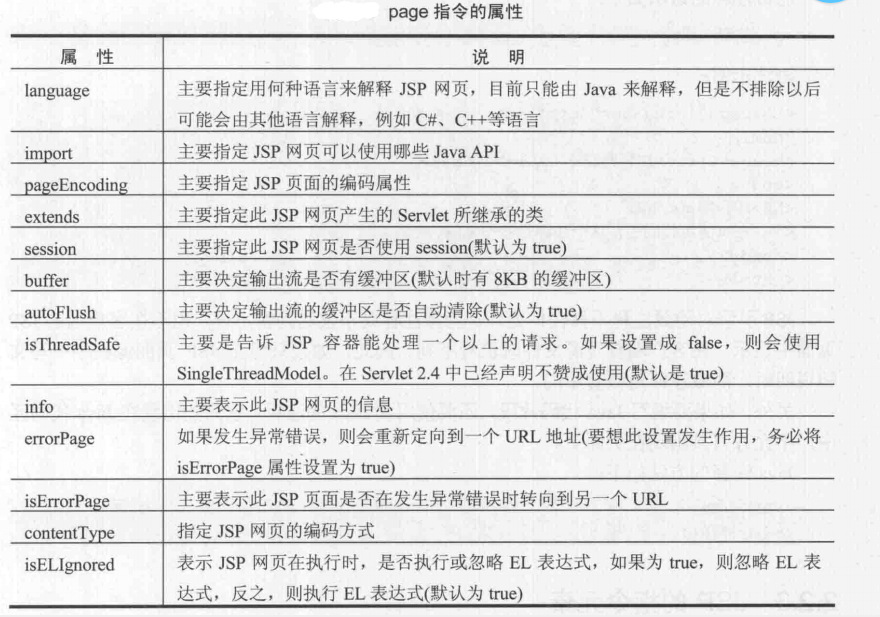
1、page指令:配置整个页面属性,一共13个属性
JSP_01的更多相关文章
- JSP页面中<%! %>和<% %>的区别
JSP声明语句:<%!声明语句%>,通常声明全局变量.常量.方法.类JSP Scriptlet:<%java代码%>,其中可包含局部变量.java语句JSP表达式:<%= ...
- JSP页面的基本结构
一:一个JSP页面由以下基本元素组成. (1)HTML标签 (2)CSS (3)变量和方法 (4)Java代码段 (5)JSP动作和指令 (6)其他脚本元素(如Javascript) 二:JSP的基本 ...
随机推荐
- SpringBoot官方文档学习(二)使用Spring Boot构建系统
强烈建议您选择一个支持依赖关系管理并且可以使用发布到“ Maven Central”仓库的构建系统.我们建议您选择Maven或Gradle.其他构建系统(例如,Ant)也可以和Spring Boot一 ...
- python爬虫相关安装与应用
1.mysql数据库用于存储大量数据. 2.Navicat for MySQL以图形和表格等形式管理数据库工具. 3.编程语言python3与环境配置 4.pythcharm集成开发环境(社区版)不需 ...
- #10017 传送带(SCOI 2010)(三分套三分)
[题目描述] 在一个 2 维平面上有两条传送带,每一条传送带可以看成是一条线段.两条传送带分别为线段 AB 和线段 CD.lxhgww 在 AB上的移动速度为 P ,在 CD 上的移动速度为 Q,在平 ...
- [51Nod2558] 选址
link 考虑二分答案 $F$ ,那么现在的问题变成是否对于覆盖并有交集. 考虑边 $(u,v)$ ,若覆盖并在 $(u,v,w)$ 线段中,设点 $i$ 走到 $u$ 号后还能走 $F1$ , 走到 ...
- 《Cascaded Pyramid Network for Multi-Person Pose Estimation》论文阅读及复现笔记
一.PipeLine 要点 TopDown + GlobalNet + RefineNet 二.Motivation 通过提高对难以识别的关键点的识别准确率,来提升总体识别准确率. 方法:1.refi ...
- 基于 VirtualApp 结合 whale hook框架实现hook第三方应用
要点 1. whale hook framework 使用示例: 2. 参考项目:VirtualHook: 3. 按照 VirtualHook 修改 VirtualApp: 4. 编写 hook pl ...
- spring+mybatis+log4j 输出SQL
1.在mybatis-config.xml配置中添加setting配置参数,会打印SQL执行结果 <?xml version="1.0" encoding="UTF ...
- 线程工具类 - Semaphore(信号量)
Semaphore官方文档 一.使用信号量实现线程间的通信 /** * Demo:使用信号量实现线程间通信*/ public class SemaphoreDemo { public static v ...
- pycharm中能运行,但是往往py都要放到服务器上去跑,问题来了
py文件在linux上运行,导包错误: 在py文件中添加项目的根目录: import sys sys.path.append('项目路径') sys.path.append(os.path.dirna ...
- Vue的自定义滚动,我用el-scrollbar
弄了一个持续更新的github笔记,可以去看看,诚意之作(本来就是写给自己看的--)链接地址:Front-End-Basics 此篇文章的地址:Vue的自定义滚动,我用el-scrollbar 基础笔 ...