
mysql中explain输出列之id的用法详解
参考mysql5.7 en manual,对列id的解释:
The SELECT identifier. This is the sequential number of the SELECT within the query. The value can be NULL if the row refers to the union result of other rows. In this case, the table column shows a value like <unionM,N> to indicate that the row refers to the union of the rows with id values of M and N.
翻译:SELECT标识符,它是查询里的SELECT的顺序编号,如果这行涉及其他行联合的结果,这个值可能是NULL。在这种情况下,explain输出列中的table列会展示一个像<unionM,N>的值来指出该行涉及带id值为M和N的行的联合。
示例
# 快速创建三个表tb1, tb2, tb3

# 创建tb1

mysql> create table tb1(

    -> id int unsigned not null primary key auto_increment comment '主键,自增',

    -> name varchar(30) not null default '' comment '姓名'

    -> ) engine=innodb auto_increment=1 default charset=utf8 collate=utf8_general_ci;

Query OK, 0 rows affected (0.01 sec)

# 创建tb2

mysql> create table tb2 like tb1;

Query OK, 0 rows affected (0.02 sec)

# 创建tb3

mysql> create table tb3 like tb1;

Query OK, 0 rows affected (0.02 sec)
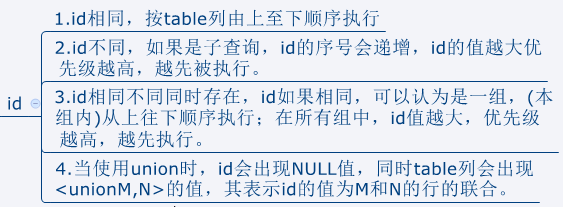
一,id相同,按table列由上至下顺序执行
# id都是1,值相同,执行顺序是从上至下依次是tb1, tb2, tb3

mysql> explain select tb2.* from tb1, tb2, tb3 where tb1.id=tb2.id and tb1.id=tb3.id and tb1.name='jerry';

二,id不同,如果是子查询,id的序号会递增,id的值越大优先级越高,越先被执行
# 分别向三个表中插入记录

mysql> insert into tb1 values(null, 'tom');

Query OK, 1 row affected (0.00 sec)

mysql> insert into tb2 select * from tb1;

Query OK, 1 row affected (0.01 sec)

Records: 1  Duplicates: 0  Warnings: 0

mysql> insert into tb3 select * from tb1;

Query OK, 1 row affected (0.01 sec)

Records: 1  Duplicates: 0  Warnings: 0

mysql> select * from tb1, tb2, tb3;

+----+------+----+------+----+------+

| id | name | id | name | id | name |

+----+------+----+------+----+------+

|  1 | tom  |  1 | tom  |  1 | tom  |

+----+------+----+------+----+------+

1 row in set (0.00 sec)

# id不相同并且子查询的id是递增的,此时table列的执行顺序是tb3, tb1, tb2

# tb3的id是3优先被执行,其次是tb1, tb2

mysql> explain select tb2.* from tb2 where id=(select id from tb1 where id=(select tb3.id from tb3 where tb3.name='tom'));

三,id相同不同,同时存在
# id相同都是1,顺序执行依次是tb3, tb2

mysql> explain select tb2.* from (select tb3.id from tb3 where tb3.name='') as n1, tb2 where n1.id=tb2.id;

在上面的例子中没有模拟出id相同不同混合的情况,可以看下下面的截图

如上图所示,id如果相同,可以认为是一组,(本组内)从上往下顺序执行;在所有组中,id值越大,优先级越高,越先执行。
四,对于使用union的情况
# id有相同也有不同,相同id为一组,所以执行顺序为tb1, tb2, tb3

mysql> explain select tb3.* from tb3 union select tb2.* from (select tb1.* from tb1) as n1, tb2;

总结
注意:以上示例显示的结果是在centos7和mysql5.7.26上测试所得,其他mysql版本或环境结果可能会有所不同。
欢迎访问我的个人站点:瑾年笔记
mysql中explain输出列之id的用法详解的更多相关文章
- Python中第三方库Requests库的高级用法详解
Python中第三方库Requests库的高级用法详解 虽然Python的标准库中urllib2模块已经包含了平常我们使用的大多数功能,但是它的API使用起来让人实在感觉不好.它已经不适合现在的时代, ...
- Mysql导入导出工具Mysqldump和Source命令用法详解
Mysql本身提供了命令行导出工具Mysqldump和Mysql Source导入命令进行SQL数据导入导出工作,通过Mysql命令行导出工具Mysqldump命令能够将Mysql数据导出为文本格式( ...
- [转]Mysql导入导出工具Mysqldump和Source命令用法详解
Mysql本身提供了命令行导出工具Mysqldump和Mysql Source导入命令进行SQL数据导入导出工作,通过Mysql命令行导出工具Mysqldump命令能够将Mysql数据导出为文本格式( ...
- JavaScript中return的用法和this的用法详解
JavaScript中return的用法详解 最近,跟身边学前端的朋友了解,有很多人对this和函数中的return的用法和意思理解的比较模糊,这里写一篇博客跟大家一起探讨一下return和this的 ...
- MySQL中tinytext、text、mediumtext和longtext详解
一.数字类型 类型 范围 说明 Char(N) [binary] N=1~255 个字元binary :分辨大小写 固定长度 std_name cahr(32) not null VarChar( ...
- mysql 中tinytext、text、mediumtext和longtext详解
一.数字类型 类型 范围 说明 Char(N) [ binary] N=1~255 个字元binary :分辨大小写 固定长度 std_name cahr(32) not null VarChar ...
- 【blog】MySQL中tinytext、text、mediumtext和longtext详解
参考链接 http://www.cnblogs.com/pureEve/p/6015000.html
- MySQL中tinytext、text、mediumtext和longtext详解【转】
一.数字类型 类型 范围 说明 Char(N) [binary] N=1~255 个字元binary :分辨大小写 固定长度 std_name cahr(32) not null VarChar( ...
- Python中内置的日志模块logging用法详解
logging模块简介 Python的logging模块提供了通用的日志系统,可以方便第三方模块或者是应用使用.这个模块提供不同的日志级别,并可以采用不同的方式记录日志,比如文件,HTTP GET/P ...
随机推荐
- compile and link C/CPP programs on Mac
ref: https://stackoverflow.com/questions/29987716/cannot-use-gsl-library-on-macos-ld-symbols-not-fou ...
- HTML5基础知识汇总(一)
一.HTML的开发工具和使用的浏览器 开发工具:记事本等文本编辑器,Atom.VisualStudioCode( VSCode).Brackets.Sublime text和Hbuider. 浏览器: ...
- React Native 之ScrollView
import React, { Component } from 'react' import { Text, StyleSheet, View, Button ,TouchableOpacity,A ...
- 开发工具Intellij IDEA:面板介绍
一.面板说明 IDEA面板的全貌如下图 2|0 二.菜单栏 下面会简单介绍下一些常用的部分菜单使用,如有疑问或补充欢迎留言. (1).File文件 1. New:新建一个工程 可以新建project, ...
- Comet OJ - Contest #7 D 机器学习题 斜率优化 + 未调完
Code: #include <cstdio> #include <algorithm> #include <cstring> #define setIO(s) f ...
- 【WINDOWS】设置路由表实现有线内网,无线外网
前提!!! 需要有线无线双网卡
- Linux下JDK1.7升级1.8版本
先下载 jdk-8u45-linux-x64.rpm 然后上传到 /usr/local/src 去.当然其他目录也可以.这里是默认位置 给所有用户添加可执行权限 #chmod +x jdk-8u4 ...
- C/C++判断字符串是否包含某个子字符串
C风格 #include <iostream> #include <string> #include <cstring> using namespace std; ...
- WinForm实现最小化右下角
首先,要在窗体里面加入这么两个控件,左边的是托盘控件,右边的是菜单控件. 然后设置窗体的FormClosing事件: if (e.CloseReason == CloseReason.UserClos ...
- (转)VS2010结合水晶报表做条码标签打印功能
本文转载自:http://blog.sina.com.cn/s/blog_552ca1400100y6dd.html 先来个功能效果图: 大家都知道VS2005和VS2008软件本身是包含水晶报表插件 ...