
(2-2)SpringCloud-服务注册到Eureka Server集群并消费
服务注册到Eureka Server集群
在(2-1)SpringCloue-Eureka实现高可用注册中心中我们搭建好了高可用的Eureka注册中心,下面我们要把服务注册到Eureka Server 的集群中。
步骤一、修改(1-1)SpringCloud-Eureka:服务的注册与发现中 “服务注册与服务发现---注册服务提供者” 中的配置文件
eureka.client.serviceUrl.defaultZone=http://peer2:8752/eureka,http://peer2:8751/eureka

server.port=8877

spring.application.name=service-ha-hello
步骤二、启动集群注册中心
java -jar eureka-server-1.0.0.jar --spring.profiles.active=peer1

java -jar eureka-server-1.0.0.jar --spring.profiles.active=peer2
步骤三、启动服务提供者
java -jar eureka-server-ha-service-1.0.0.jar --server.port=8877

java -jar eureka-server-ha-service-1.0.0.jar --server.port=8878
然后我们看到注册中心控制台已经有两个服务提供者了。说明注册成功了

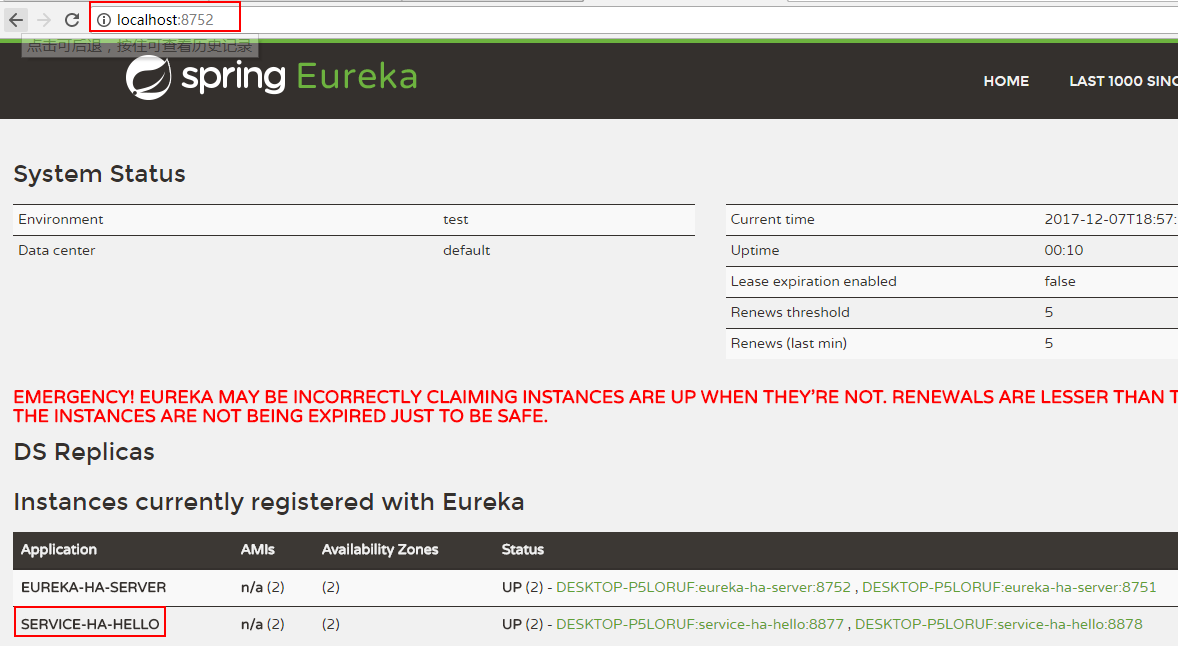
https://gitee.com/huayicompany/springcloud-learn/tree/master/lesson2/eureka-server-ha-service
Ribbon负载均衡服务消费者实现:
根据 (1-2)SpringCloud:服务的消费者rest+ribbon 中的例子修改。
步骤一、修改ServiceRibbonApplication中的restTemplate()
package org.hope;

import org.springframework.boot.SpringApplication;

import org.springframework.boot.autoconfigure.SpringBootApplication;

import org.springframework.cloud.client.discovery.EnableDiscoveryClient;

import org.springframework.cloud.client.loadbalancer.LoadBalanced;

import org.springframework.context.annotation.Bean;

import org.springframework.web.client.RestTemplate;

@SpringBootApplication

@EnableDiscoveryClient

public class ServiceRibbonApplication {

    public static void main(String[] args) {

        SpringApplication.run(ServiceRibbonApplication.class, args);

    }

    @Bean

    @LoadBalanced//添加了这个注解

    RestTemplate restTemplate() {

        return new RestTemplate();

    }

}
步骤二、修改HelloService中的restTemplate
package org.hope.service;

import org.springframework.beans.factory.annotation.Autowired;

import org.springframework.stereotype.Service;

import org.springframework.web.client.RestTemplate;

@Service

public class HelloService {

    @Autowired

    RestTemplate restTemplate;

    public String hiService(String name) {

        //这里不能用这个localhost,否则调用不成功

//        return restTemplate.getForEntity("http://localhost:8877/hello?name=" + name, String.class).getBody();

        return restTemplate.getForEntity("http://service-ha-hello/hello?name=" + name, String.class).getBody();

    }

}
步骤三、浏览器中输入http://localhost:8764/hello?name=zhangsan
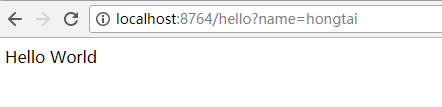
尝试多请求几次,看两个eureka-server-ha-service的控制台,可以看到两个控制台交替的打印日志。
https://gitee.com/huayicompany/springcloud-learn/tree/master/lesson2/service-ha-ribbon
参考:
[1] 《SpringCloud微服务实战》,电子工业出版社,翟永超
(2-2)SpringCloud-服务注册到Eureka Server集群并消费的更多相关文章
- Spring Cloud之微服务注册到Eureka Server集群
在Spring Cloud之服务注册中心搭建Eureka Server服务注册中⼼ - 池塘里洗澡的鸭子 - 博客园 (cnblogs.com)中已经搭建好了Eureka Server集群,本文就利用 ...
- Spring Cloud之微服务注册到Eureka Server集群后访问改造
上篇Spring Cloud之服务注册中心搭建Eureka Server服务注册中⼼ - 池塘里洗澡的鸭子 - 博客园 (cnblogs.com)已经已经成功将两个微服务注册到集群中,那么能正常能与注 ...
- SpringCloud系列四:实现Eureka Server的高可用并将应用注册到Eureka Sever集群上
1. 回顾 上一篇博客中,实现了单节点的Eureka Server.Eureka Client会定时连接Eureka Server,获取注册表中的信息并缓存到本地.微服务在消费远程API时总是使用本地 ...
- springcloud(四)-Eureka Server集群
Eureka Server的高可用 这一节我们接着上一节说. 有分布式应用开发经验的朋友应该发现,前文编写的单节点Eureka Server并不适合线上生产环境.Eureka Client会定时连接E ...
- SpringCloud 将服务注册到Eureka Server上
提供好服务生产者: 1.添加spring-cloud-starter-eureka依赖 <dependencyManagement> <dependencies> <de ...
- SpringCloud系列三:将微服务注册到Eureka Server上
1. 回顾 通过上篇博客的讲解,我们知道硬编码提供者地址的方式有不少问题.要想解决这些问题,服务消费者需要一个强大的服务发现机制,服务消费者使用这种机制获取服务提供者的网络信息.不仅如此,即使服务提供 ...
- spring boot 2.0.3+spring cloud (Finchley)1、搭建服务注册和发现组件Eureka 以及构建高可用Eureka Server集群
一 .搭建Eureka 编写Eureka Server 由于有多个spring boot项目,采用maven多module的结构,项目结构如下: 新建一个maven主工程,在主maven的pom文件中 ...
- 0402-服务注册与发现-Eureka Server使用、将服务注册到Eureka server上
一.Eureka Server使用 官方文档地址:http://cloud.spring.io/spring-cloud-static/Edgware.SR3/single/spring-cloud. ...
- 将微服务注册到Eureka Server
一.微服务程序编写 1.在已写好的微服务程序中添加pom依赖: <dependency> <groupId>org.springframework.cloud</grou ...
随机推荐
- vue2.0 项目build后资源文件报错404的解决方案
当vue项目build后,我们会看到css.js报错404的问题: 那我们就去找错误原因吧. 首先,查看build后的dist文件目录 可以看出,js.css在index.html的同级目录下: 然后 ...
- HTML5 Audio/Video 标签,属性,方法,事件汇总 (转)
HTML5 Audio/Video 标签,属性,方法,事件 <audio> 标签属性:src:音乐的URLpreload:预加载autoplay:自动播放loop:循环播放contro ...
- Linux上leveldb的安装和使用
1.首先从官网上下载leveldb进行编译 git clone https://github.com/google/leveldb.git cd leveldb make 2.将头文件和动态链接库拷到 ...
- Redis in Docker on Linux Container
记录:在Docker中运行一个Redis实例当我们在Windows系统中安装好Docker以后,在Hyper-V中会自动创建一个Linux虚拟机,如果这个虚拟机没有运行,说明当前运行的是Windows ...
- ECharts模拟迁徙案例
ECharts模拟迁徙案例 独立页面:http://211.140.7.173:8081/t/wuhairui/ditu/a.html
- spring 实现邮箱发送
使用spring mail 实现的邮箱发送功能,包括附件的发送(附件发送要保证附件存在的路径是真实),使用maven集成jar包,通过spring mvc 实现前后台的调用,发送方使用的是163邮箱, ...
- viewport预备知识
dpr === dppx dpr:device pixel ratio 设备像素比 dppx:Number of dots per px unit 每像素有多少点 . 1dppx = 96dpi dp ...
- React Native学习(三)—— 使用导航器Navigation跳转页面
本文基于React Native 0.52 参考文档https://reactnavigation.org/docs/navigators/navigation-prop 一.基础 1.三种类型 Ta ...
- centos6.x升级protobuf操作流程.
1.首先卸载protobuf,使用命令如下: sudo yum remove protobuf 2.下载protobuf源,依据自己的需要下载: 2.1下载地址:https://github.com/ ...
- 【JavaScript随机生成验证码及其颜色】
css样式: <style type="text/css"> /*给验证码设一个盒子*/ #yzm{ width: 120px; height: 50px; text- ...