
Qt Creator打造VScode one dark pro主题配色
1.缘由
我之前习惯使用 vscode 进行开发,对 vscode 的 one dark pro 主题情有独钟。无奈公司需要使用 Qt Creator 进行日常开发,只能暂时舍弃 vscode,采用曲线救国的方式,把 Qt Creator 打造为 vscode one dark pro 主题配色。写这篇博文一来方便后期查阅,二来也希望能帮助到有相同困扰的同仁。
2.效果对比
在网络上搜索了一番,发现很多 one dark pro 配色都不是很全,看起来挺别扭的。无意中发现一个 Qt Creator 的 one dark pro 主题配色方案,基本上复刻了 vscode 的 one dark pro 主题配色(文末会放配色文件来源)。最令人欣喜的是把代码区以外的边框也复刻了,我要找的就是这种!!!
下面是放一下对比图:
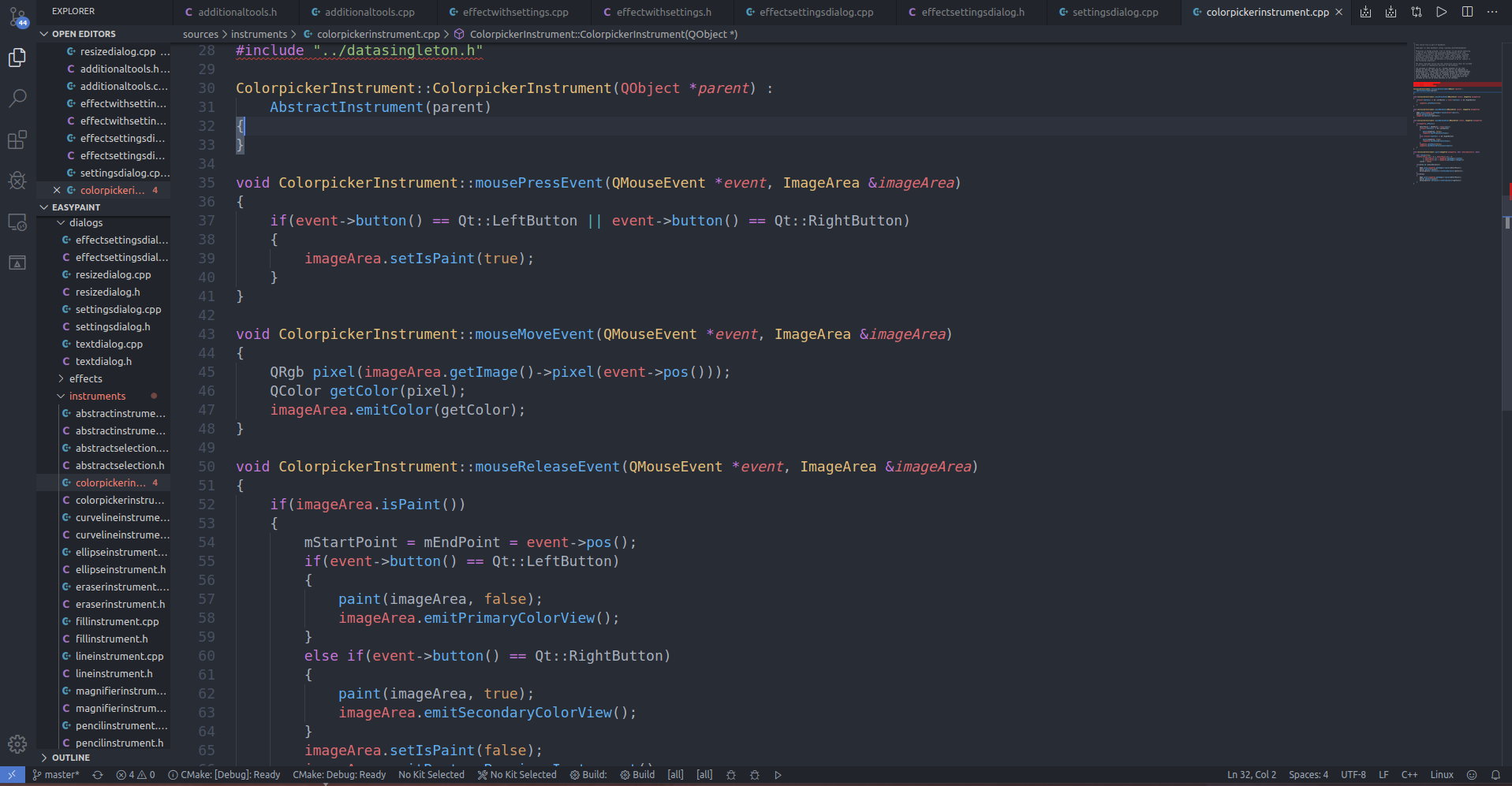
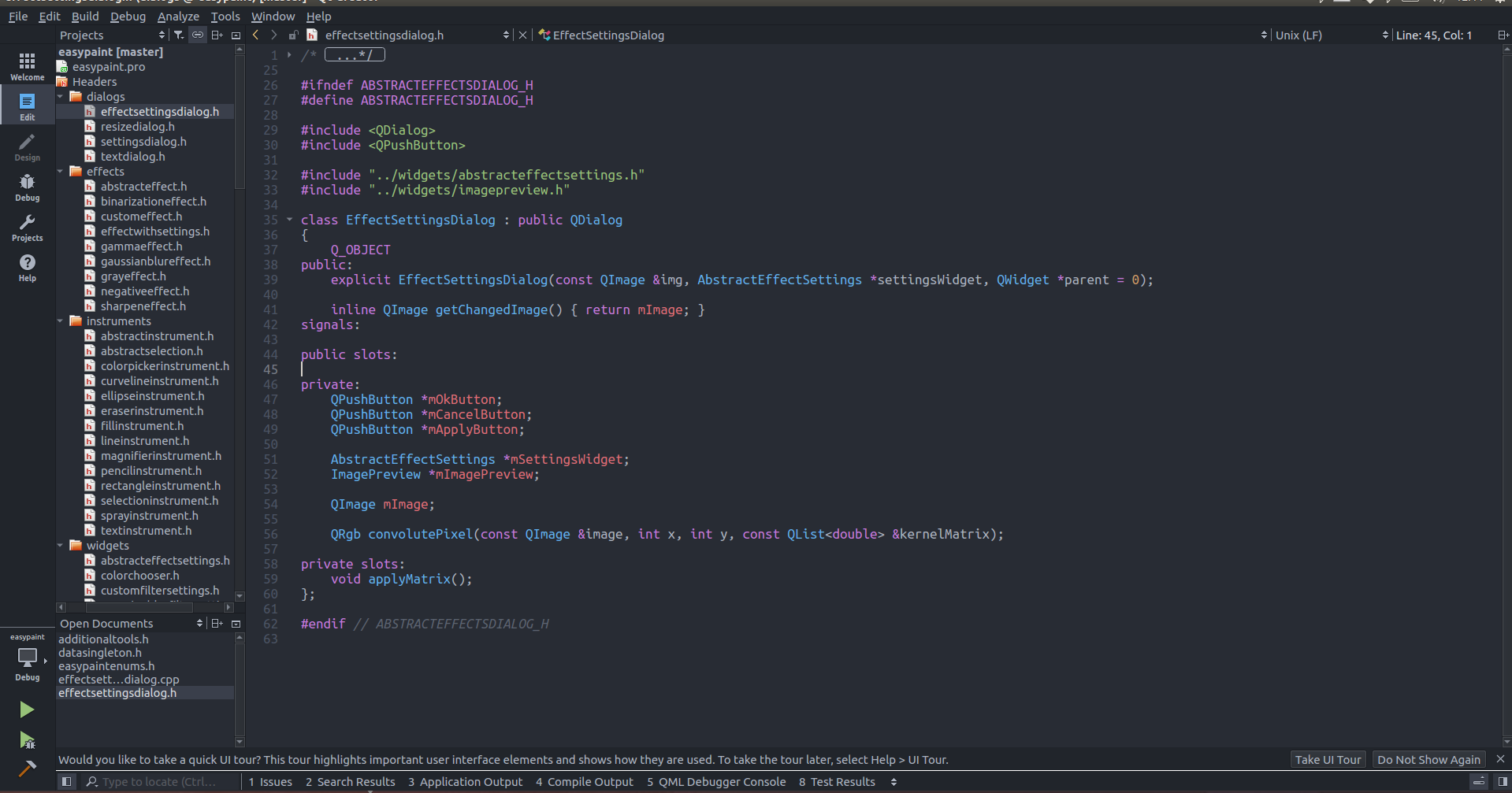
虽然有些颜色没有一一对应,但是整体感觉已经非常像 vscode 了,看起来并不逊色于原版。
3.配置文件
3.1 onedark.xml
<?xml version="1.0" encoding="UTF-8"?>

<style-scheme version="1.0" name="One Dark">

  <style name="Text" foreground="#abb2bf" background="#282c34"/>

  <style name="Link" underlineStyle="SingleUnderline"/>

  <style name="Selection" background="#3e4451"/>

  <style name="LineNumber" foreground="#4b5363"/>

  <style name="SearchResult" background="#324365"/>

  <style name="SearchScope" background="#3e4451"/>

  <style name="Parentheses" underlineColor="#61afef" underlineStyle="SingleUnderline"/>

  <style name="ParenthesesMismatch" foreground="#000000" background="#c678dd"/>

  <style name="AutoComplete" background="#3e4451"/>

  <style name="CurrentLine" background="#3a3f4b"/>

  <style name="CurrentLineNumber" foreground="#777c87"/>

  <style name="Occurrences" background="#324365"/>

  <style name="Occurrences.Unused" underlineColor="#d19a66" underlineStyle="DashUnderline"/>

  <style name="Occurrences.Rename" background="#e06c75"/>

  <style name="Number" foreground="#d19a66"/>

  <style name="String" foreground="#98c379"/>

  <style name="Type" foreground="#61afef"/>

  <style name="Local"/>

  <style name="Global"/>

  <style name="Field" foreground="#e06c75"/>

  <style name="Static" foreground="#61afef" italic="true"/>

  <style name="VirtualMethod" foreground="#61afef" italic="true"/>

  <style name="Function" foreground="#61afef"/>

  <style name="Keyword" foreground="#c678dd"/>

  <style name="PrimitiveType" foreground="#c678dd"/>

  <style name="Operator" foreground="#c678dd"/>

  <style name="Overloaded Operator" foreground="#c678dd"/>

  <style name="Punctuation"/>

  <style name="Preprocessor" foreground="#c678dd"/>

  <style name="Label" foreground="#e06c75" bold="true"/>

  <style name="Comment" foreground="#5c6370" italic="true"/>

  <style name="Doxygen.Comment" foreground="#5c6370" italic="true"/>

  <style name="Doxygen.Tag" foreground="#61afef"/>

  <style name="VisualWhitespace" foreground="#3c4049"/>

  <style name="QmlLocalId" foreground="#61afef"/>

  <style name="QmlExternalId"/>

  <style name="QmlTypeId" foreground="#61afef"/>

  <style name="QmlRootObjectProperty" foreground="#61afef"/>

  <style name="QmlScopeObjectProperty" foreground="#61afef"/>

  <style name="QmlExternalObjectProperty"/>

  <style name="JsScopeVar"/>

  <style name="JsImportVar" foreground="#d19a66"/>

  <style name="JsGlobalVar" foreground="#d19a66"/>

  <style name="QmlStateName" foreground="#61afef"/>

  <style name="Binding" foreground="#c678dd"/>

  <style name="DisabledCode" foreground="#5c6370"/>

  <style name="AddedLine" foreground="#98c379"/>

  <style name="RemovedLine" foreground="#e06c75"/>

  <style name="DiffFile" foreground="#61afef"/>

  <style name="DiffLocation" foreground="#d19a66"/>

  <style name="DiffFileLine" foreground="#000000" background="#e5c07b"/>

  <style name="DiffContextLine" foreground="#000000" background="#56b6c2"/>

  <style name="DiffSourceLine" foreground="#000000" background="#be5046"/>

  <style name="DiffSourceChar" foreground="#000000" background="#e06c75"/>

  <style name="DiffDestLine" foreground="#000000" background="#789353"/>

  <style name="DiffDestChar" foreground="#000000" background="#98c379"/>

  <style name="LogChangeLine" foreground="#e06c75"/>

  <style name="LogAuthorName" foreground="#61afef"/>

  <style name="LogCommitDate" foreground="#98c379"/>

  <style name="LogCommitHash" foreground="#e06c75"/>

  <style name="LogCommitSubject"/>

  <style name="LogDecoration" foreground="#c678dd"/>

  <style name="Warning" underlineColor="#d19a66" underlineStyle="SingleUnderline"/>

  <style name="WarningContext" underlineColor="#d19a66" underlineStyle="DotLine"/>

  <style name="Error" underlineColor="#e06c75" underlineStyle="SingleUnderline"/>

  <style name="ErrorContext" underlineColor="#e06c75" underlineStyle="DotLine"/>

  <style name="Declaration"/>

  <style name="FunctionDefinition"/>

  <style name="OutputArgument" italic="true"/>

  <style name="LastStyleSentinel"/>

</style-scheme>
这个文件主要是配置代码区代码颜色的。
onedark.xml 文件存放路径:/home/ricardo/Qt5.12.7/Tools/QtCreator/share/qtcreator/styles
我的环境是 ubuntu16.04,这个路径是 ubuntu 的,如果是 win10 用户找到对应的安装路径即可。
3.2 onedark.creatortheme
[General]

ThemeName=One Dark

PreferredStyles=Fusion

DefaultTextEditorColorScheme=onedark.xml

[Palette]

shadowBackground=ff21252b

text=ffabb2bf

textDisabled=99abb2bf

textHighlighted=ffd7dae0

toolBarItem=ffabb2bf

toolBarItemDisabled=99abb2bf

fancyBarsNormalTextColor=ffabb2bf

fancyBarsBoldTextColor=ffabb2bf

hoverBackground=ff31363f

selectedBackground=ff3a3f4b

selectedBackgroundText=ffd7dae0

normalBackground=ff282c34

alternateBackground=ff31363f

error=ffe06c75

warning=ffe5c07b

success=ff98c379

message=ff61afef

splitter=ff181a1f

textColorLink=61afef

textColorLinkVisited=c678dd

backgroundColorDisabled=ff21252b

[Colors]

;DS controls theme START

DScontrolBackground=normalBackground

DScontrolOutline=splitter

DStextColor=text

DSdisabledTextColor=textDisabled

DSpanelBackground=ff454444

DShoverHighlight=hoverBackground

DScolumnBackground=ff363636

DSfocusEdit=normalBackground

DSfocusDrag=ff565656

DScontrolBackgroundPressed=selectedBackground

DScontrolBackgroundChecked=selectedBackground

DSinteraction=selectedBackground

DSsliderActiveTrack=ff7a7a7a

DSsliderInactiveTrack=ff4d4d4d

DSsliderHandle=ff4b5362

DSsliderActiveTrackHover=ff7f7f7f

DSsliderInactiveTrackHover=ff505050

DSsliderHandleHover=ff7a7a7a

DSsliderActiveTrackFocus=ffaaaaaa

DSsliderInactiveTrackFocus=ff7a7a7a

DSsliderHandleFocus=ff1d545c

DSerrorColor=error

DScontrolBackgroundDisabled=backgroundColorDisabled

DScontrolOutlineDisabled=ff4d4d4d

DStextColorDisabled=textDisabled

DStextSelectionColor=selectedBackground

DStextSelectedTextColor=selectedBackgroundText

DSscrollBarTrack=ff4d4d4d

DSscrollBarHandle=ff4b5362

DScontrolBackgroundInteraction=ff4d4d4d

DStranslationIndicatorBorder=splitter

DSsectionHeadBackground=alternateBackground

DSchangedStateText=message

DS3DAxisXColor=error

DS3DAxisYColor=success

DS3DAxisZColor=message

;DS controls theme END

BackgroundColorAlternate=alternateBackground

BackgroundColorDark=shadowBackground

BackgroundColorHover=hoverBackground

BackgroundColorNormal=normalBackground

BackgroundColorDisabled=backgroundColorDisabled

BackgroundColorSelected=selectedBackground

BadgeLabelBackgroundColorChecked=text

BadgeLabelBackgroundColorUnchecked=text

BadgeLabelTextColorChecked=normalBackground

BadgeLabelTextColorUnchecked=normalBackground

CanceledSearchTextColor=error

ComboBoxArrowColor=toolBarItem

ComboBoxArrowColorDisabled=toolBarItemDisabled

ComboBoxTextColor=fancyBarsNormalTextColor

DetailsButtonBackgroundColorHover=hoverBackground

DetailsWidgetBackgroundColor=shadowBackground

DockWidgetResizeHandleColor=splitter

DoubleTabWidget1stSeparatorColor=splitter

DoubleTabWidget1stTabActiveTextColor=text

DoubleTabWidget1stTabBackgroundColor=normalBackground

DoubleTabWidget1stTabInactiveTextColor=text

DoubleTabWidget2ndSeparatorColor=toolBarItemDisabled

DoubleTabWidget2ndTabActiveTextColor=text

DoubleTabWidget2ndTabBackgroundColor=selectedBackground

DoubleTabWidget2ndTabInactiveTextColor=text

EditorPlaceholderColor=shadowBackground

FancyToolBarSeparatorColor=toolBarItemDisabled

FancyTabBarBackgroundColor=shadowBackground

FancyTabBarSelectedBackgroundColor=selectedBackground

FancyTabWidgetDisabledSelectedTextColor=toolBarItemDisabled

FancyTabWidgetDisabledUnselectedTextColor=toolBarItemDisabled

FancyTabWidgetEnabledSelectedTextColor=fancyBarsBoldTextColor

FancyTabWidgetEnabledUnselectedTextColor=fancyBarsBoldTextColor

FancyToolButtonHoverColor=hoverBackground

FancyToolButtonSelectedColor=selectedBackground

FutureProgressBackgroundColor=shadowBackground

IconsBaseColor=toolBarItem

IconsDisabledColor=toolBarItemDisabled

IconsInfoColor=message

IconsInfoToolBarColor=message

IconsWarningColor=warning

IconsWarningToolBarColor=warning

IconsErrorColor=error

IconsErrorToolBarColor=error

IconsRunColor=success

IconsRunToolBarColor=success

IconsStopColor=error

IconsStopToolBarColor=error

IconsInterruptColor=message

IconsInterruptToolBarColor=message

IconsDebugColor=toolBarItem

IconsNavigationArrowsColor=warning

IconsBuildHammerHandleColor=b06112

IconsBuildHammerHeadColor=toolBarItem

IconsModeWelcomeActiveColor=success

IconsModeEditActiveColor=message

IconsModeDesignActiveColor=warning

IconsModeDebugActiveColor=message

IconsModeProjectActiveColor=success

IconsModeAnalyzeActiveColor=message

IconsModeHelpActiveColor=warning

IconsCodeModelKeywordColor=ff777777

IconsCodeModelClassColor=ffc0b550

IconsCodeModelStructColor=ff53b053

IconsCodeModelFunctionColor=ffd34373

IconsCodeModelVariableColor=ff2bbbcc

IconsCodeModelEnumColor=ffc0b550

IconsCodeModelMacroColor=ff476ba0

IconsCodeModelAttributeColor=ff316511

IconsCodeModelUniformColor=ff994899

IconsCodeModelVaryingColor=ffa08833

IconsCodeModelOverlayBackgroundColor=normalBackground

IconsCodeModelOverlayForegroundColor=text

InfoBarBackground=shadowBackground

InfoBarText=text

MenuBarEmptyAreaBackgroundColor=shadowBackground

MenuBarItemBackgroundColor=shadowBackground

MenuBarItemTextColorDisabled=textDisabled

MenuBarItemTextColorNormal=text

MenuItemTextColorDisabled=textDisabled

MenuItemTextColorNormal=text

MiniProjectTargetSelectorBackgroundColor=shadowBackground

MiniProjectTargetSelectorBorderColor=shadowBackground

MiniProjectTargetSelectorSummaryBackgroundColor=normalBackground

MiniProjectTargetSelectorTextColor=fancyBarsNormalTextColor

PanelStatusBarBackgroundColor=shadowBackground

PanelsWidgetSeparatorLineColor=splitter

PanelTextColorDark=text

PanelTextColorMid=text

PanelTextColorLight=textHighlighted

ProgressBarColorError=error

ProgressBarColorFinished=success

ProgressBarColorNormal=message

ProgressBarTitleColor=text

ProgressBarBackgroundColor=alternateBackground

SplitterColor=splitter

TextColorDisabled=textDisabled

TextColorError=error

TextColorHighlight=textHighlighted

TextColorHighlightBackground=hoverBackground

TextColorLink=textColorLink

TextColorLinkVisited=textColorLinkVisited

TextColorNormal=text

ToggleButtonBackgroundColor=shadowBackground

ToolBarBackgroundColor=shadowBackground

TreeViewArrowColorNormal=hoverBackground

TreeViewArrowColorSelected=text

OutputPanes_DebugTextColor=text

OutputPanes_ErrorMessageTextColor=error

OutputPanes_MessageOutput=message

OutputPanes_NormalMessageTextColor=text

OutputPanes_StdErrTextColor=error

OutputPanes_StdOutTextColor=text

OutputPanes_WarningMessageTextColor=warning

OutputPanes_TestPassTextColor=success

OutputPanes_TestFailTextColor=error

OutputPanes_TestXFailTextColor=error

OutputPanes_TestXPassTextColor=message

OutputPanes_TestSkipTextColor=message

OutputPanes_TestWarnTextColor=warning

OutputPanes_TestFatalTextColor=error

OutputPanes_TestDebugTextColor=text

OutputPaneButtonFlashColor=error

OutputPaneToggleButtonTextColorChecked=fancyBarsNormalTextColor

OutputPaneToggleButtonTextColorUnchecked=fancyBarsNormalTextColor

Debugger_LogWindow_LogInput=ff56b6c2

Debugger_LogWindow_LogStatus=message

Debugger_LogWindow_LogTime=error

Debugger_WatchItem_ValueNormal=text

Debugger_WatchItem_ValueInvalid=textDisabled

Debugger_WatchItem_ValueChanged=error

Debugger_Breakpoint_TextMarkColor=message

Welcome_TextColor=text

Welcome_ForegroundPrimaryColor=text

Welcome_ForegroundSecondaryColor=text

Welcome_BackgroundColor=normalBackground

Welcome_ButtonBackgroundColor=normalBackground

Welcome_DividerColor=splitter

Welcome_HoverColor=hoverBackground

Welcome_LinkColor=textColorLink

Welcome_DisabledLinkColor=textDisabled

Timeline_TextColor=text

Timeline_BackgroundColor1=normalBackground

Timeline_BackgroundColor2=shadowBackground

Timeline_DividerColor=splitter

Timeline_HighlightColor=selectedBackground

Timeline_PanelBackgroundColor=alternateBackground

Timeline_PanelHeaderColor=normalBackground

Timeline_HandleColor=ff4b5362

Timeline_RangeColor=selectedBackground

VcsBase_FileStatusUnknown_TextColor=text

VcsBase_FileAdded_TextColor=success

VcsBase_FileModified_TextColor=warning

VcsBase_FileDeleted_TextColor=error

VcsBase_FileRenamed_TextColor=message

VcsBase_FileUnmerged_TextColor=error

Bookmarks_TextMarkColor=message

TextEditor_SearchResult_ScrollBarColor=success

TextEditor_CurrentLine_ScrollBarColor=message

ProjectExplorer_TaskError_TextMarkColor=error

ProjectExplorer_TaskWarn_TextMarkColor=warning

CodeModel_Error_TextMarkColor=error

CodeModel_Warning_TextMarkColor=warning

QmlDesigner_BackgroundColor=normalBackground

QmlDesigner_HighlightColor=selectedBackground

QmlDesigner_FormEditorSelectionColor=message

QmlDesigner_FormEditorForegroundColor=normalBackground

QmlDesigner_BackgroundColorDarkAlternate=shadowBackground

QmlDesigner_BackgroundColorDarker=splitter

QmlDesigner_BorderColor=splitter

QmlDesigner_ButtonColor=normalBackground

QmlDesigner_TabDark=shadowBackground

QmlDesigner_TabLight=text

QmlDesigner_FormeditorBackgroundColor=normalBackground

QmlDesigner_AlternateBackgroundColor=alternateBackground

QmlDesigner_ScrollBarHandleColor=ff4b5362

PaletteWindow=shadowBackground

PaletteWindowText=text

PaletteBase=normalBackground

PaletteAlternateBase=alternateBackground

PaletteButton=shadowBackground

PaletteBrightText=error

PaletteText=text

PaletteButtonText=text

PaletteButtonTextDisabled=textDisabled

PaletteToolTipBase=hoverBackground

PaletteHighlight=selectedBackground

PaletteDark=shadowBackground

PaletteHighlightedText=selectedBackgroundText

PaletteToolTipText=text

PaletteLink=textColorLink

PaletteLinkVisited=textColorLinkVisited

PaletteWindowDisabled=backgroundColorDisabled

PaletteWindowTextDisabled=textDisabled

PaletteBaseDisabled=backgroundColorDisabled

PaletteTextDisabled=textDisabled

[Flags]

ComboBoxDrawTextShadow=false

DerivePaletteFromTheme=true

DrawIndicatorBranch=true

DrawSearchResultWidgetFrame=false

DrawTargetSelectorBottom=false

DrawToolBarHighlights=false

DrawToolBarBorders=false

ApplyThemePaletteGlobally=true

FlatToolBars=true

FlatSideBarIcons=true

FlatProjectsMode=true

FlatMenuBar=true

ToolBarIconShadow=true

WindowColorAsBase=true

DarkUserInterface=true

[Gradients]

DetailsWidgetHeaderGradient\1\color=normalBackground

DetailsWidgetHeaderGradient\1\pos=1

DetailsWidgetHeaderGradient\size=1
这个文件主要是配置代码区外边的边框的。
onedark.creatortheme 文件存放路径:/home/ricardo/Qt5.12.7/Tools/QtCreator/share/qtcreator/themes
4.选择主题
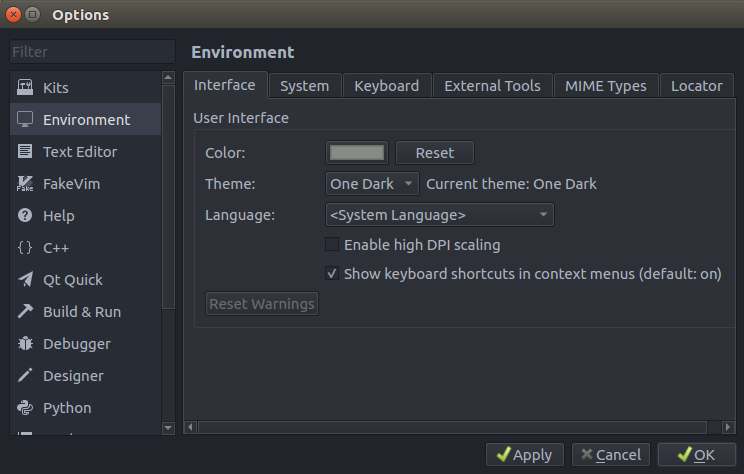
打开 Qt Creator,打开选项卡 Tools->Options->Environment,Theme 选择 One Dark。
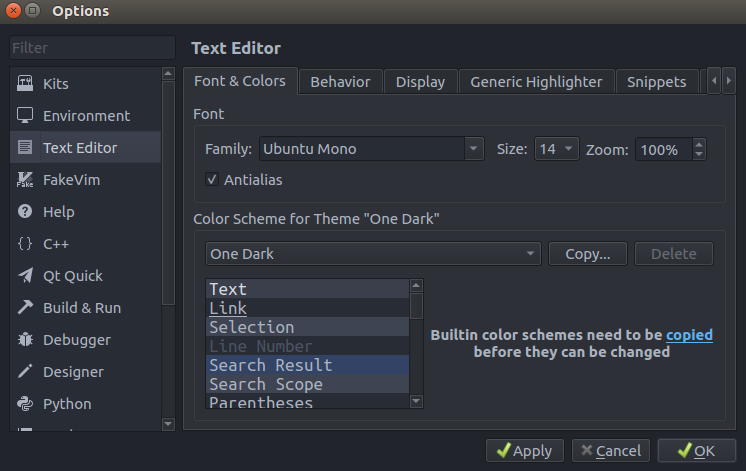
接下来打开 Text Editor 也选择 One Dark,重启一下 Qt Creator 就能看到 one dark pro 主题。
5.最后
最后附上配色方案的链接地址: vscode 配色方案地址
个人博客地址:Ricardo的小破站

Qt Creator打造VScode one dark pro主题配色的更多相关文章
- 如何在 Qt Creator 中应用 one dark pro 主题
前言 Qt Creator 自带了几款主题,但是并不好看.在博客 <Qt Creator打造VScode one dark pro主题配色> 中给出了 one dark pro 主题的配置 ...
- Qt Creator 源码学习 03:qtcreator.pro
当我们准备好 Qt Creator 的源代码之后,首先进入到它的目录,来看一下它的源代码目录有什么奥秘. 这里一共有 9 个文件夹和 9 个文件.我们来一一看看它们都是干什么用的. .git: 版本控 ...
- Qt Creator 黑色主题配置
可能是一个习惯了吧,我个人比较喜欢在黑色主题的环境下进行编程.黑色主题对眼睛稍微友好一点,看起来也不是那么low.这里给出QtCreator的黑色主题配置方案. 如果是最新的Creator3.3+的版 ...
- Qt Creator设置黑色主题背景
黑色的主题看起来比較炫酷一点.也有人说黑色主题用起来对眼睛好.只是个人感觉然并卵,依据自己的习惯爱好设置就好. 假设想保护眼睛,还是将屏幕调到合适的亮度,不要太暗.自己眼睛认为舒服最好.也能够通过&q ...
- Qt creator 编译错误 :cannot find file .pro qt
事实上问题的解决的方法非常easy:就是Qt不支持中文的路径,把源代码的路径所有改成英文就可以解决这个问题. 首先问题发生在我执行网上的样例程序时,又一次构建编译也是出错.提示: Cannot fin ...
- mac book pro macOS10.13.3安装qt、qt creator C++开发环境,qt5.11.1,并解决cmake构建:qt mac this file is not part of any project the code
因为之前在Ubuntu下使用的是qtcreator开发,现在想在mac上装一个系统,因为许久未装了,还是花了点时间,不如写个博客,下次就更快安装了.在Mac OS X下使用Qt开发,需要配置Qt库和编 ...
- Qt Creator 源码学习笔记04,多插件实现原理分析
阅读本文大概需要 8 分钟 插件听上去很高大上,实际上就是一个个动态库,动态库在不同平台下后缀名不一样,比如在 Windows下以.dll结尾,Linux 下以.so结尾 开发插件其实就是开发一个动态 ...
- qt creator源码全方面分析(1)
目录介绍 首先我们对软件源代码根目录下的各个重要文件(夹)做一个简单的介绍,对整体有一个大概的了解. 下面对目录及其内容做一个大概的初步的介绍,后面我尽量按照目录顺序进行依次介绍,当然可能会有一些交叉 ...
- Qt Creator 源码学习笔记02,认识框架结构
阅读本文大概需要 6 分钟 在上一篇大概了解了关于Qt Creator 基础知识后[1],本篇先学习下框架基本结构,这样能够清晰的知道这个框架当中包含哪些文件.文件夹.工程文件,这些文件分别代表什么意 ...
随机推荐
- Java基础系列(13)- 包机制
包机制 为了更好的组织类,Java提供了包机制,用于区别类名的命名空间 包语句的语法格式为: package pkg1[. pkg2[. pkg3...]]; 一般利用公司域名倒置作为报名 为了能够使 ...
- Linux系列(25) - 常用快捷键(未更新完)
快捷键 说明 Ctrl+L 清屏 tab tab按一次自动补全目录文件名称/tab按二次将目录下带有补全前面字段的所有文件目录展示出来,例子: cd / tab键按两次将根目录下所有文件展示出来 ...
- PHP 算法之 -- 计算器设计
<?php//$exp='300+20*6-20'; $exp='71*2-50*3-3-67*6+80'; //14-15-3=-4 //定义一个数栈和一个符号栈 $numsStack=new ...
- HTML 网页开发、CSS 基础语法——十二.CSS选择器
选择器 基础选择器:标签选择器,id选择器,类选择器,通配符选择器 高级选择器:后代选择器,交集选择器,并集选择器 1. 标签选择器: • 优点:可以选中所有的同名标签,设置所有同名标签的公共样式. ...
- P4480-[BJWC2018]餐巾计划问题【三分,贪心】
正题 题目链接:https://www.luogu.com.cn/problem/P4480 题目大意 \(n\)天,第\(i\)天需要\(a_i\)个餐巾. 每个餐巾价格为\(p\),使用完后有两种 ...
- 域名系统-DNS
域名系统DNS 域名系统DNS(Domain Name System)是互联网使用的命名系统,用来把便于人们使用的机器名转化为IP地址,域名系统就是名字系统. 很多应用层的软件经常直接使用DNS.DN ...
- 解决安装mysql 到start service出现未响应问题
mysql下载地址 链接: https://pan.baidu.com/s/1vYpsNkVjUHqOKPQl9Y9A9A 提取码: wngn 安装可以参考 今天下载了MySql5.5,没想到的是前面 ...
- DL4J实战之三:经典卷积实例(LeNet-5)
欢迎访问我的GitHub https://github.com/zq2599/blog_demos 内容:所有原创文章分类汇总及配套源码,涉及Java.Docker.Kubernetes.DevOPS ...
- std::sort 的注意事项
Luogu P1177 [模板]快速排序 \(\Large{AC}\) 代码: #include<bits/stdc++.h> using namespace std; int n,a[1 ...
- SpringBoot-thymeleaf-静态资源引入和接管
引入前端 templates下放html页面 static下放css.js.image等静态资源 添加thymeleaf命名空间 <html lang="en" xmlns: ...