
第一篇 -- Sprint Tool Suite配置和Hello World编写
首先需要安装
1. Sprint Tool Suite(本次所用版本:spring-tool-suite-3.8.3.RELEASE-e4.6.2-win32-x86_64)
2. Tomcat(本次所用版本:apache-tomcat-7.0.85)
3. JDK(本次所用版本:jdk-8u161-windows-x64)
4. JRE(本次所用版本:jre-8u161-windows-x64)
备注:tomcat7本来默认端口是8080,由于电脑中之前装过tomcat11,所以在tomcat7\conf\server.xml中将端口改为8081,这样两个tomcat就不会冲突。
server.xml


<?xml version='1.0' encoding='utf-8'?>
<!--
Licensed to the Apache Software Foundation (ASF) under one or more
contributor license agreements. See the NOTICE file distributed with
this work for additional information regarding copyright ownership.
The ASF licenses this file to You under the Apache License, Version 2.0
(the "License"); you may not use this file except in compliance with
the License. You may obtain a copy of the License at http://www.apache.org/licenses/LICENSE-2.0 Unless required by applicable law or agreed to in writing, software
distributed under the License is distributed on an "AS IS" BASIS,
WITHOUT WARRANTIES OR CONDITIONS OF ANY KIND, either express or implied.
See the License for the specific language governing permissions and
limitations under the License.
-->
<!-- Note: A "Server" is not itself a "Container", so you may not
define subcomponents such as "Valves" at this level.
Documentation at /docs/config/server.html
-->
<Server port="8006" shutdown="SHUTDOWN">
<Listener className="org.apache.catalina.startup.VersionLoggerListener" />
<!-- Security listener. Documentation at /docs/config/listeners.html
<Listener className="org.apache.catalina.security.SecurityListener" />
-->
<!--APR library loader. Documentation at /docs/apr.html -->
<Listener className="org.apache.catalina.core.AprLifecycleListener" SSLEngine="on" />
<!--Initialize Jasper prior to webapps are loaded. Documentation at /docs/jasper-howto.html -->
<Listener className="org.apache.catalina.core.JasperListener" />
<!-- Prevent memory leaks due to use of particular java/javax APIs-->
<Listener className="org.apache.catalina.core.JreMemoryLeakPreventionListener" />
<Listener className="org.apache.catalina.mbeans.GlobalResourcesLifecycleListener" />
<Listener className="org.apache.catalina.core.ThreadLocalLeakPreventionListener" /> <!-- Global JNDI resources
Documentation at /docs/jndi-resources-howto.html
-->
<GlobalNamingResources>
<!-- Editable user database that can also be used by
UserDatabaseRealm to authenticate users
-->
<Resource name="UserDatabase" auth="Container"
type="org.apache.catalina.UserDatabase"
description="User database that can be updated and saved"
factory="org.apache.catalina.users.MemoryUserDatabaseFactory"
pathname="conf/tomcat-users.xml" />
</GlobalNamingResources> <!-- A "Service" is a collection of one or more "Connectors" that share
a single "Container" Note: A "Service" is not itself a "Container",
so you may not define subcomponents such as "Valves" at this level.
Documentation at /docs/config/service.html
-->
<Service name="Catalina"> <!--The connectors can use a shared executor, you can define one or more named thread pools-->
<!--
<Executor name="tomcatThreadPool" namePrefix="catalina-exec-"
maxThreads="150" minSpareThreads="4"/>
--> <!-- A "Connector" represents an endpoint by which requests are received
and responses are returned. Documentation at :
Java HTTP Connector: /docs/config/http.html (blocking & non-blocking)
Java AJP Connector: /docs/config/ajp.html
APR (HTTP/AJP) Connector: /docs/apr.html
Define a non-SSL HTTP/1.1 Connector on port 8081
-->
<Connector port="8081" protocol="HTTP/1.1"
connectionTimeout="20000"
redirectPort="8443" />
<!-- A "Connector" using the shared thread pool-->
<!--
<Connector executor="tomcatThreadPool"
port="8081" protocol="HTTP/1.1"
connectionTimeout="20000"
redirectPort="8443" />
-->
<!-- Define a SSL HTTP/1.1 Connector on port 8443
This connector uses the BIO implementation that requires the JSSE
style configuration. When using the APR/native implementation, the
OpenSSL style configuration is required as described in the APR/native
documentation -->
<!--
<Connector port="8443" protocol="org.apache.coyote.http11.Http11Protocol"
maxThreads="150" SSLEnabled="true" scheme="https" secure="true"
clientAuth="false" sslProtocol="TLS" />
--> <!-- Define an AJP 1.3 Connector on port 8010 -->
<Connector port="8010" protocol="AJP/1.3" redirectPort="8443" /> <!-- An Engine represents the entry point (within Catalina) that processes
every request. The Engine implementation for Tomcat stand alone
analyzes the HTTP headers included with the request, and passes them
on to the appropriate Host (virtual host).
Documentation at /docs/config/engine.html --> <!-- You should set jvmRoute to support load-balancing via AJP ie :
<Engine name="Catalina" defaultHost="localhost" jvmRoute="jvm1">
-->
<Engine name="Catalina" defaultHost="localhost"> <!--For clustering, please take a look at documentation at:
/docs/cluster-howto.html (simple how to)
/docs/config/cluster.html (reference documentation) -->
<!--
<Cluster className="org.apache.catalina.ha.tcp.SimpleTcpCluster"/>
--> <!-- Use the LockOutRealm to prevent attempts to guess user passwords
via a brute-force attack -->
<Realm className="org.apache.catalina.realm.LockOutRealm">
<!-- This Realm uses the UserDatabase configured in the global JNDI
resources under the key "UserDatabase". Any edits
that are performed against this UserDatabase are immediately
available for use by the Realm. -->
<Realm className="org.apache.catalina.realm.UserDatabaseRealm"
resourceName="UserDatabase"/>
</Realm> <Host name="localhost" appBase="webapps"
unpackWARs="true" autoDeploy="true"> <!-- SingleSignOn valve, share authentication between web applications
Documentation at: /docs/config/valve.html -->
<!--
<Valve className="org.apache.catalina.authenticator.SingleSignOn" />
--> <!-- Access log processes all example.
Documentation at: /docs/config/valve.html
Note: The pattern used is equivalent to using pattern="common" -->
<Valve className="org.apache.catalina.valves.AccessLogValve" directory="logs"
prefix="localhost_access_log." suffix=".txt"
pattern="%h %l %u %t "%r" %s %b" /> </Host>
</Engine>
</Service>
</Server>
编写HelloWorld
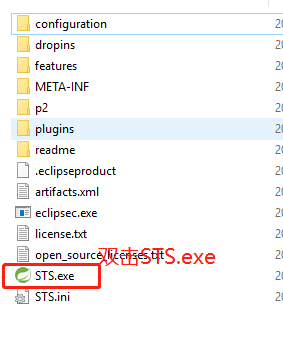
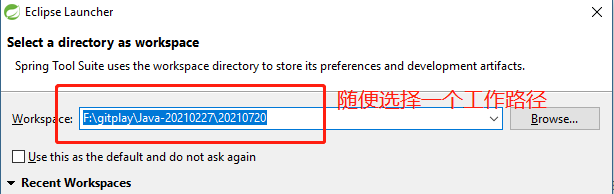
1. 双击STS.exe,接着选择自己创建项目的工作路径。
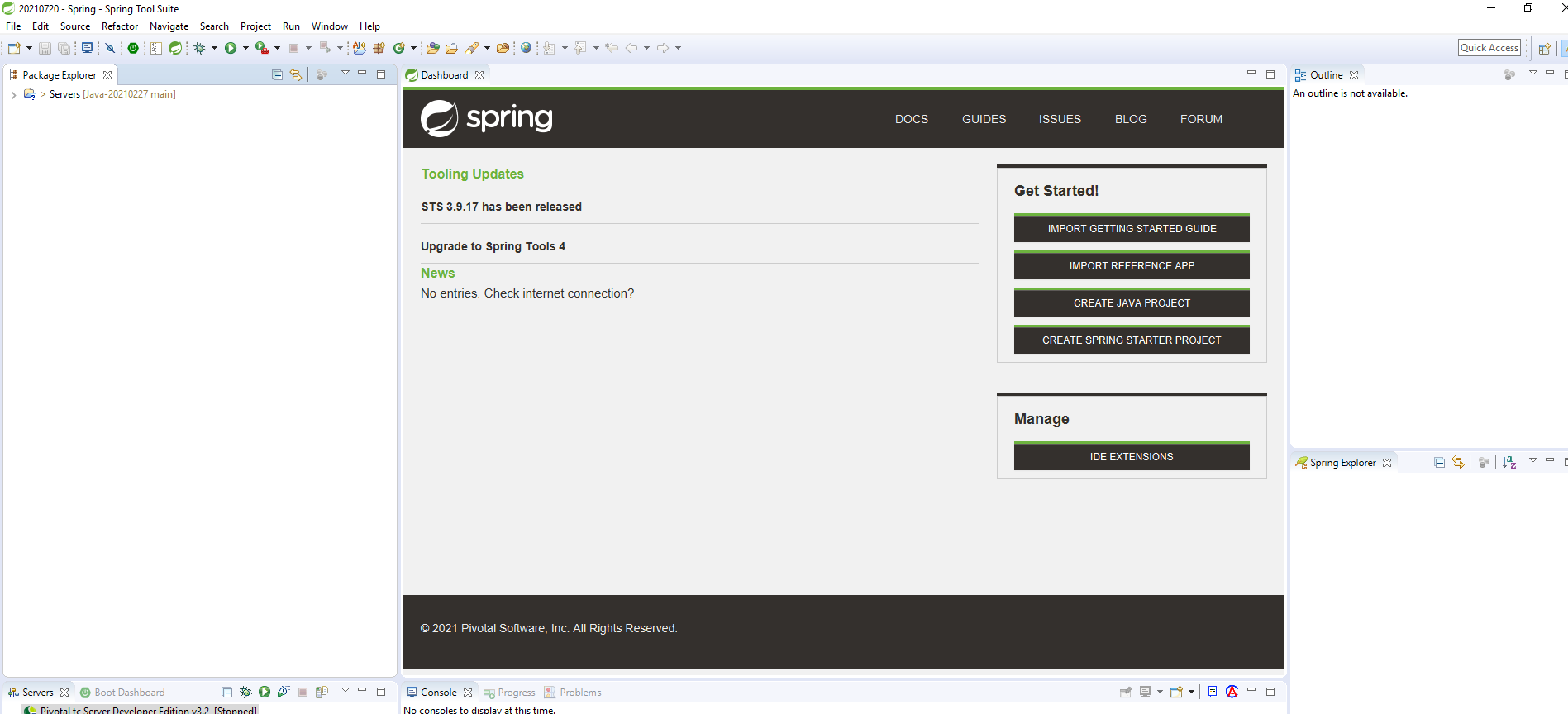
2. 工作界面如下
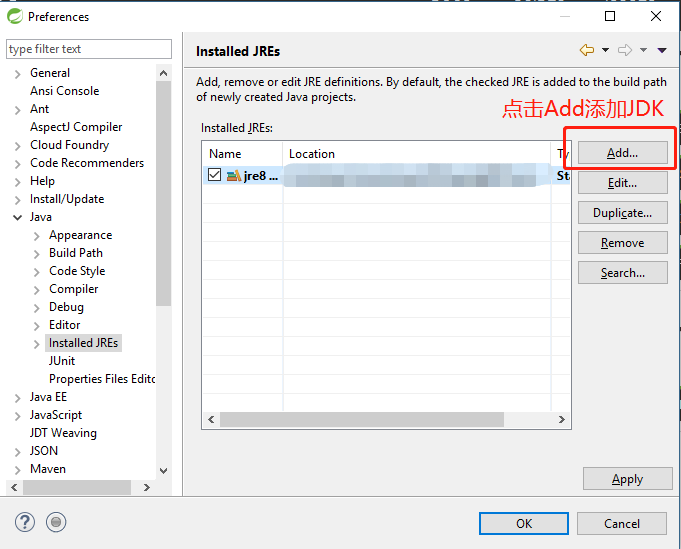
3. 配置JDK
Window->Preferences->Java->Installed JREs
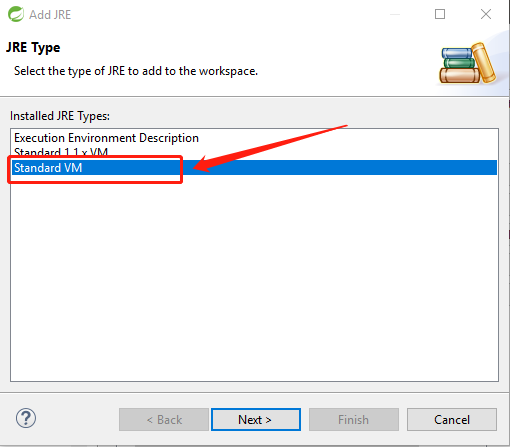
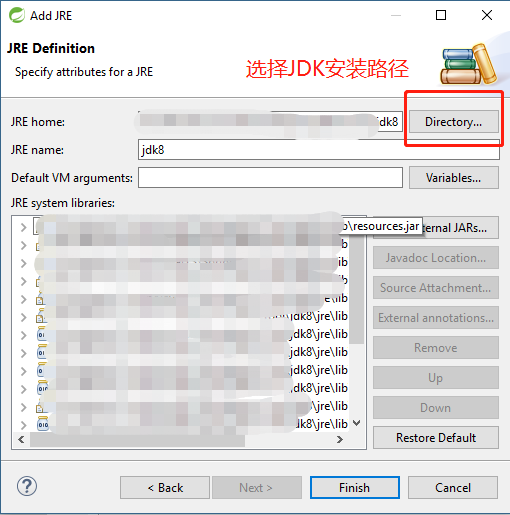
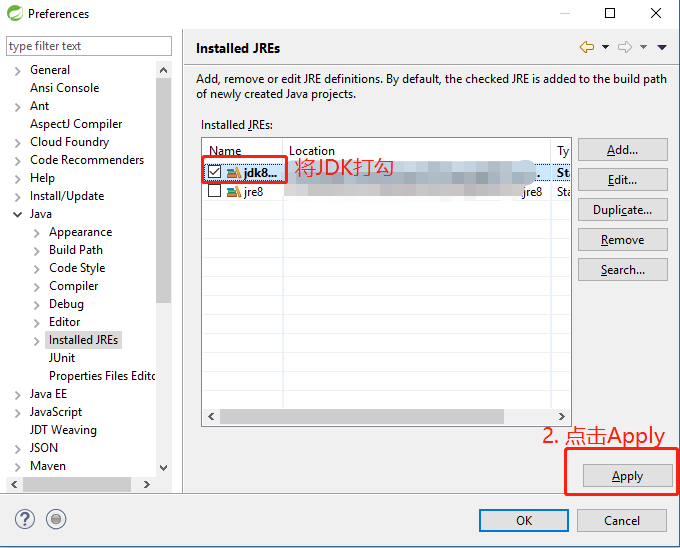
4. 配置Tomcat
Window->Preferences->Server->Runtime Environments
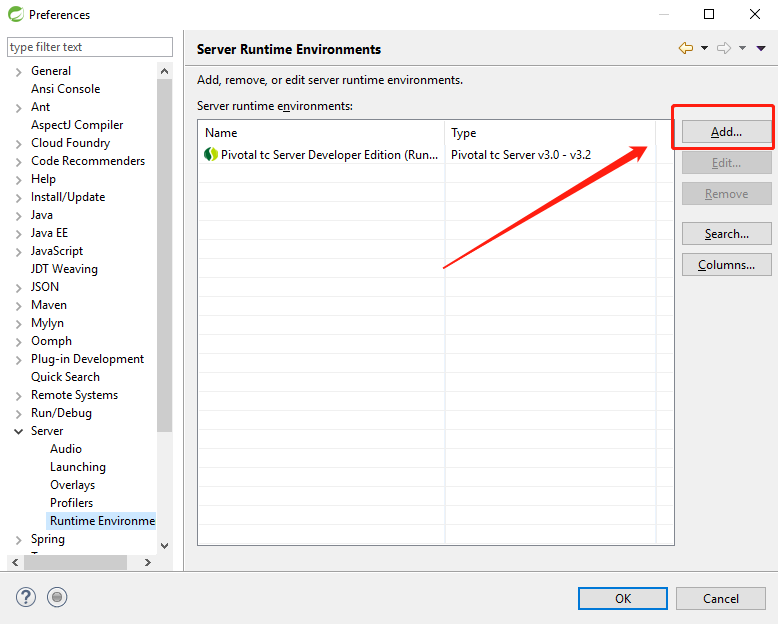
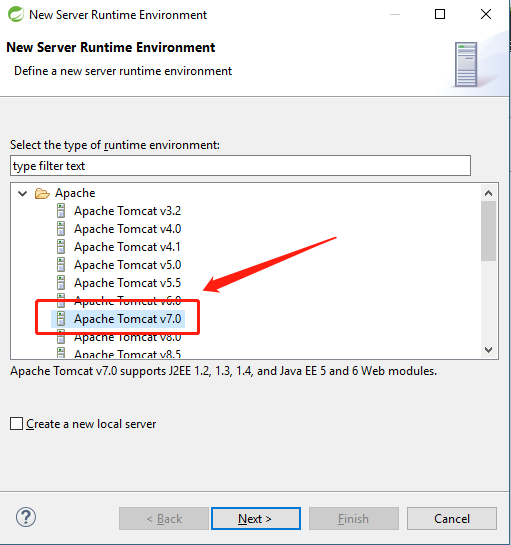
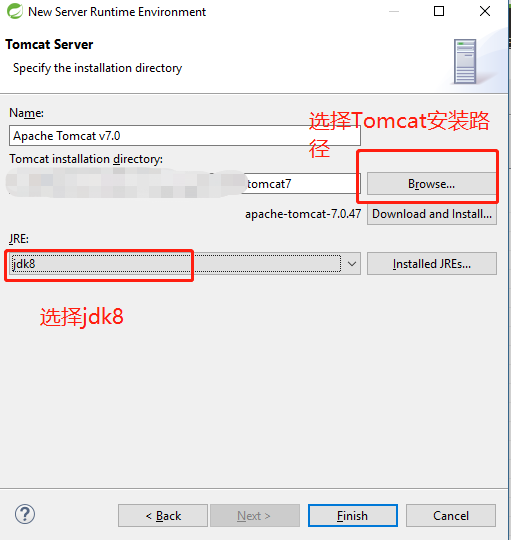
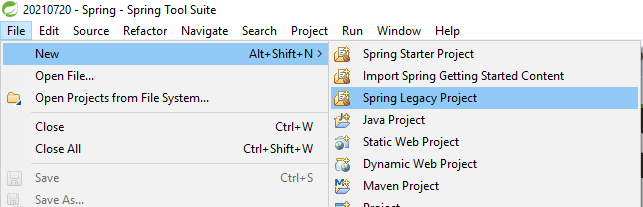
5. 新建项目File->New->Spring Legacy Project,等着它refresh结束,填写项目名,选择Spring MVC Project。
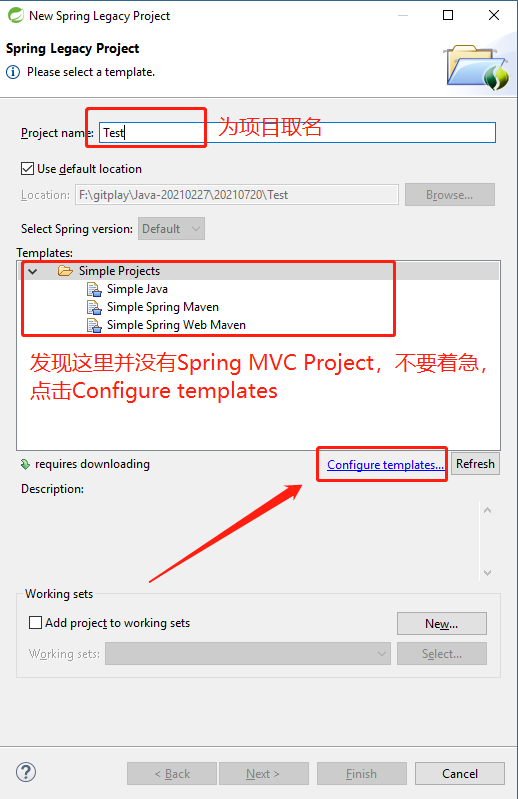
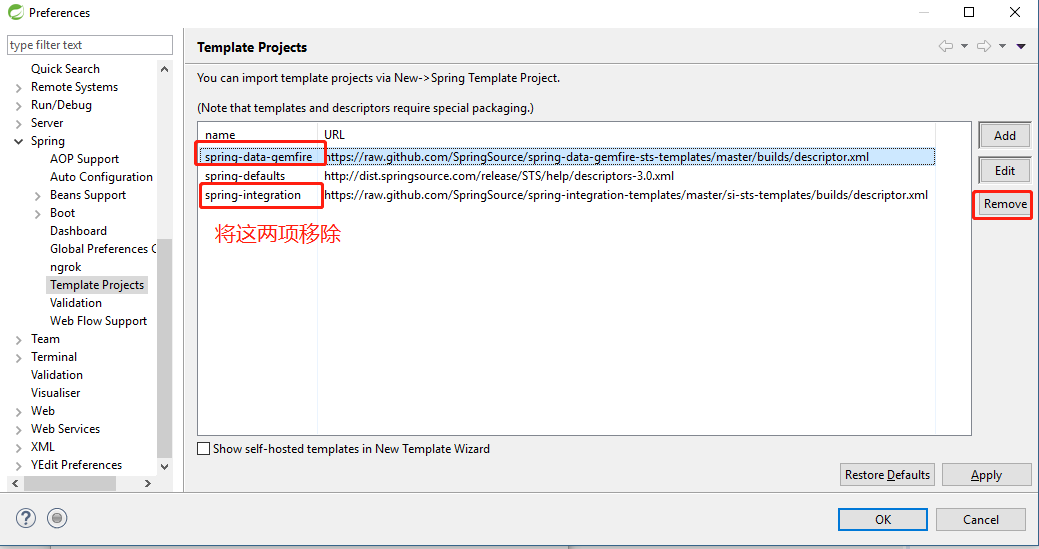
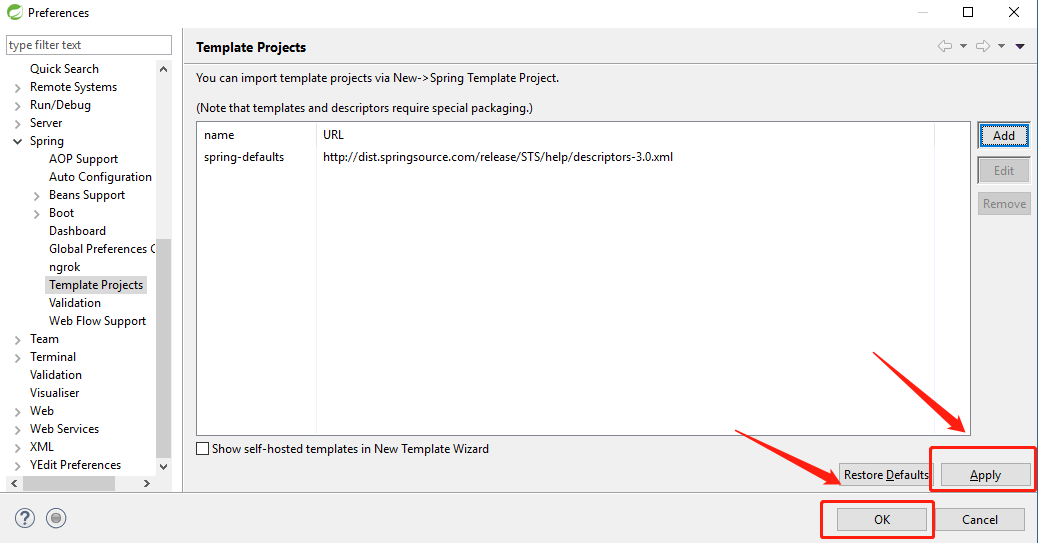
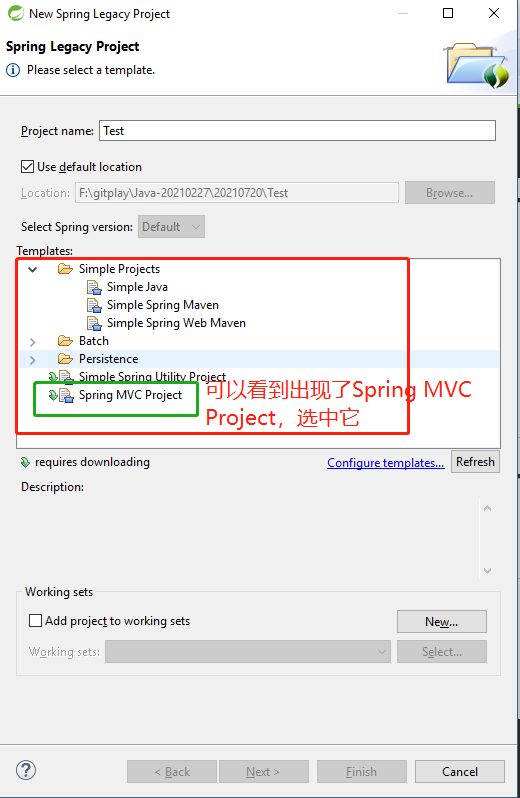
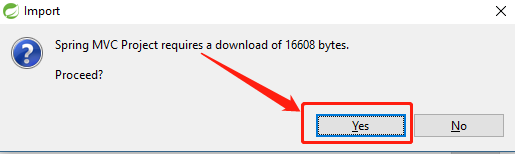
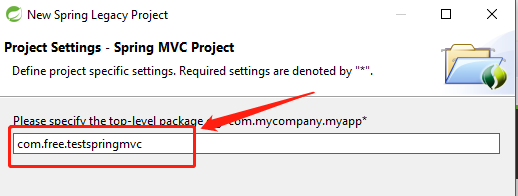
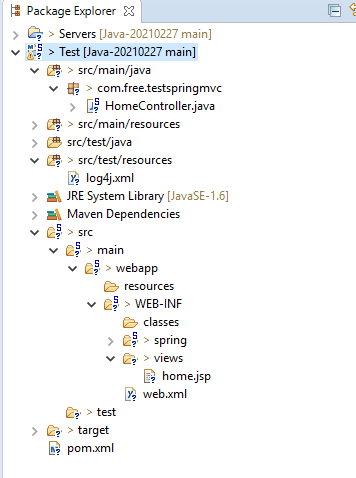
现在就新建好了项目。
6. Maven(保证网络通畅)
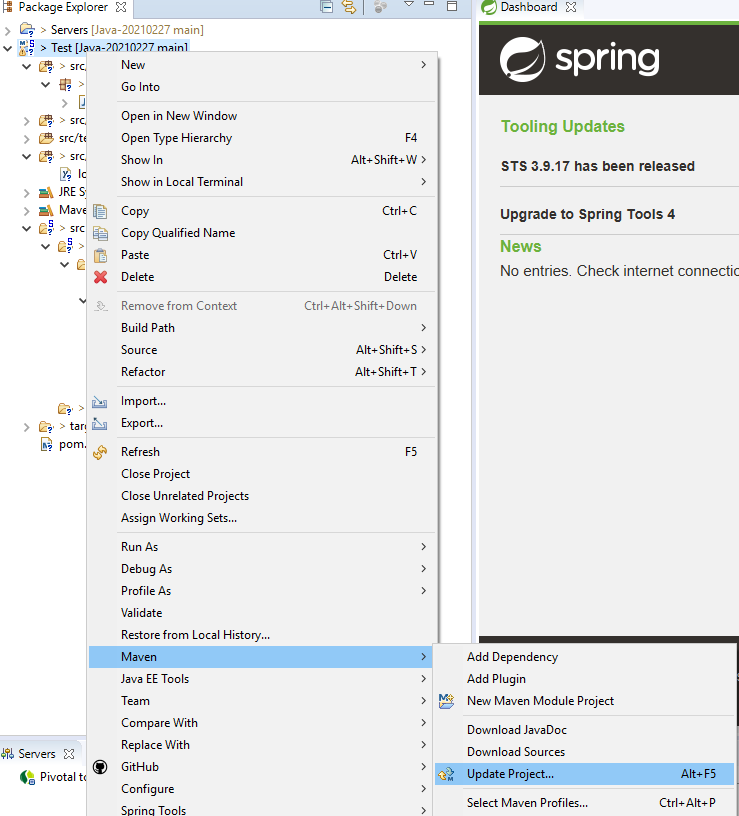
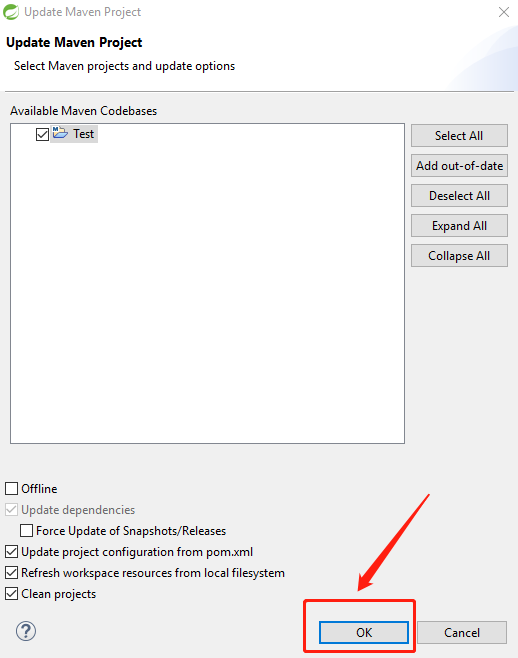
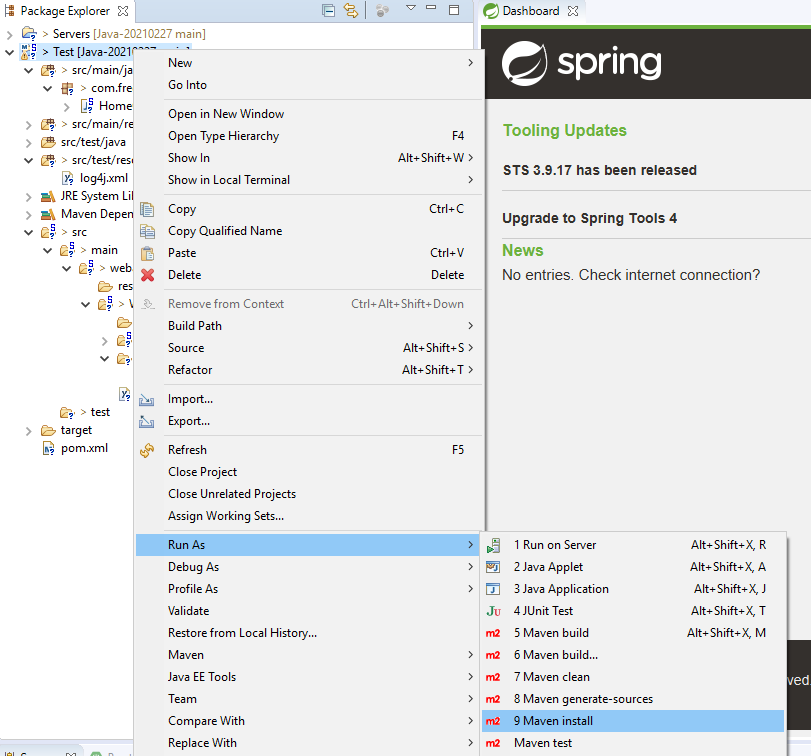
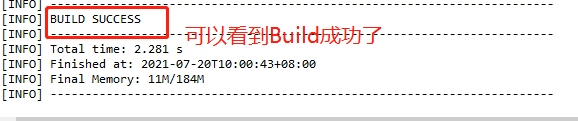
7. 运行程序

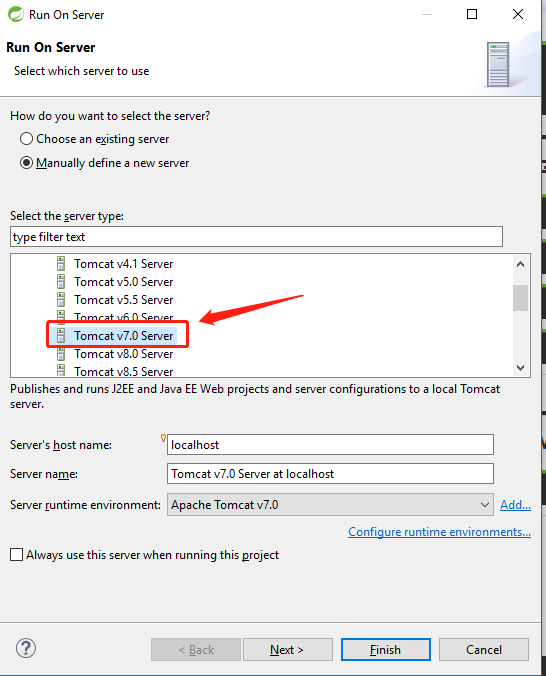

好了,到此为止,程序可以运行了,不过由于打印消息有中文,输出页面乱码,这跟编码有关,怎么解决呢,即将揭晓。
8. 解决中文乱码
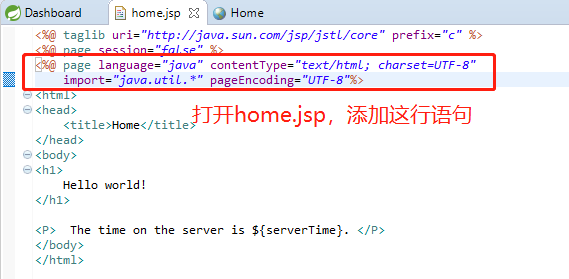
运行结果如下
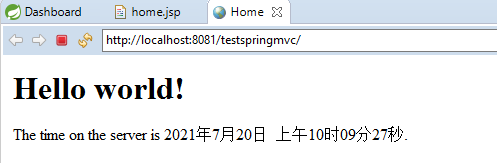
一个Hello World就完成了。
第一篇 -- Sprint Tool Suite配置和Hello World编写的更多相关文章
- 在eclipse中,使用spring tool suite配置spring环境
本人第一次接触spring,在经过一天的努力之后,终于成功配置了spring环境. 使用spring tool suite配置 1.打开eclipse,选择help->Eclipse marke ...
- 从零开始使用git第一篇:下载安装配置
从零开始使用git 第一篇:下载安装配置 第一篇:从零开始使用git第一篇:下载安装配置 第二篇:从零开始使用git第二篇:git实践操作 第三篇:从零开始使用git第三篇:git撤销操作.分支操作和 ...
- Spring Tool Suite 配置和使用
Spring Tool Suite使用 1.下载地址: http://spring.io/tools 2.配置字符编码:UTF-8 默认的编码是ISO-8859-1的西欧文字编 1.windows-- ...
- Activiti第一篇【介绍、配置开发环境、快速入门】
Activiti介绍 什么是Activiti? Activiti5是由Alfresco软件在2010年5月17日发布的业务流程管理(BPM)框架,它是覆盖了业务流程管理.工作流.服务协作等领域的一个开 ...
- struts快速入门第一篇 —— struts相关XML配置映射及讲解
我们回忆一下在学习JavaWeb过程中(Jsp + servlet编程)所感受到的Servlet的不足: 1 Servllet很多时,web.xml中的代码会很多.这样一来,维护起来就不方便,不利于团 ...
- .net core工具组件系列之Redis—— 第一篇:Windows环境配置Redis(5.x以上版本)以及部署为Windows服务
Cygwin工具编译Redis Redis6.x版本是未编译版本(官方很调皮,所以没办法,咱只好帮他们编译一下了),所以咱们先下载一个Cygwin,用它来对Redis进行编译. Cygwin下载地址: ...
- 国内第一篇详细讲解hadoop2的automatic HA+Federation+Yarn配置的教程
前言 hadoop是分布式系统,运行在linux之上,配置起来相对复杂.对于hadoop1,很多同学就因为不能搭建正确的运行环境,导致学习兴趣锐减.不过,我有免费的学习视频下载,请点击这里. hado ...
- Spring Tool Suite 创建 SpringMVC+Maven 项目(一)!
使用Spring Tool Suite 创建 SpringMVC Web 项目,使用Maven来管理依赖! 首先对环境进行必要的配置 1. 配置必要的Java JDK版本! (菜单栏-窗口-首选项.) ...
- 第一个使用Spring Tool Suite(STS)和Maven建立的Spring mvc 项目
一.目标 在这篇文章中.我将要向您展示怎样使用Spring Frameworks 和 Maven build创建您的第一个J2ee 应用程序. 二.信息 Maven是一个java项目的构建工具(或者自 ...
随机推荐
- React Hooks使用避坑指南
函数组件比类组件更加方便实现业务逻辑代码的分离和组件的复用,函数组件也比类组件轻量,没有react hooks之前,函数组件是无法实现LocalState的,这导致有localstate状态的组件无法 ...
- 十八、.net core(.NET 6)搭建ElasticSearch(ES)系列之使用Logstash通过Rabbitmq接收Serilog日志到ES
使用Logstash通过Rabbitmq接收Serilog日志到ES 首先,要部署logstash 为了与前面的ElasticSearch版本保持一致,此处Logstash下载的版本也是7.13.1, ...
- 最多能创建多少个 TCP 连接?
我是一个 Linux 服务器上的进程,名叫小进. 老是有人说我最多只能创建 65535 个 TCP 连接. 我不信这个邪,今天我要亲自去实践一下. 我走到操作系统老大的跟前,说: "老操,我 ...
- CCF CSP认证考试在线评测系统
关于 CCF CSP 认证考试在线评测系统 CCF CSP 认证考试简介 CCF 是中国计算机学会的简称.CCF 计算机软件能力认证(简称 CCF CSP 认证考试)是 CCF 于 2014 年推出, ...
- mycat高可用-安全管理-监控 看这一篇就够了
在之前的操作中,我们已经实现了mysql机器的高可用,可以动态切换master,那么如果mycat崩溃了呢?我们应该如何处理呢?所以此时就需要搭建mycat的高可用集群了. 在mycat的权威 ...
- python返回列表最大值(java返回数组最大值)
b=["3","2","1","6","5","2","1" ...
- excel VBA正则匹配单元格符号,并按符号把单元格拆分行(这里是按第一列分行,分行是从活动单元格的行开始,分行前需要选择所有需要填充内容的列,否则需要后期手动填充)
Sub W() ' MsgBox "行数:" & Selection.Rows.Count Dim rows_count As Integer Dim ro ...
- Unity MVC思想
MVC框架概念MVC全名是Model View Controller,是模型(Model)-视图(View)-控制器(Controller)的缩写,一种软件设计典范,用一种业务逻辑.数据.界面显示分离 ...
- 关于Kubernetes(简称K8S)的开启及基本使用,基于Docker Desktop & WSL2
背景介绍 Kubernetes(简称k8s)已成为目前业界容器编排的事实标准,其搭配Docker可建立非常高效便捷的高可扩展.高可用应用服务架构. Kubernetes的名字来自希腊语,意思是&quo ...
- C语言:C99 中的37个关键字
一.数据类型关键字(12个): 1.char [tʃɑ:]:声明字符型变量或函数 2.double [ˈdʌbəl] :声明双精度变量或函数 3.enum :声明枚举类型 4.float [fləut ...