
QML学习笔记(七)— 实现可拖拽、编辑、选中的ListView
鼠标单击可选中当前项,头部呈绿色显示;按压当前项可进行拖拽更换列表项位置;点击数据可以进行编辑;
GitHub:八至
作者:狐狸家的鱼
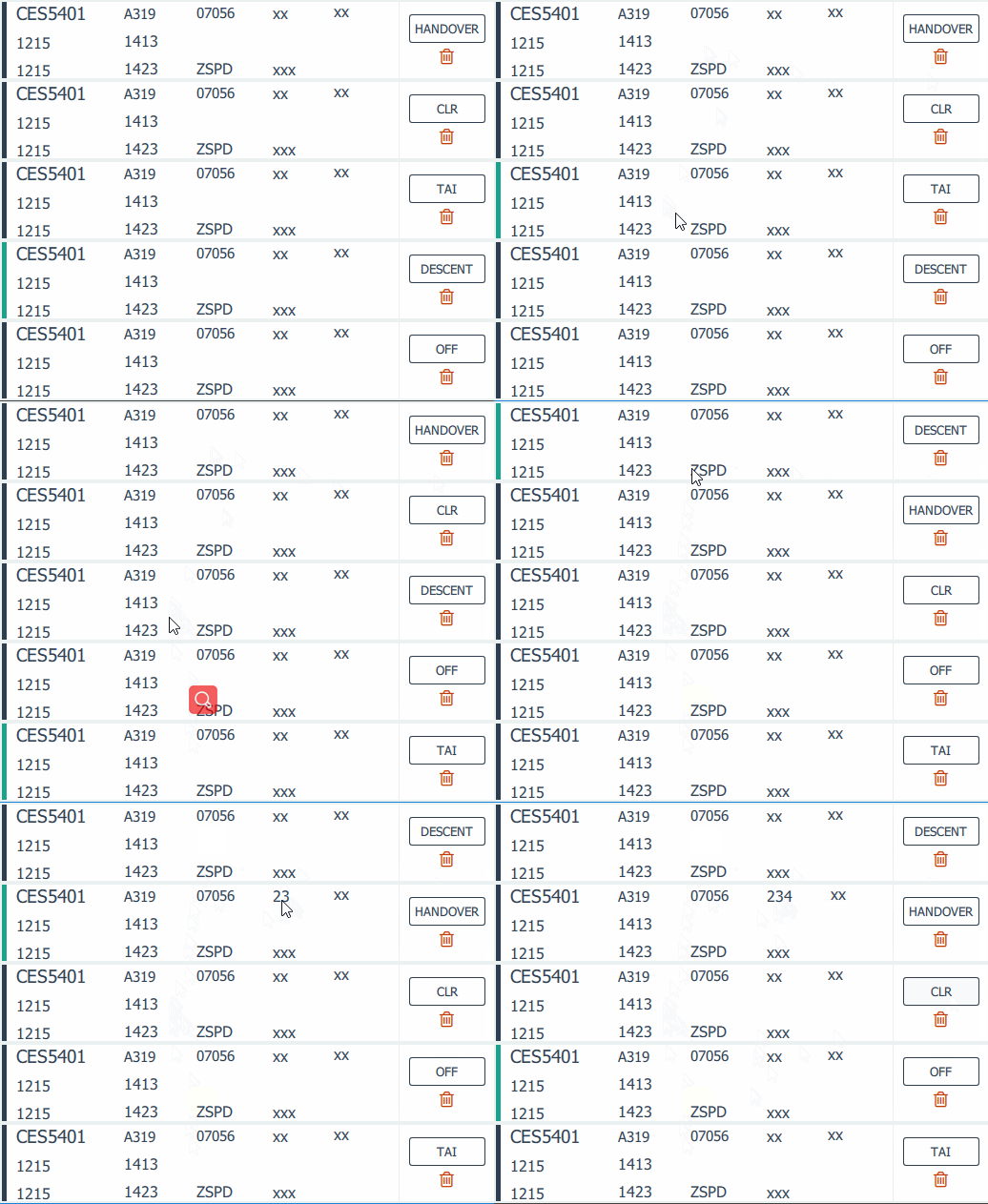
这里是自己定义的model,有些字体和颜色都是使用的全局属性,
ListView{
id:thelist
property bool isClicked: false //初始化没有点击事件
anchors.fill: parent
clip:true
interactive: !isClicked
focus: true
flickableDirection: Flickable.VerticalFlick
boundsBehavior: Flickable.StopAtBounds
ScrollBar.vertical: ScrollBar {id:scrollBar;active: true;}
Keys.onUpPressed: scrollBar.decrease()
Keys.onDownPressed: scrollBar.increase()
move:Transition {
NumberAnimation{
properties: "x,y";
duration: 300
}
}
anchors {
left: parent.left; top: parent.top; right: parent.right;
margins: 2
}
spacing: 4
cacheBuffer: 50
//model: anAirModel
model: ListModel{
id:sstpModel;
ListElement{
air_iden:"CES5401"//呼号 航班号
type:"A319"//机型
el:"07056"//机场标高 ALT-高度
status:"TAI"// 管制按钮 HANDOVER-移交 CLR-放行 TAI-滑行 OFF-起飞 DESCENT-降落 DISENGAGE-脱离
etd:"1215"//预计离港时间
eta:"1413"//预计到达时间
departureTime:"1215"//departureTime 起飞时间 离港时间
arrivalTime:"1423"// arrivalTime到达时间 到港时间
ades:"ZSPD"//到达机场 目的地
takeOffRunway:"xx"//takeOffRunway 起飞跑道
landingRunway:"xx"//landingRunway 降落跑道
procedure:"xxx"//进离场程序
//tas:"K0860"//巡航速度 860km/h
//waypoint1:"TEBUN";//航路点
//assr:"6255"//应答机编码
//cvsm:"S0820"//对应高度层 82km
}
ListElement{
air_iden:"CES5401"//呼号 航班号
type:"A319"//机型
el:"07056"//机场标高
status:"HANDOVER"// 管制按钮 HANDOVER-移交 CLR-放行 TAI-滑行 OFF-起飞 DESCENT-降落 DISENGAGE-脱离
etd:"1215"//预计离港时间
eta:"1413"//预计到达时间
departureTime:"1215"//起飞时间 离港时间
arrivalTime:"1423"//到达时间 到港时间
ades:"ZSPD"//到达机场 目的地
takeOffRunway:"xx"//起飞跑道
landingRunway:"xx"//降落跑道
procedure:"xxx"//进离场程序
//tas:"K0860"//巡航速度 860km/h
//waypoint1:"TEBUN";//航路点
//assr:"6255"//应答机编码
//cvsm:"S0820"//对应高度层 82km
}
ListElement{
air_iden:"CES5401"//呼号 航班号
type:"A319"//机型
el:"07056"//机场标高
status:"CLR"// 管制按钮 HANDOVER-移交 CLR-放行 TAI-滑行 OFF-起飞 DESCENT-降落 DISENGAGE-脱离
etd:"1215"//预计离港时间
eta:"1413"//预计到达时间
departureTime:"1215"//起飞时间 离港时间
arrivalTime:"1423"//到达时间 到港时间
ades:"ZSPD"//到达机场 目的地
takeOffRunway:"xx"//起飞跑道
landingRunway:"xx"//降落跑道
procedure:"xxx"//进离场程序
//tas:"K0860"//巡航速度 860km/h
//waypoint1:"TEBUN";//航路点
//assr:"6255"//应答机编码
//cvsm:"S0820"//对应高度层 82km
}
ListElement{
air_iden:"CES5401"//呼号 航班号
type:"A319"//机型
el:"07056"//机场标高
status:"OFF"// 管制按钮 HANDOVER-移交 CLR-放行 TAI-滑行 OFF-起飞 DESCENT-降落 DISENGAGE-脱离
etd:"1215"//预计离港时间
eta:"1413"//预计到达时间
departureTime:"1215"//起飞时间 离港时间
arrivalTime:"1423"//到达时间 到港时间
ades:"ZSPD"//到达机场 目的地
takeOffRunway:"xx"//起飞跑道
landingRunway:"xx"//降落跑道
procedure:"xxx"//进离场程序
//tas:"K0860"//巡航速度 860km/h
//waypoint1:"TEBUN";//航路点
//assr:"6255"//应答机编码
//cvsm:"S0820"//对应高度层 82km
}
ListElement{
air_iden:"CES5401"//呼号 航班号
type:"A319"//机型
el:"07056"//机场标高
status:"DESCENT"// 管制按钮 HANDOVER-移交 CLR-放行 TAI-滑行 OFF-起飞 DESCENT-降落 DISENGAGE-脱离
etd:"1215"//预计离港时间
eta:"1413"//预计到达时间
departureTime:"1215"//起飞时间 离港时间
arrivalTime:"1423"//到达时间 到港时间
ades:"ZSPD"//到达机场 目的地
takeOffRunway:"xx"//起飞跑道
landingRunway:"xx"//降落跑道
procedure:"xxx"//进离场程序
//tas:"K0860"//巡航速度 860km/h
//waypoint1:"TEBUN";//航路点
//assr:"6255"//应答机编码
//cvsm:"S0820"//对应高度层 82km
}
ListElement{
air_iden:"CES5401"//呼号 航班号
type:"A319"//机型
el:"07056"//机场标高
status:"DISENGAGE"// 管制按钮 HANDOVER-移交 CLR-放行 TAI-滑行 OFF-起飞 DESCENT-降落 DISENGAGE-脱离
etd:"1215"//预计离港时间
eta:"1413"//预计到达时间
departureTime:"1215"//起飞时间 离港时间
arrivalTime:"1423"//到达时间 到港时间
ades:"ZSPD"//到达机场 目的地
takeOffRunway:"xx"//起飞跑道
landingRunway:"xx"//降落跑道
procedure:"xxx"//进离场程序
//tas:"K0860"//巡航速度 860km/h
//waypoint1:"TEBUN";//航路点
//assr:"6255"//应答机编码
//cvsm:"S0820"//对应高度层 82km
}
ListElement{
air_iden:"CES5401"//呼号 航班号
type:"A319"//机型
el:"07056"//机场标高
status:"TAI"// 管制按钮 HANDOVER-移交 CLR-放行 TAI-滑行 OFF-起飞 DESCENT-降落 DISENGAGE-脱离
etd:"1215"//预计离港时间
eta:"1413"//预计到达时间
departureTime:"1215"//起飞时间 离港时间
arrivalTime:"1423"//到达时间 到港时间
ades:"ZSPD"//到达机场 目的地
takeOffRunway:"xx"//起飞跑道
landingRunway:"xx"//降落跑道
procedure:"xxx"//进离场程序
//tas:"K0860"//巡航速度 860km/h
//waypoint1:"TEBUN";//航路点
//assr:"6255"//应答机编码
//cvsm:"S0820"//对应高度层 82km
}
}
delegate:Rectangle{
id:sstpDelegate
property int fromIndex:0
property int toIndex:0
width: parent.width
height: 80
MouseArea {
id:mousearea
anchors.fill: parent
onClicked: {
thelist.currentIndex = index
}
onPressed: {
thelist.currentIndex = index
sstpDelegate.fromIndex = index
thelist.isClicked = true //每项按钮点击就true
}
onReleased: {
thelist.isClicked = false //每项按钮点击就false
console.log("fromIndex:",sstpDelegate.fromIndex,"toIndex:",sstpDelegate.toIndex)
}
onPositionChanged: {
var lastIndex = thelist.indexAt(mousearea.mouseX + sstpDelegate.x,mousearea.mouseY + sstpDelegate.y);
if ((lastIndex < 0) || (lastIndex > sstpModel.rowCount()))
return;
if (index !== lastIndex){
sstpModel.move(index, lastIndex, 1);
}
sstpDelegate.toIndex = lastIndex;
}
}
Row{
Rectangle{
id:curRect
width: 5
height: sstpDelegate.height
color: index===thelist.currentIndex ? Global.GlobalVar.sstpCurIndex : Global.GlobalVar.mainFontColor//选中颜色设置
}
Rectangle{//info
id:infoRect
width: sstpDelegate.width - controlRect.width - 5
height: sstpDelegate.height
RowLayout{
spacing: Global.GlobalVar.space*4
anchors.left: parent.left
anchors.leftMargin: Global.GlobalVar.space
ColumnLayout{
spacing: Global.GlobalVar.space
MyText{//航班呼号
text: air_iden
fontColor: b1
fontSize: xl
}
TextInput{//预计起飞时间
text: etd
color: Global.GlobalVar.mainFontColor
font.pointSize: 12
onEditingFinished: {
}
}
TextInput{//起飞时间
text: departureTime
color: Global.GlobalVar.mainFontColor
font.pointSize: 12
onEditingFinished: {
}
}
}
ColumnLayout{
spacing: Global.GlobalVar.space
MyText{//飞行机型
text: type
fontColor: b1
fontSize: m
}
TextInput{//预计到达时间
text: eta
color: Global.GlobalVar.mainFontColor
font.pointSize: 12
onEditingFinished: {
}
}
TextInput{//到达时间
text: arrivalTime
color: Global.GlobalVar.mainFontColor
font.pointSize: 12
onEditingFinished: {
}
}
}
ColumnLayout{
spacing: Global.GlobalVar.space*4
MyText{//机场标高
text: el
fontColor: b1
fontSize: m
}
TextInput{//目的机场
text: ades
color: Global.GlobalVar.mainFontColor
font.pointSize: 12
onEditingFinished: {
}
}
}
ColumnLayout{
spacing: Global.GlobalVar.space*4
TextInput{//起飞跑道
text: takeOffRunway
color: Global.GlobalVar.mainFontColor
font.pointSize: 12
}
TextInput{//进离场程序
text: procedure
color: Global.GlobalVar.mainFontColor
font.pointSize: 12
onEditingFinished: {
}
}
}
TextInput{//降落跑道
anchors.top: parent.top
text: takeOffRunway
color: Global.GlobalVar.mainFontColor
font.pointSize: 12
}
}
}
RecLine{id:recLine;direction:false}
Rectangle{
id:controlRect
width: 100
height: sstpDelegate.height
ColumnLayout{
anchors.horizontalCenter: parent.horizontalCenter
anchors.verticalCenter: parent.verticalCenter
BorderButton{
implicitWidth: 80
implicitHeight: 30
borderbtnText: status
fontSize: 10
MouseArea{
anchors.fill: parent
}
}
MyText{
anchors.horizontalCenter: parent.horizontalCenter
font.family: "FontAwesome"
text: '\uf014'
fontSize: xl
MouseArea{
anchors.fill: parent
onClicked: an_del.open()
}
}
}
}
}
}
IsDelDialog{id:an_del;x:SSTPWind.width/2;y:SSTPWind.height/2;}
Connections{
target: an_del.del_area;
onClicked:{
//anAirModel.remove(thelist.currentIndex)
sstpModel.remove(thelist.currentIndex)
an_del.close()
}
}
}
关于拖拽,参考https://blog.csdn.net/zhengtianzuo06/article/details/78631977,由于设置交互事件,会影响鼠标滚动和拖拽,所以进行了修改
interactive: !isClicked
这样就不会影响拖拽和鼠标滚动了。
QML学习笔记(七)— 实现可拖拽、编辑、选中的ListView的更多相关文章
- Bootstrap学习笔记之Nestable可拖拽树结构
Nestable是基于Bootstrap的一个可拖拽的树结构表现插件. 下面粗略的介绍一下它的用法,只作为学习参考,如有不合适之处,请各位凑合看. 下图是我在现在系统中用到的Nestable,对系统模 ...
- OpenLayers学习笔记(六)— 拖拽叠加层overlayer
是在官网例子基础上增加的拖拽功能 GitHub:八至 作者:狐狸家的鱼 本文链接:拖拽叠加层overlayer 全部代码 <!DOCTYPE html> <html> < ...
- OpenLayers学习笔记(五)— 拖拽Feature图层
参考文档的例子可以知道如何拖动矢量图层feature GitHub: 八至 作者:狐狸家的鱼 本文链接:拖拽Feature图层 全部代码 <!DOCTYPE html> <html& ...
- (转)Qt Model/View 学习笔记 (七)——Delegate类
Qt Model/View 学习笔记 (七) Delegate 类 概念 与MVC模式不同,model/view结构没有用于与用户交互的完全独立的组件.一般来讲, view负责把数据展示 给用户,也 ...
- Learning ROS for Robotics Programming Second Edition学习笔记(七) indigo PCL xtion pro live
中文译著已经出版,详情请参考:http://blog.csdn.net/ZhangRelay/article/category/6506865 Learning ROS forRobotics Pro ...
- QML学习笔记(六)- 简单计时器和定时器
做一个简单的qml计时器和定时器,左键触发计时,右键触发定时 GitHub:八至 作者:狐狸家的鱼 本文链接:QML学习笔记(六)- 简单计时器和定时器 左键点击按钮,触发计时器,中键可以暂停计时,同 ...
- QML学习笔记(五)— 做一个简单的待做事项列表
做一个简单的QML待做事项列表,能够动态添加和删除和编辑数据 GitHub:八至 作者:狐狸家的鱼 本文链接:QML学习笔记(五)— 做一个待做事项列表 主要用到QML:ListView 效果 全部代 ...
- Typescript 学习笔记七:泛型
中文网:https://www.tslang.cn/ 官网:http://www.typescriptlang.org/ 目录: Typescript 学习笔记一:介绍.安装.编译 Typescrip ...
- python3.4学习笔记(七) 学习网站博客推荐
python3.4学习笔记(七) 学习网站博客推荐 深入 Python 3http://sebug.net/paper/books/dive-into-python3/<深入 Python 3& ...
- Go语言学习笔记七: 函数
Go语言学习笔记七: 函数 Go语言有函数还有方法,神奇不.这有点像python了. 函数定义 func function_name( [parameter list] ) [return_types ...
随机推荐
- Golang的md5 hash计算
Golang计算md5值的方法都是接收byte型slice([]byte).而且使用习惯上也觉得略奇怪. 看了好几个例子才看懂. 感觉Golang标准库在设计这些模块的时候,都会考虑使用带New关键字 ...
- drf图片字段序列化完整路径
一.需求 前端需要它想要的数据格式: 原有的数据格式: 二.定制化: 1.可以嵌套序列化pol_type,lit_des,area_detail,但结构如下: class ChrDetailSeria ...
- Java并发编程之ThreadGroup
ThreadGroup是Java提供的一种对线程进行分组管理的手段,可以对所有线程以组为单位进行操作,如设置优先级.守护线程等. 线程组也有父子的概念,如下图: 线程组的创建 public class ...
- PLSQL 错误问题:ora-12154:TNS:could not resolve the connect identifier
错误问题: ORA-12154: TNS:could not resolve the connect identifier specified 即无法解析指定的连接,这说明缺少了一个环境变量,TNS_ ...
- 循环神经网络RNN及LSTM
一.循环神经网络RNN RNN综述 https://juejin.im/entry/5b97e36cf265da0aa81be239 RNN中为什么要采用tanh而不是ReLu作为激活函数? htt ...
- 如何设置C-Lodop打印控件的端口
Lodop是一款功能强大的打印控件,在一些浏览器不再支持np插件之后,Lodop公司又推出了C-Lodop,C-Lodop是以服务的方式解决web打印,摆脱了对浏览器的依赖,支持了所有的浏览器. 该控 ...
- Lodop打印设计矩形重合预览线条变粗
LODOP中的打印设计是辅助进行开发的,实际打印效果应以预览为准,很多效果都是在设计界面显示不出来,或设计和预览界面有差异.例如add_print_text文本的字间距.行间距,旋转,还有允许标点溢出 ...
- Using MongoDB with Web API and ASP.NET Core
MongoDB is a NoSQL document-oriented database that allows you to define JSON based documents which a ...
- 洛谷 P1484 种树
题目描述 cyrcyr今天在种树,他在一条直线上挖了n个坑.这n个坑都可以种树,但为了保证每一棵树都有充足的养料,cyrcyr不会在相邻的两个坑中种树.而且由于cyrcyr的树种不够,他至多会种k棵树 ...
- 洛谷 P1538 迎春舞会之数字舞蹈
题目背景 HNSDFZ的同学们为了庆祝春节,准备排练一场舞会. 题目描述 在越来越讲究合作的时代,人们注意的更多的不是个人物的舞姿,而是集体的排列. 为了配合每年的倒计时,同学们决定排出——“数字舞蹈 ...